"No" song tags. Errors when I try manual set

mistamontiel

Banned
VIP
Local time
11:11 PM
Messages
122
Location
Miami, FL, CUBA
Hello,

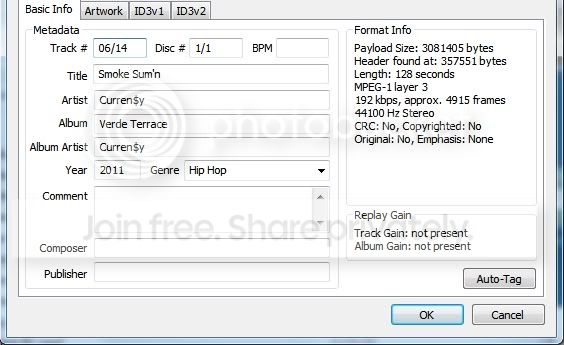
I've had some songs I think used to properly display their tags, and some new ones that never have.

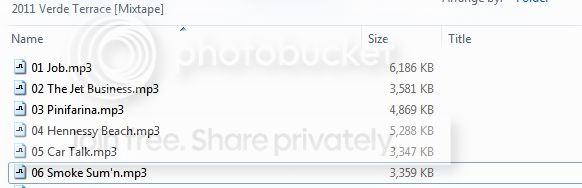
I use Winamp. I play them, and I can see they have tags, but in Explorer they appear to have nothing.

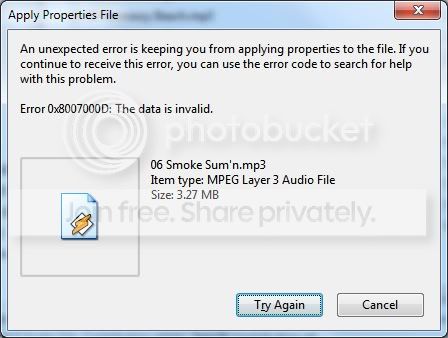
Sorry for many shots, they're just to prove that I am not hallucinating.

I fear much..this happens a little on my primary, and a lot on my slave drive. Which is only a month old.
tagprob1.jpg


tagprob2.jpg


tagprob3.jpg
 

My Computer My Computer

Computer Manufacturer/Model Number
Compaq Presario
OS
Windows 7 Home Edition 64-bit
Memory
4 gigger
Graphics Card(s)
NVIDIA GeForce GT 440
Screen Resolution
1920x1080
PSU
AMD 2.30GHz
Keyboard
USB Logitech wired..with the volume knob not buttons :)
Mouse
USB wired
Internet Speed
AT&T (384kilos down 40 kilos up) wired
Right click on the folder where your music files are located and go to the properties and then customize tab and then select music in the drop down box and then check the box for all sub-folders and click apply and OK. Then open up the folder and check to see if your tags are displaying properly, they should be if tagged correctly.
 

My Computer My Computer

Computer Manufacturer/Model Number
Alienware
OS
Windows 7 Ultimate x64
CPU
I7
Motherboard
GA-X58-USB3
Memory
6 x 1.5V DDR3 DIMM sockets supporting up to 24 GB of system
Graphics Card(s)
GeForce GTX 580
Sound Card
Realtek ALC892 codec 2/4/5.1/7.1-channel
Monitor(s) Displays
NEC Display Solutions E321 Black 32"
Screen Resolution
1366 x 768
Hard Drives
OCZ Colossus LT Series OCZSSD2-1CLSLT1T 3.5" 1TB SATA II MLC Internal Solid State Drive
PSU
XFX Black Edition XPS-850W-BES 850W ATX12V
Case
Antec
Cooling
Zalman
Keyboard
Microsoft
Mouse
Microsoft
Thanks much for posting.

It's odd. It was set to General Items. So I set to Music, checked in the apply to all subfolders box, and they still don't display in Explorer.
 

My Computer My Computer

Computer Manufacturer/Model Number
Compaq Presario
OS
Windows 7 Home Edition 64-bit
Memory
4 gigger
Graphics Card(s)
NVIDIA GeForce GT 440
Screen Resolution
1920x1080
PSU
AMD 2.30GHz
Keyboard
USB Logitech wired..with the volume knob not buttons :)
Mouse
USB wired
Internet Speed
AT&T (384kilos down 40 kilos up) wired
Hi again mistamontiel try this:

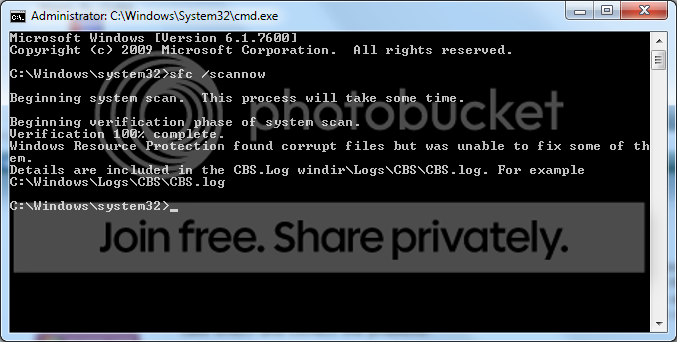
Open up an elevated command prompt by going to start>programs>accesories>right clicking on command prompt>Run as Administrator>if UAC opens asking you if you want to run this program say YES>then type in the command prompt "sfc /scannow" without the quotes and see if there are any integrity violations on the system, if there are it will find them and fix them, most of the time after the scan it requires a reboot for the changes to take effect and correct the problems.

If your still having issues please post back so we can look at something else...:)
 

My Computer My Computer

Computer Manufacturer/Model Number
Alienware
OS
Windows 7 Ultimate x64
CPU
I7
Motherboard
GA-X58-USB3
Memory
6 x 1.5V DDR3 DIMM sockets supporting up to 24 GB of system
Graphics Card(s)
GeForce GTX 580
Sound Card
Realtek ALC892 codec 2/4/5.1/7.1-channel
Monitor(s) Displays
NEC Display Solutions E321 Black 32"
Screen Resolution
1366 x 768
Hard Drives
OCZ Colossus LT Series OCZSSD2-1CLSLT1T 3.5" 1TB SATA II MLC Internal Solid State Drive
PSU
XFX Black Edition XPS-850W-BES 850W ATX12V
Case
Antec
Cooling
Zalman
Keyboard
Microsoft
Mouse
Microsoft
cmd says that some corrupt files could not be fixed. And did not tell me to reboot

Explorer is still not showing those tags. A reminder: Explorer pic is from a slave (secondary) drive. Recently purchased. Not sure if it matters.

sfcscannowprompt.png
 

My Computer My Computer

Computer Manufacturer/Model Number
Compaq Presario
OS
Windows 7 Home Edition 64-bit
Memory
4 gigger
Graphics Card(s)
NVIDIA GeForce GT 440
Screen Resolution
1920x1080
PSU
AMD 2.30GHz
Keyboard
USB Logitech wired..with the volume knob not buttons :)
Mouse
USB wired
Internet Speed
AT&T (384kilos down 40 kilos up) wired
I've had some songs I think used to properly display their tags, and some new ones that never have.

I use Winamp. I play them, and I can see they have tags, but in Explorer they appear to have nothing.
I don't have an explanation or solution for your problem. But I do have a suggestion, if you are serious about your music collection.

I'd like to recommend that you consider abandoning Windows Explorer as a primary tool for music collection organizing and browsing.

Instead, I'd like to suggest that you look into a wonderful player/organizer program named Jaangle that I discovered a few months ago. I have since scrapped all of my old organizer programs (some obtained many years ago back in 1998, when I was first getting into creating MP3 files from my CDs so that I could play music conveniently on my PC).

Jaangle is my new all-in-one magic program that does it all, and also supports FLAC as well as MP3, and also automatically manages album art/reviews from Amazon, as well as artist bio/art from LastFM. If you have your own album art (e.g. "cover.jpg" in album folders) it will use what you've got.


So again, while I know I'm not really working towards finding a genuine solution to your current issue, I think that if you give Jaangle a try you may decide simply to flush Windows Explorer as your music organizer/browser.

There is a very informative thread in the Music and Pictures forum which was initially concerning album art cache and Windows Explorer. I tried to help that OP, and in doing so also suggested that she look into Jaangle. Well... she's now a complete convert! Her days of trying using MS's WMP and Explorer to manage and play her music collection are now a thing of the past. The thread strayed far and wide after her initial problem was eliminated (by going to Jaangle, and cleaning tags up with MP3Tag, etc.) but as a result it now is a real reference thread for pretty much all-things music related.

Look through that thread, and give Jaangle a try. It is unbelievably powerful, great to look at, its built-in player sounds terrific, etc. You can still use Winamp as your default player to launch from "PLAY" button in other media programs or from a simple double-click on music files while in Explorer. But when you want to just play music using a player/organizer program, Jaangle is right at the top.
 

My Computer My Computer

Computer type
PC/Desktop
Computer Manufacturer/Model Number
Home-built, two systems (1) and (2)
OS
Windows 7 Pro x64 (1), Win7 Pro X64 (2)
CPU
i5-3350p 3.1Ghz/6MB-cache (1); E8400 3.0Ghz/6MB-cache (2)
Motherboard
ASUS P8Z77-V Pro (1); ASUS P5Q3 (2)
Memory
8GB PC3-12800 DDR3 (1); 4GB PC3-10600 DDR3 (2)
Graphics Card(s)
ATI HD7750 (1), (see TV cards); ATI R7 250 (2)
Sound Card
Realtek ALC892 HD Audio (1); Realtek ALC1200 HD Audio (2)
Monitor(s) Displays
Eizo HD2441W LCD, Eizo S2433W (1); Eizo 24" S2433W (2)
Screen Resolution
1920x1200, 1920x1200 (1); 1920x1200 (2)
Hard Drives
(1) 1TB SATA-II (7200RPM), 2x2TB SATA-III (7200RPM), 250GB SATA-III (10000RPM) for OS; 2x2TB external USB 3.0

(2) 320GB SATA-II (7200RPM), 750GB SATA-II (7200RPM), 150GB SATA-II (10000RPM) for OS; 2TB external USB 3.0
PSU
Nesteq ECS-6001 600W (1); Nesteq ECS-5001 500W (2)
Case
Acousti-Case 360 (1) and (2)
Cooling
Noctua NH-U12P SE2 for CPU, 2x120mm case fans (1) and (2)
Keyboard
IBM PS/2 (1) and (2)
Mouse
Logitech MX Revolution wireless (1); Microsoft wired (2)
Internet Speed
100mbps down / 10mbps up
Antivirus
Microsoft Security Essentials; Malwarebyte Anti-Malware Pro
Browser
Firefox
Other Info
Ceton InfiniTV 4-tuner cablecard-enabled TV card as well as Hauppauge HVR-2250 OTA/ATSC 2-tuner TV card in (1), running under Win7 WMC
dsperber, thanks much for coming forward.

I just hope it's an Explorer fault, and not any of my two hard drives.

WMP eh ? Absolutely lagtastic. Definitely in my past

Cheers to ya bud
 

My Computer My Computer

Computer Manufacturer/Model Number
Compaq Presario
OS
Windows 7 Home Edition 64-bit
Memory
4 gigger
Graphics Card(s)
NVIDIA GeForce GT 440
Screen Resolution
1920x1080
PSU
AMD 2.30GHz
Keyboard
USB Logitech wired..with the volume knob not buttons :)
Mouse
USB wired
Internet Speed
AT&T (384kilos down 40 kilos up) wired
Back
Top