No Sound from HDMI Port after installing ATI Radeon 5750 graphics card

Sun Moon Stars

New member
Local time
10:17 AM
Messages
8
After I installed my new graphics card physically, I switched my display to a Sony LCD TV and plugged it into the HDMI port on the graphics card. After that, I installed all included device drivers and have since updated my Catalyst drivers. Still, I don't seem to have any sound from the TV, though I can still get sound by hooking up my speakers...

Despite that, I'd really like to get sound out of my TV. Any advice? Here are my specs:

Operating System
MS Windows 7 Home Premium 64-bit
CPU
Intel Core 2 Quad Q8300 @ 2.50GHz 37 °C
Yorkfield 45nm Technology
RAM
8.0GB Dual-Channel DDR2 @ 399MHz (5-5-5-18)
Motherboard
ASUSTeK Computer INC. CG5270 (LGA775)
Graphics
SONY TV @ 1360x768
ATI Radeon HD 5700 Series
Hard Drives
977GB Hitachi Hitachi HDT721010SLA360 ATA Device (IDE) 44 °C
Optical Drives
HL-DT-ST DVDRAM GH40N ATA Device
Audio
High Definition Audio Device

Thanks!
 

My Computer My Computer

At a glance

Windows 7 Home Premium 64bitIntel Core 2 Quad Q8300 @ 2.50GHz8.0GB Dual-Channel DDR2 @ 399MHz (5-5-5-18)ATI Radeon HD 5700 Series
Computer Manufacturer/Model Number
ASUS
OS
Windows 7 Home Premium 64bit
CPU
Intel Core 2 Quad Q8300 @ 2.50GHz
Motherboard
ASUSTeK Computer INC. CG5270 (LGA775)
Memory
8.0GB Dual-Channel DDR2 @ 399MHz (5-5-5-18)
Graphics Card(s)
ATI Radeon HD 5700 Series
Sound Card
High Definition Audio Device
Monitor(s) Displays
SONY TV @ 1360x768
Hard Drives
Hitachi HDT721010SLA360 ATA Device
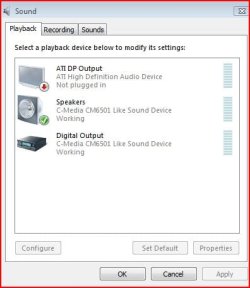
Check your sound and see if your device is disabled.
 

Attachments

  • sound.JPG
    sound.JPG
    28.8 KB · Views: 126

My Computer My Computer

At a glance

Systems 1 and 2: Windows 7 Enterprise x64, Wi...System 1: i7 [email protected], System 2: AMD FX-41...System 1: 8GB System 2: 8GBSystem 1: ATI FirePro V4800 System 2: Radeon ...
Computer Manufacturer/Model Number
Dell and Custom
OS
Systems 1 and 2: Windows 7 Enterprise x64, Win 8 Developer
CPU
System 1: i7 [email protected], System 2: AMD FX-4100 Zambezi 3.6G
Motherboard
System 1:Dell 06NWYK System 2: ASUS M5A97 AM3+
Memory
System 1: 8GB System 2: 8GB
Graphics Card(s)
System 1: ATI FirePro V4800 System 2: Radeon HD 6850
Sound Card
System 1: onboard System 2: onboard
Monitor(s) Displays
System1: Viewsonic HDMI 24"
Screen Resolution
System 1: 1920x1080 System 2: 1920x1080
Hard Drives
System 1: Mirrored .5B drives System 2: Seagate Barracuda ST1000DM003 1TB 7200 RPM 64MB Cache SATA 6.0Gb/s
Case
System 1: Dell System 2: Cooler Master
Internet Speed
10 MBPS

My Computer My Computer

At a glance

Windows 7 Home Premium 64bitIntel Core 2 Quad Q8300 @ 2.50GHz8.0GB Dual-Channel DDR2 @ 399MHz (5-5-5-18)ATI Radeon HD 5700 Series
Computer Manufacturer/Model Number
ASUS
OS
Windows 7 Home Premium 64bit
CPU
Intel Core 2 Quad Q8300 @ 2.50GHz
Motherboard
ASUSTeK Computer INC. CG5270 (LGA775)
Memory
8.0GB Dual-Channel DDR2 @ 399MHz (5-5-5-18)
Graphics Card(s)
ATI Radeon HD 5700 Series
Sound Card
High Definition Audio Device
Monitor(s) Displays
SONY TV @ 1360x768
Hard Drives
Hitachi HDT721010SLA360 ATA Device
Sun Moon Stars, welcome to the forums.

Did you make sure to set the ATI HDMI Audio as the default playback device in the Windows playback properties?
 

My Computer My Computer

At a glance

Win 7 Ultimate x64FX-8350 @ 4.6 GHz so farADATA XPG V1 Series Black 8GB DDR3 1600Sapphire R9 270x Dual-X
Computer type
PC/Desktop
Computer Manufacturer/Model Number
Me
OS
Win 7 Ultimate x64
CPU
FX-8350 @ 4.6 GHz so far
Motherboard
Asus M5A97 EVO
Memory
ADATA XPG V1 Series Black 8GB DDR3 1600
Graphics Card(s)
Sapphire R9 270x Dual-X
Sound Card
Xonar DGX w/ Corsair Vengence 1300
Monitor(s) Displays
Acer S232HL Abid
Screen Resolution
1920x1080
Hard Drives
120 GB OCZ Vertex 3
500 GB Seagate 7200.12
PSU
Antec Earthwatts 650W Green
Case
Antec Three Hundred
Cooling
Cooler Master 212 EVO
Keyboard
Logitech G510
Mouse
Logitech G500s
Internet Speed
35000/3000
Sun Moon Stars, welcome to the forums.

Did you make sure to set the ATI HDMI Audio as the default playback device in the Windows playback properties?

Thanks!

Can you give me a step-by-step on that?
 

My Computer My Computer

At a glance

Windows 7 Home Premium 64bitIntel Core 2 Quad Q8300 @ 2.50GHz8.0GB Dual-Channel DDR2 @ 399MHz (5-5-5-18)ATI Radeon HD 5700 Series
Computer Manufacturer/Model Number
ASUS
OS
Windows 7 Home Premium 64bit
CPU
Intel Core 2 Quad Q8300 @ 2.50GHz
Motherboard
ASUSTeK Computer INC. CG5270 (LGA775)
Memory
8.0GB Dual-Channel DDR2 @ 399MHz (5-5-5-18)
Graphics Card(s)
ATI Radeon HD 5700 Series
Sound Card
High Definition Audio Device
Monitor(s) Displays
SONY TV @ 1360x768
Hard Drives
Hitachi HDT721010SLA360 ATA Device
Lemur's screen shot above, if yours is showing as enabled, click on it then click on "Set Default".
 

My Computer My Computer

At a glance

Win 7 Ultimate x64FX-8350 @ 4.6 GHz so farADATA XPG V1 Series Black 8GB DDR3 1600Sapphire R9 270x Dual-X
Computer type
PC/Desktop
Computer Manufacturer/Model Number
Me
OS
Win 7 Ultimate x64
CPU
FX-8350 @ 4.6 GHz so far
Motherboard
Asus M5A97 EVO
Memory
ADATA XPG V1 Series Black 8GB DDR3 1600
Graphics Card(s)
Sapphire R9 270x Dual-X
Sound Card
Xonar DGX w/ Corsair Vengence 1300
Monitor(s) Displays
Acer S232HL Abid
Screen Resolution
1920x1080
Hard Drives
120 GB OCZ Vertex 3
500 GB Seagate 7200.12
PSU
Antec Earthwatts 650W Green
Case
Antec Three Hundred
Cooling
Cooler Master 212 EVO
Keyboard
Logitech G510
Mouse
Logitech G500s
Internet Speed
35000/3000
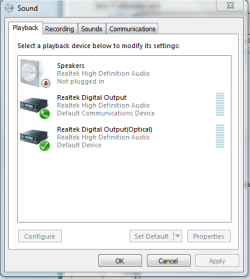
Ah, yes, then they are all enabled.

Here's a screenshot for reference:
 

Attachments

  • Capture.PNG
    Capture.PNG
    14.3 KB · Views: 40

My Computer My Computer

At a glance

Windows 7 Home Premium 64bitIntel Core 2 Quad Q8300 @ 2.50GHz8.0GB Dual-Channel DDR2 @ 399MHz (5-5-5-18)ATI Radeon HD 5700 Series
Computer Manufacturer/Model Number
ASUS
OS
Windows 7 Home Premium 64bit
CPU
Intel Core 2 Quad Q8300 @ 2.50GHz
Motherboard
ASUSTeK Computer INC. CG5270 (LGA775)
Memory
8.0GB Dual-Channel DDR2 @ 399MHz (5-5-5-18)
Graphics Card(s)
ATI Radeon HD 5700 Series
Sound Card
High Definition Audio Device
Monitor(s) Displays
SONY TV @ 1360x768
Hard Drives
Hitachi HDT721010SLA360 ATA Device
One very good reason you're not getting sound over HDMI, it isn't showing in the list. This is from mine,

atihdmi.png

and just like Lemur's shows as "not plugged in". That would be because neither of us are using the HDMI port on our cards. In your case you don't even have the ATI audio showing. Let's start with installing the drivers, use the full Catalyst Suite from here,

ATI Radeon™ Video Card Drivers for Windows 7 - 64-Bit Edition

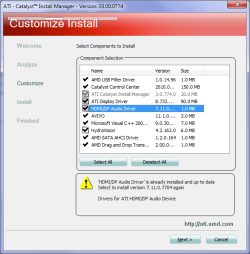
and during the install when you get to the screen where it asks Express or Custom install, choose Custom. Then on the next screen it will show everything that will be installed/updated. If the audio portion was installed previously it will be greyed out but allow you the option of installing again by unchecking it,

atihdmi1.png
 

My Computer My Computer

At a glance

Win 7 Ultimate x64FX-8350 @ 4.6 GHz so farADATA XPG V1 Series Black 8GB DDR3 1600Sapphire R9 270x Dual-X
Computer type
PC/Desktop
Computer Manufacturer/Model Number
Me
OS
Win 7 Ultimate x64
CPU
FX-8350 @ 4.6 GHz so far
Motherboard
Asus M5A97 EVO
Memory
ADATA XPG V1 Series Black 8GB DDR3 1600
Graphics Card(s)
Sapphire R9 270x Dual-X
Sound Card
Xonar DGX w/ Corsair Vengence 1300
Monitor(s) Displays
Acer S232HL Abid
Screen Resolution
1920x1080
Hard Drives
120 GB OCZ Vertex 3
500 GB Seagate 7200.12
PSU
Antec Earthwatts 650W Green
Case
Antec Three Hundred
Cooling
Cooler Master 212 EVO
Keyboard
Logitech G510
Mouse
Logitech G500s
Internet Speed
35000/3000
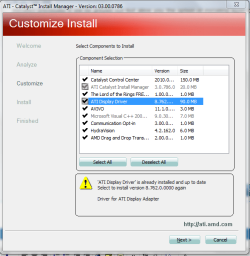
Well, then, here's something curious. When I downloaded Catalyst Suite again, and went through to Custom install, there was never an option to download an HDMI driver for some reason. Look here, these are all the options I got:
 

Attachments

  • Capture.PNG
    Capture.PNG
    27.7 KB · Views: 127

My Computer My Computer

At a glance

Windows 7 Home Premium 64bitIntel Core 2 Quad Q8300 @ 2.50GHz8.0GB Dual-Channel DDR2 @ 399MHz (5-5-5-18)ATI Radeon HD 5700 Series
Computer Manufacturer/Model Number
ASUS
OS
Windows 7 Home Premium 64bit
CPU
Intel Core 2 Quad Q8300 @ 2.50GHz
Motherboard
ASUSTeK Computer INC. CG5270 (LGA775)
Memory
8.0GB Dual-Channel DDR2 @ 399MHz (5-5-5-18)
Graphics Card(s)
ATI Radeon HD 5700 Series
Sound Card
High Definition Audio Device
Monitor(s) Displays
SONY TV @ 1360x768
Hard Drives
Hitachi HDT721010SLA360 ATA Device
A couple of things to try,

1. Pull the card and clean the contacts (a pencil eraser is good for this, just make sure the bits are cleaned off after) and clean out the slot itself, and then re-seat the card.

2. Make sure that the extra power connector is plugged into the card.

then run the install again. If that doesn't get the audio portion to show up it is possible that you got a defective card (it happens).
 

My Computer My Computer

At a glance

Win 7 Ultimate x64FX-8350 @ 4.6 GHz so farADATA XPG V1 Series Black 8GB DDR3 1600Sapphire R9 270x Dual-X
Computer type
PC/Desktop
Computer Manufacturer/Model Number
Me
OS
Win 7 Ultimate x64
CPU
FX-8350 @ 4.6 GHz so far
Motherboard
Asus M5A97 EVO
Memory
ADATA XPG V1 Series Black 8GB DDR3 1600
Graphics Card(s)
Sapphire R9 270x Dual-X
Sound Card
Xonar DGX w/ Corsair Vengence 1300
Monitor(s) Displays
Acer S232HL Abid
Screen Resolution
1920x1080
Hard Drives
120 GB OCZ Vertex 3
500 GB Seagate 7200.12
PSU
Antec Earthwatts 650W Green
Case
Antec Three Hundred
Cooling
Cooler Master 212 EVO
Keyboard
Logitech G510
Mouse
Logitech G500s
Internet Speed
35000/3000
Also, please look in device manager and see if you have a yellow warning.
 

My Computer My Computer

At a glance

Systems 1 and 2: Windows 7 Enterprise x64, Wi...System 1: i7 [email protected], System 2: AMD FX-41...System 1: 8GB System 2: 8GBSystem 1: ATI FirePro V4800 System 2: Radeon ...
Computer Manufacturer/Model Number
Dell and Custom
OS
Systems 1 and 2: Windows 7 Enterprise x64, Win 8 Developer
CPU
System 1: i7 [email protected], System 2: AMD FX-4100 Zambezi 3.6G
Motherboard
System 1:Dell 06NWYK System 2: ASUS M5A97 AM3+
Memory
System 1: 8GB System 2: 8GB
Graphics Card(s)
System 1: ATI FirePro V4800 System 2: Radeon HD 6850
Sound Card
System 1: onboard System 2: onboard
Monitor(s) Displays
System1: Viewsonic HDMI 24"
Screen Resolution
System 1: 1920x1080 System 2: 1920x1080
Hard Drives
System 1: Mirrored .5B drives System 2: Seagate Barracuda ST1000DM003 1TB 7200 RPM 64MB Cache SATA 6.0Gb/s
Case
System 1: Dell System 2: Cooler Master
Internet Speed
10 MBPS
Also, please look in device manager and see if you have a yellow warning.

Nope...

OK, will reply again once I've tried these things. In the event my card is defective, I bought from Best Buy... do you think they'll replace it?
 

My Computer My Computer

At a glance

Windows 7 Home Premium 64bitIntel Core 2 Quad Q8300 @ 2.50GHz8.0GB Dual-Channel DDR2 @ 399MHz (5-5-5-18)ATI Radeon HD 5700 Series
Computer Manufacturer/Model Number
ASUS
OS
Windows 7 Home Premium 64bit
CPU
Intel Core 2 Quad Q8300 @ 2.50GHz
Motherboard
ASUSTeK Computer INC. CG5270 (LGA775)
Memory
8.0GB Dual-Channel DDR2 @ 399MHz (5-5-5-18)
Graphics Card(s)
ATI Radeon HD 5700 Series
Sound Card
High Definition Audio Device
Monitor(s) Displays
SONY TV @ 1360x768
Hard Drives
Hitachi HDT721010SLA360 ATA Device
Well, I cleaned the contacts, made sure the extra power chord was connected, and re-ran the installation, and still nothing. I suppose the next step is to call Best Buy and ask about warranty information?
 

My Computer My Computer

At a glance

Windows 7 Home Premium 64bitIntel Core 2 Quad Q8300 @ 2.50GHz8.0GB Dual-Channel DDR2 @ 399MHz (5-5-5-18)ATI Radeon HD 5700 Series
Computer Manufacturer/Model Number
ASUS
OS
Windows 7 Home Premium 64bit
CPU
Intel Core 2 Quad Q8300 @ 2.50GHz
Motherboard
ASUSTeK Computer INC. CG5270 (LGA775)
Memory
8.0GB Dual-Channel DDR2 @ 399MHz (5-5-5-18)
Graphics Card(s)
ATI Radeon HD 5700 Series
Sound Card
High Definition Audio Device
Monitor(s) Displays
SONY TV @ 1360x768
Hard Drives
Hitachi HDT721010SLA360 ATA Device
Well, then, here's something curious. When I downloaded Catalyst Suite again, and went through to Custom install, there was never an option to download an HDMI driver for some reason. Look here, these are all the options I got:


There's an ATI HDMI device available from Realtek.

Realtek

After you accept the download agreement you will see the driver at the bottom of the Realtek driver listing. ATI HDMI Device (in red).

Ap
 

My Computer My Computer

At a glance

Windows 7 Home PremiumIntel Core 2 Duo @ 3.00gHz4 GBATI Radeon HD 2600 XT
Computer Manufacturer/Model Number
Assembled in my workshop
OS
Windows 7 Home Premium
CPU
Intel Core 2 Duo @ 3.00gHz
Motherboard
Gigabyte GA-P35-S3G
Memory
4 GB
Graphics Card(s)
ATI Radeon HD 2600 XT
Sound Card
RME 24/96 Card, Realtek Internal Audio PreSonus FireStudio
Monitor(s) Displays
Acer 1917 (x2)
Screen Resolution
1280 x 1024 on both monitors
Hard Drives
Three 250GB Seagate SATA Barracuda 7200rpm
PSU
Rosewill 500-watt
Case
Rosewill mid-tower
Cooling
Noctua NH-U9B (CPU), PwrSupply fan + single large case Fan
Keyboard
Macally w/2/USB ports.
Mouse
Trackman Wheel
Other Info
Event 20/20 bas studio monitors, Yamaha sub.
Rackmount Korg/Roland/Yamaha synthesizers,
Cubase MIDI/audio recording. Sony Soundforge audio/mastering software. CD Architect Mastering. RME & Presonus audio interfaces.
Well, then, here's something curious. When I downloaded Catalyst Suite again, and went through to Custom install, there was never an option to download an HDMI driver for some reason. Look here, these are all the options I got:


There's an ATI HDMI device available from Realtek.

Realtek

After you accept the download agreement you will see the driver at the bottom of the Realtek driver listing. ATI HDMI Device (in red).

Ap

Problem solved... thanks so much!
 

My Computer My Computer

At a glance

Windows 7 Home Premium 64bitIntel Core 2 Quad Q8300 @ 2.50GHz8.0GB Dual-Channel DDR2 @ 399MHz (5-5-5-18)ATI Radeon HD 5700 Series
Computer Manufacturer/Model Number
ASUS
OS
Windows 7 Home Premium 64bit
CPU
Intel Core 2 Quad Q8300 @ 2.50GHz
Motherboard
ASUSTeK Computer INC. CG5270 (LGA775)
Memory
8.0GB Dual-Channel DDR2 @ 399MHz (5-5-5-18)
Graphics Card(s)
ATI Radeon HD 5700 Series
Sound Card
High Definition Audio Device
Monitor(s) Displays
SONY TV @ 1360x768
Hard Drives
Hitachi HDT721010SLA360 ATA Device
Problem solved... thanks so much!

Hey, glad it worked... you never know.

The Realtek audio drivers must not include the HDMI port device for the ATI HDMI drivers to hook into, but that's just a guess.

Ap
 

My Computer My Computer

At a glance

Windows 7 Home PremiumIntel Core 2 Duo @ 3.00gHz4 GBATI Radeon HD 2600 XT
Computer Manufacturer/Model Number
Assembled in my workshop
OS
Windows 7 Home Premium
CPU
Intel Core 2 Duo @ 3.00gHz
Motherboard
Gigabyte GA-P35-S3G
Memory
4 GB
Graphics Card(s)
ATI Radeon HD 2600 XT
Sound Card
RME 24/96 Card, Realtek Internal Audio PreSonus FireStudio
Monitor(s) Displays
Acer 1917 (x2)
Screen Resolution
1280 x 1024 on both monitors
Hard Drives
Three 250GB Seagate SATA Barracuda 7200rpm
PSU
Rosewill 500-watt
Case
Rosewill mid-tower
Cooling
Noctua NH-U9B (CPU), PwrSupply fan + single large case Fan
Keyboard
Macally w/2/USB ports.
Mouse
Trackman Wheel
Other Info
Event 20/20 bas studio monitors, Yamaha sub.
Rackmount Korg/Roland/Yamaha synthesizers,
Cubase MIDI/audio recording. Sony Soundforge audio/mastering software. CD Architect Mastering. RME & Presonus audio interfaces.
Back
Top