No sound in Windows 7

NoLove4Me

New member
Local time
4:05 PM
Messages
10
Location
Romania
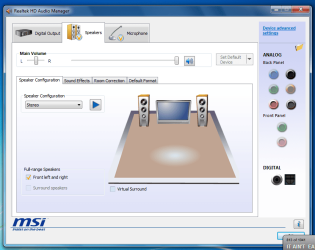
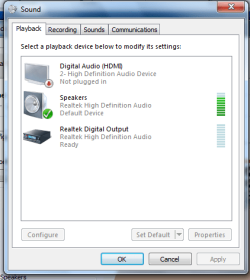
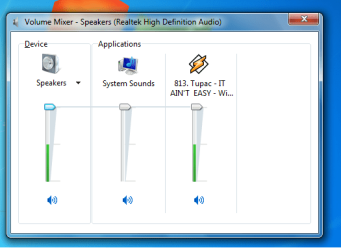
Hi, last night i upgraded from Windows XP SP3 to Windows 7 Home Premium and when i started winamp i heard no sound, this is happend to headphones and 5.1 ; so today i thought that maybe is form Home Premium or because of the upgrade so i formated my HDD and installed a fresh Windows 7 Ultimate , after i installed last Realtek drivers but no sound either.
1.png

2.png

3.png

4.png

My soundcard is working fine, 4 month ago i had windows 7 and no problem with the sound.

In Everest show :
Multimedia
Audio Adapter ATI Radeon HDMI @ ATI RV710/730/740 - High Definition Audio Controller

Audio Adapter : Realtek ALC888/1200 @ ATI SB750 - High Definition Audio Controller
 

My Computer

Computer Manufacturer/Model Number
AMD
OS
Windows 7 Ultimate x86
CPU
AMD Athlon II X3 425 2.7Ghz
Motherboard
MSI 770-C35/C45
Memory
3 GB DDR3
Graphics Card(s)
ATI Radeon HD 4670 (1024 MB)
Sound Card
Realtek onboard
Monitor(s) Displays
Founder LU761 [17" LCD]
Screen Resolution
1024x768
Hard Drives
SAMSUNG HD502HJ ATA Device (500 GB, 7200 RPM, SATA-II)
Keyboard
Black Multimedia Keyboard
Mouse
Agiler Black
Winkey+R

"Services.msc"

Restart/Enable "Windows Audio".
 

My Computer

OS
Windows 7
CPU
Core i7 920 D0
Motherboard
Rampage II Gene
Memory
Corsair Dominator 1600
Graphics Card(s)
Geforce GTX 275
Sound Card
Auzentech Prelude
Monitor(s) Displays
BenQ G2400WD
Screen Resolution
1920x1200
Hard Drives
WD AAKS 500GB
WD 1TB
Seagate 160GB
PSU
Corsair HX620
Case
NZXT Rogue
Cooling
TRUE Copper
Keyboard
Logitech G15
Internet Speed
Anywhere from 2.5 to 3.5mb
You need to plug the speaker jack into the green slot not the black one.
 

My Computer

OS
Windows 7 Ultimate x64 Service Pack 1 (Build 6.1.7601)
CPU
Intel Core 2 Quad Q6600 (G0 Kentsfield) LGA775 (FC-LGA6)
Motherboard
GIGABYTE GA-EP35C-DS3R (Rev. 2.1)
Memory
Corsair TW3X4G1333C9A 4GB PC-10600 (2x XMS3 2GB)
Graphics Card(s)
ASUS nVIDIA GeForce 560
Sound Card
RealTek ALC885/889A/890
Monitor(s) Displays
ChiMei CMV CT-730D 17inch (LCD Monitor)
Screen Resolution
1280-1024 60Hertz (Ture Colour 32bit)
Hard Drives
2x Barracuda 7200.10 SATA 3.0Gb/s 160-GB Hard Drive ST3160815AS (AHCI)
PSU
ANTEC 750w Earthwatts
Case
Thermaltake Shark (VA7000SWA ATX) Full Tower
Cooling
Front 120mm fan (1400 RPM) /Rear 120mm (1400 RPM) blue LED
Keyboard
Labtec Media Desktop Y-SAD65
Mouse
Razer DeathAdder 3G Infrared Sensor (1800DPI)
Internet Speed
Telstra BigPond Elite Liberty ADSL2+ 24Mbps/256kbps
Other Info
ASUS PCE-N13 802.11n Wireless LAN card

My Computer

Computer Manufacturer/Model Number
Apple Macbook Pro (April 2009)
OS
W7 Ult. x64 | OS X
CPU
Intel Mobile Core 2 Duo 2.93Ghz [T9800 Penryn]
Motherboard
NVIDIA nForce 730i Rev. B1 [Mac-F2268EC8 (U2E1)]
Memory
4096MB Samsung DDR3 Dual Channel [PC3-8500F 1066Mhz]
Graphics Card(s)
NVIDIA GeForce 9600M GT 512MB [G96M Rev. C1]
Sound Card
SB X-Fi Surround 5.1 USB | Onboard Realtek (Disabled)
Monitor(s) Displays
Acer x223wbd 22" | Apple Anti-Glare 17" (Disabled)
Screen Resolution
{Current} 1440x900 {Acer} 1680x1050 {Apple} 1920x1200
Hard Drives
{Internal}
Seagate Momentus 320GB 2.5" 7200RPM [ST9320421AS]

{Externals}
LaCie 320GB USB 2.0 HDD [301284UR]
LaCie 750GB USB 2.0 FW400 eSATA HDD [301314U]
LaCie 1TB USB 2.0 HDD [301304UR]
PSU
Magsafe
Case
Aluminum/Unibody (MBP52)
Cooling
2 x 6000 RPM Fans
Keyboard
Logitech G-15v2 [PN 920-000379]
Mouse
Logitech G-9 [PN 910-000338]
Internet Speed
12Mbps/2.5Mbps w/ 24Mbps Speed Boost [Comcast]
Other Info
Logitech X-540 Speakers [PN 970223-0122]
Sennheiser PC-151 Headset
You need to plug the speaker jack into the green slot not the black one.

Intel HD Spec audio devices are able to detect changes in the jack. if he was plugging in the wrong port while in Stereo mode, the Realtek HD audio device in Playback would be marked as disconnected.

Not to mention the realtek driver can automatically enable surround modes as additional jacks are plugged in.
 

My Computer

OS
Windows 7
CPU
Core i7 920 D0
Motherboard
Rampage II Gene
Memory
Corsair Dominator 1600
Graphics Card(s)
Geforce GTX 275
Sound Card
Auzentech Prelude
Monitor(s) Displays
BenQ G2400WD
Screen Resolution
1920x1200
Hard Drives
WD AAKS 500GB
WD 1TB
Seagate 160GB
PSU
Corsair HX620
Case
NZXT Rogue
Cooling
TRUE Copper
Keyboard
Logitech G15
Internet Speed
Anywhere from 2.5 to 3.5mb

My Computer

Computer Manufacturer/Model Number
AMD
OS
Windows 7 Ultimate x86
CPU
AMD Athlon II X3 425 2.7Ghz
Motherboard
MSI 770-C35/C45
Memory
3 GB DDR3
Graphics Card(s)
ATI Radeon HD 4670 (1024 MB)
Sound Card
Realtek onboard
Monitor(s) Displays
Founder LU761 [17" LCD]
Screen Resolution
1024x768
Hard Drives
SAMSUNG HD502HJ ATA Device (500 GB, 7200 RPM, SATA-II)
Keyboard
Black Multimedia Keyboard
Mouse
Agiler Black
is this a laptop or desktop.

model number and brand please, its most likely a custom implementation of the Chipset. Vendors often require custom drivers because they stuff up the channel implementation.
 

My Computer

OS
Windows 7
CPU
Core i7 920 D0
Motherboard
Rampage II Gene
Memory
Corsair Dominator 1600
Graphics Card(s)
Geforce GTX 275
Sound Card
Auzentech Prelude
Monitor(s) Displays
BenQ G2400WD
Screen Resolution
1920x1200
Hard Drives
WD AAKS 500GB
WD 1TB
Seagate 160GB
PSU
Corsair HX620
Case
NZXT Rogue
Cooling
TRUE Copper
Keyboard
Logitech G15
Internet Speed
Anywhere from 2.5 to 3.5mb
Is a desktop , click on my system specs to see specification.
 

My Computer

Computer Manufacturer/Model Number
AMD
OS
Windows 7 Ultimate x86
CPU
AMD Athlon II X3 425 2.7Ghz
Motherboard
MSI 770-C35/C45
Memory
3 GB DDR3
Graphics Card(s)
ATI Radeon HD 4670 (1024 MB)
Sound Card
Realtek onboard
Monitor(s) Displays
Founder LU761 [17" LCD]
Screen Resolution
1024x768
Hard Drives
SAMSUNG HD502HJ ATA Device (500 GB, 7200 RPM, SATA-II)
Keyboard
Black Multimedia Keyboard
Mouse
Agiler Black

My Computer

OS
Windows 7
CPU
Core i7 920 D0
Motherboard
Rampage II Gene
Memory
Corsair Dominator 1600
Graphics Card(s)
Geforce GTX 275
Sound Card
Auzentech Prelude
Monitor(s) Displays
BenQ G2400WD
Screen Resolution
1920x1200
Hard Drives
WD AAKS 500GB
WD 1TB
Seagate 160GB
PSU
Corsair HX620
Case
NZXT Rogue
Cooling
TRUE Copper
Keyboard
Logitech G15
Internet Speed
Anywhere from 2.5 to 3.5mb
is not the latest bios , i have 1.3 the latest is 1.6 and i never updated bios.

I will install these drivers, i will give feedback after.
 

My Computer

Computer Manufacturer/Model Number
AMD
OS
Windows 7 Ultimate x86
CPU
AMD Athlon II X3 425 2.7Ghz
Motherboard
MSI 770-C35/C45
Memory
3 GB DDR3
Graphics Card(s)
ATI Radeon HD 4670 (1024 MB)
Sound Card
Realtek onboard
Monitor(s) Displays
Founder LU761 [17" LCD]
Screen Resolution
1024x768
Hard Drives
SAMSUNG HD502HJ ATA Device (500 GB, 7200 RPM, SATA-II)
Keyboard
Black Multimedia Keyboard
Mouse
Agiler Black
Uninstall your present drivers. Then reboot, let windows detect the sound card and install whatever driver it wants to install. Then try these one by one.

1) Install your realtek drivers manually from the device manager by right clicking on the sound card and selecting Update driver, then point it to the location of your realtek drivers. Make sure you have the correct drivers.

2) If 1) does not work, again go to device manager and update driver but this time, let windows go online and update the driver by itself.

If nothing works, try using the Vista driver for your card.
 

My Computer

Computer Manufacturer/Model Number
Too many to describe...
OS
Windows 7 x64 pro/ Windows 7 x86 Pro/ XP SP3 x86
I upgraded bios to 1.6 and installed drivers from msi and still no sound :cry:
 

My Computer

Computer Manufacturer/Model Number
AMD
OS
Windows 7 Ultimate x86
CPU
AMD Athlon II X3 425 2.7Ghz
Motherboard
MSI 770-C35/C45
Memory
3 GB DDR3
Graphics Card(s)
ATI Radeon HD 4670 (1024 MB)
Sound Card
Realtek onboard
Monitor(s) Displays
Founder LU761 [17" LCD]
Screen Resolution
1024x768
Hard Drives
SAMSUNG HD502HJ ATA Device (500 GB, 7200 RPM, SATA-II)
Keyboard
Black Multimedia Keyboard
Mouse
Agiler Black
Are there any windows sounds?
is winamp set to use the default windows device?

Are there any devices hidden/disabled in the playback control panel?.
 

My Computer

OS
Windows 7
CPU
Core i7 920 D0
Motherboard
Rampage II Gene
Memory
Corsair Dominator 1600
Graphics Card(s)
Geforce GTX 275
Sound Card
Auzentech Prelude
Monitor(s) Displays
BenQ G2400WD
Screen Resolution
1920x1200
Hard Drives
WD AAKS 500GB
WD 1TB
Seagate 160GB
PSU
Corsair HX620
Case
NZXT Rogue
Cooling
TRUE Copper
Keyboard
Logitech G15
Internet Speed
Anywhere from 2.5 to 3.5mb
Yes ,winamp is set to default device, there is no hidden playback device but Digital Audio (HDMI) say not plugged in.And no sound , not even when i restart .
 

My Computer

Computer Manufacturer/Model Number
AMD
OS
Windows 7 Ultimate x86
CPU
AMD Athlon II X3 425 2.7Ghz
Motherboard
MSI 770-C35/C45
Memory
3 GB DDR3
Graphics Card(s)
ATI Radeon HD 4670 (1024 MB)
Sound Card
Realtek onboard
Monitor(s) Displays
Founder LU761 [17" LCD]
Screen Resolution
1024x768
Hard Drives
SAMSUNG HD502HJ ATA Device (500 GB, 7200 RPM, SATA-II)
Keyboard
Black Multimedia Keyboard
Mouse
Agiler Black
I made headphones work:party: , i unplugged all 5.1 cables and i have 2 green slots, i plugged in to the second one.
 

My Computer

Computer Manufacturer/Model Number
AMD
OS
Windows 7 Ultimate x86
CPU
AMD Athlon II X3 425 2.7Ghz
Motherboard
MSI 770-C35/C45
Memory
3 GB DDR3
Graphics Card(s)
ATI Radeon HD 4670 (1024 MB)
Sound Card
Realtek onboard
Monitor(s) Displays
Founder LU761 [17" LCD]
Screen Resolution
1024x768
Hard Drives
SAMSUNG HD502HJ ATA Device (500 GB, 7200 RPM, SATA-II)
Keyboard
Black Multimedia Keyboard
Mouse
Agiler Black
uninstall the realtek drivers and let windows install the HD Audio driver.
then check windows update for an available driver.

its strange for this to happen on realtek hd, the old ac97 codecs were more problematic by far.

hang on a moment.

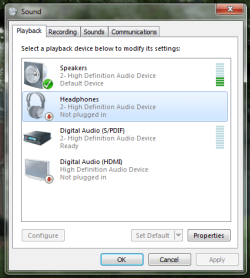
HD Audio devices are supposed to include 2 outputs, 1 for front channel speakers and the other for headphones, the headphones output is meant to be installed as another playback device and only be active when headphones are plugged in, and yet there is no headphones device in your screenshot in the first post.
 

My Computer

OS
Windows 7
CPU
Core i7 920 D0
Motherboard
Rampage II Gene
Memory
Corsair Dominator 1600
Graphics Card(s)
Geforce GTX 275
Sound Card
Auzentech Prelude
Monitor(s) Displays
BenQ G2400WD
Screen Resolution
1920x1200
Hard Drives
WD AAKS 500GB
WD 1TB
Seagate 160GB
PSU
Corsair HX620
Case
NZXT Rogue
Cooling
TRUE Copper
Keyboard
Logitech G15
Internet Speed
Anywhere from 2.5 to 3.5mb
now 5.1 works too, i switched all cables and works, don't know why is needed to be plugged different now.:(
 

My Computer

Computer Manufacturer/Model Number
AMD
OS
Windows 7 Ultimate x86
CPU
AMD Athlon II X3 425 2.7Ghz
Motherboard
MSI 770-C35/C45
Memory
3 GB DDR3
Graphics Card(s)
ATI Radeon HD 4670 (1024 MB)
Sound Card
Realtek onboard
Monitor(s) Displays
Founder LU761 [17" LCD]
Screen Resolution
1024x768
Hard Drives
SAMSUNG HD502HJ ATA Device (500 GB, 7200 RPM, SATA-II)
Keyboard
Black Multimedia Keyboard
Mouse
Agiler Black
I'm glad that you've got it sorted out :)

So there were no software/BIOS issues, it was "only" a cabling problem?

Can you describe exactly what you have connected where and post screenshots of the current Sound properties windows? That would probably help any others who run into similar problems.
 

My Computer

Computer type
PC/Desktop
Computer Manufacturer/Model Number
Scan 3XS P55 liteDAW
OS
Windows Home Premium (64)
CPU
Intel Core i7 860
Motherboard
Gigabyte GA-P55A-UD4
Memory
8GB (4x2GB) Corsair TwinX XMS3
Graphics Card(s)
1GB Gainward 9500 GT
Sound Card
M-Audio Delta 66
Monitor(s) Displays
Acer v223wBBd
Screen Resolution
1680 x 1050
Hard Drives
1 x 500 GB WD Barracuda (OS+Docs)
2 x 1TB Samsung Spinpoint F3 (Data)
PSU
Enermax EMD625AWT II - 625W Enermax Modu82+ II
Case
Fractal Design Define R2 Black
Cooling
Prolima Megahalems Super 6 Heatpipe Tower Cooler
Keyboard
Microsoft Digital Media Pro
Mouse
Belkin Optical Ergo
Internet Speed
8 Mbps nominal (14.9 achieved !)
Other Info
Digital Audio Workstation
is not the latest bios , i have 1.3 the latest is 1.6 and i never updated bios.

I will install these drivers, i will give feedback after.


This sometimes happens after driver installs... usually it just a matter of selecting a different default output, like the Digital Output.... after apply the change, then switch back to speakers as the default output.

One other problem some one had... they couldn't get any output unless they disabled all enhancements.

Ap
 

My Computer

Computer Manufacturer/Model Number
Assembled in my workshop
OS
Windows 7 Home Premium
CPU
Intel Core 2 Duo @ 3.00gHz
Motherboard
Gigabyte GA-P35-S3G
Memory
4 GB
Graphics Card(s)
ATI Radeon HD 2600 XT
Sound Card
RME 24/96 Card, Realtek Internal Audio PreSonus FireStudio
Monitor(s) Displays
Acer 1917 (x2)
Screen Resolution
1280 x 1024 on both monitors
Hard Drives
Three 250GB Seagate SATA Barracuda 7200rpm
PSU
Rosewill 500-watt
Case
Rosewill mid-tower
Cooling
Noctua NH-U9B (CPU), PwrSupply fan + single large case Fan
Keyboard
Macally w/2/USB ports.
Mouse
Trackman Wheel
Other Info
Event 20/20 bas studio monitors, Yamaha sub.
Rackmount Korg/Roland/Yamaha synthesizers,
Cubase MIDI/audio recording. Sony Soundforge audio/mastering software. CD Architect Mastering. RME & Presonus audio interfaces.
I'm glad that you've got it sorted out :)

So there were no software/BIOS issues, it was "only" a cabling problem?

Can you describe exactly what you have connected where and post screenshots of the current Sound properties windows? That would probably help any others who run into similar problems.

1.png

I have headphones plugged in and works but here show not plugged, anyway i'm glad it's work .

le: installed latest drivers r2.46 then i got to hd audio manager and right click on the green slot > Connector Retasking and choosed Headphones.

Perfect now, sound loud and clear.
 
Last edited:

My Computer

Computer Manufacturer/Model Number
AMD
OS
Windows 7 Ultimate x86
CPU
AMD Athlon II X3 425 2.7Ghz
Motherboard
MSI 770-C35/C45
Memory
3 GB DDR3
Graphics Card(s)
ATI Radeon HD 4670 (1024 MB)
Sound Card
Realtek onboard
Monitor(s) Displays
Founder LU761 [17" LCD]
Screen Resolution
1024x768
Hard Drives
SAMSUNG HD502HJ ATA Device (500 GB, 7200 RPM, SATA-II)
Keyboard
Black Multimedia Keyboard
Mouse
Agiler Black
Back
Top