
No Sound on Computer. Suddenly. Startup sounds play.

Username4You

New member
Local time
2:40 PM
Messages
3
Please help.

Allow me to give you my specs.

https://defuse.ca/b/j46gAeWk

Password: helpmeplease

Thank you all.

It started happening 1 month ago all of a sudden. I don't know what information I can give you else. Please ask if you need it.

As of right now, starting and stopping the audio service doesn't do anything and the sound on start up and login for Windows 7 plays loud and clear. However, playing star wars battlefront 3? No sound. Literally after the start up sound plays, nothing else does.

However, sometimes when I turn on the computer, the sound comes on again and works consistently fine after a few reboots with no sound.

When I attempt to Test the sound configuration, it simply states:
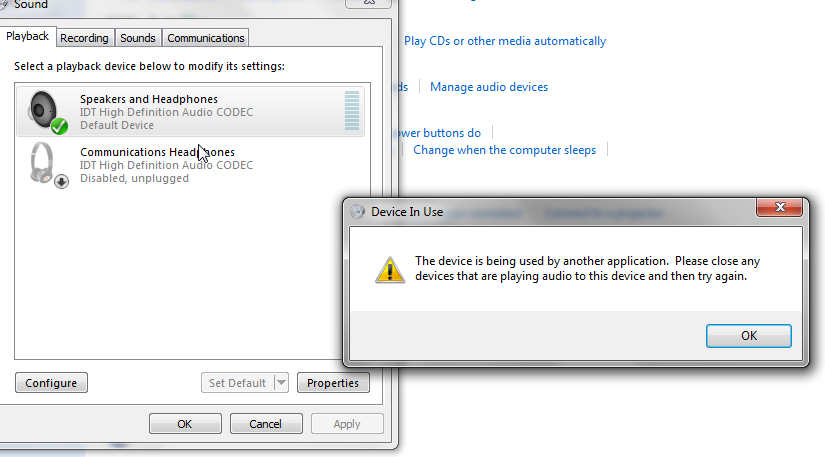
Ue01Rhj.png


I have no other devices except the built in IDT Audio from my laptop with Dre Beats Software enhancement. Please help.
 
Last edited:

My Computer My Computer

At a glance

64 Bit Windows 7 Pro
Computer type
PC/Desktop
OS
64 Bit Windows 7 Pro
Since you haven't mentioned what you've done, I'm going to start with the obvious by saying uninstall your audio drivers, reboot, and reinstall them. Search for the latest drivers for your laptop model off the manufacturer's website.

Also, are you using USB speakers/headphones or analog ones?

Also, what happens when you play media files from windows? Is the problem present only with games?
 

My Computer My Computer

At a glance

Windows 7 Pro 64 bit SP1Intel Core i7 950 Quad OC'ed to 3.2 GHZ12GB DDR 3Radeon HD 5870 1GB
Computer type
PC/Desktop
OS
Windows 7 Pro 64 bit SP1
CPU
Intel Core i7 950 Quad OC'ed to 3.2 GHZ
Motherboard
ASRock X58
Memory
12GB DDR 3
Graphics Card(s)
Radeon HD 5870 1GB
Sound Card
Onboard
Monitor(s) Displays
23" Acer HD
Screen Resolution
1920x1080
Hard Drives
128GB SSD
PSU
700W
Case
Coolermaster
Antivirus
Avast Free
Browser
Firefox
I am currently attempting to uninstall the Audio driver and re-install it. No other sound plays except start up sounds prior to uninstalling it.

I attempted an uninstall and reinstall of the audio driver which did not work. Still no sound except start up. Please help?

I am using a HP Pavilion dv6t-7000 laptop. No USB speakers/headphones/bluetooth.
 
Last edited:

My Computer My Computer

At a glance

64 Bit Windows 7 Pro
Computer type
PC/Desktop
OS
64 Bit Windows 7 Pro
have you tried headphones at all?
 

My Computer My Computer

At a glance

Windows 7 Pro 64 bit SP1Intel Core i7 950 Quad OC'ed to 3.2 GHZ12GB DDR 3Radeon HD 5870 1GB
Computer type
PC/Desktop
OS
Windows 7 Pro 64 bit SP1
CPU
Intel Core i7 950 Quad OC'ed to 3.2 GHZ
Motherboard
ASRock X58
Memory
12GB DDR 3
Graphics Card(s)
Radeon HD 5870 1GB
Sound Card
Onboard
Monitor(s) Displays
23" Acer HD
Screen Resolution
1920x1080
Hard Drives
128GB SSD
PSU
700W
Case
Coolermaster
Antivirus
Avast Free
Browser
Firefox
In the properties of your audio device, there should be a checkbox option labelled "Allow applications to take exclusive control of this device". disable it and reboot, see if that fixes it.
 

My Computer My Computer

At a glance

Windows 7 Pro 64 bit SP1Intel Core i7 950 Quad OC'ed to 3.2 GHZ12GB DDR 3Radeon HD 5870 1GB
Computer type
PC/Desktop
OS
Windows 7 Pro 64 bit SP1
CPU
Intel Core i7 950 Quad OC'ed to 3.2 GHZ
Motherboard
ASRock X58
Memory
12GB DDR 3
Graphics Card(s)
Radeon HD 5870 1GB
Sound Card
Onboard
Monitor(s) Displays
23" Acer HD
Screen Resolution
1920x1080
Hard Drives
128GB SSD
PSU
700W
Case
Coolermaster
Antivirus
Avast Free
Browser
Firefox
It was fixed. It turns out I had to disable my Intel Audio Display Driver which was causing all the problems. I do need to enable it if I want to produce a screen on another device.
 

My Computer My Computer

At a glance

64 Bit Windows 7 Pro
Computer type
PC/Desktop
OS
64 Bit Windows 7 Pro
Back
Top