No Sound on W7

SFisch

New member
Local time
1:58 AM
Messages
5
Heya, all. I'm new here, and I'm not really sure on how to fill out all of my system info, so you'll be seeing a lot of question marks.

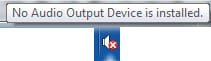
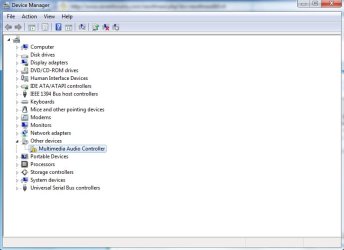
Aaaanyway, I seem to be having a problem with sound in Windows 7. I have a little speaker icon on the task bar with the "X" over it. When I hover the mouse over it, it simply says "No Audio Output Device is installed."

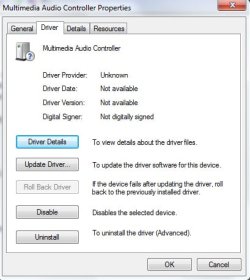
I have tried installing drivers, uninstalling drivers, searching for drivers with Windows Update, and pretty much scourging Google for a solution. No luck so far.

As far as I can tell, this is a x64 problem. I upgraded from my Vista x32 to the Windows 7 x64. I'm assuming my sound driver was out of date or something. I don't really understand how this stuff works and as such, finding a solution is pretty difficult. I would appreciate any help that anyone could offer!

Thank-you :D
 

Attachments

  • No Device.jpg
    No Device.jpg
    17.3 KB · Views: 952
  • Error in Device Manager.jpg
    Error in Device Manager.jpg
    51.8 KB · Views: 27
  • Nothing installed.jpg
    Nothing installed.jpg
    49.2 KB · Views: 16

My Computer

Computer Manufacturer/Model Number
HP Pavilion A6030N
OS
Windows 7
CPU
AMD Athalon 64 X2 Dual Core Processor 4800+ 2.50 GHz
Motherboard
?
Memory
2.00 GB
Graphics Card(s)
?
Sound Card
?
Monitor(s) Displays
?
Hard Drives
?
PSU
?
Case
?
Cooling
?

My Computer

Computer Manufacturer/Model Number
Dell XPS 15 L502x
OS
Windows 7 Ultimate x64 SP1
CPU
Core i7-2670QM
Memory
8GB DDR3 PC3-10600
Graphics Card(s)
Intel HD Graphics 3000 + GeForce GT 540M
Screen Resolution
1920x1080
Hard Drives
1TB 5400RPM Seagate
I've tried that every which way in compatibility mode. I ended up downloading a setup file called "sp37325" and no matter which compatibility mode I use it always ends up with the same error message, "Your system does not meet the minimum requirements for this update. Update has been cancelled. (9998)" I don't really understand this; if this driver was meant to work on my system and if my manufacturer specifically suggested it, how does my system not meet the minimum requirements?
 

My Computer

Computer Manufacturer/Model Number
HP Pavilion A6030N
OS
Windows 7
CPU
AMD Athalon 64 X2 Dual Core Processor 4800+ 2.50 GHz
Motherboard
?
Memory
2.00 GB
Graphics Card(s)
?
Sound Card
?
Monitor(s) Displays
?
Hard Drives
?
PSU
?
Case
?
Cooling
?
Right click on audio device with missing driver in device manager. Choose properties. Go to details tab, change dropdown to hardware ids. Copy and paste results. I could possibly locate something, even from another manufacturer.

Or install what you have now using device manager. Right click, update driver software. Browse. Let me pick. Have disk. Browse. Find the .inf. Click or double click on it. Hit ok and let it install.
 

My Computer

Computer Manufacturer/Model Number
self built
OS
7600.20510 x86
CPU
P4 550 3.4 GHz HT running at 3.5 GHz
Motherboard
MSI PM8M3-V (MS-7211 v1.x) Micro-ATX mainboard
Memory
OCZ 2 GB(2x1GB) DDR400mHz running @ 414 mHz
Graphics Card(s)
HIS Radeon HD 3850 IceQ 3 Turbo HDMI Dual DL-DVI AGP
Sound Card
MOTU Traveler firewire studio interface 192 kHz 24 bit
Monitor(s) Displays
22" widescreen Acer X223W LCD, 17" Compaq P75 CRT
Screen Resolution
1680x1050 and 1280x1024
Hard Drives
SATA I x2 WD, 400 GB and 120 GB, SATA 2 WD Caviar Black 1 TB
PSU
350W generic
Case
Cybertronpc, it glows blue
Cooling
stock cpu fan, Ice-Q 3 gpu and system, many case fans
Keyboard
Logitch Classical Keyboard 200
Mouse
Logitech Mediaplay cordless
Internet Speed
1792/448 kbits/sec
Other Info
SATA II PCI fake RAID adapter, 1 GB Readyboost, original ATI Remote Wonder (even works with WMC perfectly), Logitech Rumblepad 2 game controller x2
Multimedia controller? That might be difficult.
 

My Computer

Computer Manufacturer/Model Number
Sony Vaio Z46GDU
OS
Windows 7 Ultimate x86-64
CPU
[email protected] 1066MHz FSB
Motherboard
Sony branded
Memory
6GB DDR3 1066MHz
Graphics Card(s)
9300M GS 256MB Dedicated (Speed) + Intel4500MHD (Stamina)
Sound Card
Realtek HD Audio
Monitor(s) Displays
13.1' WXGA
Screen Resolution
1600x900
Hard Drives
320GB 7200RPM w/ 16MB cache
Internet Speed
1MB/s
Multimedia controller? Is your computer from the vista era or did it come with 7?
 

My Computer

Computer Manufacturer/Model Number
Sony Vaio Z46GDU
OS
Windows 7 Ultimate x86-64
CPU
[email protected] 1066MHz FSB
Motherboard
Sony branded
Memory
6GB DDR3 1066MHz
Graphics Card(s)
9300M GS 256MB Dedicated (Speed) + Intel4500MHD (Stamina)
Sound Card
Realtek HD Audio
Monitor(s) Displays
13.1' WXGA
Screen Resolution
1600x900
Hard Drives
320GB 7200RPM w/ 16MB cache
Internet Speed
1MB/s
Multimedia controller? Is your computer from the vista era or did it come with 7?

Windows can't identify the exact hardware, but it knows the device falls into the multimedia controller category. His computer came with Vista - although I didn't spell that out in my previous post, I did state that there are no Windows 7 drivers available for his computer.
 

My Computer

Computer Manufacturer/Model Number
Dell XPS 15 L502x
OS
Windows 7 Ultimate x64 SP1
CPU
Core i7-2670QM
Memory
8GB DDR3 PC3-10600
Graphics Card(s)
Intel HD Graphics 3000 + GeForce GT 540M
Screen Resolution
1920x1080
Hard Drives
1TB 5400RPM Seagate
I've tried that every which way in compatibility mode. I ended up downloading a setup file called "sp37325" and no matter which compatibility mode I use it always ends up with the same error message, "Your system does not meet the minimum requirements for this update. Update has been cancelled. (9998)" I don't really understand this; if this driver was meant to work on my system and if my manufacturer specifically suggested it, how does my system not meet the minimum requirements?

Actually, HP recommended that driver for Vista, not Windows 7. There are ways around this particular error - download and install WinRAR. WinRAR is an archival tool like the built-in Windows 7 zipped file tool, but it's a lot more robust. Once installed, right click on the sp37325 file and choose to "extract to sp37325\". Then, manually update the driver from the device manager and point Windows to the newly extracted folder. Or, you could try to use bypass the HP utility - go to the \Source directory and run the Setup.exe file in compatibility mode.

http://www.rarlab.com/rar/winrar-x64-390.exe
 

My Computer

Computer Manufacturer/Model Number
Dell XPS 15 L502x
OS
Windows 7 Ultimate x64 SP1
CPU
Core i7-2670QM
Memory
8GB DDR3 PC3-10600
Graphics Card(s)
Intel HD Graphics 3000 + GeForce GT 540M
Screen Resolution
1920x1080
Hard Drives
1TB 5400RPM Seagate
right click on audio device with missing driver in device manager. Choose properties. Go to details tab, change dropdown to hardware ids. Copy and paste results. I could possibly locate something, even from another manufacturer.

pci\ven_1274&dev_5000&subsys_4c4c4942&rev_00
pci\ven_1274&dev_5000&subsys_4c4c4942
pci\ven_1274&dev_5000&cc_040100
pci\ven_1274&dev_5000&cc_0401
 

My Computer

Computer Manufacturer/Model Number
HP Pavilion A6030N
OS
Windows 7
CPU
AMD Athalon 64 X2 Dual Core Processor 4800+ 2.50 GHz
Motherboard
?
Memory
2.00 GB
Graphics Card(s)
?
Sound Card
?
Monitor(s) Displays
?
Hard Drives
?
PSU
?
Case
?
Cooling
?
Then, manually update the driver from the device manager and point Windows to the newly extracted folder.

This didn't work.

Or, you could try to use bypass the HP utility - go to the \Source directory and run the Setup.exe file in compatibility mode.

This did, however. Unfortunately, nothing has changed. The driver installed but the same flags are up. (All the above attachments still apply)
 

My Computer

Computer Manufacturer/Model Number
HP Pavilion A6030N
OS
Windows 7
CPU
AMD Athalon 64 X2 Dual Core Processor 4800+ 2.50 GHz
Motherboard
?
Memory
2.00 GB
Graphics Card(s)
?
Sound Card
?
Monitor(s) Displays
?
Hard Drives
?
PSU
?
Case
?
Cooling
?
Another custom creation? ugh....lol

Give me a few moments and let me see what I can do.
 

My Computer

Computer Manufacturer/Model Number
self built
OS
7600.20510 x86
CPU
P4 550 3.4 GHz HT running at 3.5 GHz
Motherboard
MSI PM8M3-V (MS-7211 v1.x) Micro-ATX mainboard
Memory
OCZ 2 GB(2x1GB) DDR400mHz running @ 414 mHz
Graphics Card(s)
HIS Radeon HD 3850 IceQ 3 Turbo HDMI Dual DL-DVI AGP
Sound Card
MOTU Traveler firewire studio interface 192 kHz 24 bit
Monitor(s) Displays
22" widescreen Acer X223W LCD, 17" Compaq P75 CRT
Screen Resolution
1680x1050 and 1280x1024
Hard Drives
SATA I x2 WD, 400 GB and 120 GB, SATA 2 WD Caviar Black 1 TB
PSU
350W generic
Case
Cybertronpc, it glows blue
Cooling
stock cpu fan, Ice-Q 3 gpu and system, many case fans
Keyboard
Logitch Classical Keyboard 200
Mouse
Logitech Mediaplay cordless
Internet Speed
1792/448 kbits/sec
Other Info
SATA II PCI fake RAID adapter, 1 GB Readyboost, original ATI Remote Wonder (even works with WMC perfectly), Logitech Rumblepad 2 game controller x2
This should work for x64. Right click the audio device in device manager. Update driver software. Browse. Have disk. Let me pick. Browse. Navigate to the folder you extracted to. Double click .inf and let it install.

http://h10025.www1.hp.com/ewfrf/wc/...&dlc=en&cc=us&lang=en&os=2100&product=3377275


Only other driver I can find and make work is for x86. If you want to install x86 version of Windows instead so it is compatible with audio....then.....

Download my attachment and extract it to desktop or wherever.

Right click the audio device in device manager. Update driver software. Browse. Have disk. Let me pick. Browse. Navigate to the folder you extracted to. Double click on wdma_ens.inf. Hit ok. Let it install.
 

Attachments

My Computer

Computer Manufacturer/Model Number
self built
OS
7600.20510 x86
CPU
P4 550 3.4 GHz HT running at 3.5 GHz
Motherboard
MSI PM8M3-V (MS-7211 v1.x) Micro-ATX mainboard
Memory
OCZ 2 GB(2x1GB) DDR400mHz running @ 414 mHz
Graphics Card(s)
HIS Radeon HD 3850 IceQ 3 Turbo HDMI Dual DL-DVI AGP
Sound Card
MOTU Traveler firewire studio interface 192 kHz 24 bit
Monitor(s) Displays
22" widescreen Acer X223W LCD, 17" Compaq P75 CRT
Screen Resolution
1680x1050 and 1280x1024
Hard Drives
SATA I x2 WD, 400 GB and 120 GB, SATA 2 WD Caviar Black 1 TB
PSU
350W generic
Case
Cybertronpc, it glows blue
Cooling
stock cpu fan, Ice-Q 3 gpu and system, many case fans
Keyboard
Logitch Classical Keyboard 200
Mouse
Logitech Mediaplay cordless
Internet Speed
1792/448 kbits/sec
Other Info
SATA II PCI fake RAID adapter, 1 GB Readyboost, original ATI Remote Wonder (even works with WMC perfectly), Logitech Rumblepad 2 game controller x2
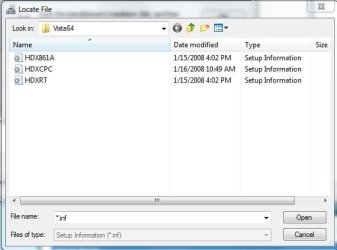
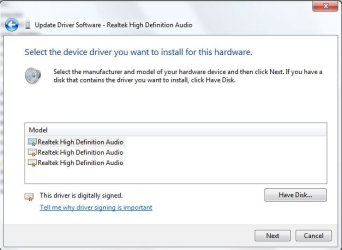
Well, I'm a little confused, since there are three .inf files to the extracted "sp37325." I tried one of them, but it led me to a screen with three more options. Only some of the .inf's install. Even if they do install, however, there is no change. Setup forces me to restart, but there is no change upon returning. Am I going to have to get a new sound card? Is this a hardware problem? I don't see how it could be if I haven't changed any hardware, only the OS.
Three inf.JPG

three more.JPG
 

My Computer

Computer Manufacturer/Model Number
HP Pavilion A6030N
OS
Windows 7
CPU
AMD Athalon 64 X2 Dual Core Processor 4800+ 2.50 GHz
Motherboard
?
Memory
2.00 GB
Graphics Card(s)
?
Sound Card
?
Monitor(s) Displays
?
Hard Drives
?
PSU
?
Case
?
Cooling
?
Back
Top