No sound through earplugs, although plugging in is recognized

Wonkietonkie

New member
Local time
6:28 AM
Messages
6
Hi all,

I have a curious problem, which I'm not able to solve on my own although I've a couple of solutions. Here is the problem:

When I plug my earphones in, its recognized that something is plugged in, the sound output changes, but I hear nothing through my earplugs.

I'm sure that: the hardware is working correctly (I have a dual OS system, and there everything is working fine). I have already reinstalled the drivers, reinstalled the HD Audio manager from Realtek including their drivers. One time, I had it working, but with the next reboot it did not work anymore.

In my sound settings everything seems OK, at least when it was working the same devices were listed and asssigned as standard devices so I dont think that the problem lies there. Anybody has an idea what to do or how to solve this?
 

My Computer My Computer

At a glance

Microsoft Windows 7 Home Premium 64-bits 7601...Intel(R) Core(TM) i5-2410M CPU @ 2.30GHz8,00 GB(1) NVIDIA GeForce GT 540M (2) Intel(R) HD Gr...
Computer type
Laptop
Computer Manufacturer/Model Number
Asus
OS
Microsoft Windows 7 Home Premium 64-bits 7601 Multiprocessor Free Service Pack 1
CPU
Intel(R) Core(TM) i5-2410M CPU @ 2.30GHz
Motherboard
ASUSTeK Computer Inc. K53SV
Memory
8,00 GB
Graphics Card(s)
(1) NVIDIA GeForce GT 540M (2) Intel(R) HD Graphics 30
Sound Card
(1) NVIDIA Virtual Audio Device (Wave Extensible) (WDM) (2
Screen Resolution
0 x 0 x 0 bits (0 colors) @ 0 Hz
Hard Drives
ST1000LM014-1EJ164
Hello and welcome Wonkie mate seems rather an obvious question but do these ear buds work in anything else??
 

My Computer My Computer

At a glance

Desk1 7 Home Prem / Desk2 10 Pro / Main lap A...Desk1 i5 3750K / Laptop i7 GTX 860M / Desk2 i...Desk1 8GB (1866) / Desk2 16GB (1333) / Laptop...Desk 1& 2NVidia GTX 650 & Laptops on board Intel
Computer type
PC/Desktop
Computer Manufacturer/Model Number
Own build (new) Desk1 / Asus ROG Win 7 / Desk2 1st build
OS
Desk1 7 Home Prem / Desk2 10 Pro / Main lap Asus ROG 10 Pro 2 laptop Toshiba 7 Pro Asus P2520 7 & 10
CPU
Desk1 i5 3750K / Laptop i7 GTX 860M / Desk2 i5 2500
Motherboard
Desk1 Asus P877-V / Desk2 Gigabyte H67 UD3H / Laptop ?
Memory
Desk1 8GB (1866) / Desk2 16GB (1333) / Laptop 8Gb DDR3
Graphics Card(s)
Desk 1& 2NVidia GTX 650 & Laptops on board Intel
Sound Card
Desk 1 & 2 -XONAR DG Realtek High Def audio Laptop
Monitor(s) Displays
Desk 1 Benq HD 2450 / Desk2 Philips 24" / Laptop 17.5"
Screen Resolution
1920x1080 D1 & D2 & Laptop 1
Hard Drives
Desk1 Samsung 120GB 830 SSD
Asus ROG 256GB 850 Pro SSD
Desk2 Samsung 840 256 SSD
Toshiba 120GB EVO
PSU
Desk 1 Corsair HX 1050/ Laptop ? / Desk 2 Corsair HX 650
Case
Desk 1 Cooler HAF XM ? Toshiba laptop / Desk2 Coolermaster
Cooling
Fans on all Desk1 -2 Desk2 - all Coolermasters 5 Laptop ?
Keyboard
Desk 1 MS Sidewinder X6 Desk 2 MS Sidewinder X 4
Mouse
Desk 1&2 - Gigabyte MS 900 gamer - laptop - Logitec wireless
Internet Speed
ADSL2+
Other Info
One other Desktop (tester) and spare Toshba laptop both with SSD's
Running Kaspersky 2016 ISS on all machines config'd identically
Logitec audio stereo systems on each machine (x3)
Canon MG5250MFC
Router/modem TP-Link running WPA2SK
Yes, I've also tested with different sets of earplugs..
 

My Computer My Computer

At a glance

Microsoft Windows 7 Home Premium 64-bits 7601...Intel(R) Core(TM) i5-2410M CPU @ 2.30GHz8,00 GB(1) NVIDIA GeForce GT 540M (2) Intel(R) HD Gr...
Computer type
Laptop
Computer Manufacturer/Model Number
Asus
OS
Microsoft Windows 7 Home Premium 64-bits 7601 Multiprocessor Free Service Pack 1
CPU
Intel(R) Core(TM) i5-2410M CPU @ 2.30GHz
Motherboard
ASUSTeK Computer Inc. K53SV
Memory
8,00 GB
Graphics Card(s)
(1) NVIDIA GeForce GT 540M (2) Intel(R) HD Graphics 30
Sound Card
(1) NVIDIA Virtual Audio Device (Wave Extensible) (WDM) (2
Screen Resolution
0 x 0 x 0 bits (0 colors) @ 0 Hz
Hard Drives
ST1000LM014-1EJ164

My Computer My Computer

At a glance

Desk1 7 Home Prem / Desk2 10 Pro / Main lap A...Desk1 i5 3750K / Laptop i7 GTX 860M / Desk2 i...Desk1 8GB (1866) / Desk2 16GB (1333) / Laptop...Desk 1& 2NVidia GTX 650 & Laptops on board Intel
Computer type
PC/Desktop
Computer Manufacturer/Model Number
Own build (new) Desk1 / Asus ROG Win 7 / Desk2 1st build
OS
Desk1 7 Home Prem / Desk2 10 Pro / Main lap Asus ROG 10 Pro 2 laptop Toshiba 7 Pro Asus P2520 7 & 10
CPU
Desk1 i5 3750K / Laptop i7 GTX 860M / Desk2 i5 2500
Motherboard
Desk1 Asus P877-V / Desk2 Gigabyte H67 UD3H / Laptop ?
Memory
Desk1 8GB (1866) / Desk2 16GB (1333) / Laptop 8Gb DDR3
Graphics Card(s)
Desk 1& 2NVidia GTX 650 & Laptops on board Intel
Sound Card
Desk 1 & 2 -XONAR DG Realtek High Def audio Laptop
Monitor(s) Displays
Desk 1 Benq HD 2450 / Desk2 Philips 24" / Laptop 17.5"
Screen Resolution
1920x1080 D1 & D2 & Laptop 1
Hard Drives
Desk1 Samsung 120GB 830 SSD
Asus ROG 256GB 850 Pro SSD
Desk2 Samsung 840 256 SSD
Toshiba 120GB EVO
PSU
Desk 1 Corsair HX 1050/ Laptop ? / Desk 2 Corsair HX 650
Case
Desk 1 Cooler HAF XM ? Toshiba laptop / Desk2 Coolermaster
Cooling
Fans on all Desk1 -2 Desk2 - all Coolermasters 5 Laptop ?
Keyboard
Desk 1 MS Sidewinder X6 Desk 2 MS Sidewinder X 4
Mouse
Desk 1&2 - Gigabyte MS 900 gamer - laptop - Logitec wireless
Internet Speed
ADSL2+
Other Info
One other Desktop (tester) and spare Toshba laptop both with SSD's
Running Kaspersky 2016 ISS on all machines config'd identically
Logitec audio stereo systems on each machine (x3)
Canon MG5250MFC
Router/modem TP-Link running WPA2SK
Sorry for the late reply. I'm also studying and it can be sometimes quite demanding to do everything at the same time. I uploaded the info to my profile, if anything else is needed, please let me know.

There is some interesting outcome in the summary provided by the executable you gave me, there are three sound cards listed:

1. Nvidia
2. Realtek
3. Intel

The Nvidia card is listed first, could this have anything to do with the problems I am experiencing?
 

My Computer My Computer

At a glance

Microsoft Windows 7 Home Premium 64-bits 7601...Intel(R) Core(TM) i5-2410M CPU @ 2.30GHz8,00 GB(1) NVIDIA GeForce GT 540M (2) Intel(R) HD Gr...
Computer type
Laptop
Computer Manufacturer/Model Number
Asus
OS
Microsoft Windows 7 Home Premium 64-bits 7601 Multiprocessor Free Service Pack 1
CPU
Intel(R) Core(TM) i5-2410M CPU @ 2.30GHz
Motherboard
ASUSTeK Computer Inc. K53SV
Memory
8,00 GB
Graphics Card(s)
(1) NVIDIA GeForce GT 540M (2) Intel(R) HD Graphics 30
Sound Card
(1) NVIDIA Virtual Audio Device (Wave Extensible) (WDM) (2
Screen Resolution
0 x 0 x 0 bits (0 colors) @ 0 Hz
Hard Drives
ST1000LM014-1EJ164
Hmm now you have my curiosity fired up as I can understand the Intel and Realtek as sound sources but the NVidia has me wondering what it is? The only reference I can find is to one that is an APU which used to be associated with AMD CPU's has recently been taken up by Intel.
In other words the CPU carries a graphical and sound component. I really don't know which of these are being used on your machine.

Now there are some references to the NVidia sound component and I am not real sure now of what to do.
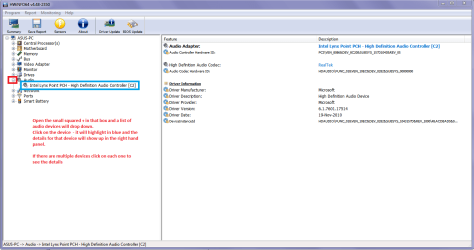
I think it might be an idea to run HW Info see my ditty and pic to see what is actually on the system.
Using HW Info
You can test the volts on the PSU with HW Info HWiNFO, HWiNFO32/64 - Download < download the right bit version and close the right hand window select Sensors and scroll down to the power section where you will see what the volts are doing see my pic.
The original right hand window shows the machine running and is handy for that but for looking at the components in some detail close it and use the main left hand side panel
FOR OTHER COMPONENTS
Open each + down into the component itself and then click on it - in the right hand side will appear all sorts of details including brands speeds and other essential info that device. See my pic for an example.
Just use the latter part.
 

Attachments

  • HW INFO AUDIO.PNG
    HW INFO AUDIO.PNG
    35.3 KB · Views: 0

My Computer My Computer

At a glance

Desk1 7 Home Prem / Desk2 10 Pro / Main lap A...Desk1 i5 3750K / Laptop i7 GTX 860M / Desk2 i...Desk1 8GB (1866) / Desk2 16GB (1333) / Laptop...Desk 1& 2NVidia GTX 650 & Laptops on board Intel
Computer type
PC/Desktop
Computer Manufacturer/Model Number
Own build (new) Desk1 / Asus ROG Win 7 / Desk2 1st build
OS
Desk1 7 Home Prem / Desk2 10 Pro / Main lap Asus ROG 10 Pro 2 laptop Toshiba 7 Pro Asus P2520 7 & 10
CPU
Desk1 i5 3750K / Laptop i7 GTX 860M / Desk2 i5 2500
Motherboard
Desk1 Asus P877-V / Desk2 Gigabyte H67 UD3H / Laptop ?
Memory
Desk1 8GB (1866) / Desk2 16GB (1333) / Laptop 8Gb DDR3
Graphics Card(s)
Desk 1& 2NVidia GTX 650 & Laptops on board Intel
Sound Card
Desk 1 & 2 -XONAR DG Realtek High Def audio Laptop
Monitor(s) Displays
Desk 1 Benq HD 2450 / Desk2 Philips 24" / Laptop 17.5"
Screen Resolution
1920x1080 D1 & D2 & Laptop 1
Hard Drives
Desk1 Samsung 120GB 830 SSD
Asus ROG 256GB 850 Pro SSD
Desk2 Samsung 840 256 SSD
Toshiba 120GB EVO
PSU
Desk 1 Corsair HX 1050/ Laptop ? / Desk 2 Corsair HX 650
Case
Desk 1 Cooler HAF XM ? Toshiba laptop / Desk2 Coolermaster
Cooling
Fans on all Desk1 -2 Desk2 - all Coolermasters 5 Laptop ?
Keyboard
Desk 1 MS Sidewinder X6 Desk 2 MS Sidewinder X 4
Mouse
Desk 1&2 - Gigabyte MS 900 gamer - laptop - Logitec wireless
Internet Speed
ADSL2+
Other Info
One other Desktop (tester) and spare Toshba laptop both with SSD's
Running Kaspersky 2016 ISS on all machines config'd identically
Logitec audio stereo systems on each machine (x3)
Canon MG5250MFC
Router/modem TP-Link running WPA2SK
Hi ICIT2LOL,

I'm not quite sure what you're expecting from me, but here is some info on the Audio device. The Nvidia audio device probably comes from the HDMI connection which is on this card, and of course also includes sound. I think its not related to my problem.

I need to say again, that the earphones are working proper in my other OS (as I have a dual OS system) which is Arch Linux. There pluggin in and out results in the desired outcome. So I'm not sure whether this a hardware problem, I thinking more about a software problem.

uGktdi.png
 

My Computer My Computer

At a glance

Microsoft Windows 7 Home Premium 64-bits 7601...Intel(R) Core(TM) i5-2410M CPU @ 2.30GHz8,00 GB(1) NVIDIA GeForce GT 540M (2) Intel(R) HD Gr...
Computer type
Laptop
Computer Manufacturer/Model Number
Asus
OS
Microsoft Windows 7 Home Premium 64-bits 7601 Multiprocessor Free Service Pack 1
CPU
Intel(R) Core(TM) i5-2410M CPU @ 2.30GHz
Motherboard
ASUSTeK Computer Inc. K53SV
Memory
8,00 GB
Graphics Card(s)
(1) NVIDIA GeForce GT 540M (2) Intel(R) HD Graphics 30
Sound Card
(1) NVIDIA Virtual Audio Device (Wave Extensible) (WDM) (2
Screen Resolution
0 x 0 x 0 bits (0 colors) @ 0 Hz
Hard Drives
ST1000LM014-1EJ164
Hmm well as you say it does seem to be a software problem and it also seems to me that while in Linux the drivers are fine but not in Windows?

So I was thinking that you may need to reinstall that driver for that device you posted while in Windows.
The drivers for the Cougar Point I cannot find on the Intel site and as you say you have installed the driver from the Realtek site maybe trying them form the Asus site could prove to be a fix I am not sure but worth a try

http://www.asus.com/Notebooks_Ultrabooks/K53SV/HelpDesk_Download/

I don’t know if it would help either if you ran these too
http://www.sevenforums.com/tutorials/1538-sfc-scannow-command-system-file-checker.html
http://www.sevenforums.com/tutorials/433-disk-check.html < if necessary include the /f and /r in the command line as per Option2 (in Windows boot of course)
 

My Computer My Computer

At a glance

Desk1 7 Home Prem / Desk2 10 Pro / Main lap A...Desk1 i5 3750K / Laptop i7 GTX 860M / Desk2 i...Desk1 8GB (1866) / Desk2 16GB (1333) / Laptop...Desk 1& 2NVidia GTX 650 & Laptops on board Intel
Computer type
PC/Desktop
Computer Manufacturer/Model Number
Own build (new) Desk1 / Asus ROG Win 7 / Desk2 1st build
OS
Desk1 7 Home Prem / Desk2 10 Pro / Main lap Asus ROG 10 Pro 2 laptop Toshiba 7 Pro Asus P2520 7 & 10
CPU
Desk1 i5 3750K / Laptop i7 GTX 860M / Desk2 i5 2500
Motherboard
Desk1 Asus P877-V / Desk2 Gigabyte H67 UD3H / Laptop ?
Memory
Desk1 8GB (1866) / Desk2 16GB (1333) / Laptop 8Gb DDR3
Graphics Card(s)
Desk 1& 2NVidia GTX 650 & Laptops on board Intel
Sound Card
Desk 1 & 2 -XONAR DG Realtek High Def audio Laptop
Monitor(s) Displays
Desk 1 Benq HD 2450 / Desk2 Philips 24" / Laptop 17.5"
Screen Resolution
1920x1080 D1 & D2 & Laptop 1
Hard Drives
Desk1 Samsung 120GB 830 SSD
Asus ROG 256GB 850 Pro SSD
Desk2 Samsung 840 256 SSD
Toshiba 120GB EVO
PSU
Desk 1 Corsair HX 1050/ Laptop ? / Desk 2 Corsair HX 650
Case
Desk 1 Cooler HAF XM ? Toshiba laptop / Desk2 Coolermaster
Cooling
Fans on all Desk1 -2 Desk2 - all Coolermasters 5 Laptop ?
Keyboard
Desk 1 MS Sidewinder X6 Desk 2 MS Sidewinder X 4
Mouse
Desk 1&2 - Gigabyte MS 900 gamer - laptop - Logitec wireless
Internet Speed
ADSL2+
Other Info
One other Desktop (tester) and spare Toshba laptop both with SSD's
Running Kaspersky 2016 ISS on all machines config'd identically
Logitec audio stereo systems on each machine (x3)
Canon MG5250MFC
Router/modem TP-Link running WPA2SK
Thank you so much for your help ICIT2LOL! I reinstalled the original driver of which you provided the weblink and now its working again.

Again, thanks for your support and suggestions!
 

My Computer My Computer

At a glance

Microsoft Windows 7 Home Premium 64-bits 7601...Intel(R) Core(TM) i5-2410M CPU @ 2.30GHz8,00 GB(1) NVIDIA GeForce GT 540M (2) Intel(R) HD Gr...
Computer type
Laptop
Computer Manufacturer/Model Number
Asus
OS
Microsoft Windows 7 Home Premium 64-bits 7601 Multiprocessor Free Service Pack 1
CPU
Intel(R) Core(TM) i5-2410M CPU @ 2.30GHz
Motherboard
ASUSTeK Computer Inc. K53SV
Memory
8,00 GB
Graphics Card(s)
(1) NVIDIA GeForce GT 540M (2) Intel(R) HD Graphics 30
Sound Card
(1) NVIDIA Virtual Audio Device (Wave Extensible) (WDM) (2
Screen Resolution
0 x 0 x 0 bits (0 colors) @ 0 Hz
Hard Drives
ST1000LM014-1EJ164
Good it worked mate and if you feel like a little more out of your machine run through this tutorial
http://www.sevenforums.com/tutorials/11728-optimize-windows-7-a.html there are a few tweaks that are registry based one and I know Brink is the master and really is the master when it comes to jus about anything bit I always back up the registry for two reasons -
a) when ever I do a clean install or
b) when tweaking the registry and like I said there are no problems with what Brink instructs you to do - more that I do it because I may or someone else might hit a wrong key and then it is only a matter of merging the full registry back again. F course you do not have to use the tutorial but I think you will notice a considerable improvement in the performance of your machine.

To backup the registry - http://www.sevenforums.com/tutorials/4230-registry-backup-restore.html takes about a minute and a half to do and saves you form wrecking the machine:)
 

My Computer My Computer

At a glance

Desk1 7 Home Prem / Desk2 10 Pro / Main lap A...Desk1 i5 3750K / Laptop i7 GTX 860M / Desk2 i...Desk1 8GB (1866) / Desk2 16GB (1333) / Laptop...Desk 1& 2NVidia GTX 650 & Laptops on board Intel
Computer type
PC/Desktop
Computer Manufacturer/Model Number
Own build (new) Desk1 / Asus ROG Win 7 / Desk2 1st build
OS
Desk1 7 Home Prem / Desk2 10 Pro / Main lap Asus ROG 10 Pro 2 laptop Toshiba 7 Pro Asus P2520 7 & 10
CPU
Desk1 i5 3750K / Laptop i7 GTX 860M / Desk2 i5 2500
Motherboard
Desk1 Asus P877-V / Desk2 Gigabyte H67 UD3H / Laptop ?
Memory
Desk1 8GB (1866) / Desk2 16GB (1333) / Laptop 8Gb DDR3
Graphics Card(s)
Desk 1& 2NVidia GTX 650 & Laptops on board Intel
Sound Card
Desk 1 & 2 -XONAR DG Realtek High Def audio Laptop
Monitor(s) Displays
Desk 1 Benq HD 2450 / Desk2 Philips 24" / Laptop 17.5"
Screen Resolution
1920x1080 D1 & D2 & Laptop 1
Hard Drives
Desk1 Samsung 120GB 830 SSD
Asus ROG 256GB 850 Pro SSD
Desk2 Samsung 840 256 SSD
Toshiba 120GB EVO
PSU
Desk 1 Corsair HX 1050/ Laptop ? / Desk 2 Corsair HX 650
Case
Desk 1 Cooler HAF XM ? Toshiba laptop / Desk2 Coolermaster
Cooling
Fans on all Desk1 -2 Desk2 - all Coolermasters 5 Laptop ?
Keyboard
Desk 1 MS Sidewinder X6 Desk 2 MS Sidewinder X 4
Mouse
Desk 1&2 - Gigabyte MS 900 gamer - laptop - Logitec wireless
Internet Speed
ADSL2+
Other Info
One other Desktop (tester) and spare Toshba laptop both with SSD's
Running Kaspersky 2016 ISS on all machines config'd identically
Logitec audio stereo systems on each machine (x3)
Canon MG5250MFC
Router/modem TP-Link running WPA2SK
Yes well, that didnt take too long to break again. I've enjoyed the sound through earphones for three times, then I switched one time to Linux, and now its broken again. Reinstalling drivers doesnt solve it.

It almost seems like Linux and Windows are interacting or communicating differently with the sound (chip or card?). Almost like one puts it in a certain status, and then Windows is not able to work with it anymore. Although the normal sound (through speakers), continues to work always. So, maybe it has something to do with putting the 3.5 jack connection point in a certain mode.

Is there any way to reset certain pieces of hardware, like for example the onboard sound card, or 3.5 jack connection point?

EDIT: well this problem seems to be very odd to say the least. After a quick search on the Internet I found that sound problems with dual boot systems occur more often. I found a suggestion to put Windows to sleep and then wake up, everything should be working. And what happens? It works! So at least I have a workaround, but its just crazy, and if anyone can point out whats the reason for this I would be happy.

EDIT2: I can imagine that during wake-up of the system, ports and hardware is reinitialized and setup again to some extent. If this is true for the onboard and audio ports, it could be the reason why after a sleep - wakeup cycle, everything works as it should be. It could also point at the possible cause that when its not working, sound is directed to the HDMI output, instead of the 3.5 jack output.

If someone has a command to reinitialize the sound card and/or audio ports, similar to a sleep and wakeup cycle, it would be nice.
 

My Computer My Computer

At a glance

Microsoft Windows 7 Home Premium 64-bits 7601...Intel(R) Core(TM) i5-2410M CPU @ 2.30GHz8,00 GB(1) NVIDIA GeForce GT 540M (2) Intel(R) HD Gr...
Computer type
Laptop
Computer Manufacturer/Model Number
Asus
OS
Microsoft Windows 7 Home Premium 64-bits 7601 Multiprocessor Free Service Pack 1
CPU
Intel(R) Core(TM) i5-2410M CPU @ 2.30GHz
Motherboard
ASUSTeK Computer Inc. K53SV
Memory
8,00 GB
Graphics Card(s)
(1) NVIDIA GeForce GT 540M (2) Intel(R) HD Graphics 30
Sound Card
(1) NVIDIA Virtual Audio Device (Wave Extensible) (WDM) (2
Screen Resolution
0 x 0 x 0 bits (0 colors) @ 0 Hz
Hard Drives
ST1000LM014-1EJ164
Ok something odd going on here and I am not sure what, because I have not used a dual boot for years now - seems almost like you have to install the driver while in Linux and also when in Windows. There again if you have to do that with the audio then it follows that has to be done with all the drivers??

Perhaps running Linux wrecks the Windows drivers and I did find this and while it doesn't solve the problem may have something to do with it what I am not sure but it does look like Linux has audio issues.
How it works: Linux audio explained | TuxRadar Linux
 

My Computer My Computer

At a glance

Desk1 7 Home Prem / Desk2 10 Pro / Main lap A...Desk1 i5 3750K / Laptop i7 GTX 860M / Desk2 i...Desk1 8GB (1866) / Desk2 16GB (1333) / Laptop...Desk 1& 2NVidia GTX 650 & Laptops on board Intel
Computer type
PC/Desktop
Computer Manufacturer/Model Number
Own build (new) Desk1 / Asus ROG Win 7 / Desk2 1st build
OS
Desk1 7 Home Prem / Desk2 10 Pro / Main lap Asus ROG 10 Pro 2 laptop Toshiba 7 Pro Asus P2520 7 & 10
CPU
Desk1 i5 3750K / Laptop i7 GTX 860M / Desk2 i5 2500
Motherboard
Desk1 Asus P877-V / Desk2 Gigabyte H67 UD3H / Laptop ?
Memory
Desk1 8GB (1866) / Desk2 16GB (1333) / Laptop 8Gb DDR3
Graphics Card(s)
Desk 1& 2NVidia GTX 650 & Laptops on board Intel
Sound Card
Desk 1 & 2 -XONAR DG Realtek High Def audio Laptop
Monitor(s) Displays
Desk 1 Benq HD 2450 / Desk2 Philips 24" / Laptop 17.5"
Screen Resolution
1920x1080 D1 & D2 & Laptop 1
Hard Drives
Desk1 Samsung 120GB 830 SSD
Asus ROG 256GB 850 Pro SSD
Desk2 Samsung 840 256 SSD
Toshiba 120GB EVO
PSU
Desk 1 Corsair HX 1050/ Laptop ? / Desk 2 Corsair HX 650
Case
Desk 1 Cooler HAF XM ? Toshiba laptop / Desk2 Coolermaster
Cooling
Fans on all Desk1 -2 Desk2 - all Coolermasters 5 Laptop ?
Keyboard
Desk 1 MS Sidewinder X6 Desk 2 MS Sidewinder X 4
Mouse
Desk 1&2 - Gigabyte MS 900 gamer - laptop - Logitec wireless
Internet Speed
ADSL2+
Other Info
One other Desktop (tester) and spare Toshba laptop both with SSD's
Running Kaspersky 2016 ISS on all machines config'd identically
Logitec audio stereo systems on each machine (x3)
Canon MG5250MFC
Router/modem TP-Link running WPA2SK
Back
Top