No sound when connected to TV

kmy

New member
Local time
9:21 PM
Messages
11
Location
Mn
Everytime I connect my Laptop to my 40 lcd tv I always dont get sound to the tv. I have to play it through my laptop. I have a Sony VAIO, less then a yr old running winds 7 64bit. I use a HDMI cable to connect to my tv. My laptop has Blu-Ray player but I haven't try that to see if there's sound TO the tv. So far, I've just been using a external speaker for playing movies from my laptop to my tv. Thats starting to get annoying. Even in "PROJECTOR ONLY" mode I still get sound from my laptop only.

I want sound from my TV speakers. What should I do?
 

My Computer My Computer

At a glance

Windows 7
OS
Windows 7
You usually have to go into your Sounds Control Panel and change the output device to the video device...which should show up in sounds (yes, seems odd, but that's how it works). My Dell E6400 is this way, and so was an HTPC I had running. The laptop used an Intel graphics card, but had Intel's High Def audio listed in sounds. The HTPC used a Radeon 4350, and I had to switch to the ATI High Def HDMI audio device.

Projector Only mode is dealing with visuals only. You'd definitely want laptop sound in that mode, in case your presentation included sound.
 

My Computer My Computer

At a glance

Windows 7 Ultimate x64 SP1Intel Core i7-260012 GB Patriot Extreme DDR3-1333Nvidia GTX 470
OS
Windows 7 Ultimate x64 SP1
CPU
Intel Core i7-2600
Motherboard
Gigabyte GA-P67A-UD3P-B3
Memory
12 GB Patriot Extreme DDR3-1333
Graphics Card(s)
Nvidia GTX 470
Monitor(s) Displays
Dell UltraSharp 2209WA
Hard Drives
OCZ Agility3 240 GB, WD5001AALS, WD7501AALS
PSU
OCZ ModStream 700W
Case
CoolerMaster HAF 912 Advanced
Cooling
CoolerMaster Hyper 212 Plus
the new win7 sp1 includes some fixes for hdmi audio devices. also, if you have an nvidia graphics card, you may have to change the resolution. my current driver has the option of 1080p with audio or 1080p without audio. and obviously, check to make sure our system is set to use the correct audio device. (you can right-click the speaker icon next to the clock)
 

My Computer My Computer

At a glance

windows 7 ultimate 64bitIntel Core2 Extreme x9000 2.8GHZ4Gig2 NVidia GeForce 8800M GTX (SLi)
Computer Manufacturer/Model Number
Alienware AREA-51 M17x
OS
windows 7 ultimate 64bit
CPU
Intel Core2 Extreme x9000 2.8GHZ
Motherboard
Asus P965 Intel chipset
Memory
4Gig
Graphics Card(s)
2 NVidia GeForce 8800M GTX (SLi)
Sound Card
onboard
Monitor(s) Displays
17in. built-in, 47in JVC LCD
Screen Resolution
1080p
Hard Drives
2 250Gig Hitachi (RAID 0) @ 7200RPM
Case
17in. laptop
Mouse
touchpad, Logitech Anywhere Mouse cordless laser
Internet Speed
cable
I went to "SOUNDS SETTINGS" and it only displays the schemes. Can't seem to find any more sound settings besides of master volume but has nothing to do with OUTPUT. Any more ideas?

I wonder if it'll work if I use a 3.5mm-to-RCA cable to connect from my laptops OUTPUT audio to my tv's INPUT audio?
 

My Computer My Computer

At a glance

Windows 7
OS
Windows 7
Hi,

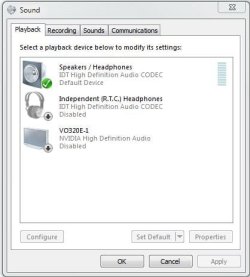
What happens when you right-click the speaker icon and select Playback devices?

There should be a HDMI (High Definition output) device. If you could provide a pic like the 1 below that'd be very handy.

Playback Devices.PNG


OS
 

My Computer My Computer

At a glance

Windows 7 Ultimate x64AMD Sempron Dual Core3GBNVIDIA GeForce 6150SE nForce 430
Computer Manufacturer/Model Number
Compaq Desktop
OS
Windows 7 Ultimate x64
CPU
AMD Sempron Dual Core
Memory
3GB
Graphics Card(s)
NVIDIA GeForce 6150SE nForce 430
Screen Resolution
1024x768
Hard Drives
150GB Sata
^...Under PLAYBACK i only have "speakers". Nothing shows up even when I right click & click on Show all device. I think I may have a low end sound card. My Laptop is a SONY VAIO VPCEB15FM. Everything is up to date.
 

My Computer My Computer

At a glance

Windows 7
OS
Windows 7

My Computer My Computer

At a glance

Win 7 Ultimate x64FX-8350 @ 4.6 GHz so farADATA XPG V1 Series Black 8GB DDR3 1600Sapphire R9 270x Dual-X
Computer type
PC/Desktop
Computer Manufacturer/Model Number
Me
OS
Win 7 Ultimate x64
CPU
FX-8350 @ 4.6 GHz so far
Motherboard
Asus M5A97 EVO
Memory
ADATA XPG V1 Series Black 8GB DDR3 1600
Graphics Card(s)
Sapphire R9 270x Dual-X
Sound Card
Xonar DGX w/ Corsair Vengence 1300
Monitor(s) Displays
Acer S232HL Abid
Screen Resolution
1920x1080
Hard Drives
120 GB OCZ Vertex 3
500 GB Seagate 7200.12
PSU
Antec Earthwatts 650W Green
Case
Antec Three Hundred
Cooling
Cooler Master 212 EVO
Keyboard
Logitech G510
Mouse
Logitech G500s
Internet Speed
35000/3000
when I try the driver update it saids I'm all updated but my versions are the following:

-High Definition Audio Device.......DRIVER VERSION 6.1.7600.16385
-Intel(R) Display Audio................DRIVER VERSION 6.12.0.3040
 

My Computer My Computer

At a glance

Windows 7
OS
Windows 7
Just did an autodetect on the Intel website and found I am running version 8.15.10.2040.
 

My Computer My Computer

At a glance

Windows 7
OS
Windows 7
Under PLAYBACK i only have "speakers". Nothing shows up even when I right click & click on Show all device. My Laptop is a DELL INSPIRON N5010.plz tell me should i do , it drives me crazy...
 

My Computer My Computer

At a glance

Windows 7 Ultimate x86
OS
Windows 7 Ultimate x86
My set up is similar to Orbital Sharks. Right click on the volume icon and click playback devices, right click on speaker/headphones (IDT High Definition Audio) and disable, right click on V02320-E (Vizio HDTV)(Nvidia High Definition Audio) and click enable for sound to come through my TV.

I would think with a HDMI output and a BR player you'd have a decent sound card.

I actually prefer the Harmon/Kardon desktop speakers I use with my laptop over my TV's sound, unless I have my Bose Aucostic Wave running from the TV.
 

Attachments

  • Capture.JPG
    Capture.JPG
    30.2 KB · Views: 6

My Computer My Computer

At a glance

Windows 7 Professional 64bit8GBIntel HD Graphics, NVIDIA GeForce
Computer type
PC/Desktop
Computer Manufacturer/Model Number
Dell Vostro 3558 (Laptop)
OS
Windows 7 Professional 64bit
Motherboard
Dell
Memory
8GB
Graphics Card(s)
Intel HD Graphics, NVIDIA GeForce
Screen Resolution
1366 x 768
Antivirus
Avira Free, MalwareBytes AntiMalware Pro
Browser
Chrome
Back
Top