No sound when playing DVD

JPF

New member
Local time
1:47 AM
Messages
2
Hi all

i'm having problems with my new webbook. the sound is working in general, wma files play and I can hear sound when streaming etc but when I try and play a dvd I get no sound. i thought it was the external dvd player so I reinstalled the driver with the windows 7 driver, installed the latest driver for the DVD software for Win 7 no luck, then someone suggested DivX so I installed that still no luck. on the DivX website it suggests that you install this software to see if you have the correct codec, did that and it says i have the correct codec installed to play the specific file, (see here DivX Support)
so while looking here i read about issues with realtek drivers so I installed the latest driver for win 7 I thinkn its R2.37 and still no luck.

Is there some setting in the Sound Manager that i need to adjust.

any healp at all is appreciated as I cant take much more of this thing!!

Thanks
JPF
 

My Computer

OS
Windows 7 starter
Hi JPF, Welcome to SF,

You can try something that might work

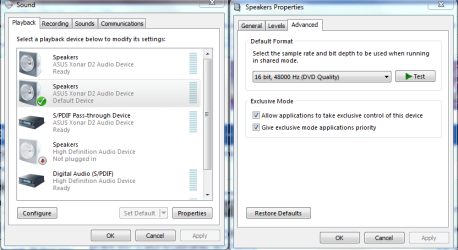
Go To Control Panel > Hardware and Sound > Sound > Right click on Speakers > Properties > Advanced > Uncheck : "Allow applications to take exclusive control of this device".

Or

You could download and install VLC Media Player try to play in that one

Hope that helps
 

My Computer

Computer Manufacturer/Model Number
Samsung NP550P5C-S02IN
OS
Windows 7 Ultimate - 64-bit | Windows 8 Pro - 64-bit
CPU
Intel® Core™ i7 Processor 3,610QM (2.30Hz, 6MB L3 Cach
Memory
8 GB
Graphics Card(s)
NVIDIA® GeForce® GT 650M 2GB Graphics, Optimus™ techno
Sound Card
SoundAlive™ JBL 3 Speakers (With sub-Woofer)
Monitor(s) Displays
39.62cm (15.6) SuperBright 300nit HD+ LED Display
Screen Resolution
1,600 x 900, Anti-Reflective
Hard Drives
1TB S-ATA II Hard Drive (5,400RPM)
This setting seems to have an effect on DVD's when they aren't playing sound. Switching to DVD quality 48000 seems to help sometimes.
 

Attachments

  • application control of this device.PNG
    application control of this device.PNG
    34.8 KB · Views: 352

My Computer

Computer type
PC/Desktop
Computer Manufacturer/Model Number
Home built
OS
Windows 7 Ult, Windows 8.1 Pro,
CPU
Q9650-4.275GHz, E8600 4.5GHz, E6750-3.8GHz
Motherboard
Evga 780i FTW
Memory
G.Skill PC2 9600 1200Mhz 5 5 5 15 2T
Graphics Card(s)
GTX480
Sound Card
Asus Xonar D2
Monitor(s) Displays
HannsG
Screen Resolution
1680X1050
Hard Drives
GSkill Phoenix Pro 120GB SSD
PSU
ThermalTake Toughpower 1000Watt modular
Case
ThermalTake XaserV
Cooling
Xigmatek S1283
Keyboard
Logitech G15
Mouse
Logitech G9
Internet Speed
T1
Just in case anyone missed it JPF has Windows 7 Starter as his OS and it comes with one very large limitation regarding what he is trying to do,

Let?s talk about Windows 7 Starter - Windows 7 Team Blog - The Windows Blog

It is important to note that Windows 7 Starter still includes only a subset of the features offered in the higher editions of Windows 7 such as Windows 7 Home Premium, Windows 7 Professional and above. Windows 7 Starter does not include:
  • Aero Glass, meaning you can only use the “Windows Basic” or other opaque themes. It also means you do not get Taskbar Previews or Aero Peek.
  • Personalization features for changing desktop backgrounds, window colors, or sound schemes.
  • The ability to switch between users without having to log off.
  • Multi-monitor support.
  • DVD playback.
  • Windows Media Center for watching recorded TV or other media.
  • Remote Media Streaming for streaming your music, videos, and recorded TV from your home computer.
  • Domain support for business customers.
  • XP Mode for those that want the ability to run older Windows XP programs on Windows 7.

That said the VLC that Capt. Jack linked to should work. If not will have to look into some other DVD playing capable software.
 

My Computer

Computer type
PC/Desktop
Computer Manufacturer/Model Number
Me
OS
Win 7 Ultimate x64
CPU
FX-8350 @ 4.6 GHz so far
Motherboard
Asus M5A97 EVO
Memory
ADATA XPG V1 Series Black 8GB DDR3 1600
Graphics Card(s)
Sapphire R9 270x Dual-X
Sound Card
Xonar DGX w/ Corsair Vengence 1300
Monitor(s) Displays
Acer S232HL Abid
Screen Resolution
1920x1080
Hard Drives
120 GB OCZ Vertex 3
500 GB Seagate 7200.12
PSU
Antec Earthwatts 650W Green
Case
Antec Three Hundred
Cooling
Cooler Master 212 EVO
Keyboard
Logitech G510
Mouse
Logitech G500s
Internet Speed
35000/3000
thanks for the advice guys. only getting to check back now, I'll try and download the VLC software and if that doesn't work maybe try and install windows XP which is what was advertised with the web book initially but when I got home discovered win 7 was installed!!
 

My Computer

OS
Windows 7 starter
Back
Top