Solved No Sound

michelle22

alfred01
Local time
4:56 PM
Messages
19
Location
Marina Del Rey
Hi everyone. My name is Michelle and I'm new here so please forgive me if I make some mistakes at first. My problem is that my computer, a Dell Latitude, has got no sound coming from the speakers. I've checked and updated the drivers, turned the volume right up and checked Device Manager which doesn't show any problem. Would anyone have any suggestions? It would be much appreciated.

Michelle
 

My Computer

Computer Manufacturer/Model Number
Dell Latitude D610
OS
Windows 7 Home Premium 64 bit
CPU
Intel® Pentium® MIntel® Pentium® M
Motherboard
?
Memory
2 GB
Graphics Card(s)
ATI Mobility Radeon X300
Sound Card
Sigmatel 9751
Monitor(s) Displays
XGA; SXGA+
Screen Resolution
?
Hard Drives
80 GB
PSU
?
Case
?
Cooling
?
Keyboard
QWERTY/AZERTY/Kanji
Mouse
Microsoft 7000 Laser
Internet Speed
DSL Ultra High Speed
Other Info
NIS 2011
is it on mute? its seems silly but that could be it.
 

My Computer

Computer Manufacturer/Model Number
The Vampire
OS
Windows 7 Ultimate
CPU
Intel i5 2500k @ 3.30
Motherboard
P8Z68 V-Pro
Memory
G.Skill Ripjaws 1600 2x4 Gb
Graphics Card(s)
BFG GTX 260 MAXCORE 55 OC 896MB GDDR3
Sound Card
Onboard
Monitor(s) Displays
50'' Sony Display Panel
Screen Resolution
1360 x 768
Hard Drives
Seagate 750 GB
WD 160 GB
PSU
OCZ 750 Watts ZT Series Fully Modular PSU 80 Plus Bronze
Case
NZXT Red Phantom
Cooling
120mm x2 Intake, 120mm x 1 and 200mm x2 Exhaust
Keyboard
LX710 Logitech Wireless Keyboard
Mouse
Logitech Wireless Mouse
try to check the wirings. .ur using a mono jack?,try another one..or to other speakers..if you hear sound then its about your speakers. .
 

My Computer

OS
windows 7 32 bit build 7600
Motherboard
emx mcp61m2 icafe
Graphics Card(s)
NVIDIA GEforce 8400GS super
Monitor(s) Displays
Samsung LD190
Check to see if you get sound out of your headphones. At least that way you can narrow down the problem. If you do get sound out of the headphones then the problem has to do with the speakers/connections only. If you don't, then you have a systemwide problem.
 

My Computer

Computer Manufacturer/Model Number
HP Pavillion dv5t (generation 1)
OS
Vista 64 bit and 32 bit (SP2)
CPU
Intel(R) Core(TM)2 Duo Processor T9400 (2.53 GHz
Memory
4GB DDR2 System Memory (2 Dimm)
Graphics Card(s)
512 MB NVIDIA GeForce 9600M GT
Monitor(s) Displays
15.4" diagonal WSXGA+ High-Definition HP BrightView Widescre
Screen Resolution
1680 x 1050
Hard Drives
320GB 5400RPM SATA Hard Drive with HP ProtectSmart Hard Drive Protection
Keyboard
Built-in HP
Mouse
Built in - Synaptics TouchPad V6.5 on PS/2 Port
Internet Speed
Max
Other Info
~ Intel Next-Gen Wireless-N Mini-card w/Bluetooth ~ Blu-Ray ROM DVD+/-R/RW ~ Integ. HDTV Hybrid Tuner ~ 12 Cell Battery ~ MS Office (Home Premium) 2007 ~
  • Like
Reactions: TCG
Hi Michelle22

System spec's are very important in this situation, is it onboard sound or sound card (type), chipset drivers installed, video drivers also have bearing on your sound, just a few things to check.
 

My Computer

Computer Manufacturer/Model Number
Dell XPS 730
OS
Windows 7 Home Premium 64 bit
CPU
Intel Core 2 quad Extreme Q9770 @ 3.2 GHz
Memory
4x2 GB Muskin 1600 MHz ram
Graphics Card(s)
NVidia GTX 250
Sound Card
Soundblaster X-Fi Fatality Champion
Monitor(s) Displays
2 Dell 2007WFP Ultrascans
Screen Resolution
3360 x 1050
Hard Drives
WD Black 1TB sata, 2-WD Black 500 sata, 2-Seagate 500 Go external
PSU
1000 Watt
Cooling
air
Keyboard
MS Natrual Keyboard Pro
Mouse
Logitech Wireless Trackball
Internet Speed
DSL Elite
Thank you everyone. I will try all suggestions. You're all so helpful. I will get my system specification's up soon.

Thanks M.
 

My Computer

Computer Manufacturer/Model Number
Dell Latitude D610
OS
Windows 7 Home Premium 64 bit
CPU
Intel® Pentium® MIntel® Pentium® M
Motherboard
?
Memory
2 GB
Graphics Card(s)
ATI Mobility Radeon X300
Sound Card
Sigmatel 9751
Monitor(s) Displays
XGA; SXGA+
Screen Resolution
?
Hard Drives
80 GB
PSU
?
Case
?
Cooling
?
Keyboard
QWERTY/AZERTY/Kanji
Mouse
Microsoft 7000 Laser
Internet Speed
DSL Ultra High Speed
Other Info
NIS 2011
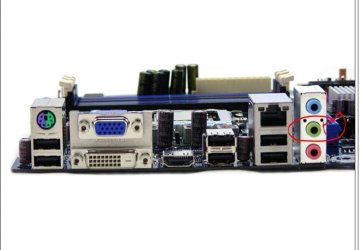
Do you have your speakers plugged into the correct speaker jack ? Ususally green on most newer computers.
 

Attachments

  • Speaker_jack_MB.JPG
    Speaker_jack_MB.JPG
    44.4 KB · Views: 1

My Computer

Computer type
PC/Desktop
Computer Manufacturer/Model Number
Built them myself, Science Experiments !
OS
Win7 Enterprise, Win7 x86 (Ult 7600), Win7 x64 Ult 7600, TechNet RTM on AMD x64 (2.8Ghz)
CPU
AMD fx8350 4ghz, AMD-32 2400mhz, AMD-64 3200mhz, AMDx64 2.8G
Motherboard
SIS 755, ECS-K8M890M-M (Ult 7600), GigaByte & others
Memory
2gb, 4gb on the Ult 7600, 4gb on Technet RTM, 32gb on FX8350
Graphics Card(s)
Draw my own Graphics, several nVidia cards
Sound Card
on motherboard
Monitor(s) Displays
19" flat scr, 28" I-Inc widescr,22" Emprex Widescr, 23" Acer
Screen Resolution
1280 x 1024, 1440 x 900, 1920 x 1080
Hard Drives
6 pata Ide HD's & 2 Sata HD's
added 80gb external on Ult 7600 computer,
numerous extra 1tb, 2TB, 3Tb SATA HD's
A collection of ext HD Docks w/ HDs
PSU
430w, 550w, 600w, 700, 800, etc
Case
All Generic Full Towers
Cooling
Open Air & a few fans, some w/ colored LEDs
Keyboard
Compaq & Dell recycled from GoodWill
Mouse
Made in China Optical Wired Mouse
Internet Speed
Fast Cable InterNet
Antivirus
AVG Free on 24 different Desktops, NO Problems!
Browser
IE 8 is preferred, but use FireFox sometimes
Other Info
Linksys Routers, switches, & Hubs
Too Many USB Flash Drives to count, Biggest is 64GB !
Eight computers in my home network.
Sixteen computers at my business network.
Linked via TeamViewer !
Lots of old used spare computer parts everywhere!
Sometimes the fix is simple. If you are using windows 7 click on start and control panel and go to hardware and sound. Click on change system sounds and then click on the playback tab. Look at the icons and see which one has the green check mark. You may have the wrong device activated. You might try changing the default device and see if that solves your problem. Good luck.
 

My Computer

Computer Manufacturer/Model Number
My own build
OS
Windows 7 Ultimate 64 bit
CPU
AMD Triple Core
Motherboard
ASUS M4A785TD-EVO
Memory
6 Gig
Graphics Card(s)
on board
Sound Card
on board
Monitor(s) Displays
LG HD Television
Hard Drives
750 gig and 640 gig Caviar Black
PSU
550 Watt
Case
Silverstone
Cooling
two 80mm and 1 90 mm fan
Check to see if you get sound out of your headphones. At least that way you can narrow down the problem. If you do get sound out of the headphones then the problem has to do with the speakers/connections only. If you don't, then you have a systemwide problem.

Hello Imperfect1. This is the one that worked. I used headphones and the sound was fine so I guess it's the speakers themselves. And its not on mute. Thank you so much for your help, at least I know where to go from here. Great avatar by the way.

Thank you all so much for your help. I think I'm going to have to come up with a better avatar, yours are all so great. And DocBrown, that is one freaked out avatar. I love it.

Thanks again

M
 

My Computer

Computer Manufacturer/Model Number
Dell Latitude D610
OS
Windows 7 Home Premium 64 bit
CPU
Intel® Pentium® MIntel® Pentium® M
Motherboard
?
Memory
2 GB
Graphics Card(s)
ATI Mobility Radeon X300
Sound Card
Sigmatel 9751
Monitor(s) Displays
XGA; SXGA+
Screen Resolution
?
Hard Drives
80 GB
PSU
?
Case
?
Cooling
?
Keyboard
QWERTY/AZERTY/Kanji
Mouse
Microsoft 7000 Laser
Internet Speed
DSL Ultra High Speed
Other Info
NIS 2011
Back
Top