No Sound

hazer73

New member
Local time
12:42 AM
Messages
11
Have just installed windows 7 and been really impressed with it so far, however there's one big flaw - no sound!

The drivers been installed, updated, it says it's running fine and when the volume bar is clicked on down bottom right and you drag the bar up and down, no sound at all, although the bar does fill up green (if you know what i mean).

When i tried reinstalling the driver it came up with a message saying about 'hardware changes may have not been detected' and then about the audio services not running. However, I've restarted the pair of them and still no luck.


PLEASE PLEASE PLEASE SOME1 HELP :cry::cry::cry::cry::cry:
 

My Computer

Computer Manufacturer/Model Number
PC Specialist custom made
OS
windows 7 ultimate
CPU
intel pentium 2x3GHz
Motherboard
Asus P5LD2
Memory
2048MB (2 x 1GB)
Graphics Card(s)
512MB GeForce 6600
Sound Card
High End Onboard 8 Channel Sound
Have just installed windows 7 and been really impressed with it so far, however there's one big flaw - no sound!

The drivers been installed, updated, it says it's running fine and when the volume bar is clicked on down bottom right and you drag the bar up and down, no sound at all, although the bar does fill up green (if you know what i mean).

When i tried reinstalling the driver it came up with a message saying about 'hardware changes may have not been detected' and then about the audio services not running. However, I've restarted the pair of them and still no luck.


PLEASE PLEASE PLEASE SOME1 HELP :cry::cry::cry::cry::cry:


Have you rebooted since starting the services? Are you sure the drivers are working correctly? (have you looked in device manager)

Are there head phones plugged in?

Is there a setting in the audio control panel for muting?

etc

Ken
 

My Computer

Computer Manufacturer/Model Number
HP Pavillion dv-7 1005 Tx
OS
Win 8 Release candidate 8400
CPU
[email protected]
Memory
4 gigs
Graphics Card(s)
Nvidia 9600M
Sound Card
HD built-in
Monitor(s) Displays
17" Wxga
Screen Resolution
1440x900
Cooling
none
Internet Speed
45Mb down 5Mb up
Yep, and its saying drivers are fine.

No headphones plugged in and even when they are they don't work either. Looked in control panel and theres nothing about a mute but system volume is up full.
 

My Computer

Computer Manufacturer/Model Number
PC Specialist custom made
OS
windows 7 ultimate
CPU
intel pentium 2x3GHz
Motherboard
Asus P5LD2
Memory
2048MB (2 x 1GB)
Graphics Card(s)
512MB GeForce 6600
Sound Card
High End Onboard 8 Channel Sound
Yep, and its saying drivers are fine.

No headphones plugged in and even when they are they don't work either. Looked in control panel and theres nothing about a mute but system volume is up full.


And your default output Device is?

Right click on the Microsoft Speaker icon, select output devices. Can you set it to speakers (if it's not already) and then click the "Set Default" button.

Ap
 

My Computer

Computer Manufacturer/Model Number
Assembled in my workshop
OS
Windows 7 Home Premium
CPU
Intel Core 2 Duo @ 3.00gHz
Motherboard
Gigabyte GA-P35-S3G
Memory
4 GB
Graphics Card(s)
ATI Radeon HD 2600 XT
Sound Card
RME 24/96 Card, Realtek Internal Audio PreSonus FireStudio
Monitor(s) Displays
Acer 1917 (x2)
Screen Resolution
1280 x 1024 on both monitors
Hard Drives
Three 250GB Seagate SATA Barracuda 7200rpm
PSU
Rosewill 500-watt
Case
Rosewill mid-tower
Cooling
Noctua NH-U9B (CPU), PwrSupply fan + single large case Fan
Keyboard
Macally w/2/USB ports.
Mouse
Trackman Wheel
Other Info
Event 20/20 bas studio monitors, Yamaha sub.
Rackmount Korg/Roland/Yamaha synthesizers,
Cubase MIDI/audio recording. Sony Soundforge audio/mastering software. CD Architect Mastering. RME & Presonus audio interfaces.
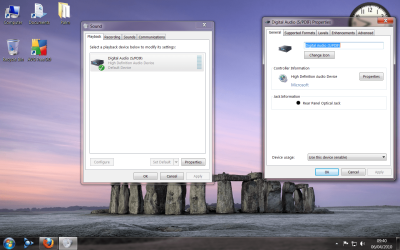
The default is is called 'Digital Audio (S/PDIF)' and under controller information it then says; 'High Definition Audio Device'. There is no option to setting it to speakers as far as I'm aware. If the option to change it was there, where abouts would it be?
 

My Computer

Computer Manufacturer/Model Number
PC Specialist custom made
OS
windows 7 ultimate
CPU
intel pentium 2x3GHz
Motherboard
Asus P5LD2
Memory
2048MB (2 x 1GB)
Graphics Card(s)
512MB GeForce 6600
Sound Card
High End Onboard 8 Channel Sound
Just to show what it is saying
 

Attachments

  • Untitled.png
    Untitled.png
    299.6 KB · Views: 43

My Computer

Computer Manufacturer/Model Number
PC Specialist custom made
OS
windows 7 ultimate
CPU
intel pentium 2x3GHz
Motherboard
Asus P5LD2
Memory
2048MB (2 x 1GB)
Graphics Card(s)
512MB GeForce 6600
Sound Card
High End Onboard 8 Channel Sound
I just look at ASUS site ASUSTeK Computer Inc.
In section Download/Select OS... there is no drivers for W7 for your mobo P5LD2

Do some more research on your mobo drivers on Google or some ASUS forum. As your sound device shows SPDIF output thats not gonna work with your speakers. W7 had installed legacy HD audio drivers. I have one ASUS mobo P5QL Pro installed with W7 in my puter and on board audio works great [have more sound-card installed too] Maybe someone also who solved this problem could share here on this thread.
 

My Computer

OS
Windows 7 x64
Been messing around on the ASUS website and siving through posts, and have finally located the drivers. Now re-experiencing the joys of sound from the computer.

Thanks everyone!! :D
 

My Computer

Computer Manufacturer/Model Number
PC Specialist custom made
OS
windows 7 ultimate
CPU
intel pentium 2x3GHz
Motherboard
Asus P5LD2
Memory
2048MB (2 x 1GB)
Graphics Card(s)
512MB GeForce 6600
Sound Card
High End Onboard 8 Channel Sound
Back
Top