No Speakers

Myatt88

New member
Local time
11:45 PM
Messages
4
Hey All.

I've only recently finished building my rig but cant seem to get my sound to work correctly.
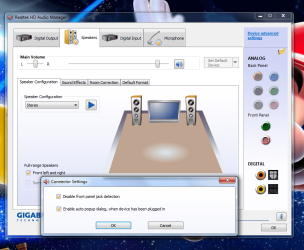
If i go into the Realtek settings, no speakers are detected. The only way to get them to show is to tick "Disable Front Panel Jack Detection" but then the side, sub ... ect jacks do not work.
I've installed the Realtek drivers from my driver disk, Gigabyte website and Windows but still no luck.

I'm hoping the problem is something simple and would appreciate any help.

Thank you Paul

System Spec below
 

My Computer

OS
Windows 7 64
CPU
AMD Phenom II 965 3.4 OC - 3.8
Motherboard
GIGABYTE MA790XT-UD4P AMD 790X
Memory
CORSAIR DOMINATOR XMS3 4GB 1600
Graphics Card(s)
HIS 5770
Monitor(s) Displays
Viewsonic VX2260WM 22" Widescreen
Hard Drives
CAVIAR BLACK 500GB 32MB
PSU
OCZ MODXSTREAM PRO 600W SILENT
Case
ANTEC NINE HUNDRED - 2
Cooling
COOLERMASTER HYPER TX3
I thought i should add a couple of screenshots to help.

As you can see, no speakers detected here just Digital
1.png


Once i tick "Disable Front Panel Jack Detection" i get it show but the back panel jacks are faded out.
2.png
 

My Computer

OS
Windows 7 64
CPU
AMD Phenom II 965 3.4 OC - 3.8
Motherboard
GIGABYTE MA790XT-UD4P AMD 790X
Memory
CORSAIR DOMINATOR XMS3 4GB 1600
Graphics Card(s)
HIS 5770
Monitor(s) Displays
Viewsonic VX2260WM 22" Widescreen
Hard Drives
CAVIAR BLACK 500GB 32MB
PSU
OCZ MODXSTREAM PRO 600W SILENT
Case
ANTEC NINE HUNDRED - 2
Cooling
COOLERMASTER HYPER TX3
Nothing will show up in the Rear Panel connector display until you plug something into them...insert your speaker plug into the green receptor.
 

My Computer

Computer Manufacturer/Model Number
ASUS p5w-dh deluxe & IBM Thinkpad T43
OS
Windows 7 x86 and x64 - RTM
CPU
E6700 (core 2 duo ^3.25GHz) & Pentium M 750 (1.86GHz)
Motherboard
P5W-DH Deluxe & Thinkpad T43
Memory
4GB and 1.5GB
Graphics Card(s)
ATI 4850 & ATI X300
Nothing will show up in the Rear Panel connector display until you plug something into them...insert your speaker plug into the green receptor.

Tried but they remain the same :(

Thx for the reply.
 

My Computer

OS
Windows 7 64
CPU
AMD Phenom II 965 3.4 OC - 3.8
Motherboard
GIGABYTE MA790XT-UD4P AMD 790X
Memory
CORSAIR DOMINATOR XMS3 4GB 1600
Graphics Card(s)
HIS 5770
Monitor(s) Displays
Viewsonic VX2260WM 22" Widescreen
Hard Drives
CAVIAR BLACK 500GB 32MB
PSU
OCZ MODXSTREAM PRO 600W SILENT
Case
ANTEC NINE HUNDRED - 2
Cooling
COOLERMASTER HYPER TX3
As this is a new build the first thing I would do is the obvious - re-check all the internal connections and the BIOS settings.

I have known the BIOS for realtek to default to a setting that fails to work ;)

Pay particular attention to the board connectors for the front panel connections these are often a set of multi-plugs that can easily find themselves the wrong way round or such.

All this is obvious but it's surprising how many times a second look will discover something simple
 

My Computers

System One System Two

  • Computer type
    PC/Desktop
    Computer Manufacturer/Model Number
    ChillBlast - Custom to my design
    OS
    Windows 11 Pro x64 [Latest Release and Release Preview]
    CPU
    Ryzen 9 5950X, 3.8 - 5.2 MHz
    Motherboard
    Asus Prime X570-Pro
    Memory
    64GB [2 x 32GB] DDR4 3200MHz
    Graphics Card(s)
    4GB NVIDIA GEFORCE GTX 1650 Ti
    Sound Card
    On-board SPDIF to 5.1 System + HDMI [5.1 system]
    Monitor(s) Displays
    32" UHD 32 Bit HDR Monitor + 43" UHD 4K 32Bit HDR TV
    Screen Resolution
    2 x 3840 x 2160 @60Hz
    Hard Drives
    1TB M2 SSD OS, 500GB Fast Access SSD, 2 x 8TB Data + Various Externals from 1TB to 4TB, 10TB NAS
    PSU
    NZXT C750 80 PLUS Gold 750W Modular PSU
    Case
    Workstation Case [Matt Black]
    Cooling
    NZXT Kraken X63 280mm CPU Cooler +2x Quiet Case fans
    Keyboard
    Logitech Wireless MX Keys & K400 + others
    Mouse
    Logitech Wireless MX Master 3S
    Internet Speed
    920 MB Down 50 MB Up
    Antivirus
    BitDefender Total Security Pro
    Browser
    Chrome (always run latest Non-Beta)
    Other Info
    Also run ...
    Laptop - Quad 8GB - Windows 10 Pro x64
    Nexus 7 Android tablet x2
    Samsung 10.2" tablet
    Blackview TAB 8 4G Android Tablet c/w Keyboard
    Wacom Intuos Pro Medium Pen Pad
    Wacom Intuos Pro Small Pen Pad
    Wacom Expresskeys Remote
    Loopdeck+ Graphics Controller
    Shuttle Pro v2 Control
  • Computer type
    Laptop
    System Manufacturer/Model Number
    Dell XPS 17 10750H
    OS
    Windows 11 Pro x64 Latest RP
    CPU
    Intel I7 10750H 5.0GHz
    Motherboard
    Dell XPS
    Memory
    32GB [2x16GB] DDR4 2933 MHz
    Graphics Card(s)
    nVidia GTX1650Ti 4 GB GDDR6
    Sound Card
    Stock [Realtek] 4 Speaker
    Monitor(s) Displays
    17" IPS UHD+ Infinity Edge Touchscreen
    Screen Resolution
    3840 x 2400
    Hard Drives
    2TB M2 NVMe, 4TB External + various 500GB & 1TB External NVMe (also have access to spinner HDD from
    PSU
    Stock
    Case
    Stock XPS Aluminium & Carbon Fibre
    Cooling
    Stock - Active Fan Control
    Keyboard
    Backlit + Various Logitech
    Mouse
    Stock Track Pad + Logitech MX Trackball
    Internet Speed
    72 MB Down 18MB Up
    Browser
    Chrome
    Other Info
    Also run ...
    Laptop - Quad 8GB - Windows 10 Pro x64
    Nexus 7 Android tablet x2
    10.2" tablet
    Sony Z3 Android Smartphone
    Wacom Intuos Pro Medium Pen Pad
    Wacom Intuos Pro Small Pen Pad
    Wacom Expresskeys Remote
    Loopdeck+ Graphics Controller
    Shuttle Pro v2 Control Pad
    10TB NAS
Just rechecked and all was good. Tried booting up with the front panel disconnected but still the same :(

Thx for the reply.
 

My Computer

OS
Windows 7 64
CPU
AMD Phenom II 965 3.4 OC - 3.8
Motherboard
GIGABYTE MA790XT-UD4P AMD 790X
Memory
CORSAIR DOMINATOR XMS3 4GB 1600
Graphics Card(s)
HIS 5770
Monitor(s) Displays
Viewsonic VX2260WM 22" Widescreen
Hard Drives
CAVIAR BLACK 500GB 32MB
PSU
OCZ MODXSTREAM PRO 600W SILENT
Case
ANTEC NINE HUNDRED - 2
Cooling
COOLERMASTER HYPER TX3
One thing you could try is to use the drivers from the Realtek website - but I will warn you that although they will be the most current the site is very slow to download.

Realtek

The other thing this may be of course is a basic hardware failure of the audio circuitry on the board, this is not as uncommon as we would like and as this is a totally new build, with no working history, it is something to consider as a last resort :(
 

My Computers

System One System Two

  • Computer type
    PC/Desktop
    Computer Manufacturer/Model Number
    ChillBlast - Custom to my design
    OS
    Windows 11 Pro x64 [Latest Release and Release Preview]
    CPU
    Ryzen 9 5950X, 3.8 - 5.2 MHz
    Motherboard
    Asus Prime X570-Pro
    Memory
    64GB [2 x 32GB] DDR4 3200MHz
    Graphics Card(s)
    4GB NVIDIA GEFORCE GTX 1650 Ti
    Sound Card
    On-board SPDIF to 5.1 System + HDMI [5.1 system]
    Monitor(s) Displays
    32" UHD 32 Bit HDR Monitor + 43" UHD 4K 32Bit HDR TV
    Screen Resolution
    2 x 3840 x 2160 @60Hz
    Hard Drives
    1TB M2 SSD OS, 500GB Fast Access SSD, 2 x 8TB Data + Various Externals from 1TB to 4TB, 10TB NAS
    PSU
    NZXT C750 80 PLUS Gold 750W Modular PSU
    Case
    Workstation Case [Matt Black]
    Cooling
    NZXT Kraken X63 280mm CPU Cooler +2x Quiet Case fans
    Keyboard
    Logitech Wireless MX Keys & K400 + others
    Mouse
    Logitech Wireless MX Master 3S
    Internet Speed
    920 MB Down 50 MB Up
    Antivirus
    BitDefender Total Security Pro
    Browser
    Chrome (always run latest Non-Beta)
    Other Info
    Also run ...
    Laptop - Quad 8GB - Windows 10 Pro x64
    Nexus 7 Android tablet x2
    Samsung 10.2" tablet
    Blackview TAB 8 4G Android Tablet c/w Keyboard
    Wacom Intuos Pro Medium Pen Pad
    Wacom Intuos Pro Small Pen Pad
    Wacom Expresskeys Remote
    Loopdeck+ Graphics Controller
    Shuttle Pro v2 Control
  • Computer type
    Laptop
    System Manufacturer/Model Number
    Dell XPS 17 10750H
    OS
    Windows 11 Pro x64 Latest RP
    CPU
    Intel I7 10750H 5.0GHz
    Motherboard
    Dell XPS
    Memory
    32GB [2x16GB] DDR4 2933 MHz
    Graphics Card(s)
    nVidia GTX1650Ti 4 GB GDDR6
    Sound Card
    Stock [Realtek] 4 Speaker
    Monitor(s) Displays
    17" IPS UHD+ Infinity Edge Touchscreen
    Screen Resolution
    3840 x 2400
    Hard Drives
    2TB M2 NVMe, 4TB External + various 500GB & 1TB External NVMe (also have access to spinner HDD from
    PSU
    Stock
    Case
    Stock XPS Aluminium & Carbon Fibre
    Cooling
    Stock - Active Fan Control
    Keyboard
    Backlit + Various Logitech
    Mouse
    Stock Track Pad + Logitech MX Trackball
    Internet Speed
    72 MB Down 18MB Up
    Browser
    Chrome
    Other Info
    Also run ...
    Laptop - Quad 8GB - Windows 10 Pro x64
    Nexus 7 Android tablet x2
    10.2" tablet
    Sony Z3 Android Smartphone
    Wacom Intuos Pro Medium Pen Pad
    Wacom Intuos Pro Small Pen Pad
    Wacom Expresskeys Remote
    Loopdeck+ Graphics Controller
    Shuttle Pro v2 Control Pad
    10TB NAS
Back
Top