Solved no stereo mix option,help?

paparazzo79

New member
Member
Local time
7:48 PM
Messages
95
I switched to Windows 7 with SP1 after Win XP but I noticed after installing Realtek newest drivers for my motherboard (it has ALC662 realtek audio chip) I don't have anymore option to record external sound from stereo mix,and in fact I don't even see stereo mix option in mixer so I can not activate it.All this worked normally in Windows XP but not in 7.
What do I need to do to be able to record external sound from my sound card,where has "stereo mix" option dissapear
 

My Computer

OS
Windows 7 Ultimate 32bit
CPU
amd athlon 64 3600+ X2
Motherboard
Biostar NF520-TE
Graphics Card(s)
Ati Radeon 3650 HD
Monitor(s) Displays
Philips 227EL
Hi paparazzo79 and welcome to W7 Forums :party:

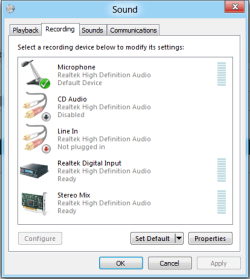
Stereo Mix is still available, however it needs to be enabled. Right-click the speaker icon in the Notification Area and choose Recording Devices from the pop-up menu. The Stereo Mix option should be displayed, if not you might need to scroll until it shows. If you don't see it, this means that it is hidden or disconnected. Right-click on the dialogue panel and check both Show Disabled Devices and Show Disconnected Devices.

Capture.PNG
 

My Computer

Computer type
PC/Desktop
Computer Manufacturer/Model Number
Dwarf Dwf/11/2012 r09/2013
OS
Windows 8.1 Pro RTM x64
CPU
Intel Core-i5-3570K 4-core @ 3.4GHz (Ivy Bridge) (OC 4.4GHz)
Motherboard
ASRock Z77 Extreme4-M
Memory
4 x 4GB DDR3-1600 Corsair Vengeance CMZ8GX3M2A1600C9B (16GB)
Graphics Card(s)
MSI GeForce GTX770 Gaming OC 2GB
Sound Card
Realtek High Definition on board solution (ALC 898)
Monitor(s) Displays
ViewSonic VA1912w Widescreen (VGA)
Screen Resolution
1440x900
Hard Drives
OCZ Agility 3 SSD 120GB SATA III x2 (RAID 0)
Samsung HD501LJ 500GB SATA II x2
Hitachi HDS721010CLA332 1TB SATA II
Iomega 1.5TB Ext USB 2.0
WD 2.0TB Ext USB 3.0
PSU
XFX Pro Series 850W Semi-Modular
Case
Gigabyte IF233
Cooling
1 x 120mm Front Inlet 1 x 120mm Rear Exhaust
Keyboard
Microsoft Comfort Curve Keyboard 3000 (USB)
Mouse
Microsoft Comfort Mouse 3000 for Business (USB)
Internet Speed
NetGear DG834Gv3 ADSL Modem/Router (Ethernet) ~4.0 Mb/s (O2)
Antivirus
Avast! 8.0.1497
Browser
IE 11
Other Info
Optical Drive: HL-DT-ST BD-RE BH10LS30 SATA Bluray
Lexmark S305 Printer/Scanner/Copier (USB)
WEI Score: 8.1/8.1/8.5/8.5/8.25
Asus Eee PC 1011PX Netbook (Windows 7 x86 Starter)
OK I did enabled it it was hidden.currently my microphone from my webcam is set as default recording device.And I set it as default device with microphone,it's green checked,thank you so much it works now.
It was hidden but I could not find it.
 

My Computer

OS
Windows 7 Ultimate 32bit
CPU
amd athlon 64 3600+ X2
Motherboard
Biostar NF520-TE
Graphics Card(s)
Ati Radeon 3650 HD
Monitor(s) Displays
Philips 227EL
You're welcome. :)
 

My Computer

Computer type
PC/Desktop
Computer Manufacturer/Model Number
Dwarf Dwf/11/2012 r09/2013
OS
Windows 8.1 Pro RTM x64
CPU
Intel Core-i5-3570K 4-core @ 3.4GHz (Ivy Bridge) (OC 4.4GHz)
Motherboard
ASRock Z77 Extreme4-M
Memory
4 x 4GB DDR3-1600 Corsair Vengeance CMZ8GX3M2A1600C9B (16GB)
Graphics Card(s)
MSI GeForce GTX770 Gaming OC 2GB
Sound Card
Realtek High Definition on board solution (ALC 898)
Monitor(s) Displays
ViewSonic VA1912w Widescreen (VGA)
Screen Resolution
1440x900
Hard Drives
OCZ Agility 3 SSD 120GB SATA III x2 (RAID 0)
Samsung HD501LJ 500GB SATA II x2
Hitachi HDS721010CLA332 1TB SATA II
Iomega 1.5TB Ext USB 2.0
WD 2.0TB Ext USB 3.0
PSU
XFX Pro Series 850W Semi-Modular
Case
Gigabyte IF233
Cooling
1 x 120mm Front Inlet 1 x 120mm Rear Exhaust
Keyboard
Microsoft Comfort Curve Keyboard 3000 (USB)
Mouse
Microsoft Comfort Mouse 3000 for Business (USB)
Internet Speed
NetGear DG834Gv3 ADSL Modem/Router (Ethernet) ~4.0 Mb/s (O2)
Antivirus
Avast! 8.0.1497
Browser
IE 11
Other Info
Optical Drive: HL-DT-ST BD-RE BH10LS30 SATA Bluray
Lexmark S305 Printer/Scanner/Copier (USB)
WEI Score: 8.1/8.1/8.5/8.5/8.25
Asus Eee PC 1011PX Netbook (Windows 7 x86 Starter)
I have the same problem on my new toshiba notebook with connexant audio card,except now recording devices and disabled devices are both checked,but I only see Microphone under recording devices tab.What should I do to enable stero mix option?
 

My Computer

OS
Windows 7 Ultimate 32bit
CPU
amd athlon 64 3600+ X2
Motherboard
Biostar NF520-TE
Graphics Card(s)
Ati Radeon 3650 HD
Monitor(s) Displays
Philips 227EL
I have the same problem on my new toshiba notebook with connexant audio card,except now recording devices and disabled devices are both checked,but I only see Microphone under recording devices tab.What should I do to enable stero mix option?

Some sound cards do NOT support stereo mix, regardless of settings.

You can try older drivers--XP or Vista--in compatibility mode. That works in some cases.

If not, you would need to buy another internal or external sound card that is known to support stereo mix in Windows 7.
 

My Computer

Computer type
PC/Desktop
Computer Manufacturer/Model Number
Ignatz Special; 4 speed manual gearbox; factory air conditioning; one of one
OS
Windows 7 Home Premium SP1, 64-bit
CPU
Intel Skylake i5-6600K, not overclocked
Motherboard
AsRock Z170M Extreme 4, micro ATX
Memory
8 GB HyperX DDR4-2666 (2 x 4 GB)
Graphics Card(s)
none; graphics are integrated on CPU
Sound Card
onboard: Realtek ALC1150; external: USB Behringer UF0-202
Monitor(s) Displays
Dell S2340M 23 inch IPS
Screen Resolution
1600 x 900
Hard Drives
System: Crucial MX100 series SSD, 128 GB;
Data: Samsung Spinpoint 103SJ, 1 TB;
Backup: WD Caviar Green WD30EZRX-00D8PB0, 3 TB
PSU
Rosewill SilentNight 500 watt fanless, semi-modular
Case
Antec Solo II
Cooling
Noctua NH-U12S; Noctua F12 intake, Noctua S12A exhaust
Keyboard
Microsoft 200 6JH-00001 USB
Mouse
Dell or Microsoft optical wired; USB
Antivirus
Microsoft Security Essentials and Malwarebytes Premium
Browser
Pale Moon
Other Info
All fans PWM; speeds at idle: CPU circa 500 rpm; intake circa 600 rpm; exhaust circa 600 rpm; CPU temps 27 idle and 47 C load in a warm room (27 C/81 F) when running Intel Extreme Tuning Utility stress test.
I have a Lenovo Think Centre M92p being built now for me.
The only sound card they offer with that model is the Realtek 662. This is my first Lenovo after using Dell's since '04 and most recently their POS Alienware Aurora R4 ATX. With that one I had ordered it with a Sound Blaster X-Fi Titanium. You could record off the board with this card, (after you d/l the driver).

I use it a lot for work.

After researching this question about 'what you hear' I am reading both no and yes as here.

Not sure when, but I do plan to get a different card but until the system arrives I guess it's anyone's guess if it will or won't?

...but I do have a question, this is a 5.1 card, I assume it has 5.1 jacks on the back, yes?

Thanks for any feedback..

Zb
 

My Computer

Computer Manufacturer/Model Number
Alienware
OS
Windows 7 Untimate x64
CPU
Gen 3 -3.30 gigahertz Intel Core i7-3960X
Motherboard
Alienware
Memory
8 gig
Graphics Card(s)
AMD 7870 2Gig
Sound Card
SB X-Fi Titanium
Monitor(s) Displays
23" LG 1080P HD
Screen Resolution
1920 x 1080
Hard Drives
2T WD
PSU
875W
Cooling
Liquid
Keyboard
Alienware
Mouse
Alienware
Internet Speed
6 megs down, 600 up.... I know, it's DSL
Back
Top