No "STEREO MIX"

LeNger

New member
Local time
1:40 AM
Messages
26
Hey Forum.
I got a problem with my sound on Windows 7 32-bit. I wanna record gameplay but I can't record ingame sound since there's no Stereo Mix. I have set "Show disabled devices" and also updated my Realtek HD audio. I need help! Dxdiag available if someone needs it.
 

Attachments

My Computer

OS
Windows 7 Ultimate
CPU
Intel Duo 2 Core E86000 @3.33 Ghz
Motherboard
Asus P5QL-E
Memory
4GB RAM DDR3
Graphics Card(s)
NVIDIA GeForce GTX 260
Sound Card
Realtek ALC888/1200
Keyboard
Logitech classic
Mouse
Logitech MX Revolution
Internet Speed
25 mb/s
We need the exact make and model of your sound card.

please f in your details in the UserCP section
 

My Computer

Computer Manufacturer/Model Number
Cheap $399.00 E-Machine
OS
Windows 7 Pro & Vista Home Premium
CPU
Athlon 64 3800+ (Orleans) 2.40GHz
Motherboard
Winfast
Memory
2GB DDR2 RAM DIMM
Graphics Card(s)
NVIDIA GeForce 8500 GT 512 MB memory HDMI out
Sound Card
creative X-Fi Exteme 7..1 channel
Monitor(s) Displays
Acer V223W 22" widescreen DVI
Screen Resolution
1680x1050
Hard Drives
WDC WD5 500GB
WDC WD25 250GB
PSU
OCZ 550 watt
Case
Gateway
Cooling
2 fans
Keyboard
Dell
Mouse
Sony Vaio
Internet Speed
18MB/s down - .72MB /s up
I'm sorry, I'm pretty new to computers, so im not quite sure where exactly to find this information. All I find is High Definition Audio Realtek...
Please give me a step by step guide if possible.
 

My Computer

OS
Windows 7 Ultimate
CPU
Intel Duo 2 Core E86000 @3.33 Ghz
Motherboard
Asus P5QL-E
Memory
4GB RAM DDR3
Graphics Card(s)
NVIDIA GeForce GTX 260
Sound Card
Realtek ALC888/1200
Keyboard
Logitech classic
Mouse
Logitech MX Revolution
Internet Speed
25 mb/s
Have you tried recording with fraps?
 

My Computer

Computer Manufacturer/Model Number
Started out as an AST180
OS
Windows 7 Ultimate x64 | Windows XP Pro x86 | Windows Vista Ultimate x86
CPU
AMD Athlon 64 X2 Dual Core 5200 2.7 GHz
Motherboard
Acer EM61SM/EM61PM
Memory
3G RAM
Graphics Card(s)
ATI HD Radeon 4670
Screen Resolution
1280x1024
Hard Drives
Western Digital Caviar Black WD1001FALS 1TB 7200 RPM 32MB Cache, 160 GB Seagate
PSU
Corsair 450VX 450W
Keyboard
Microsoft Media Pro 3000
Mouse
Logitech MX310
Yeah Ive tried fraps but I don't use it, since it changes my mouse sensetivaty for some reason, and I didn't have audio on there either. I only see my gameplay and no sound or either my breathing through the mic...
 

My Computer

OS
Windows 7 Ultimate
CPU
Intel Duo 2 Core E86000 @3.33 Ghz
Motherboard
Asus P5QL-E
Memory
4GB RAM DDR3
Graphics Card(s)
NVIDIA GeForce GTX 260
Sound Card
Realtek ALC888/1200
Keyboard
Logitech classic
Mouse
Logitech MX Revolution
Internet Speed
25 mb/s
Ok, well i installed an older driver now (R2.16) instead of the R2.39. And now i have a Stereo Mix availible although it recieves no sound. So if anyone has a solution, please post!
 

My Computer

OS
Windows 7 Ultimate
CPU
Intel Duo 2 Core E86000 @3.33 Ghz
Motherboard
Asus P5QL-E
Memory
4GB RAM DDR3
Graphics Card(s)
NVIDIA GeForce GTX 260
Sound Card
Realtek ALC888/1200
Keyboard
Logitech classic
Mouse
Logitech MX Revolution
Internet Speed
25 mb/s
Go to Start > Run, and type msinfo32. Expand the Components section and look under Sound Device.
 

My Computer

Computer Manufacturer/Model Number
Cheap $399.00 E-Machine
OS
Windows 7 Pro & Vista Home Premium
CPU
Athlon 64 3800+ (Orleans) 2.40GHz
Motherboard
Winfast
Memory
2GB DDR2 RAM DIMM
Graphics Card(s)
NVIDIA GeForce 8500 GT 512 MB memory HDMI out
Sound Card
creative X-Fi Exteme 7..1 channel
Monitor(s) Displays
Acer V223W 22" widescreen DVI
Screen Resolution
1680x1050
Hard Drives
WDC WD5 500GB
WDC WD25 250GB
PSU
OCZ 550 watt
Case
Gateway
Cooling
2 fans
Keyboard
Dell
Mouse
Sony Vaio
Internet Speed
18MB/s down - .72MB /s up
Name USB Audio Device
Manufacturer (Generic USB Audio)
Status OK
PNP Device ID USB\VID_046D&PID_0A01&MI_00\6&46A712A&0&0000
Driver c:\windows\system32\drivers\usbaudio.sys (6.1.7600.16385, 78,75 KB (80.640 bytes), 14.07.2009 00:51)


Name Realtek High Definition Audio
Manufacturer Realtek
Status OK
PNP Device ID HDAUDIO\FUNC_01&VEN_10EC&DEV_0888&SUBSYS_10438357&REV_1001\4&5E4D696&0&0001
Driver c:\windows\system32\drivers\rtkvhda.sys (6.0.1.5791, 2,22 MB (2.325.728 bytes), 20.12.2009 19:03)


There. That's what's under sound.
 

My Computer

OS
Windows 7 Ultimate
CPU
Intel Duo 2 Core E86000 @3.33 Ghz
Motherboard
Asus P5QL-E
Memory
4GB RAM DDR3
Graphics Card(s)
NVIDIA GeForce GTX 260
Sound Card
Realtek ALC888/1200
Keyboard
Logitech classic
Mouse
Logitech MX Revolution
Internet Speed
25 mb/s
Could you please fill in your computer specs in the UserCP link at the top left hand side of the page.

Then click Edit Your Details.

This freeware program will give you all the information you will need:

EVEREST Ultimate Edition v5.30

or

SIV (System Information Viewer) 4.04

We need to know the exact model of your soud card.
 

My Computer

Computer Manufacturer/Model Number
Cheap $399.00 E-Machine
OS
Windows 7 Pro & Vista Home Premium
CPU
Athlon 64 3800+ (Orleans) 2.40GHz
Motherboard
Winfast
Memory
2GB DDR2 RAM DIMM
Graphics Card(s)
NVIDIA GeForce 8500 GT 512 MB memory HDMI out
Sound Card
creative X-Fi Exteme 7..1 channel
Monitor(s) Displays
Acer V223W 22" widescreen DVI
Screen Resolution
1680x1050
Hard Drives
WDC WD5 500GB
WDC WD25 250GB
PSU
OCZ 550 watt
Case
Gateway
Cooling
2 fans
Keyboard
Dell
Mouse
Sony Vaio
Internet Speed
18MB/s down - .72MB /s up
Here's the summary report from EVEREST
 

Attachments

My Computer

OS
Windows 7 Ultimate
CPU
Intel Duo 2 Core E86000 @3.33 Ghz
Motherboard
Asus P5QL-E
Memory
4GB RAM DDR3
Graphics Card(s)
NVIDIA GeForce GTX 260
Sound Card
Realtek ALC888/1200
Keyboard
Logitech classic
Mouse
Logitech MX Revolution
Internet Speed
25 mb/s

My Computer

Computer Manufacturer/Model Number
Cheap $399.00 E-Machine
OS
Windows 7 Pro & Vista Home Premium
CPU
Athlon 64 3800+ (Orleans) 2.40GHz
Motherboard
Winfast
Memory
2GB DDR2 RAM DIMM
Graphics Card(s)
NVIDIA GeForce 8500 GT 512 MB memory HDMI out
Sound Card
creative X-Fi Exteme 7..1 channel
Monitor(s) Displays
Acer V223W 22" widescreen DVI
Screen Resolution
1680x1050
Hard Drives
WDC WD5 500GB
WDC WD25 250GB
PSU
OCZ 550 watt
Case
Gateway
Cooling
2 fans
Keyboard
Dell
Mouse
Sony Vaio
Internet Speed
18MB/s down - .72MB /s up

My Computer

Computer Manufacturer/Model Number
Cheap $399.00 E-Machine
OS
Windows 7 Pro & Vista Home Premium
CPU
Athlon 64 3800+ (Orleans) 2.40GHz
Motherboard
Winfast
Memory
2GB DDR2 RAM DIMM
Graphics Card(s)
NVIDIA GeForce 8500 GT 512 MB memory HDMI out
Sound Card
creative X-Fi Exteme 7..1 channel
Monitor(s) Displays
Acer V223W 22" widescreen DVI
Screen Resolution
1680x1050
Hard Drives
WDC WD5 500GB
WDC WD25 250GB
PSU
OCZ 550 watt
Case
Gateway
Cooling
2 fans
Keyboard
Dell
Mouse
Sony Vaio
Internet Speed
18MB/s down - .72MB /s up
Ok, well first I updated my GTX 260 driver. Then I updated the realtek driver and rebooted my computer. But now I don't have a "Stereo Mix" at all! What now?
 

My Computer

OS
Windows 7 Ultimate
CPU
Intel Duo 2 Core E86000 @3.33 Ghz
Motherboard
Asus P5QL-E
Memory
4GB RAM DDR3
Graphics Card(s)
NVIDIA GeForce GTX 260
Sound Card
Realtek ALC888/1200
Keyboard
Logitech classic
Mouse
Logitech MX Revolution
Internet Speed
25 mb/s
Do you have any other options that you didn't have before.

Could you tell me exactly what Stereo Mix is?

In all my years here, I have never come across that terminology.
 

My Computer

Computer Manufacturer/Model Number
Cheap $399.00 E-Machine
OS
Windows 7 Pro & Vista Home Premium
CPU
Athlon 64 3800+ (Orleans) 2.40GHz
Motherboard
Winfast
Memory
2GB DDR2 RAM DIMM
Graphics Card(s)
NVIDIA GeForce 8500 GT 512 MB memory HDMI out
Sound Card
creative X-Fi Exteme 7..1 channel
Monitor(s) Displays
Acer V223W 22" widescreen DVI
Screen Resolution
1680x1050
Hard Drives
WDC WD5 500GB
WDC WD25 250GB
PSU
OCZ 550 watt
Case
Gateway
Cooling
2 fans
Keyboard
Dell
Mouse
Sony Vaio
Internet Speed
18MB/s down - .72MB /s up
"Stereo Mix" is what used to be called "What you hear" or summat. In XP recording options you could select "What you hear" as a source, instead of Mic or Line-In. So whatever sounds coming out of the speakers will be recorded, as in "what you hear".
 

My Computer

Computer Manufacturer/Model Number
Asus V2-M3M8200 Barebones
OS
Windows 7 Professional x64
CPU
AMD Phenom II X4 925
Motherboard
V2-M3M8200 (basically a M3N78-VM)
Memory
4x1024mb Kingston HyperX DDR2-1066 KHX8500D2/1G
Graphics Card(s)
Asus GTS 450 OC
Sound Card
Creative Sound Blaster X-Fi Titanium PCIe
Monitor(s) Displays
Asus 24" LCD VH242H
Screen Resolution
1920x1080
Hard Drives
WDC WD5000AAKS
WDC WD5002ABYS
Seagate ST325062 USB-to-IDE
Fujitsu 160GB Pocket USB HDD
PSU
Antec Earthwatts EA-430D
Case
Asus V2-M3M8200
Cooling
120mm side fan & 80mm front & 92mm rear fan
Keyboard
Dell USB mini Multimedia
Mouse
Logitech MX518
Internet Speed
Comcast Xfinity
Other Info
Logitech Webcam Pro 9000
Accurian 40-1462 Speakers
little dot MKII Headphone Amp
For anyother options: Yes I have under Hardware and Sound in my Control Panel-> NVIDIA Control Panel.
Stereo Mix is an option under Control panel-> Hardware & Sound -> Sound -> Recording. It's basiclly the option that playsback audio that you actually hear. On some computers it's also called "What You Hear"/"What U Hear". And I'm now missing it.

* Exactly what Joshatdot said.
 

My Computer

OS
Windows 7 Ultimate
CPU
Intel Duo 2 Core E86000 @3.33 Ghz
Motherboard
Asus P5QL-E
Memory
4GB RAM DDR3
Graphics Card(s)
NVIDIA GeForce GTX 260
Sound Card
Realtek ALC888/1200
Keyboard
Logitech classic
Mouse
Logitech MX Revolution
Internet Speed
25 mb/s
LeNger..are you tryingto record what is coming out from your RealTek or Headset Earphone (Logitech USB Headset)?
 

My Computer

Computer Manufacturer/Model Number
Asus V2-M3M8200 Barebones
OS
Windows 7 Professional x64
CPU
AMD Phenom II X4 925
Motherboard
V2-M3M8200 (basically a M3N78-VM)
Memory
4x1024mb Kingston HyperX DDR2-1066 KHX8500D2/1G
Graphics Card(s)
Asus GTS 450 OC
Sound Card
Creative Sound Blaster X-Fi Titanium PCIe
Monitor(s) Displays
Asus 24" LCD VH242H
Screen Resolution
1920x1080
Hard Drives
WDC WD5000AAKS
WDC WD5002ABYS
Seagate ST325062 USB-to-IDE
Fujitsu 160GB Pocket USB HDD
PSU
Antec Earthwatts EA-430D
Case
Asus V2-M3M8200
Cooling
120mm side fan & 80mm front & 92mm rear fan
Keyboard
Dell USB mini Multimedia
Mouse
Logitech MX518
Internet Speed
Comcast Xfinity
Other Info
Logitech Webcam Pro 9000
Accurian 40-1462 Speakers
little dot MKII Headphone Amp
I'm trying to record sound from the game ONLY. So I guess RealTek.
 

My Computer

OS
Windows 7 Ultimate
CPU
Intel Duo 2 Core E86000 @3.33 Ghz
Motherboard
Asus P5QL-E
Memory
4GB RAM DDR3
Graphics Card(s)
NVIDIA GeForce GTX 260
Sound Card
Realtek ALC888/1200
Keyboard
Logitech classic
Mouse
Logitech MX Revolution
Internet Speed
25 mb/s
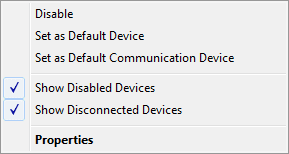
Are both Show Disabled Devices & Show Disconnected Devices check boxed?

I have the option to record my Stereo Mix..but since I have to use Vista64 drivers to get my output to work, it's messed up and crashes Sound Mixer.

Maybe, do you have a mini Y adapter and a short mini stereo cable? I know it seems silly, but maybe split your speaker output and connect it to the Line-In?
 

Attachments

  • show_devices.png
    show_devices.png
    1.8 KB · Views: 2,799

My Computer

Computer Manufacturer/Model Number
Asus V2-M3M8200 Barebones
OS
Windows 7 Professional x64
CPU
AMD Phenom II X4 925
Motherboard
V2-M3M8200 (basically a M3N78-VM)
Memory
4x1024mb Kingston HyperX DDR2-1066 KHX8500D2/1G
Graphics Card(s)
Asus GTS 450 OC
Sound Card
Creative Sound Blaster X-Fi Titanium PCIe
Monitor(s) Displays
Asus 24" LCD VH242H
Screen Resolution
1920x1080
Hard Drives
WDC WD5000AAKS
WDC WD5002ABYS
Seagate ST325062 USB-to-IDE
Fujitsu 160GB Pocket USB HDD
PSU
Antec Earthwatts EA-430D
Case
Asus V2-M3M8200
Cooling
120mm side fan & 80mm front & 92mm rear fan
Keyboard
Dell USB mini Multimedia
Mouse
Logitech MX518
Internet Speed
Comcast Xfinity
Other Info
Logitech Webcam Pro 9000
Accurian 40-1462 Speakers
little dot MKII Headphone Amp
Yes they are. And the split cabel idea, I also thought of that but I don't have the cabels to try it.
 

My Computer

OS
Windows 7 Ultimate
CPU
Intel Duo 2 Core E86000 @3.33 Ghz
Motherboard
Asus P5QL-E
Memory
4GB RAM DDR3
Graphics Card(s)
NVIDIA GeForce GTX 260
Sound Card
Realtek ALC888/1200
Keyboard
Logitech classic
Mouse
Logitech MX Revolution
Internet Speed
25 mb/s
Back
Top