Don't know why but I was so curious about Linux product Kubuntu and I've install it on one of my partition. Few days after I've realize that I do not like it...actually I couldn't acclimatise on it so its off now.
Then my problem appeared. No stereo sound!
As i recall,after uninstalling kubuntu I had problem to start up windows displaying that it cant find GNOME or something to start....nevertheless I had to reinstall win7
After all that mess and starting almost from beginning there is NO stereo sound!
NOTE:
I use ordinary Realtek High Definition audio device
I tried with GLARY utillities to solve problem but none
And I fear to mess around with registry cleaner
right click on your speaker icon and select playback devices and make sure that you have speakers selected as your default playback device.. hope this helps...
My Computer
Computer type
PC/Desktop
Computer Manufacturer/Model Number
LENOVO K450 @3.0GHZ
OS
64-bit Windows 8.1 Pro
CPU
Core(TM) i5 CPU 4330 Haswell @ 3.20GHz
Motherboard
LENOVO
Memory
12.00 GB
Graphics Card(s)
Intel(R) HD Graphics
Sound Card
Intel HD integtrated
Monitor(s) Displays
HP 25' ISP Monitor
Screen Resolution
1900/1020
Hard Drives
(1) ST1000DM003-1CH162 (2) Generic STORAGE DEVICE USB Device (3) Generic STORAGE DEVICE USB Device
thank you for your reply but ok I'm not so stupid.... that was the first thing I've done but it's not the issue...
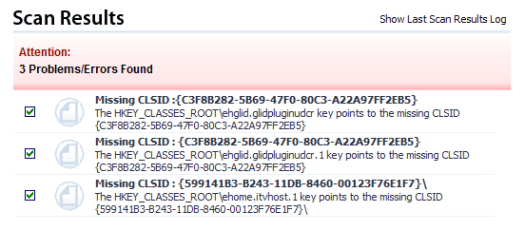
I've scan it with Uniblue power suite and after few times of repairing things it wont repair this(attach below). what can I do?
No one was calling you stupid, you would be surprised how many people dont check their playback device settings... you could try a system restore to a point previous to when your problem started...you could also try a repair install ... good luck..
My Computer
Computer type
PC/Desktop
Computer Manufacturer/Model Number
LENOVO K450 @3.0GHZ
OS
64-bit Windows 8.1 Pro
CPU
Core(TM) i5 CPU 4330 Haswell @ 3.20GHz
Motherboard
LENOVO
Memory
12.00 GB
Graphics Card(s)
Intel(R) HD Graphics
Sound Card
Intel HD integtrated
Monitor(s) Displays
HP 25' ISP Monitor
Screen Resolution
1900/1020
Hard Drives
(1) ST1000DM003-1CH162 (2) Generic STORAGE DEVICE USB Device (3) Generic STORAGE DEVICE USB Device
really? ok can u please link me to some explanation how to do it...or explain it with your words because I don't know how. sorry for your time loss but I would be grateful (if it mean something to you))
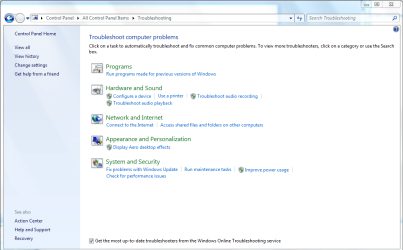
Hi, try this, Go to the flag at the bot right of your Taskbar , click on it and Open Action Centre Click on Troubleshooting and then on Troubleshooting Audio Playback, and see can you fix it from there, also go to the device Manager and see if you have any yellow triangle marks beside your sound device. Let us know what you find.
My Computer
Computer Manufacturer/Model Number
Self Build 64bit
OS
Vista Ult64, Win7600
CPU
Intel Core 2 Quad Q6600 @ 2400 MHz 64bit OS
Motherboard
Asus P5E3 Deluxe WiFi @p 64 bit OS
Memory
4096 MB DDR3-SDRAM
Graphics Card(s)
ATI Radeon HD 3870 Series x2 Crossfired
Sound Card
Realtek on board
Monitor(s) Displays
Samsung SyncMaster - 23 inches
Screen Resolution
1680x1050 pixels at 60 Hz in True Colors
Hard Drives
Hitachi (250 GB)/Samsung 750 GB. /Barracuda 160 GB.
My Book 1 TB external..