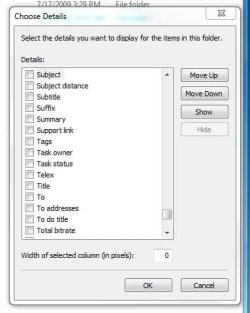
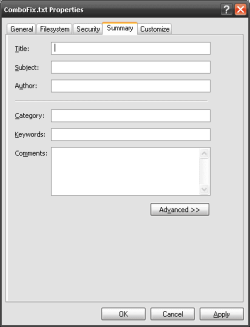
No Summary Information

rln

New member
Local time
5:41 AM
Messages
5
Is any body knows Why Summar Information (NTFS File System Based) is removed in Windows 7 ?

I have written program to update Title,Author,Comment,Subject etc.. It is still working from Windows 2000/XP/Vista ..

Is it removed or hidden (any tweak needed for that)?
 

My Computer

OS
Windows 7
CPU
64 Bit
Motherboard
Intel DG965 RY
Memory
2.5 GB
In what context do you mean 'Summary' information?
 

My Computer

Computer Manufacturer/Model Number
Compaq Desktop
OS
Windows 7 Ultimate x64
CPU
AMD Sempron Dual Core
Memory
3GB
Graphics Card(s)
NVIDIA GeForce 6150SE nForce 430
Screen Resolution
1024x768
Hard Drives
150GB Sata
If by system info you mean drive information as shown below do the following:

Start>>All Programs>>Administrative Tools>>Computer Management
Then in the Computer Management window under the Storage folder
Select the Disk Management option.


systeminfo.jpg
 

My Computer

Computer Manufacturer/Model Number
Custom
OS
Win 7 Pro
CPU
Intel Q6600/Quad Core 2.40MHz X 4
Motherboard
Asus Commando
Memory
8 GB DDR 3
Graphics Card(s)
NVidia GeForce GT240 / 1GB PCIe
Sound Card
Integrated HD Digital Audio
Monitor(s) Displays
Sharp LC-30HV4U
Screen Resolution
1280 x 768
Hard Drives
Primary C:\ 1TB SATA II 3.0 GB
Storage E:\ 1TB SATA II 3.0 GB
Terra Stack I:\ 1TB
USB Port N:\ 150GB
PSU
OCZ 700Watt
Case
Antec Ninehundred
Cooling
Cooler Master Hyper Cooler
Keyboard
Logitech Wave Wireless
Mouse
Logitech High Resolution Wireless
right click column, add more.
 

Attachments

  • summary.JPG
    summary.JPG
    29.8 KB · Views: 66

My Computer

Computer Manufacturer/Model Number
Built Myself
OS
Windows 7 7600.16384 x64
CPU
Intel Core i7 OC'd to 3.20 GHz
Motherboard
Gigabyte
Memory
6GB GSkillz Triple Channel DDR3 OC'd to 1600 MHz
Graphics Card(s)
Nvidia GTX 280
Sound Card
X-Fi Platinum
Monitor(s) Displays
Dual 2001FWP
Screen Resolution
1680x1050 x 2
Hard Drives
System - Dual 150GB Raptors Raid0
Doc Storage - 1TB SATA 32MB cache Samsung
TV Recordings - 1TB SATA 32MB cache Samsung
PSU
Gigawatt Antec
Case
Antec 900
Keyboard
Saitek
Mouse
logitech MX 10000
Internet Speed
30 mb/s
Summary Information - Info

right click column, add more.


Summary Information means File Properties . For a file (NTFS File System only ) we can give Title,Subject,Author,Keyword,Category ,Comment etc..

Please see the attachment for more information. Using the above properties . We can organize our files in windows Explorer itself. (This is also alternativly called as NTFS Alternate Streams )
 

Attachments

  • Summary Information for a file.PNG
    Summary Information for a file.PNG
    4.3 KB · Views: 40

My Computer

OS
Windows 7
CPU
64 Bit
Motherboard
Intel DG965 RY
Memory
2.5 GB
Sorry, your OP wasn't clear to me. These properties are not available for txt files and all properties are now based on file type. This transition was made starting with Vista.

Summary is now the details tab, starting at vista.

But as MS states, you cannot edit this data for txt and rtf files.

Change the properties for a file

I believe that is why they buried the summary column and replaced it with "tags" on the quick pick columns.

hope this helps...
 

My Computer

Computer Manufacturer/Model Number
Built Myself
OS
Windows 7 7600.16384 x64
CPU
Intel Core i7 OC'd to 3.20 GHz
Motherboard
Gigabyte
Memory
6GB GSkillz Triple Channel DDR3 OC'd to 1600 MHz
Graphics Card(s)
Nvidia GTX 280
Sound Card
X-Fi Platinum
Monitor(s) Displays
Dual 2001FWP
Screen Resolution
1680x1050 x 2
Hard Drives
System - Dual 150GB Raptors Raid0
Doc Storage - 1TB SATA 32MB cache Samsung
TV Recordings - 1TB SATA 32MB cache Samsung
PSU
Gigawatt Antec
Case
Antec 900
Keyboard
Saitek
Mouse
logitech MX 10000
Internet Speed
30 mb/s
Back
Top