no surround sound windows 7

flynt169

New member
Local time
5:59 AM
Messages
5
no matter what i do, nothing will give me true surround sound. I only have 2 options of outputting sound from my computer, 3.5mm jack, which im pretty sure doesnt support surround sound, and hdmi out. Heres the kicker: when i change my output source via control panel/sounds, to the hdmi output, I get only stereo. but when i change the output to the 3.5mm jack, I can hear from all 5 speakers. Isnt that *** backwards? I mean im pretty sure hdmi supports digital audio and 3.5mm jack does not, so youd think it would be the other way around. Ohh, and i say i can hear from all 5 speakers when using the 3.5 jack, but it isnt true surround sound, i think. i think my receiver is emulating it (although it has a surround sound emulation setting, and i make sure it is off and that its on dolby pro logic 2 surround sound) and the reason i think this is because when i have the audio out set to the 3.5mm and run audio test files to test each speaker, (you know the ones that say audibly 'left front speaker ...... right front speaker ..... and so on) i can only hear when she say front left and right speakers, in the correct speaker. but when i have it set to hdmi audio, i can hear front and rear left out of the front left speaker, and i can hear front right, rear right, and center out of the right speaker. also, when its on hdmi, i can go to the control pannel/sound and click on realtek digital audio (the hdmi) and under advanced tab under default format there is only 2 channel options (a lot of em, from 16bit 44,110 hz up to 24bit 192,000 hz, but all of em are proceeded by 2 chanel) But when i select the speakers under control panel/sound (the 3.5mm jack) i have the same options, only none of them are proceeded by ANY channel numbers. heres a screenshot of each so you can see what i mean:
http://i49.photobucket.com/albums/f252/flynt169/hdmi.png
http://i49.photobucket.com/albums/f252/flynt169/speakers.png


Here are my specs and connections:
computer:gateway gm5474
surround sound reciever: rca rt2870
tv: vizio vx52lfhdtv10a

further specs on computer:
windows 7 ult. 64x, using realtek hd audio manager or just the control pannel/sound. i found out they both do the same thing.

connections:
i have the hdmi going from the computer, into the tv. and then an optical audio out from my tv to the reciever.
i have the 3.5mm jack going directly into the reciever
 

My Computer

Computer Manufacturer/Model Number
gateway gm5474
OS
windows 7 ult 64x
no matter what i do, nothing will give me true surround sound. I only have 2 options of outputting sound from my computer, 3.5mm jack, which im pretty sure doesnt support surround sound, and hdmi out. Heres the kicker: when i change my output source via control panel/sounds, to the hdmi output, I get only stereo. but when i change the output to the 3.5mm jack, I can hear from all 5 speakers. Isnt that *** backwards? I mean im pretty sure hdmi supports digital audio and 3.5mm jack does not, so youd think it would be the other way around. Ohh, and i say i can hear from all 5 speakers when using the 3.5 jack, but it isnt true surround sound, i think. i think my receiver is emulating it (although it has a surround sound emulation setting, and i make sure it is off and that its on dolby pro logic 2 surround sound) and the reason i think this is because when i have the audio out set to the 3.5mm and run audio test files to test each speaker, (you know the ones that say audibly 'left front speaker ...... right front speaker ..... and so on) i can only hear when she say front left and right speakers, in the correct speaker. but when i have it set to hdmi audio, i can hear front and rear left out of the front left speaker, and i can hear front right, rear right, and center out of the right speaker. also, when its on hdmi, i can go to the control pannel/sound and click on realtek digital audio (the hdmi) and under advanced tab under default format there is only 2 channel options (a lot of em, from 16bit 44,110 hz up to 24bit 192,000 hz, but all of em are proceeded by 2 chanel) But when i select the speakers under control panel/sound (the 3.5mm jack) i have the same options, only none of them are proceeded by ANY channel numbers. heres a screenshot of each so you can see what i mean:
http://i49.photobucket.com/albums/f252/flynt169/hdmi.png
http://i49.photobucket.com/albums/f252/flynt169/speakers.png


Here are my specs and connections:
computer:gateway gm5474
surround sound reciever: rca rt2870
tv: vizio vx52lfhdtv10a

further specs on computer:
windows 7 ult. 64x, using realtek hd audio manager or just the control pannel/sound. i found out they both do the same thing.

connections:
i have the hdmi going from the computer, into the tv. and then an optical audio out from my tv to the reciever.
i have the 3.5mm jack going directly into the reciever


Hi and welcome.

Don't know much about surround sound but here it goes.
It sasy your motherboard has Integrated 8-Channel (7.1) High Definition Audio.

Another idea is have you set up your sound and speakers in Media Center?
I know that has selection for surround sound.

If that doesn't work I'd check your BIOS.
If you are not getting the proper output from the audio jacks I'd look in your bios and see what you have in relations to sound.
Sometime a minor change in the bios makes it all work.
 

My Computer

Computer type
PC/Desktop
Computer Manufacturer/Model Number
Self Built
OS
Windows 10 Pro
CPU
Intel i5
Motherboard
I have a fatherboard
Memory
I'm old and lost a few chips
Graphics Card(s)
Yup
Sound Card
Yup
Monitor(s) Displays
Samsung 32" UHD
Screen Resolution
3840 x 2160
Hard Drives
Samsung 860 EVO drives
PSU
450 Watt and some fans that blow
Case
Small tower
Cooling
Yes I am cool. lol
Keyboard
Who needs a keyboard?
Mouse
Logitech Laser G7 wireless
Internet Speed
Zippy fast UP and DOWN
Antivirus
I got a shot
Browser
The new Improved EDGE 2020
Do you have on your grafic card HDMI?Do ur motherboard have licence for Dolby?
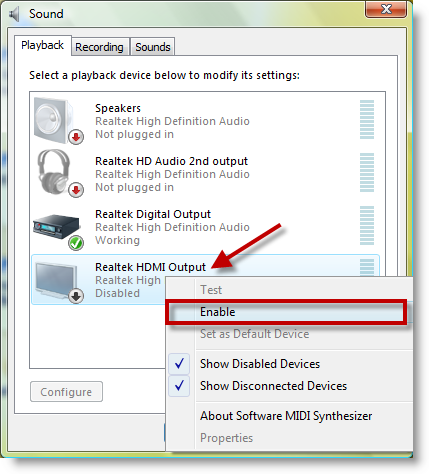
You need this option and realtek hdmi driver for 5.1 on hdmi!
enable-hdmi-audio-in-hp-media-center1.png
 

My Computer

OS
Windows 7 Ultimate x64
Hi and welcome.

Don't know much about surround sound but here it goes.
It sasy your motherboard has Integrated 8-Channel (7.1) High Definition Audio.

Another idea is have you set up your sound and speakers in Media Center?
I know that has selection for surround sound.

If that doesn't work I'd check your BIOS.
If you are not getting the proper output from the audio jacks I'd look in your bios and see what you have in relations to sound.
Sometime a minor change in the bios makes it all work.

Yes my motherboard does support 7.1, but it has the weirdest input ive ever seen. No digital outs, just 8 different 3.5mm jacks on the back for the corresponding speaker. I wouldnt even know what to do with those, as all surround sound speakers ive ever seen have standard speaker wire. So i use the hdmi as my output, but that is on the graphic cardand im using dual monitors to output the video to my big screen tv. (nvidia geforce 8500gt) Could this be the problem? That that graphics card doesnt support digital sound? (although its hdmi, and i have the option to select realtek digital output (hdmi) as my main output device under sounds, so i dont see why not)

Tried media center setup, all it did was play the tones, and i got the same results, can hear front left front right and center out of the correct speaker, but rear left comes out of the front left and rear right comes out of the front right. It does not offer any solutions other than to go to control panel/sound and setup properly.

I also checked my bios and i couldnt find anything relating to sound. I saw video, where you could change the output display, like vga and some other stuff, but no audio options.
 

My Computer

Computer Manufacturer/Model Number
gateway gm5474
OS
windows 7 ult 64x
Do you have on your grafic card HDMI?Do ur motherboard have licence for Dolby?
You need this option and realtek hdmi driver for 5.1 on hdmi!

Yes i have an hdmi port on my graphis card, it is the only hdmi port i have, and im using it to output dual monitors and sound. Ive never heard, and nothing turned up in google for motherboard licenses for dolby. As for the screenshot u provided, realtek digital audio output IS my hdmi output, I can tell this by enabling or disabling, and i get sound or not from the tv. But i tried anyways. I tried to go to realtek and download realtek hdmi output, but all i could find was 'ATI HDMI Audio Device' and that would not install. it said none of the drivers are supported from this driver package. So how did you get that option on your computer? please provide a link, because the only thing at realtek.com is that 'ATI HDMI Audio Device' and it will not install.
 

My Computer

Computer Manufacturer/Model Number
gateway gm5474
OS
windows 7 ult 64x
oo, and in installing these new drivers, i have lost my realtek audio manager. It no longer exists on my computer. where can i download this?
 

My Computer

Computer Manufacturer/Model Number
gateway gm5474
OS
windows 7 ult 64x
Got Sound to work on win 7 ulti x64 but...

(This is with Onboard 5.1 realtek) I got my left front rear and right/rear working WITHOUT Speaker Fill. i just turned on the "Loudness Equalization" and (preferance) clicked "Auditorium" and then below selected "Rock"(Rock is the slection that gives me little or no static) i recomend raising the DB of both rear speakers to 10. no static in rear so thats a huge bonus. BUT my subwoofer is still not working >< so i solved one issue now on to the next ><
 

My Computer

Computer Manufacturer/Model Number
Gateway
OS
Windows 7 Ultimate x64
CPU
Intel core 2 Quad Core Q8200
Memory
8GB
Graphics Card(s)
ATI HD 4650 1024MB
Sound Card
Realtec onboard
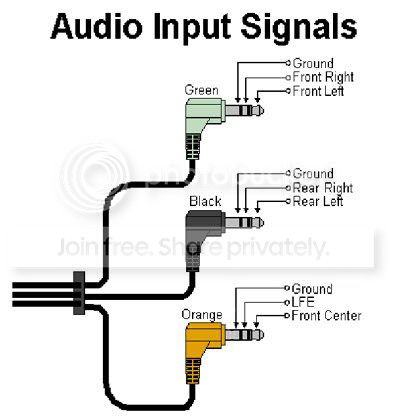
To use the 3.5mm jacks in a surround sound system, you need the right speaker setup.

Micro-plugs.jpg


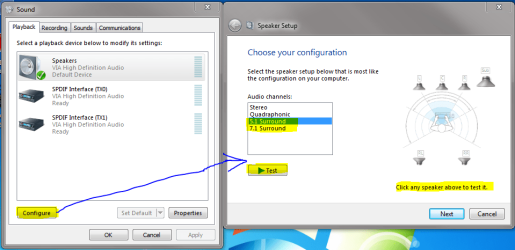
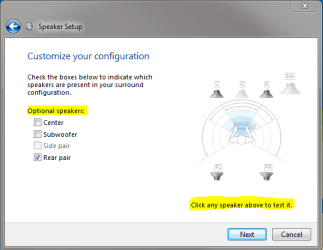
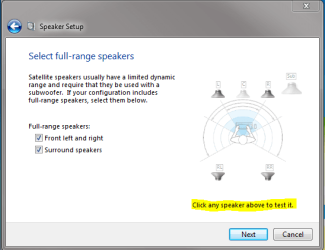
Then in playback devices, you select your configuration. Click next. Select optional speakers. Next. Select stereo speakers. Next and finish.
 

Attachments

  • 51SURjacks.PNG
    51SURjacks.PNG
    39.2 KB · Views: 163
  • 51SURtwo.PNG
    51SURtwo.PNG
    15.6 KB · Views: 73
  • 51SURthree.PNG
    51SURthree.PNG
    16 KB · Views: 55

My Computer

Computer Manufacturer/Model Number
Pugh Technologies
OS
W7 Professional x64
CPU
AMD Athlon II X3 445 Rana 3.10 GHz
Motherboard
MSI 870A-G54
Memory
PNY XLR DDR3 1600 4x2GB
Graphics Card(s)
NVIDIA GeForce GTS 450 (fermi) 1GB GDDR5
Sound Card
Realtek ALC892 onboard
Monitor(s) Displays
ASUS VE205t, Viewsonic VX2035WM
Screen Resolution
1600x900, 1600x1050
Hard Drives
977GB Hitachi Hitachi HDS721010CLA332
244GB Western Digital WDC WD2500AAJS-65B4A0
488GB Western Digital WDC WD5000AAJS-00A8B0
488GB Western Digital WDC WD5000AAKS-00UU3A0
PSU
Antec EarthWatts EA650 650W
Case
ThermalTake Armor A90 Mid Tower
Cooling
3x 120mm in, 1x 120mm & 200mm out, self built hydro-cooler
Keyboard
Logitec 55
Mouse
Razer Deathadder
Internet Speed
20 Mbps D/L, 9 Mbps U/L
Guess what i did and i got my full surround sound back ?
brought a sound card ...... all done lOl
 

My Computer

OS
Window 7 Ultimate 64bit
Guess what i did and i got my full surround sound back ?
brought a sound card ...... all done lOl

Buying something isnt always an answer :)


In regards for the OP:

HDMI can be used as surround sound just your receiver has to be setup for it.... When I set my Surround up over fiber it took some tweaking and playing on the settings... Im not sure how I fixed it i guess I just hit the Magical switch
 

My Computer

Computer Manufacturer/Model Number
SMN-Productions
OS
Windows 7 x86/x64, Server 2008r2, Web Server 2008
CPU
i7 v2 3930K Steping stone 2
Motherboard
ASUS Rampage IV Extreme
Memory
G.SKILL Ripjaws Z Series 32GB
Graphics Card(s)
AMD HD 5770
Monitor(s) Displays
Acer 21" and Samsung 20"
Hard Drives
Patriot Pyro 80GB
PSU
1000 Watt
Case
HAF-X
Cooling
4 Fans
Keyboard
Black Widow Ultimate
I have already configured the setting in this way. the woofer shows a animation when testing so information is being sent but not to my woofer.i should say that my center trys to take over the woofers job and if you listen closly you can hear a faint sound threw center when testing sub
 

My Computer

Computer Manufacturer/Model Number
Gateway
OS
Windows 7 Ultimate x64
CPU
Intel core 2 Quad Core Q8200
Memory
8GB
Graphics Card(s)
ATI HD 4650 1024MB
Sound Card
Realtec onboard
Back
Top