

So what i did was patch the 3 files themeservice, themeui.dll and uxtheme.dll
with the tool Power Tool Ultimate v.2.3 - Cracks & Serials - ..:: Moviez.to Board ::..
as it is told to do here: SevenMaxClearLiveBlack for 7RC by ~molinarosp on deviantART
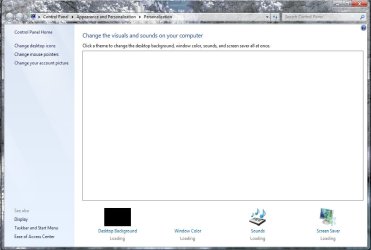
When i wanted to change the theme after patching and rebooting, the customization window was white with no themes available.
Obviously i did something wrong, would be great if anyone could tell me what, and even better if we could fix it.
EDIT: restoring the files with the same tool didnt help either.
with the tool Power Tool Ultimate v.2.3 - Cracks & Serials - ..:: Moviez.to Board ::..
as it is told to do here: SevenMaxClearLiveBlack for 7RC by ~molinarosp on deviantART
When i wanted to change the theme after patching and rebooting, the customization window was white with no themes available.
Obviously i did something wrong, would be great if anyone could tell me what, and even better if we could fix it.
EDIT: restoring the files with the same tool didnt help either.
Attachments
My Computer
- OS
- Windows 7 Ultimate x64
- CPU
- AMD Athlon 64 X2 4200+ @2,2 GHz
- Motherboard
- Asus A8V-E SE
- Memory
- 2x1 GB
- Graphics Card(s)
- Ati x1950 xt 512MB
- Sound Card
- Soundblaster Live! 5.1
- Monitor(s) Displays
- LG Flatron W2252TQ
- Screen Resolution
- 1680x1050
- Hard Drives
- WD 360 GB extern
WD 360 GB
WD 80 GB
- Keyboard
- Cherry
- Mouse
- ROCCAT Kone USB Mouse (awesome>expensive)
- Internet Speed
- 12mpbt down / 1mbp up


 ) just remember any patching u did before u ran it, unless of course its ur patching that caused the screw up in the first place.
 . I allready had to do some patching again but no problem. I'm glad it worked out fine, only with your help of course.