No thumbnails for Fujifilm RAF files generated in Explorer -Win7 64bit

bill2reg

New member
Member
Local time
4:56 AM
Messages
69
When I click open a folder, with "Large" or "Extra Large" icons selected as the viewing mode, thumbnails are generated for any JPEG files, but not for the RAF (Fuji RAW) files. For those, there is only the icon for the default program I have set. But, I have two IDENTICAL PCs, both with everything the same. I update Windows7 on both at the same time, and install the same software, etc. The strange thing is that ONE of my computers DOES display thumbnails for BOTH jpeg and RAF files! But the other system only displays thumbnails for the jpegs. I have no idea why the difference. I've checked settings for all the folder and viewing options I can think of, in control panel as well, but no solution. Any ideas are welcome.
 

My Computer My Computer

At a glance

Windows Home Premium 64bitIntel Core i7 970 @ 3.2 GHz12 GBAMD
Computer type
PC/Desktop
Computer Manufacturer/Model Number
HP Pavilion Elite HPE 490E
OS
Windows Home Premium 64bit
CPU
Intel Core i7 970 @ 3.2 GHz
Memory
12 GB
Graphics Card(s)
AMD

My Computer My Computer

At a glance

Windows 10Intel Core i5 3570K16GB 1600Mhz G.SkillGigabyte GTX 970 G1-Gaming
Computer type
PC/Desktop
OS
Windows 10
CPU
Intel Core i5 3570K
Motherboard
Asus P8Z77V-PRO
Memory
16GB 1600Mhz G.Skill
Graphics Card(s)
Gigabyte GTX 970 G1-Gaming
PSU
Seasonic 1000W Platinum
Case
Fractal Design Define R4
Cooling
Noctua NH-D14
I did install it on the 'problem' computer, however, the working computer has always shown the RAF thumbnails, and I never installed any codec on that one. But anyway, even after I installed the codec, it doesn't work.
 

My Computer My Computer

At a glance

Windows Home Premium 64bitIntel Core i7 970 @ 3.2 GHz12 GBAMD
Computer type
PC/Desktop
Computer Manufacturer/Model Number
HP Pavilion Elite HPE 490E
OS
Windows Home Premium 64bit
CPU
Intel Core i7 970 @ 3.2 GHz
Memory
12 GB
Graphics Card(s)
AMD

My Computer My Computer

At a glance

Windows 10Intel Core i5 3570K16GB 1600Mhz G.SkillGigabyte GTX 970 G1-Gaming
Computer type
PC/Desktop
OS
Windows 10
CPU
Intel Core i5 3570K
Motherboard
Asus P8Z77V-PRO
Memory
16GB 1600Mhz G.Skill
Graphics Card(s)
Gigabyte GTX 970 G1-Gaming
PSU
Seasonic 1000W Platinum
Case
Fractal Design Define R4
Cooling
Noctua NH-D14
I installed the Fuji software that came with the camera (X-S1) on both computers. I checked for updates, downloaded and installed them on both computers. This was done on Monday to make sure.
 

My Computer My Computer

At a glance

Windows Home Premium 64bitIntel Core i7 970 @ 3.2 GHz12 GBAMD
Computer type
PC/Desktop
Computer Manufacturer/Model Number
HP Pavilion Elite HPE 490E
OS
Windows Home Premium 64bit
CPU
Intel Core i7 970 @ 3.2 GHz
Memory
12 GB
Graphics Card(s)
AMD
Other than 3rd party software, I'm out of ideas at the moment.
 

My Computer My Computer

At a glance

Windows 10Intel Core i5 3570K16GB 1600Mhz G.SkillGigabyte GTX 970 G1-Gaming
Computer type
PC/Desktop
OS
Windows 10
CPU
Intel Core i5 3570K
Motherboard
Asus P8Z77V-PRO
Memory
16GB 1600Mhz G.Skill
Graphics Card(s)
Gigabyte GTX 970 G1-Gaming
PSU
Seasonic 1000W Platinum
Case
Fractal Design Define R4
Cooling
Noctua NH-D14
So am I.....
I looked at the registry entries on both systems. and just to see what happened, I changed the file type association to a different program, and then looked at the registry again, and I noticed that the registry didn't change. So then I re-associated the file type back to what it was, but the registry still showed the same software association in H_KEY classes. I thought it might change, but I don't know much about registry stuff.
 

My Computer My Computer

At a glance

Windows Home Premium 64bitIntel Core i7 970 @ 3.2 GHz12 GBAMD
Computer type
PC/Desktop
Computer Manufacturer/Model Number
HP Pavilion Elite HPE 490E
OS
Windows Home Premium 64bit
CPU
Intel Core i7 970 @ 3.2 GHz
Memory
12 GB
Graphics Card(s)
AMD
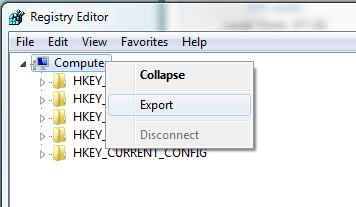
Do note that messing about in the registry is never a good idea unless you know exactly what you changing.
If you feel the need to experiment with registry keys in spite of the chance you could render your OS
unusable or un-bootable making a backup before every change is a good habit to adopt.
regbu.png

With that said most registry changes will not take affect until a system reboot has take place.
 

My Computer My Computer

At a glance

Windows 10Intel Core i5 3570K16GB 1600Mhz G.SkillGigabyte GTX 970 G1-Gaming
Computer type
PC/Desktop
OS
Windows 10
CPU
Intel Core i5 3570K
Motherboard
Asus P8Z77V-PRO
Memory
16GB 1600Mhz G.Skill
Graphics Card(s)
Gigabyte GTX 970 G1-Gaming
PSU
Seasonic 1000W Platinum
Case
Fractal Design Define R4
Cooling
Noctua NH-D14
I didn't reboot. But I didn't change anything! I'm not confident enough to do that. I merely looked at the registry. But I did do a reboot yesterday AFTER I changed the default program for .RAF files, and it still didn't work (I didn't look at the registry then, just the folders with the RAF files.)
 

My Computer My Computer

At a glance

Windows Home Premium 64bitIntel Core i7 970 @ 3.2 GHz12 GBAMD
Computer type
PC/Desktop
Computer Manufacturer/Model Number
HP Pavilion Elite HPE 490E
OS
Windows Home Premium 64bit
CPU
Intel Core i7 970 @ 3.2 GHz
Memory
12 GB
Graphics Card(s)
AMD
What is the currently associated program with RAF files?
 

My Computer My Computer

At a glance

Windows 10Intel Core i5 3570K16GB 1600Mhz G.SkillGigabyte GTX 970 G1-Gaming
Computer type
PC/Desktop
OS
Windows 10
CPU
Intel Core i5 3570K
Motherboard
Asus P8Z77V-PRO
Memory
16GB 1600Mhz G.Skill
Graphics Card(s)
Gigabyte GTX 970 G1-Gaming
PSU
Seasonic 1000W Platinum
Case
Fractal Design Define R4
Cooling
Noctua NH-D14
It's a Fuji provided program that came with the camera. It's called "RAW FILE CONVERTER EX powered by SLIKYPIX". I installed it from the same DVD on the same day on both systems. One PC has no problem showing the RAF thumbnails, and the other system never shows them, but shows only the icon for that Fuji program.
 

My Computer My Computer

At a glance

Windows Home Premium 64bitIntel Core i7 970 @ 3.2 GHz12 GBAMD
Computer type
PC/Desktop
Computer Manufacturer/Model Number
HP Pavilion Elite HPE 490E
OS
Windows Home Premium 64bit
CPU
Intel Core i7 970 @ 3.2 GHz
Memory
12 GB
Graphics Card(s)
AMD
Adobe might have a free codec, I've seen some on their site somewhere. Other than that, look into FastPictureViewer codec pack (not free). I use it for my Pentax and it's faster than anything else I've tried and they say it supports RAF.
 

My Computer My Computer

At a glance

Windows 7
OS
Windows 7
On both computers the default program for RAF files is the one supplied by Fujifilm with the camera: RAW FILE CONVERTER EX powered by SILKYPIX. If I use the software to actually open, view or convert a RAF file on either computer, that works fine. The only difference is when I open a folder in Explorer, where one computer generates RAF thumbnails along with jpeg, gif, png etc., but the other computer generates thumbnails for everything EXCEPT RAF.
 

My Computer My Computer

At a glance

Windows Home Premium 64bitIntel Core i7 970 @ 3.2 GHz12 GBAMD
Computer type
PC/Desktop
Computer Manufacturer/Model Number
HP Pavilion Elite HPE 490E
OS
Windows Home Premium 64bit
CPU
Intel Core i7 970 @ 3.2 GHz
Memory
12 GB
Graphics Card(s)
AMD
They are associated with the Fuji-provided software that came with the camera, specifically "RAW FILE CONVERTER EX powered by SILKYPIX". It was installed on both computers and both computers have that as the default program to open .RAF files. The other software is a RAF file helper and Fuji's Finepix Studio, all supplied on the same DVD with the camera. I installed all of those on both computers, and as I said, one shows the RAF thumbnails fine, and the other one doesn't.
 

My Computer My Computer

At a glance

Windows Home Premium 64bitIntel Core i7 970 @ 3.2 GHz12 GBAMD
Computer type
PC/Desktop
Computer Manufacturer/Model Number
HP Pavilion Elite HPE 490E
OS
Windows Home Premium 64bit
CPU
Intel Core i7 970 @ 3.2 GHz
Memory
12 GB
Graphics Card(s)
AMD
AS I stated earlier, RAF files are currently associated with "RAW FILE CONVERTER EX powered by SILKYPIX" on BOTH systems. This is a software program that came with the camera in the box, from Fujifilm. It was installed on the same day on both systems, and I checked for and installed an update on both machines. One machine shows RAF files as thumbnails, and the other machine does not. I am referring to seeing thumbnails when I simply open a folder in Windows Explorer, and not about viewing, opening or converting in any other photo software etc. I can do those things with the provided software as well as Adobe Photoshop. It's just when clicking on a folder to see the contents, that I see thumbnails of jpegs, on both machines, but thumbnails of RAF files on only ONE of my computers.
 

My Computer My Computer

At a glance

Windows Home Premium 64bitIntel Core i7 970 @ 3.2 GHz12 GBAMD
Computer type
PC/Desktop
Computer Manufacturer/Model Number
HP Pavilion Elite HPE 490E
OS
Windows Home Premium 64bit
CPU
Intel Core i7 970 @ 3.2 GHz
Memory
12 GB
Graphics Card(s)
AMD
As I said, RAF files are associated with the SilkyPix software on both computers. This is RAW conversion software supplied with the camera from on the Fuji CD.
 

My Computer My Computer

At a glance

Windows Home Premium 64bitIntel Core i7 970 @ 3.2 GHz12 GBAMD
Computer type
PC/Desktop
Computer Manufacturer/Model Number
HP Pavilion Elite HPE 490E
OS
Windows Home Premium 64bit
CPU
Intel Core i7 970 @ 3.2 GHz
Memory
12 GB
Graphics Card(s)
AMD
Back
Top