No thumbnails in open/save file

drrraddict14

New member
Local time
10:12 PM
Messages
1
Hi, I used this tutorial last year, it worked fine and then just a few months ago this happened.

Whenever I save or open a file, this is is what the pop-up menu looks like > link (the folder doesn't work too, but a while ago I restored the icons to default from the tutorial, and now it looks like this)

When I open it using windows explorer and Internet Explorer (ctrl+O) it works fine, but when I use Maxthon 3, Mozilla Firefox and Google Chrome it doesn't work. So maybe the problem isn't the browser, maybe it's the computer?
I don't know what happened, it's been months since like this and it's been annoying me (because I can't choose which to upload w/o seeing the thumbnail) so I tried different solutions found in the internet that DIDN'T work:
(I'm using Windows 7 Ultimate x64)
  • uninstalling then re-installing the browser
  • going to folder and search options > view > unchecking "Always show icons, never thumbnails"
  • going to control panel > all control panel items > performance information and tools > adjust visual effects > checking "show thumbnails instead of icons"
  • going to computer > right click hard disk > properties > disk cleanup > checking "thumbnails" > clean up system files (this kind of messed up my thumbnails more)
  • I tried opening command prompt then type sfc /scannow but it stopped at 20% and said "Windows Resource Protection could not perform the requested operation."

Pleeease help me :(
 

My Computer

Computer type
PC/Desktop
OS
Windows 7 Ultimate x64
Welcome to Seven Forums Cath.

First of all I don't understand how you are opening a folder with a browser?
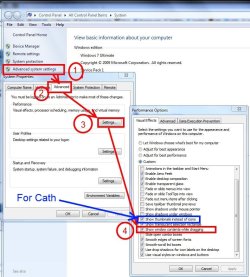
Press the windows logo key + Pause Break to open System Properties and follow the diagram below to "For Cath" and check "Show Thumbnails Instead of Icons".

http://www.sevenforums.com/tutorials/11738-thumbnail-previews-enable-disable.html

Cath.jpg

This may help too: http://www.sevenforums.com/tutorials/49819-icon-cache-rebuild.html

and

http://www.sevenforums.com/tutorials/10797-thumbnail-cache-clear-reset.html


You may need to do a repair install since sfc /scannow won't run.

http://www.sevenforums.com/tutorials/3413-repair-install.html
 
Last edited by a moderator:

My Computer

Computer type
PC/Desktop
Computer Manufacturer/Model Number
Home Built Desktop By DataTech
OS
Windows 7 Ultimate X64 SP1
CPU
Intel i5-2550K, Differing ~4.4-4.8GHz No built in GPU
Motherboard
ASUS P8Z68-V PRO/GEN3
Memory
16GB G.Skill Sniper 1866MHz @ 2133MHz 2x8GB
Graphics Card(s)
ASUS GTX650TIB-DC2OC-2GD5, (650TI Boost)
Sound Card
Onboard Realtek 5-1
Monitor(s) Displays
Samsung P2570HD
Screen Resolution
1920x1080
Hard Drives
Samsung 840 Pro 256GB SSD for OS, 500GB Seagate Constellation (Enterprise drive) for Data
PSU
Corsair HX650W
Case
Inwin Dragon Rider
Cooling
Hyper 212 EVO w/two Noctua fans, push-pull, @1300 RPM
Keyboard
E-Z Eyes, bright yellow keys with large characters
Mouse
steelseries SENSEI Laser Pro Gaming
Internet Speed
48-51Mbs Mbs down, 11 Mbs up Xfinity Cable
Antivirus
Norton Internet Security 2013
Browser
IE 10, Opera, Pale Moon if needed
Other Info
4 case fans, LG BluRay-RE, ASUS DVD-RW, Mr. Fusion power supply, 1.21 gigawatts.

My Computer

Computer type
PC/Desktop
OS
Windows 10 Home x64
CPU
INTEL Core i5-750 Quad-Core 3.37GHz
Motherboard
ASUS P7P55D
Memory
HyperX Fury Black Series 8GB (2 x 4GB) 1866Mhz
Graphics Card(s)
EVGA GeForce GTX 750 Superclocked 1GB 128-Bit GDDR5
Monitor(s) Displays
LG 32MA68HY 32" IPS
Screen Resolution
1920 x 1080
Hard Drives
Samsung 840 Evo 120GB, SEAGATE 500GB Barracuda® 7200.12, SATA 3 Gb/s, 7200 RPM, 16MB cache
PSU
ANTEC TruePower New TP-550, 80 PLUS, 550W
Case
ANTEC Three Hundred Illusion
Cooling
COOLER MASTER Hyper 212 Plus, 4 x 120mm 1 x 140mm Noctua's
Internet Speed
85 + Mbps
Antivirus
Avast
Browser
Vivaldi
Thanks Bill, I ASSumed that would apply there too. :o
 

My Computer

Computer type
PC/Desktop
Computer Manufacturer/Model Number
Home Built Desktop By DataTech
OS
Windows 7 Ultimate X64 SP1
CPU
Intel i5-2550K, Differing ~4.4-4.8GHz No built in GPU
Motherboard
ASUS P8Z68-V PRO/GEN3
Memory
16GB G.Skill Sniper 1866MHz @ 2133MHz 2x8GB
Graphics Card(s)
ASUS GTX650TIB-DC2OC-2GD5, (650TI Boost)
Sound Card
Onboard Realtek 5-1
Monitor(s) Displays
Samsung P2570HD
Screen Resolution
1920x1080
Hard Drives
Samsung 840 Pro 256GB SSD for OS, 500GB Seagate Constellation (Enterprise drive) for Data
PSU
Corsair HX650W
Case
Inwin Dragon Rider
Cooling
Hyper 212 EVO w/two Noctua fans, push-pull, @1300 RPM
Keyboard
E-Z Eyes, bright yellow keys with large characters
Mouse
steelseries SENSEI Laser Pro Gaming
Internet Speed
48-51Mbs Mbs down, 11 Mbs up Xfinity Cable
Antivirus
Norton Internet Security 2013
Browser
IE 10, Opera, Pale Moon if needed
Other Info
4 case fans, LG BluRay-RE, ASUS DVD-RW, Mr. Fusion power supply, 1.21 gigawatts.
Thanks Bill, I ASSumed that would apply there too. :o

It may well, but you asked how he was opening a folder with a browser ;)

A Guy
 

My Computer

Computer type
PC/Desktop
OS
Windows 10 Home x64
CPU
INTEL Core i5-750 Quad-Core 3.37GHz
Motherboard
ASUS P7P55D
Memory
HyperX Fury Black Series 8GB (2 x 4GB) 1866Mhz
Graphics Card(s)
EVGA GeForce GTX 750 Superclocked 1GB 128-Bit GDDR5
Monitor(s) Displays
LG 32MA68HY 32" IPS
Screen Resolution
1920 x 1080
Hard Drives
Samsung 840 Evo 120GB, SEAGATE 500GB Barracuda® 7200.12, SATA 3 Gb/s, 7200 RPM, 16MB cache
PSU
ANTEC TruePower New TP-550, 80 PLUS, 550W
Case
ANTEC Three Hundred Illusion
Cooling
COOLER MASTER Hyper 212 Plus, 4 x 120mm 1 x 140mm Noctua's
Internet Speed
85 + Mbps
Antivirus
Avast
Browser
Vivaldi
Back
Top