No Thumbnails on some .AVIs

MCleveland

New member
Member
VIP
Local time
4:52 PM
Messages
82
Location
Garden City, MI
I have a different problem I haven't been able to find anywhere. Only some .AVIs I have don't display thumbnails. I use VLC as my primary video player. Whenever I play these certain files, it shows how long I've been watching it but not how long it is. It shows "--:--" for the end time. Also, when I try playing them in WMP, it crashes. Also, not every file in the folders have this problem. I tried using Shark007 Win7codes but that didn't help either. Anyone have any idea?
 

My Computer

Computer type
PC/Desktop
Computer Manufacturer/Model Number
Custom Build
OS
Windows 7 Home Premium x64
CPU
Intel Core i7 2600K @3.40GHz
Motherboard
Asus Sabertooth z77 (LGA1155)
Memory
7.95 GB Dual-Channel DDR3 @ 686MHz (8-8-8-24)
Graphics Card(s)
2048MB NVIDIA GeForce GTX 770 (EVGA)
Monitor(s) Displays
W2361 (1920x1080@59Hz), W2361 (1920x1080@59Hz)
Screen Resolution
1920x1080, 1920x1080
Hard Drives
238GB OCZ-VERTEX4 ATA Device, 977GB Western Digital WDC WD1002FAEX-00Y9A0 ATA Device (SATA), 313GB Western Digital WDC WD3200AAKS-00B3A0 ATA Device (SATA)
PSU
OCZ ZX Series 850W Fully-Modular 80PLUS Gold
Case
Corsair Obsidian 650D
Cooling
Stock
Keyboard
Logitech G15
Mouse
Logitech MX Revolution
Antivirus
Microsoft Security Essentials
I've had this problem with a few videos in the past, I think it has something to do with the encoding or such of the specific video, possibly some type of corruption. Wait until the expert's chime in, shouldn't be long.
 

My Computer

Computer Manufacturer/Model Number
HP Dv3-2137tx
OS
7 Home Premium x64
CPU
Core 2 P8700 2.53ghz
Motherboard
Compaq
Memory
4gb DDR2
Graphics Card(s)
Nvidia GeForce 105M
Sound Card
Integrated
Monitor(s) Displays
13" 1366x768
Hard Drives
500gb 5400rpm
Cooling
Stock
I've had this problem with a few videos in the past, I think it has something to do with the encoding or such of the specific video, possibly some type of corruption. Wait until the expert's chime in, shouldn't be long.
I was thinking the same thing. I'm hoping not though because I don't feel like converting them just for a small problem. Hopefully someone has an easier fix.
 

My Computer

Computer type
PC/Desktop
Computer Manufacturer/Model Number
Custom Build
OS
Windows 7 Home Premium x64
CPU
Intel Core i7 2600K @3.40GHz
Motherboard
Asus Sabertooth z77 (LGA1155)
Memory
7.95 GB Dual-Channel DDR3 @ 686MHz (8-8-8-24)
Graphics Card(s)
2048MB NVIDIA GeForce GTX 770 (EVGA)
Monitor(s) Displays
W2361 (1920x1080@59Hz), W2361 (1920x1080@59Hz)
Screen Resolution
1920x1080, 1920x1080
Hard Drives
238GB OCZ-VERTEX4 ATA Device, 977GB Western Digital WDC WD1002FAEX-00Y9A0 ATA Device (SATA), 313GB Western Digital WDC WD3200AAKS-00B3A0 ATA Device (SATA)
PSU
OCZ ZX Series 850W Fully-Modular 80PLUS Gold
Case
Corsair Obsidian 650D
Cooling
Stock
Keyboard
Logitech G15
Mouse
Logitech MX Revolution
Antivirus
Microsoft Security Essentials
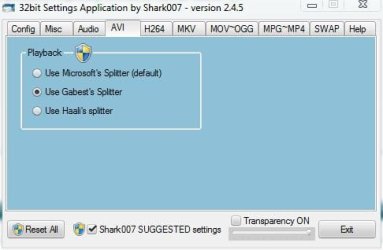
Generally .avi files generate thumbnails automatically, and plays fine in WMP without applying any special codecs. Still you amy try a little trick . In Shark007's window, click on the AVI tab. It is set to Microsoft's splitter by default. You may change it to Gabests splitter or haalis splitter , if they make any difference. (pic 1).

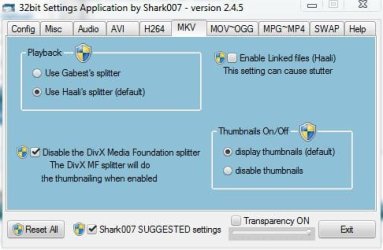
But if it is a .mkv, use haalis splitter, and click on display thumbnail (pic 2)
 

Attachments

  • 1.JPG
    1.JPG
    24.2 KB · Views: 40
  • 2.JPG
    2.JPG
    31.8 KB · Views: 33

My Computer

Computer type
PC/Desktop
Computer Manufacturer/Model Number
Self Assembled
OS
Microsoft Windows 10 Pro Insider Preview 64-bit
CPU
Intel(R) Core(TM) i3-4130 CPU @ 3.40GHz
Motherboard
Gigabyte Technology Co., Ltd. B85M-D3H
Memory
Corsair Vengence 4GB x2 (8.00GB Dual-Channel DDR3 @ 798MHz)
Graphics Card(s)
2047MB GeForce GTS 450 (ZOTAC International)
Sound Card
Onboard (Realtek High Definition Audio)
Monitor(s) Displays
LG Flatron E2040T
Screen Resolution
1600x900
Hard Drives
Western Digital 1 TB
Seagate 500 GB
PSU
Corsair VS550
Case
Cooler Master K380
Cooling
Cooler Master Seidon 120V Plus
Keyboard
Logitech MK260r
Mouse
Logitech MK260r
Internet Speed
PMPL Broadband
Antivirus
Windows Defender + MBAM
Browser
Firefox
Other Info
Dell Studio 15" Laptop
Generally .avi files generate thumbnails automatically, and plays fine in WMP without applying any special codecs. Still you amy try a little trick . In Shark007's window, click on the AVI tab. It is set to Microsoft's splitter by default. You may change it to Gabests splitter or haalis splitter , if they make any difference. (pic 1).

But if it is a .mkv, use haalis splitter, and click on display thumbnail (pic 2)
Unfortunately using either of those didn't work either. Thanks though. This problem seems unsolvable.
 

My Computer

Computer type
PC/Desktop
Computer Manufacturer/Model Number
Custom Build
OS
Windows 7 Home Premium x64
CPU
Intel Core i7 2600K @3.40GHz
Motherboard
Asus Sabertooth z77 (LGA1155)
Memory
7.95 GB Dual-Channel DDR3 @ 686MHz (8-8-8-24)
Graphics Card(s)
2048MB NVIDIA GeForce GTX 770 (EVGA)
Monitor(s) Displays
W2361 (1920x1080@59Hz), W2361 (1920x1080@59Hz)
Screen Resolution
1920x1080, 1920x1080
Hard Drives
238GB OCZ-VERTEX4 ATA Device, 977GB Western Digital WDC WD1002FAEX-00Y9A0 ATA Device (SATA), 313GB Western Digital WDC WD3200AAKS-00B3A0 ATA Device (SATA)
PSU
OCZ ZX Series 850W Fully-Modular 80PLUS Gold
Case
Corsair Obsidian 650D
Cooling
Stock
Keyboard
Logitech G15
Mouse
Logitech MX Revolution
Antivirus
Microsoft Security Essentials
Open the Shark007 settings app with admin privileges
Go to the SWAP TAB and set the DMO codecs to disabled, and then re-enable them.
check for AVI thumbs.

Still none? read on . . .
Sometimes the AVI header information is not correct. Open the Settings Application WITHOUT administrative privileges. In the lower right of the Misc TAB is a dropbox where an AVI file can be dropped, and then press 'Fix it'. It writes a new file in the originating directory. This will correct any bad headers the AVI may have and allow the thumbs to be generated.
 
Last edited:

My Computer

Computer Manufacturer/Model Number
Selfbuilt
OS
Windows 7 Ultimate 64bit
CPU
i7 2600k
Motherboard
asus P8Z68-V LE
Memory
16GB (4x4) corsair vengeance
Graphics Card(s)
Intel HD3000 iGPU / AMD HD6870 1024MB
Sound Card
bitstreamed to an Onkyo 609
Monitor(s) Displays
Asus VE278 27" LED / Bravia EX7 60" LED
Screen Resolution
native 1080p x2
Hard Drives
4x 2TB int. + 2x 2TB external and a SSD for the boot drive.
PSU
650w Antec
Case
NZXT tempest evo
Cooling
air/stock
Keyboard
Dell
Mouse
logitech m505
Internet Speed
dual: cable/blackberry tether for travel use
Other Info
BD re-writer //
asus notebook G73Jw
Open the Shark007 settings app with admin privileges
Go to the SWAP TAB and set the DMO codecs to disabled, and then re-enable them.
check for AVI thumbs.

Still none? read on . . .
Sometimes the AVI header information is not correct. Open the Settings Application WITHOUT administrative privileges. In the lower right of the Misc TAB is a dropbox where an AVI file can be dropped, and then press 'Fix it'. It writes a new file in the originating directory. This will correct any bad headers the AVI may have and allow the thumbs to be generated.
None of that seem to work unfortunately, but I opened DivFix++ in the Tools folder and tried to fix it through that and it said it couldn't because "Error: Input file is not an AVI file!" The extension definitely is .avi. Something must be wrong with these files.
 

My Computer

Computer type
PC/Desktop
Computer Manufacturer/Model Number
Custom Build
OS
Windows 7 Home Premium x64
CPU
Intel Core i7 2600K @3.40GHz
Motherboard
Asus Sabertooth z77 (LGA1155)
Memory
7.95 GB Dual-Channel DDR3 @ 686MHz (8-8-8-24)
Graphics Card(s)
2048MB NVIDIA GeForce GTX 770 (EVGA)
Monitor(s) Displays
W2361 (1920x1080@59Hz), W2361 (1920x1080@59Hz)
Screen Resolution
1920x1080, 1920x1080
Hard Drives
238GB OCZ-VERTEX4 ATA Device, 977GB Western Digital WDC WD1002FAEX-00Y9A0 ATA Device (SATA), 313GB Western Digital WDC WD3200AAKS-00B3A0 ATA Device (SATA)
PSU
OCZ ZX Series 850W Fully-Modular 80PLUS Gold
Case
Corsair Obsidian 650D
Cooling
Stock
Keyboard
Logitech G15
Mouse
Logitech MX Revolution
Antivirus
Microsoft Security Essentials
Also, I just tried playing these files through my PS3 and it gave me the error saying "This data is corrupted."
 

My Computer

Computer type
PC/Desktop
Computer Manufacturer/Model Number
Custom Build
OS
Windows 7 Home Premium x64
CPU
Intel Core i7 2600K @3.40GHz
Motherboard
Asus Sabertooth z77 (LGA1155)
Memory
7.95 GB Dual-Channel DDR3 @ 686MHz (8-8-8-24)
Graphics Card(s)
2048MB NVIDIA GeForce GTX 770 (EVGA)
Monitor(s) Displays
W2361 (1920x1080@59Hz), W2361 (1920x1080@59Hz)
Screen Resolution
1920x1080, 1920x1080
Hard Drives
238GB OCZ-VERTEX4 ATA Device, 977GB Western Digital WDC WD1002FAEX-00Y9A0 ATA Device (SATA), 313GB Western Digital WDC WD3200AAKS-00B3A0 ATA Device (SATA)
PSU
OCZ ZX Series 850W Fully-Modular 80PLUS Gold
Case
Corsair Obsidian 650D
Cooling
Stock
Keyboard
Logitech G15
Mouse
Logitech MX Revolution
Antivirus
Microsoft Security Essentials
So MCleveland , I hope you got your answer yourself ... that there is some information corruption in your files.

As VLC plays those files, you may allow vlc to play those without any change, or otherwise you may apply HandBrake to make the information correct ; i.e. to recode those.
 

My Computer

Computer type
PC/Desktop
Computer Manufacturer/Model Number
Self Assembled
OS
Microsoft Windows 10 Pro Insider Preview 64-bit
CPU
Intel(R) Core(TM) i3-4130 CPU @ 3.40GHz
Motherboard
Gigabyte Technology Co., Ltd. B85M-D3H
Memory
Corsair Vengence 4GB x2 (8.00GB Dual-Channel DDR3 @ 798MHz)
Graphics Card(s)
2047MB GeForce GTS 450 (ZOTAC International)
Sound Card
Onboard (Realtek High Definition Audio)
Monitor(s) Displays
LG Flatron E2040T
Screen Resolution
1600x900
Hard Drives
Western Digital 1 TB
Seagate 500 GB
PSU
Corsair VS550
Case
Cooler Master K380
Cooling
Cooler Master Seidon 120V Plus
Keyboard
Logitech MK260r
Mouse
Logitech MK260r
Internet Speed
PMPL Broadband
Antivirus
Windows Defender + MBAM
Browser
Firefox
Other Info
Dell Studio 15" Laptop
So MCleveland , I hope you got your answer yourself ... that there is some information corruption in your files.

As VLC plays those files, you may allow vlc to play those without any change, or otherwise you may apply HandBrake to make the information correct ; i.e. to recode those.
That seems to be what I'm going to have to do. I just wish I could select many files at once and recode them back to .AVI with HandBrake as it only supports MP4 and MKV. I already tried one file and it went from 138MB (AVI file) to 151MB (MP4 file). Oh well. Thanks for the help everyone!
 

My Computer

Computer type
PC/Desktop
Computer Manufacturer/Model Number
Custom Build
OS
Windows 7 Home Premium x64
CPU
Intel Core i7 2600K @3.40GHz
Motherboard
Asus Sabertooth z77 (LGA1155)
Memory
7.95 GB Dual-Channel DDR3 @ 686MHz (8-8-8-24)
Graphics Card(s)
2048MB NVIDIA GeForce GTX 770 (EVGA)
Monitor(s) Displays
W2361 (1920x1080@59Hz), W2361 (1920x1080@59Hz)
Screen Resolution
1920x1080, 1920x1080
Hard Drives
238GB OCZ-VERTEX4 ATA Device, 977GB Western Digital WDC WD1002FAEX-00Y9A0 ATA Device (SATA), 313GB Western Digital WDC WD3200AAKS-00B3A0 ATA Device (SATA)
PSU
OCZ ZX Series 850W Fully-Modular 80PLUS Gold
Case
Corsair Obsidian 650D
Cooling
Stock
Keyboard
Logitech G15
Mouse
Logitech MX Revolution
Antivirus
Microsoft Security Essentials
You are welcome, pal .
 

My Computer

Computer type
PC/Desktop
Computer Manufacturer/Model Number
Self Assembled
OS
Microsoft Windows 10 Pro Insider Preview 64-bit
CPU
Intel(R) Core(TM) i3-4130 CPU @ 3.40GHz
Motherboard
Gigabyte Technology Co., Ltd. B85M-D3H
Memory
Corsair Vengence 4GB x2 (8.00GB Dual-Channel DDR3 @ 798MHz)
Graphics Card(s)
2047MB GeForce GTS 450 (ZOTAC International)
Sound Card
Onboard (Realtek High Definition Audio)
Monitor(s) Displays
LG Flatron E2040T
Screen Resolution
1600x900
Hard Drives
Western Digital 1 TB
Seagate 500 GB
PSU
Corsair VS550
Case
Cooler Master K380
Cooling
Cooler Master Seidon 120V Plus
Keyboard
Logitech MK260r
Mouse
Logitech MK260r
Internet Speed
PMPL Broadband
Antivirus
Windows Defender + MBAM
Browser
Firefox
Other Info
Dell Studio 15" Laptop

My Computer

Computer type
PC/Desktop
Computer Manufacturer/Model Number
Self Assembled
OS
Microsoft Windows 10 Pro Insider Preview 64-bit
CPU
Intel(R) Core(TM) i3-4130 CPU @ 3.40GHz
Motherboard
Gigabyte Technology Co., Ltd. B85M-D3H
Memory
Corsair Vengence 4GB x2 (8.00GB Dual-Channel DDR3 @ 798MHz)
Graphics Card(s)
2047MB GeForce GTS 450 (ZOTAC International)
Sound Card
Onboard (Realtek High Definition Audio)
Monitor(s) Displays
LG Flatron E2040T
Screen Resolution
1600x900
Hard Drives
Western Digital 1 TB
Seagate 500 GB
PSU
Corsair VS550
Case
Cooler Master K380
Cooling
Cooler Master Seidon 120V Plus
Keyboard
Logitech MK260r
Mouse
Logitech MK260r
Internet Speed
PMPL Broadband
Antivirus
Windows Defender + MBAM
Browser
Firefox
Other Info
Dell Studio 15" Laptop
Back
Top