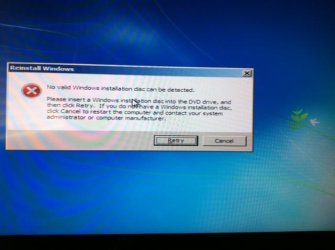
No valid windows disc detected

uneed2chiLLL

New member
Local time
12:06 AM
Messages
2
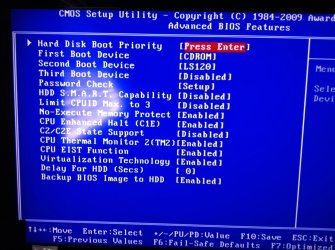
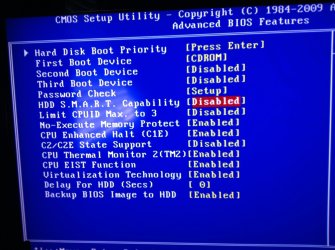
So ive made about 10 dvds now and just tried to make a bootable flash drive following one of the links in this section here are some screenshots on things i thought would be important let me know if anything further is needed the disc's wont boot nor will the flash drive
 

Attachments

  • photo 3.jpg
    photo 3.jpg
    327.4 KB · Views: 1
  • imagejpeg_9.jpg
    imagejpeg_9.jpg
    27.5 KB · Views: 15
  • photo 2.jpg
    photo 2.jpg
    357.4 KB · Views: 1

My Computer

Computer type
PC/Desktop
Computer Manufacturer/Model Number
Custom
OS
Windows 7 64 bit ultimate
CPU
2.2 dual core Intel
Motherboard
MSi
Memory
4gb ram
Graphics Card(s)
geforce 9600 gt
Hard Drives
1000 gb sata WD
Antivirus
AVG
Browser
Mozilla/Chrome
BIOS is not seeing any hard drive, just CDROM and LS120.
Make sure the power and data cables are firmly seated at both ends.

Try resetting the CMOS.
Do the following:

  • Power down the computer.
  • Unplug the power cord.
  • Open the computer case.
  • Remove the CMOS battery
  • Press and hold the power button for 10 to 15 seconds.
  • Insert the CMOS battery.
  • Plug in the power cord.
  • Power up the computer.
You will get a CMOS checksum error message.
Press F1 to continue.
Press F2 to enter Setup.

Press F2 to enter Setup.
Load defaults or Optimized defaults.
Set date and time.
Save and exit.


Boot back into BIOS and see if the hard drive shows up now. If not replace the hard drive.
 

My Computer

Computer type
PC/Desktop
Computer Manufacturer/Model Number
Lenovo IdeaCenter 450
OS
Windows 10 Pro X64
CPU
Intel Quad Core i7-4770 @ 3.4Ghz
Memory
16.0GB PC3-12800 DDR3 SDRAM 1600 MHz
Graphics Card(s)
Intel Integrated HD Graphics
Sound Card
Realtek HD Audio
Monitor(s) Displays
HP 22" LCD
Screen Resolution
1680 x 1050
Hard Drives
250GB Samsung EVO SATA-3 SSD
2TB Seagate ST2000DM001 SATA-2
1.5TB Seagate ST3150041AS SATA
Keyboard
Dell USB
Mouse
Lenovo USB
Internet Speed
Cable via Road Runner 3MB Upload, 30MB Download
Antivirus
Windows Defender, MBAM Pro, MBAE
Browser
Seamonkey
Other Info
UEFI/GPT
PLDS DVD-RW DH16AERSH
i do not believe it has anything to do with the hard drive i jus selected the cd rom to boot first because the windows disc is in there the computer will still load windows the issue is the re installation of it my disc is not coming up as a valid windows install disc
 

My Computer

Computer type
PC/Desktop
Computer Manufacturer/Model Number
Custom
OS
Windows 7 64 bit ultimate
CPU
2.2 dual core Intel
Motherboard
MSi
Memory
4gb ram
Graphics Card(s)
geforce 9600 gt
Hard Drives
1000 gb sata WD
Antivirus
AVG
Browser
Mozilla/Chrome
As Ken says you need to resolve the Hard Drive Boot priority first since the BIOS setting at the top is clearly labeled Hard Drive Boot and you have no HD appearing anywhere there.

What happens exactly when you press Enter on HD Boot Priority? Look for a popup to choose HD.

I would also physically unplug the LS120 floppy drive in case it is interfering.

It's always best to have the Hard drive set as first boot priority, then trigger the DVD to boot using the one-time BIOS Boot Priority key at boot. If this is not possible set DVD drive to boot first, then make sure HDD is clearly set to boot second.

Will your DVD boot in another PC? If not try a new ISO using the tool to burn the DVD also provided in http://www.sevenforums.com/tutorials/219487-clean-reinstall-factory-oem-windows-7-a.html#post1839164 with fresh DVD stock, or use a flash stick instead.
 
Describe the procedure you`re using to put windows on the dvd or the flash drive.

Where are you getting the install files from ?
 

My Computer

Computer type
PC/Desktop
Computer Manufacturer/Model Number
Skylake Special #666
OS
Windows 10 Pro x64
CPU
Intel Core i7 6700K
Motherboard
Asus Sabertooth Z170 Mark 1
Memory
GSkill TridentZ RGB 16GB 3600 16-16-16-36
Graphics Card(s)
EVGA GTX 980 Ti SC x2
Sound Card
Realtek High Definition
Monitor(s) Displays
AOC G2460PG
Screen Resolution
1920 x 1080 144Hz
Hard Drives
Samsung 860 Pro 256GB, Seagate Barracuda 4TB x2
PSU
EVGA 1000 P2, EVGA White Custom Braided Cables
Case
Corsair Vengeance C70 Gunmetal Black
Cooling
Corsair H100i v2, Corsair ML120 x2, Thermal Grizzly Kryonaut
Keyboard
Logitech G910 Orion Spectrum
Mouse
Logitech G700s
Internet Speed
Verizon Fios Quantum Gateway 75/75
Antivirus
Windows Defender, Malwarebytes Free 3.8.3
Browser
Chrome
Other Info
Corsair SP120 x4, LG Blu-ray Drive, Durabrand HT-395 100 Watt Dolby Digital Amp, Corsair H2100 Wireless 7.1 Headset
Back
Top