No video when added memory

Boceefus

New member
Local time
9:46 PM
Messages
18
I have an HP Pavilion model a6357c. I just installed Windows 7 Ultimate 64-bit. There are 4 memory slots. Each is supposed to be able to hold 2G. I have 4x1G sticks. When I install all sticks the computer comes on with no video. The only way I can get it to boot up normal is with 1 stick only. Any help will be greatly appreciated. Thank you.
 

My Computer

OS
Windows 7
Did you install a GPU (other than what came with the system)?
 

My Computer

Computer Manufacturer/Model Number
HP, Dell, Gateway, Toshiba - 4 laptops and 2 desktops
OS
Vista, Windows7, Mint Mate, Zorin, Windows 8
CPU
from 1.6GHz Duo to i7
Monitor(s) Displays
2x HP w2207
Hard Drives
5x HDD, 7x SSD, 12x Externals
Keyboard
with trackball - no mices
Mouse
Trackball mice
Internet Speed
DSL 6000
No, the only 2 things I did is clean install of Windows 7 64-bit and tried to add memory.
 

My Computer

OS
Windows 7
We`ll assume you have all the same type and speed memory so.
Having 1 stick in the pc add 1 more and boot up. If you have video take that stick out and install another stick and boot up. Do this to test all your memory and make sure it`s ok. Now add another stick ( repeating step 1 ) and boot up to see what happens. Make sure that the memory is firmly seated and the clips are fully engaged.

Post back your results.
 

My Computer

Computer Manufacturer/Model Number
Myself
OS
Windows 7 Ultimate 64Bit
CPU
C2D E8200
Motherboard
XFX 750i
Memory
8GB PNY PC2-6400
Graphics Card(s)
BFG 9600GT x 2
Sound Card
Stock XFX Optical
Monitor(s) Displays
Gateway 22" HD Display
Hard Drives
C: 1 TB G: 500 GB H: 500 GB
PSU
Ultra LSP 550 Pro Lifetime Series
Case
Xion2
Cooling
ThermalTake
I tried adding 1 at a time and no matter how I do it the computer still only works right when there is 1 stick. All sticks are good. :confused:
 

My Computer

OS
Windows 7
According to the product specifications:

Memory upgrade information


  • Dual channel memory architecture
  • Four 240-pin DDR2 DIMM sockets
  • Supported DIMM types:
    • PC2-4200 (533 MHz)
    • PC2-5300 (667 MHz)
    • PC2-6400 (800 MHz)
  • Non-ECC memory only, unbuffered
  • Supports 2GB DDR2 DIMMs
  • Supports up to 8 GB on 64 bit PCs
  • Supports up to 4 GB* on 32 bit PCs
    • 32 bit PCs cannot address a full 4.0 GB of memory.
Does this match the memory you are using?
 

My Computer

Computer type
PC/Desktop
Computer Manufacturer/Model Number
Lenovo IdeaCenter 450
OS
Windows 10 Pro X64
CPU
Intel Quad Core i7-4770 @ 3.4Ghz
Memory
16.0GB PC3-12800 DDR3 SDRAM 1600 MHz
Graphics Card(s)
Intel Integrated HD Graphics
Sound Card
Realtek HD Audio
Monitor(s) Displays
HP 22" LCD
Screen Resolution
1680 x 1050
Hard Drives
250GB Samsung EVO SATA-3 SSD
2TB Seagate ST2000DM001 SATA-2
1.5TB Seagate ST3150041AS SATA
Keyboard
Dell USB
Mouse
Lenovo USB
Internet Speed
Cable via Road Runner 3MB Upload, 30MB Download
Antivirus
Windows Defender, MBAM Pro, MBAE
Browser
Seamonkey
Other Info
UEFI/GPT
PLDS DVD-RW DH16AERSH
Yes. They are all PC2-5300. Is there a driver or something I need to enter in the bios to tell it to recognize 4? I searched the bios and can't find anything. Thank you for your help.
 

My Computer

OS
Windows 7
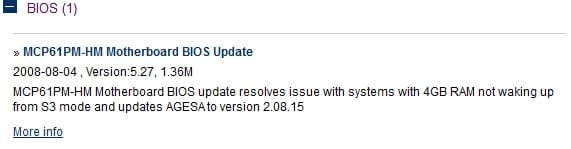
There is a BIOS update listed under Vista X64.

4GBRamVista.jpg

I know you are running Windows 7 X64 but this is applicable. I don't know if it will make any difference. Up to you if you think it's worth trying. Updating the BIOS is not something you should do unless there is something you need as there is always a chance the update will go bad, slim perhaps but still a chance.
 

My Computer

Computer type
PC/Desktop
Computer Manufacturer/Model Number
Lenovo IdeaCenter 450
OS
Windows 10 Pro X64
CPU
Intel Quad Core i7-4770 @ 3.4Ghz
Memory
16.0GB PC3-12800 DDR3 SDRAM 1600 MHz
Graphics Card(s)
Intel Integrated HD Graphics
Sound Card
Realtek HD Audio
Monitor(s) Displays
HP 22" LCD
Screen Resolution
1680 x 1050
Hard Drives
250GB Samsung EVO SATA-3 SSD
2TB Seagate ST2000DM001 SATA-2
1.5TB Seagate ST3150041AS SATA
Keyboard
Dell USB
Mouse
Lenovo USB
Internet Speed
Cable via Road Runner 3MB Upload, 30MB Download
Antivirus
Windows Defender, MBAM Pro, MBAE
Browser
Seamonkey
Other Info
UEFI/GPT
PLDS DVD-RW DH16AERSH
I had a bios update go bad a while back. That was fun. lol I'll give it a go and let you know. Thanks again.
 

My Computer

OS
Windows 7
Looking at the picture of the motherboard, the memory sockets are two different colors. How are you/have you been putting them in? Is there a required method for this?
 

My Computer

Computer type
PC/Desktop
Computer Manufacturer/Model Number
Lenovo IdeaCenter 450
OS
Windows 10 Pro X64
CPU
Intel Quad Core i7-4770 @ 3.4Ghz
Memory
16.0GB PC3-12800 DDR3 SDRAM 1600 MHz
Graphics Card(s)
Intel Integrated HD Graphics
Sound Card
Realtek HD Audio
Monitor(s) Displays
HP 22" LCD
Screen Resolution
1680 x 1050
Hard Drives
250GB Samsung EVO SATA-3 SSD
2TB Seagate ST2000DM001 SATA-2
1.5TB Seagate ST3150041AS SATA
Keyboard
Dell USB
Mouse
Lenovo USB
Internet Speed
Cable via Road Runner 3MB Upload, 30MB Download
Antivirus
Windows Defender, MBAM Pro, MBAE
Browser
Seamonkey
Other Info
UEFI/GPT
PLDS DVD-RW DH16AERSH
Problem found?

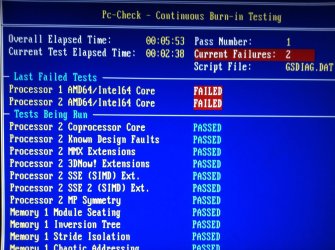
I may have found the problem. Decided to run some tests. Attached is a screenshot of partial results. Bad CPU?
 

Attachments

  • cpu.jpg
    cpu.jpg
    291.6 KB · Views: 8

My Computer

OS
Windows 7
What diagnostic are you running that gave this result?
 

My Computer

Computer type
PC/Desktop
Computer Manufacturer/Model Number
Lenovo IdeaCenter 450
OS
Windows 10 Pro X64
CPU
Intel Quad Core i7-4770 @ 3.4Ghz
Memory
16.0GB PC3-12800 DDR3 SDRAM 1600 MHz
Graphics Card(s)
Intel Integrated HD Graphics
Sound Card
Realtek HD Audio
Monitor(s) Displays
HP 22" LCD
Screen Resolution
1680 x 1050
Hard Drives
250GB Samsung EVO SATA-3 SSD
2TB Seagate ST2000DM001 SATA-2
1.5TB Seagate ST3150041AS SATA
Keyboard
Dell USB
Mouse
Lenovo USB
Internet Speed
Cable via Road Runner 3MB Upload, 30MB Download
Antivirus
Windows Defender, MBAM Pro, MBAE
Browser
Seamonkey
Other Info
UEFI/GPT
PLDS DVD-RW DH16AERSH
It's unusual for a CPU to fail, but in your case I would say that it is highly probable that the cause is the on-chip memory controller going flakey. Did you try all memory slots with a single stick?
 

My Computer

Computer type
PC/Desktop
Computer Manufacturer/Model Number
Dwarf Dwf/11/2012 r09/2013
OS
Windows 8.1 Pro RTM x64
CPU
Intel Core-i5-3570K 4-core @ 3.4GHz (Ivy Bridge) (OC 4.4GHz)
Motherboard
ASRock Z77 Extreme4-M
Memory
4 x 4GB DDR3-1600 Corsair Vengeance CMZ8GX3M2A1600C9B (16GB)
Graphics Card(s)
MSI GeForce GTX770 Gaming OC 2GB
Sound Card
Realtek High Definition on board solution (ALC 898)
Monitor(s) Displays
ViewSonic VA1912w Widescreen (VGA)
Screen Resolution
1440x900
Hard Drives
OCZ Agility 3 SSD 120GB SATA III x2 (RAID 0)
Samsung HD501LJ 500GB SATA II x2
Hitachi HDS721010CLA332 1TB SATA II
Iomega 1.5TB Ext USB 2.0
WD 2.0TB Ext USB 3.0

PSU
XFX Pro Series 850W Semi-Modular
Case
Gigabyte IF233
Cooling
1 x 120mm Front Inlet 1 x 120mm Rear Exhaust
Keyboard
Microsoft Comfort Curve Keyboard 3000 (USB)
Mouse
Microsoft Comfort Mouse 3000 for Business (USB)
Internet Speed
NetGear DG834Gv3 ADSL Modem/Router (Ethernet) ~4.0 Mb/s (O2)
Antivirus
Avast! 8.0.1497
Browser
IE 11
Other Info
Optical Drive: HL-DT-ST BD-RE BH10LS30 SATA Bluray
Lexmark S305 Printer/Scanner/Copier (USB)
WEI Score: 8.1/8.1/8.5/8.5/8.25
Asus Eee PC 1011PX Netbook (Windows 7 x86 Starter)
Back
Top