No wifi access Dell Inspiron 1750 Win7 x64 Windstream 2Wire router

djbeede

New member
Local time
5:13 PM
Messages
5
Dell Inspiron 1750, Windows 7 x64 - no wifi access through my Windstream 2wire router.

Other devices both Mac and PC are still connecting through my router so I'm pretty sure it's in the DELL. Out of warrantee of course.

I can see networks in the "connect to a network" box but when I try to connect to them, it brings up a box that says unable to connect to network. Most of the time the wireless status icon shows 5 unlit bars with an orange dot over them.

The only suggestion from trouble shooter is reset the router by turning it off and on. No go there.

I can connect with ethernet cable with no problem.

I've tried the "flush.bat" and other suggestions in other forums with no success.

My network adapter - Intel(R) Wifi Link 5100 AGN - I've updated the driver
it says it's working.

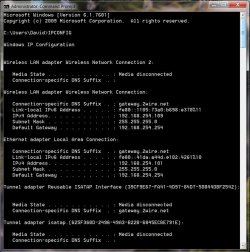
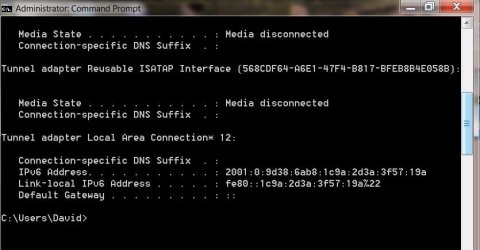
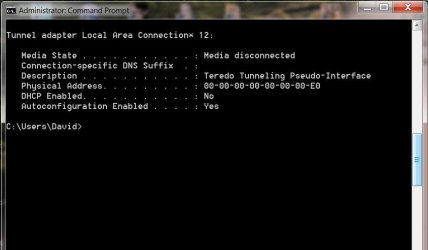
[I'll attach IPCONFIG images.]

I'm sure hoping the smart helpers might get me wifi-ing again.
Thanks...
 

Attachments

  • IPCONFIG 1A.jpg
    IPCONFIG 1A.jpg
    82.8 KB · Views: 5
  • IPCONFIG 1B.jpg
    IPCONFIG 1B.jpg
    39.4 KB · Views: 4

My Computer My Computer

At a glance

Windows 7 Home Premium 64bitIntel Core 2 Duo CPU T6600 @2.220GHz4 GB
Computer type
Laptop
Computer Manufacturer/Model Number
Dell Inspiron 1750
OS
Windows 7 Home Premium 64bit
CPU
Intel Core 2 Duo CPU T6600 @2.220GHz
Memory
4 GB
Antivirus
Avast
Browser
Firefox
Welcome to the forum djbeede.

You appear to be connected both wired and wirelessly here, valid IP for both connections, the ipconfig/all would show me more than just ipconfig. You should unplug the Ethernet when testing the wireless as an Ethernet connection will override a wireless connection most every time.

Do you have any type of third party anti virus software installed on this system?

Have you tried resetting the router using the actual reset button on the side of the router? :)
 

My Computer My Computer

At a glance

Windows 7 Ult, Windows 8.1 Pro,Q9650-4.275GHz, E8600 4.5GHz, E6750-3.8GHzG.Skill PC2 9600 1200Mhz 5 5 5 15 2TGTX480
Computer type
PC/Desktop
Computer Manufacturer/Model Number
Home built
OS
Windows 7 Ult, Windows 8.1 Pro,
CPU
Q9650-4.275GHz, E8600 4.5GHz, E6750-3.8GHz
Motherboard
Evga 780i FTW
Memory
G.Skill PC2 9600 1200Mhz 5 5 5 15 2T
Graphics Card(s)
GTX480
Sound Card
Asus Xonar D2
Monitor(s) Displays
HannsG
Screen Resolution
1680X1050
Hard Drives
GSkill Phoenix Pro 120GB SSD
PSU
ThermalTake Toughpower 1000Watt modular
Case
ThermalTake XaserV
Cooling
Xigmatek S1283
Keyboard
Logitech G15
Mouse
Logitech G9
Internet Speed
T1
Hey CHEV65

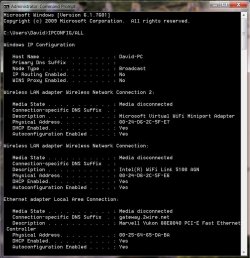
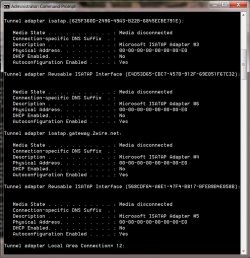
Here are my IPCONFIG/ALL results with the ethernet cable unplugged.

My antivirus software is Avast.

I didn't use the button to reset the router.
I reset my router to factory defaults via it's IP address and a browser. Still no go.

As I mentioned, my wife's Macbook and an older Dell laptop are both signing onto wifi without a problem.

Thanks...
 

Attachments

  • IPCONFIG 2A.jpg
    IPCONFIG 2A.jpg
    84 KB · Views: 4
  • IPCONFIG 2B.jpg
    IPCONFIG 2B.jpg
    88 KB · Views: 4
  • IPCONFIG 2C.jpg
    IPCONFIG 2C.jpg
    31 KB · Views: 4

My Computer My Computer

At a glance

Windows 7 Home Premium 64bitIntel Core 2 Duo CPU T6600 @2.220GHz4 GB
Computer type
Laptop
Computer Manufacturer/Model Number
Dell Inspiron 1750
OS
Windows 7 Home Premium 64bit
CPU
Intel Core 2 Duo CPU T6600 @2.220GHz
Memory
4 GB
Antivirus
Avast
Browser
Firefox
This one shows that you aren't picking up anything from the router, the first ipconfig showed you as connected wirelessly but your Ethernet was also connected.

Has the wireless connection ever worked correctly on this machine?

Have you tried removing the wireless profile for this connection then make a new one?
 

My Computer My Computer

At a glance

Windows 7 Ult, Windows 8.1 Pro,Q9650-4.275GHz, E8600 4.5GHz, E6750-3.8GHzG.Skill PC2 9600 1200Mhz 5 5 5 15 2TGTX480
Computer type
PC/Desktop
Computer Manufacturer/Model Number
Home built
OS
Windows 7 Ult, Windows 8.1 Pro,
CPU
Q9650-4.275GHz, E8600 4.5GHz, E6750-3.8GHz
Motherboard
Evga 780i FTW
Memory
G.Skill PC2 9600 1200Mhz 5 5 5 15 2T
Graphics Card(s)
GTX480
Sound Card
Asus Xonar D2
Monitor(s) Displays
HannsG
Screen Resolution
1680X1050
Hard Drives
GSkill Phoenix Pro 120GB SSD
PSU
ThermalTake Toughpower 1000Watt modular
Case
ThermalTake XaserV
Cooling
Xigmatek S1283
Keyboard
Logitech G15
Mouse
Logitech G9
Internet Speed
T1
The wireless connection has worked fine for years on this machine.

I haven't tried removing the wireless profile.
Where would I find the procedure for creating a new profile?
Thanks...
 

My Computer My Computer

At a glance

Windows 7 Home Premium 64bitIntel Core 2 Duo CPU T6600 @2.220GHz4 GB
Computer type
Laptop
Computer Manufacturer/Model Number
Dell Inspiron 1750
OS
Windows 7 Home Premium 64bit
CPU
Intel Core 2 Duo CPU T6600 @2.220GHz
Memory
4 GB
Antivirus
Avast
Browser
Firefox
The wireless connection has worked fine for years on this machine.

I haven't tried removing the wireless profile.
Where would I find the procedure for creating a new profile?
Thanks...

If you go to the Network and Sharing Center, then look to the left and open Manage Wireless Connections, you will see the wireless profiles there.

If that doesn't work consider removing Avast from the system.
 
Last edited:

My Computer My Computer

At a glance

Windows 7 Ult, Windows 8.1 Pro,Q9650-4.275GHz, E8600 4.5GHz, E6750-3.8GHzG.Skill PC2 9600 1200Mhz 5 5 5 15 2TGTX480
Computer type
PC/Desktop
Computer Manufacturer/Model Number
Home built
OS
Windows 7 Ult, Windows 8.1 Pro,
CPU
Q9650-4.275GHz, E8600 4.5GHz, E6750-3.8GHz
Motherboard
Evga 780i FTW
Memory
G.Skill PC2 9600 1200Mhz 5 5 5 15 2T
Graphics Card(s)
GTX480
Sound Card
Asus Xonar D2
Monitor(s) Displays
HannsG
Screen Resolution
1680X1050
Hard Drives
GSkill Phoenix Pro 120GB SSD
PSU
ThermalTake Toughpower 1000Watt modular
Case
ThermalTake XaserV
Cooling
Xigmatek S1283
Keyboard
Logitech G15
Mouse
Logitech G9
Internet Speed
T1
I removed the profile and created a new one. Still the same symptoms.
Avast is on my other Dell that is signing on OK. Is there some reason it would start causing problems?
Can I just turn it off, or do I have to uninstall it?
Thnx...
 

My Computer My Computer

At a glance

Windows 7 Home Premium 64bitIntel Core 2 Duo CPU T6600 @2.220GHz4 GB
Computer type
Laptop
Computer Manufacturer/Model Number
Dell Inspiron 1750
OS
Windows 7 Home Premium 64bit
CPU
Intel Core 2 Duo CPU T6600 @2.220GHz
Memory
4 GB
Antivirus
Avast
Browser
Firefox
I'm still a bit confused as to why when the Ethernet was plugged in at the same time the wireless NIC somehow showed a valid IP and network connection.

The ipconfig/all also appears to be missing information about IPv6 and no DNS servers either for some reason.

It looks like there is something wrong with the network here.

Is this a modem plugged into a single router or a combo modem/router?
 
Last edited:

My Computer My Computer

At a glance

Windows 7 Ult, Windows 8.1 Pro,Q9650-4.275GHz, E8600 4.5GHz, E6750-3.8GHzG.Skill PC2 9600 1200Mhz 5 5 5 15 2TGTX480
Computer type
PC/Desktop
Computer Manufacturer/Model Number
Home built
OS
Windows 7 Ult, Windows 8.1 Pro,
CPU
Q9650-4.275GHz, E8600 4.5GHz, E6750-3.8GHz
Motherboard
Evga 780i FTW
Memory
G.Skill PC2 9600 1200Mhz 5 5 5 15 2T
Graphics Card(s)
GTX480
Sound Card
Asus Xonar D2
Monitor(s) Displays
HannsG
Screen Resolution
1680X1050
Hard Drives
GSkill Phoenix Pro 120GB SSD
PSU
ThermalTake Toughpower 1000Watt modular
Case
ThermalTake XaserV
Cooling
Xigmatek S1283
Keyboard
Logitech G15
Mouse
Logitech G9
Internet Speed
T1
This is a combo modem router by 2Wire provided by Windstream.
Still don't know why all my other devices are signing on fine if it is a problem with the 2Wire gizmo?
 

My Computer My Computer

At a glance

Windows 7 Home Premium 64bitIntel Core 2 Duo CPU T6600 @2.220GHz4 GB
Computer type
Laptop
Computer Manufacturer/Model Number
Dell Inspiron 1750
OS
Windows 7 Home Premium 64bit
CPU
Intel Core 2 Duo CPU T6600 @2.220GHz
Memory
4 GB
Antivirus
Avast
Browser
Firefox
This is a combo modem router by 2Wire provided by Windstream.
Still don't know why all my other devices are signing on fine if it is a problem with the 2Wire gizmo?

I've been reading around on this Intel 5100 AGN NIC, apparently countless people are having issues with it, there is an entire thread dedicated to this problem at the Intel site.

Maybe you can read through it all and find a solution. :)

Intel WiFi Link 5100 AGN problem - disconnecting
 

My Computer My Computer

At a glance

Windows 7 Ult, Windows 8.1 Pro,Q9650-4.275GHz, E8600 4.5GHz, E6750-3.8GHzG.Skill PC2 9600 1200Mhz 5 5 5 15 2TGTX480
Computer type
PC/Desktop
Computer Manufacturer/Model Number
Home built
OS
Windows 7 Ult, Windows 8.1 Pro,
CPU
Q9650-4.275GHz, E8600 4.5GHz, E6750-3.8GHz
Motherboard
Evga 780i FTW
Memory
G.Skill PC2 9600 1200Mhz 5 5 5 15 2T
Graphics Card(s)
GTX480
Sound Card
Asus Xonar D2
Monitor(s) Displays
HannsG
Screen Resolution
1680X1050
Hard Drives
GSkill Phoenix Pro 120GB SSD
PSU
ThermalTake Toughpower 1000Watt modular
Case
ThermalTake XaserV
Cooling
Xigmatek S1283
Keyboard
Logitech G15
Mouse
Logitech G9
Internet Speed
T1
Back
Top