No WiFi hardware found

aldol

New member
Local time
1:54 PM
Messages
5
Hello,
I have Toshiba laptop L500 02H with Win 7 Ultimate. I'm trying to use the Easy WiFi Radar that is the XP app but I'm receiving a message " No WiFi hardware found". The XP mode is using the Shared Network adapter while in the Win 7 mode I have Realtek RTL819SE Wireless LAN 802 11n PCI-E NIC and MS Virtual miniport adapter.
Howcould I make WiFi active in the XP mode? Please advise.
Thanks
 

My Computer

Computer Manufacturer/Model Number
Toshiba L500 02H
OS
windows 7 Ultimate
XP mode is in a virtual machine environment, it is not aware of what the host computer have (including wifi hardware). If you want to install a "wifi radar", you need to install in W7 instead.

zzz2496
 

My Computer

Computer Manufacturer/Model Number
Self Built
OS
Windows7 Ultimate 64bit
CPU
Intel Core 2 Quad Q6600
Motherboard
Abit IN9-32X-MMAX
Memory
DDR2 Adata 4GB
Graphics Card(s)
Nvidia GeForce GTX 285 1024 and Nvidia GeForce 8800GT 512
Sound Card
Asus Xonar HDAV 1.3
Monitor(s) Displays
Dell 2407WFP and BenQ 2400v and Philips 150v3
Screen Resolution
3840x1200 and 1024x768
Hard Drives
2 WDC 1TB
1 WDC 1.5TB
1 WDC 640GB
1 WDC 320GB
1 Seagate 200GB
PSU
Corsair TX 850W
Case
Cooler Master HAF932
Cooling
Arctic Cooling Freezer Extreme and plenty of fans...
Keyboard
MicrosoftNaturalKeyboard 4000/Apple Alu keyboard/Dinovo mini
Mouse
Logitech G5/MarbleMouseTrackball/PerformanceMX/SpacePilotPRO
Internet Speed
1.5Mbps down/384Kbps up
Other Info
APC SURT 1000XL
Logitech Z-560
Wiimote
Mikrotik Router
Linksys (now Cisco) SD2008 8 port Gigabit switch
Linksys WRT54G (acting as AP)
Apple wireless Aluminium keyboard
Apple Magic Mouse
Xbox360 wired controller
Thanks, zzz2496. That was a reason I installed the XP mode. The Easy Radar doen't work with Win 7.
 

My Computer

Computer Manufacturer/Model Number
Toshiba L500 02H
OS
windows 7 Ultimate
So, as I understood there is no way to make WiFi working on the XP Mode.
Please, advise if anybody knows if it's still possible to have WiFi in the XP Mode.

Thanks
 

My Computer

Computer Manufacturer/Model Number
Toshiba L500 02H
OS
windows 7 Ultimate
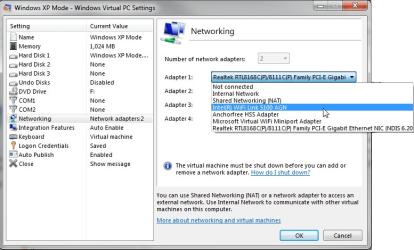
Open XP Mode settings, click Networking on the left pane, change Adapter 1 to your host machine's WiFi NIC.

Kari
 

Attachments

  • XPM_NIC1.png
    XPM_NIC1.png
    107.5 KB · Views: 539

My Computer

Computer type
Laptop
Computer Manufacturer/Model Number
HP ENVY 17-1150eg
OS
Windows 10 Pro x64 EN-GB
CPU
1.6 GHz Intel Core i7-720QM Processor
Memory
6 GB
Graphics Card(s)
ATI Mobility Radeon HD 5850 Graphics
Sound Card
Beats sound system with integrated subwoofer
Monitor(s) Displays
17" laptop display, 22" LED and 32" Full HD TV through HDMI
Screen Resolution
1600*900 (1), 1920*1080 (2&3)
Hard Drives
Internal: 2 x 500 GB SATA Hard Disk Drive 7200 rpm
External: 2TB for backups, 3TB USB3 network drive for media
Cooling
As Envy runs a bit warm, I have it on a Cooler Master pad
Keyboard
Logitech diNovo Media Desktop Laser (bluetooth)
Mouse
Logitech Performance Mouse MX
Internet Speed
50/10 Mbps VDSL
Antivirus
Windows Defender 4.3.9431.0
Browser
Maxthon 3.5.2., IE11
Thank you, Kari.

I did change it to the Realtek RTL819SE Wireless LAN 802 11n PCI-E NIC but when I opened the Network in XP it shwos only the Local Area Connection and it's still the same message "no WiFi software found" from the Easy WiFi Radar.
I tried to change it to Microsoft Virtual Miniport Adapter as well.

Any other thoughts on it?

Thanks
 

My Computer

Computer Manufacturer/Model Number
Toshiba L500 02H
OS
windows 7 Ultimate
If the WiFi NIC works on host, I really don't understand why it doesn't in XP Mode.

I am very sorry, I really don't have any other ideas. I'll do some researching and come back.

Kari
 

My Computer

Computer type
Laptop
Computer Manufacturer/Model Number
HP ENVY 17-1150eg
OS
Windows 10 Pro x64 EN-GB
CPU
1.6 GHz Intel Core i7-720QM Processor
Memory
6 GB
Graphics Card(s)
ATI Mobility Radeon HD 5850 Graphics
Sound Card
Beats sound system with integrated subwoofer
Monitor(s) Displays
17" laptop display, 22" LED and 32" Full HD TV through HDMI
Screen Resolution
1600*900 (1), 1920*1080 (2&3)
Hard Drives
Internal: 2 x 500 GB SATA Hard Disk Drive 7200 rpm
External: 2TB for backups, 3TB USB3 network drive for media
Cooling
As Envy runs a bit warm, I have it on a Cooler Master pad
Keyboard
Logitech diNovo Media Desktop Laser (bluetooth)
Mouse
Logitech Performance Mouse MX
Internet Speed
50/10 Mbps VDSL
Antivirus
Windows Defender 4.3.9431.0
Browser
Maxthon 3.5.2., IE11
Hi there
as Kari says if the Wifi works on the Host it should work on your VM (even in XP mode)

This might be a basic question but it's a well known fact that in the event of many possibilities often the SIMPLEST solution is the correct one.

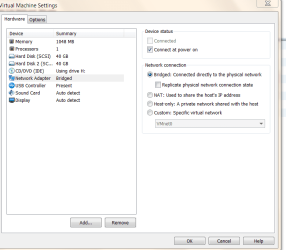
Have you actually ENABLED networking for the VM -- I'm not exactly sure how to do it in XP mode as I don't use XP mode - but on a "Typical VM" you set the Networking options in Host machine when you define the virtual machine - such as NAT, Bridged or HOST only.

In the case of VMWARE the "Virtual network adapter" (vnetxx xx is 01 - whatever) used by the Virtual Machine is the one the host is using so if your WiFi works on the host the virtual network adapter will automatically use it as well.

Pic enclosed

Cheers
jimbo
 

Attachments

  • vnetwork.png
    vnetwork.png
    20.3 KB · Views: 197

My Computer

Computer type
PC/Desktop
Computer Manufacturer/Model Number
Custom built, several laptops HP/ASUS
OS
Linux CENTOS 7 / various Windows OS'es and servers
CPU
Intel i7 Intel i5
Memory
8GB, 16GB
Graphics Card(s)
On Motherboard
Sound Card
Realtek HD audio
Monitor(s) Displays
Apple Cinema display, Samsung LCD
Screen Resolution
1920 X 1080
Hard Drives
4 X 1TB SATA
Mouse
Toshiba wireless laser
Internet Speed
> 20MB up
All changing that setting does is point the VM to that networking adapter. VPC still emulates whatever hardware it natively emulates for LAN, just referencing that connection. No devIDs are passed and Win7 would have to (and therefore doesn't) relinquish control of the device.

Unfortunately, there is no way around this. I'm not sure what success other VM software might yield.
 

My Computer

Computer Manufacturer/Model Number
Sony VPCF115FM
OS
Windows 7 Professional
CPU
Core i7 720M 2.80GHz
Memory
6GB PC 1666
Graphics Card(s)
nVidia 330M
Monitor(s) Displays
16" Sony
Screen Resolution
1920x1080
Hard Drives
500GB
Internet Speed
25Mbps
All changing that setting does is point the VM to that networking adapter. VPC still emulates whatever hardware it natively emulates for LAN, just referencing that connection. No devIDs are passed and Win7 would have to (and therefore doesn't) relinquish control of the device.

Unfortunately, there is no way around this. I'm not sure what success other VM software might yield.

I'm not sure if I understand your point correctly, so I'll just say this:

I have XP Mode installed on two laptops, both having the host's WiFi NIC as Adapter 1 in XP Mode settings. When on the road and only using WiFi (no LAN available), I've never had any problems to connect both my host and installed XP Mode to internet.
 

My Computer

Computer type
Laptop
Computer Manufacturer/Model Number
HP ENVY 17-1150eg
OS
Windows 10 Pro x64 EN-GB
CPU
1.6 GHz Intel Core i7-720QM Processor
Memory
6 GB
Graphics Card(s)
ATI Mobility Radeon HD 5850 Graphics
Sound Card
Beats sound system with integrated subwoofer
Monitor(s) Displays
17" laptop display, 22" LED and 32" Full HD TV through HDMI
Screen Resolution
1600*900 (1), 1920*1080 (2&3)
Hard Drives
Internal: 2 x 500 GB SATA Hard Disk Drive 7200 rpm
External: 2TB for backups, 3TB USB3 network drive for media
Cooling
As Envy runs a bit warm, I have it on a Cooler Master pad
Keyboard
Logitech diNovo Media Desktop Laser (bluetooth)
Mouse
Logitech Performance Mouse MX
Internet Speed
50/10 Mbps VDSL
Antivirus
Windows Defender 4.3.9431.0
Browser
Maxthon 3.5.2., IE11
All changing that setting does is point the VM to that networking adapter. VPC still emulates whatever hardware it natively emulates for LAN, just referencing that connection. No devIDs are passed and Win7 would have to (and therefore doesn't) relinquish control of the device.

Unfortunately, there is no way around this. I'm not sure what success other VM software might yield.

I'm not sure if I understand your point correctly, so I'll just say this:

I have XP Mode installed on two laptops, both having the host's WiFi NIC as Adapter 1 in XP Mode settings. When on the road and only using WiFi (no LAN available), I've never had any problems to connect both my host and installed XP Mode to internet.
Kari, our OP have a specific software that he needs to use - that needs a specific hardware to be present. Passing a VM network interface does expose the connection to the guest OS, but not the hardware, the hardware is abstracted by the VM. To the VM, it's just a regular NIC (LAN), the software needs Wifi interface.

zzz2496
 

My Computer

Computer Manufacturer/Model Number
Self Built
OS
Windows7 Ultimate 64bit
CPU
Intel Core 2 Quad Q6600
Motherboard
Abit IN9-32X-MMAX
Memory
DDR2 Adata 4GB
Graphics Card(s)
Nvidia GeForce GTX 285 1024 and Nvidia GeForce 8800GT 512
Sound Card
Asus Xonar HDAV 1.3
Monitor(s) Displays
Dell 2407WFP and BenQ 2400v and Philips 150v3
Screen Resolution
3840x1200 and 1024x768
Hard Drives
2 WDC 1TB
1 WDC 1.5TB
1 WDC 640GB
1 WDC 320GB
1 Seagate 200GB
PSU
Corsair TX 850W
Case
Cooler Master HAF932
Cooling
Arctic Cooling Freezer Extreme and plenty of fans...
Keyboard
MicrosoftNaturalKeyboard 4000/Apple Alu keyboard/Dinovo mini
Mouse
Logitech G5/MarbleMouseTrackball/PerformanceMX/SpacePilotPRO
Internet Speed
1.5Mbps down/384Kbps up
Other Info
APC SURT 1000XL
Logitech Z-560
Wiimote
Mikrotik Router
Linksys (now Cisco) SD2008 8 port Gigabit switch
Linksys WRT54G (acting as AP)
Apple wireless Aluminium keyboard
Apple Magic Mouse
Xbox360 wired controller
Thanks, I can see my mistake now.
 

My Computer

Computer type
Laptop
Computer Manufacturer/Model Number
HP ENVY 17-1150eg
OS
Windows 10 Pro x64 EN-GB
CPU
1.6 GHz Intel Core i7-720QM Processor
Memory
6 GB
Graphics Card(s)
ATI Mobility Radeon HD 5850 Graphics
Sound Card
Beats sound system with integrated subwoofer
Monitor(s) Displays
17" laptop display, 22" LED and 32" Full HD TV through HDMI
Screen Resolution
1600*900 (1), 1920*1080 (2&3)
Hard Drives
Internal: 2 x 500 GB SATA Hard Disk Drive 7200 rpm
External: 2TB for backups, 3TB USB3 network drive for media
Cooling
As Envy runs a bit warm, I have it on a Cooler Master pad
Keyboard
Logitech diNovo Media Desktop Laser (bluetooth)
Mouse
Logitech Performance Mouse MX
Internet Speed
50/10 Mbps VDSL
Antivirus
Windows Defender 4.3.9431.0
Browser
Maxthon 3.5.2., IE11
Thanks to everybody for your replies. I didn't mention that I have the Internet connection on the Win XP but I'd need to use the Easy WiFi Radar that is not working under the Win 7 but under the Win XP it says there is no WiFi hardware found. Probably, it could be the case the Easy WiFi radar doesn't support my WiFi card or the actual hardware cannot be visible from the Win XP (that is the most likely).

Thanks
 

My Computer

Computer Manufacturer/Model Number
Toshiba L500 02H
OS
windows 7 Ultimate
Back
Top