Hi to everybody.. Hope you can help me..
I have had my lap for a while now and since I changed to windows 7 everything worked great. Until last week...The wifi in my home was working just fine when I went to sleep, the next day I couldn´t connect anymore... It is like some sort of update happened and I lost the ability to find any wifi connection..
Already tried using different restore points and connecting from other places and got no change, when I try the "solve problems" on windows, it just tells me to plug the ethernet cable in.. When I go on the control panel, Manage Wireless Networks, it just says the wireless option is not currently enabled.
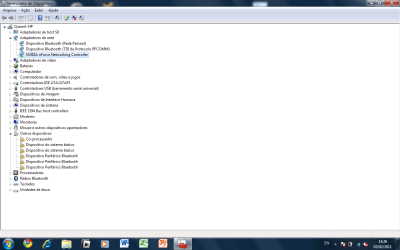
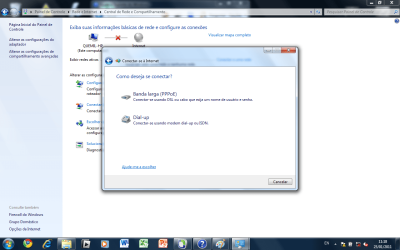
Besides this, when I try to set up a new connection to the internet, the only options I get are through broadband or dial-up, there is no link or option to wirelles connections, as you can see on the first attached image (I am sorry, but my windows is in portuguese.. This is the "How do you wish to connect?" screen and it only shows broadband and dial-up buttons). Anyhow, I am quite shure there was a third option here: Wireless Network.
One final thing I noticed is that the taskbar icon is now different from the connection strengh bar I used to have. Now I have a symbol I dont know what means, but has a red X on it... (second attached image)
Could really use a hand on this one... Thanks in advance..
I have had my lap for a while now and since I changed to windows 7 everything worked great. Until last week...The wifi in my home was working just fine when I went to sleep, the next day I couldn´t connect anymore... It is like some sort of update happened and I lost the ability to find any wifi connection..
Already tried using different restore points and connecting from other places and got no change, when I try the "solve problems" on windows, it just tells me to plug the ethernet cable in.. When I go on the control panel, Manage Wireless Networks, it just says the wireless option is not currently enabled.
Besides this, when I try to set up a new connection to the internet, the only options I get are through broadband or dial-up, there is no link or option to wirelles connections, as you can see on the first attached image (I am sorry, but my windows is in portuguese.. This is the "How do you wish to connect?" screen and it only shows broadband and dial-up buttons). Anyhow, I am quite shure there was a third option here: Wireless Network.
One final thing I noticed is that the taskbar icon is now different from the connection strengh bar I used to have. Now I have a symbol I dont know what means, but has a red X on it... (second attached image)
Could really use a hand on this one... Thanks in advance..
Attachments

My Computer
- OS
- Windows 7 32 bit