No Wireless Connection

rickyhayward

New member
Local time
11:46 PM
Messages
20
Hello, yesterday my laptop was turned on, my led screen had fell of and had disconnected, laptop then had the connector button below touchpad flashing, I then reattached led screen and my laptop was working fine. However since then I've not been able to connect to a wireless connection at all? It seems with wireless has been turned off yet this ridiculous thing doesn't have any simple option to go about fixing it. I cant use FN+F8 as for some reason it doesn't do anything like it previously did. I've had this laptop for about two years and never had a problem until yesterday. I have absolutely no idea as to what to do to fix it. This is a Window 7 64bit Toshiba Satellite (Unsure on specific name) Please help!

Update:

I just googled to do it, seemed quite straight forward, this is what it said to do:

Go to the Start Menu and select Control Panel. ...
Click the Network and Internet category and then select Networking and Sharing Centre. ...
From the options on the left-hand side, select Change adapter settings. ...
Right-click on the icon for Wireless Connection and click enable.
How to turn wireless connectivity on or off in Windows 7 - P

However all I have that shows up there is a 'local area connection' no wireless connection?
 

My Computer

Computer type
PC/Desktop
OS
Windows 7 64bit
Browser
Chrome
I also have no backup system so I cannot do a system restore
 

My Computer

Computer type
PC/Desktop
OS
Windows 7 64bit
Browser
Chrome
Hi Welcome to Seven Forums .. What is the Model Number of your Laptop ? ...

Does the Wireless adapter show in the Device Manager ?
 

My Computer

Computer Manufacturer/Model Number
W530-3630QM1
OS
windows 7 home 64bit
CPU
INTEL-CORE I7
Memory
16GB
Hard Drives
750GB
Browser
Chrome
Hi Welcome to Seven Forums .. What is the Model Number of your Laptop ? ...

Does the Wireless adapter show in the Device Manager ?

Hello, it's a Toshiba Satellite R830 and the wireless adapter does not show in the device manager
 

My Computer

Computer type
PC/Desktop
OS
Windows 7 64bit
Browser
Chrome
Boot into the BIOS and see if it is enabled there ... It is easy enough to get your Function Keys working ... Not much point though at the moment ..
 

My Computer

Computer Manufacturer/Model Number
W530-3630QM1
OS
windows 7 home 64bit
CPU
INTEL-CORE I7
Memory
16GB
Hard Drives
750GB
Browser
Chrome
Boot into the BIOS and see if it is enabled there ... It is easy enough to get your Function Keys working ... Not much point though at the moment ..


Sorry but.how do you boot into the BIOS?
 

My Computer

Computer type
PC/Desktop
OS
Windows 7 64bit
Browser
Chrome
It should be F2 at startup
 

My Computer

Computer Manufacturer/Model Number
W530-3630QM1
OS
windows 7 home 64bit
CPU
INTEL-CORE I7
Memory
16GB
Hard Drives
750GB
Browser
Chrome
It should be F2 at startup


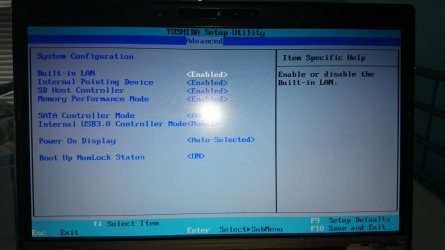
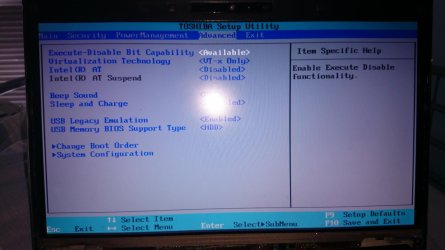
Okay, I pressed F2 but on there there is only two options, what should I be doing whilst on that screen?
 

My Computer

Computer type
PC/Desktop
OS
Windows 7 64bit
Browser
Chrome
It should be some where under Advanced Settings ..
 

My Computer

Computer Manufacturer/Model Number
W530-3630QM1
OS
windows 7 home 64bit
CPU
INTEL-CORE I7
Memory
16GB
Hard Drives
750GB
Browser
Chrome

Attachments

  • 14138928624551041345108.jpg
    14138928624551041345108.jpg
    817.6 KB · Views: 1

My Computer

Computer type
PC/Desktop
OS
Windows 7 64bit
Browser
Chrome
You can try the following shut down your Laptop ... Remove the power adapter and also the battery ..

Then press the power button that starts you Laptop and hold down for 10 seconds ..


Reassemble and see if it is showing then ...
 

My Computer

Computer Manufacturer/Model Number
W530-3630QM1
OS
windows 7 home 64bit
CPU
INTEL-CORE I7
Memory
16GB
Hard Drives
750GB
Browser
Chrome
You can try the following shut down your Laptop ... Remove the power adapter and also the battery ..

Then press the power button that starts you Laptop and hold down for 10 seconds ..


Reassemble and see if it is showing then ...

Just tried it and it's not working. I deleted something yesterday in an attempt to try and fix it but I think it may well have been the actual wireless driver
 

My Computer

Computer type
PC/Desktop
OS
Windows 7 64bit
Browser
Chrome
Did your Laptop originally have Windows 8 ?
 

My Computer

Computer Manufacturer/Model Number
W530-3630QM1
OS
windows 7 home 64bit
CPU
INTEL-CORE I7
Memory
16GB
Hard Drives
750GB
Browser
Chrome
Only see the one for the Wireless > Intel PROSet/Wireless Software
 

My Computer

Computer Manufacturer/Model Number
W530-3630QM1
OS
windows 7 home 64bit
CPU
INTEL-CORE I7
Memory
16GB
Hard Drives
750GB
Browser
Chrome
Back
Top