Solved No write access to external media.

nads1978

New member
Local time
6:10 PM
Messages
5
Hello all.

Several years ago my work laptop stopped writing to DVD and SD cards, it wasn't a big deal as I didn't really use those for work (reading worked fine).

I have recently been given my old work laptop, which had a fresh Win7 Pro 64bit install, which I now use as my main machine at home, I upped the RAM to 8GB from 4GB and fitted a 2TB SSHD. All was good until I just noticed for some reason when I try to write to: DVD/SD/memory-stick/external-HDD I always get the message "The disk is write protected".

All the media works fine in other machines and I can read from them no problem.

The same result from both admin accounts on this machine.

The only software installed which was common between them is Irfanview, GOM player, possibly some codec packs, Teamviewer, firefox, itunes, icloud,

I have tried making a registry entry:
HKEY_LOCAL_MACHINE\SYSTEM\CurrentControlSet\Control\StorageDevicePolicies
but no difference.

Can anyone help?!
 

My Computer

Computer type
Laptop
Computer Manufacturer/Model Number
Thinkpad T420
OS
Windows 7 Pro 64bit
CPU
Intel i5-2520M 2.5GHz
Memory
8GB
Monitor(s) Displays
23" Curved
Hard Drives
SSHD 2TB
Keyboard
MS Wired KB 600
Mouse
HP Wireless x4500
Internet Speed
~19Mb/s
Antivirus
Avast free
Browser
FF

My Computer

Computer type
PC/Desktop
Computer Manufacturer/Model Number
Dell
OS
Linux Mint 18.2 xfce 64-bit (VMWare host) / Windows 8.1 Pro 32-bit (VMWare guest)
CPU
Haswell
Memory
4 GB
Monitor(s) Displays
Acer 23"
Screen Resolution
1920 x 1080
Hard Drives
Two hard drives, 1TB each: One for Linux, one for my data.
Keyboard
IBM Model M
Antivirus
Sophos (Linux), Trend Micro (Windows)
Browser
Firefox, Opera
Other Info
I use Samba to share my data drive with the other computers at my house and with my guest session in VMWare Workstation Player.
Hi thanks for the reply.

I had a poke around in the policy editor, but to be honest don't know what to look for. The Win 7 install was fresh, so should be no policies in place. It worked fine for a few months!
 

My Computer

Computer type
Laptop
Computer Manufacturer/Model Number
Thinkpad T420
OS
Windows 7 Pro 64bit
CPU
Intel i5-2520M 2.5GHz
Memory
8GB
Monitor(s) Displays
23" Curved
Hard Drives
SSHD 2TB
Keyboard
MS Wired KB 600
Mouse
HP Wireless x4500
Internet Speed
~19Mb/s
Antivirus
Avast free
Browser
FF
Since your company installed it, there may have been some policies set somewhere in the install which are restricting the external devices. They may have a standard Windows 7 image that they push down to computers; if so, then it is likely that there are some policies included in it. This is something that some companies do, so as to control what can get onto or off of their network.

I don't have a Windows 7 computer available right now, but when I get home this evening, I'll poke around on my Windows 7 computer at home, to see if I can find anything that would be helpful here.
 

My Computer

Computer type
PC/Desktop
Computer Manufacturer/Model Number
Dell
OS
Linux Mint 18.2 xfce 64-bit (VMWare host) / Windows 8.1 Pro 32-bit (VMWare guest)
CPU
Haswell
Memory
4 GB
Monitor(s) Displays
Acer 23"
Screen Resolution
1920 x 1080
Hard Drives
Two hard drives, 1TB each: One for Linux, one for my data.
Keyboard
IBM Model M
Antivirus
Sophos (Linux), Trend Micro (Windows)
Browser
Firefox, Opera
Other Info
I use Samba to share my data drive with the other computers at my house and with my guest session in VMWare Workstation Player.
Okay, thanks for your time.
 

My Computer

Computer type
Laptop
Computer Manufacturer/Model Number
Thinkpad T420
OS
Windows 7 Pro 64bit
CPU
Intel i5-2520M 2.5GHz
Memory
8GB
Monitor(s) Displays
23" Curved
Hard Drives
SSHD 2TB
Keyboard
MS Wired KB 600
Mouse
HP Wireless x4500
Internet Speed
~19Mb/s
Antivirus
Avast free
Browser
FF
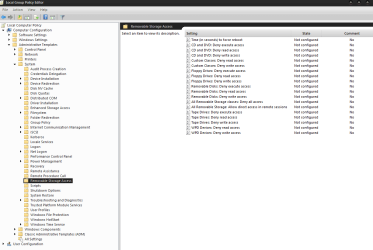
Look to see if you have any of these set. In User Config and Computer Config areas of the policy editor.
 

Attachments

  • restrictions.PNG
    restrictions.PNG
    27.1 KB · Views: 0

My Computer

Computer type
PC/Desktop
Computer Manufacturer/Model Number
Custom
OS
10 Pro x64
CPU
Ryzen 9 3900X
Motherboard
Asrock x370 Tachi
Memory
64GB(4x16GB) DDR4
Graphics Card(s)
EVGA 1080ti FTW3
Sound Card
ASUS Xonar Essence STX (V4 Bursons), ODAC rev B, NFB-11, O2
Monitor(s) Displays
3xASUS PB278Q/R, Optoma HD142X
Screen Resolution
3x1440p, 1080p
Hard Drives
512GB 850 EVO(OS, Programs)
4TB (Movies)
3TB (Downloads)
3TB (Programs)
1TB HDD (Games)
2x6TB R1 (videos)
PSU
AX760
Case
Fractal Define R5
Cooling
NH-D15S
Keyboard
Massdrop Ctrl with Box Navy's
Mouse
G903, Alioth XXL Mat
Internet Speed
280/40
Antivirus
MBAM, ESET
Browser
Canary 64 Bit
Other Info
I also own a Thinkpad P50 Xeon 4K, X220T, X1C5
Look to see if you have any of these set. In User Config and Computer Config areas of the policy editor.
No they are all okay. However, I mentioned I created HKEY_LOCAL_MACHINE\SYSTEM\CurrentControlSet\Control\StorageDevicePolicies - well, this was set to "1" not "0" - so I changed it and now have access to anything connected to USB. The built-in SD reader still won't write which may mean it is broken in some way.

I've not yet tried the CD/DVD writer, but I can live with how it is now. Even if I need to get an external CD/DVD.

I think I had 2 problems at the same time, the policy and the card reader fault.

Thanks for the suggestion.
 

My Computer

Computer type
Laptop
Computer Manufacturer/Model Number
Thinkpad T420
OS
Windows 7 Pro 64bit
CPU
Intel i5-2520M 2.5GHz
Memory
8GB
Monitor(s) Displays
23" Curved
Hard Drives
SSHD 2TB
Keyboard
MS Wired KB 600
Mouse
HP Wireless x4500
Internet Speed
~19Mb/s
Antivirus
Avast free
Browser
FF

My Computer

Computer type
PC/Desktop
Computer Manufacturer/Model Number
Custom
OS
10 Pro x64
CPU
Ryzen 9 3900X
Motherboard
Asrock x370 Tachi
Memory
64GB(4x16GB) DDR4
Graphics Card(s)
EVGA 1080ti FTW3
Sound Card
ASUS Xonar Essence STX (V4 Bursons), ODAC rev B, NFB-11, O2
Monitor(s) Displays
3xASUS PB278Q/R, Optoma HD142X
Screen Resolution
3x1440p, 1080p
Hard Drives
512GB 850 EVO(OS, Programs)
4TB (Movies)
3TB (Downloads)
3TB (Programs)
1TB HDD (Games)
2x6TB R1 (videos)
PSU
AX760
Case
Fractal Define R5
Cooling
NH-D15S
Keyboard
Massdrop Ctrl with Box Navy's
Mouse
G903, Alioth XXL Mat
Internet Speed
280/40
Antivirus
MBAM, ESET
Browser
Canary 64 Bit
Other Info
I also own a Thinkpad P50 Xeon 4K, X220T, X1C5
Yes, drivers should be okay, I used the Thinkpad update tool. Just to make sure I followed the link and did that too. I'm pretty confident it is probably the drive, as it's now hard to extract the cards, they are fowling on something, probably the read-only detector.

Edit, yes used the tool!
 

My Computer

Computer type
Laptop
Computer Manufacturer/Model Number
Thinkpad T420
OS
Windows 7 Pro 64bit
CPU
Intel i5-2520M 2.5GHz
Memory
8GB
Monitor(s) Displays
23" Curved
Hard Drives
SSHD 2TB
Keyboard
MS Wired KB 600
Mouse
HP Wireless x4500
Internet Speed
~19Mb/s
Antivirus
Avast free
Browser
FF
Oh I see you think it is flipping the read only switch on the cards, possible if the slot is bent.
 

My Computer

Computer type
PC/Desktop
Computer Manufacturer/Model Number
Custom
OS
10 Pro x64
CPU
Ryzen 9 3900X
Motherboard
Asrock x370 Tachi
Memory
64GB(4x16GB) DDR4
Graphics Card(s)
EVGA 1080ti FTW3
Sound Card
ASUS Xonar Essence STX (V4 Bursons), ODAC rev B, NFB-11, O2
Monitor(s) Displays
3xASUS PB278Q/R, Optoma HD142X
Screen Resolution
3x1440p, 1080p
Hard Drives
512GB 850 EVO(OS, Programs)
4TB (Movies)
3TB (Downloads)
3TB (Programs)
1TB HDD (Games)
2x6TB R1 (videos)
PSU
AX760
Case
Fractal Define R5
Cooling
NH-D15S
Keyboard
Massdrop Ctrl with Box Navy's
Mouse
G903, Alioth XXL Mat
Internet Speed
280/40
Antivirus
MBAM, ESET
Browser
Canary 64 Bit
Other Info
I also own a Thinkpad P50 Xeon 4K, X220T, X1C5
Back
Top