Solved Noisy multi speed Fan

N2Abyss

New member
Member
VIP
Local time
10:46 PM
Messages
172
Location
Central Wyoming
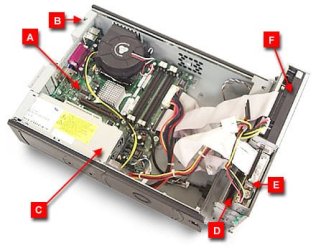
Hey guy's I may be way off base with this post here, but I have a old gateway E Series 4300 that I use as a backup box, and would like to find a solution to the noisy cooling system it sports. It's a SFF case with a noisy multi speed fan and I really don't want to go to all the trouble of moving everything to a bigger case! I thought with all the new technology in cooling there might be a solution utilizing the stock case?
Thanks in advance for any help!
N2
[SIZE=-1]gateway-e4300
[/SIZE]Windows XP Professional Service Pack 3
3.20 gigahertz Intel Pentium 4
16 kilobyte primary memory cache
1024 kilobyte secondary memory cache
Board: Intel Corporation D915GUX AAC85199-202
Bus Clock: 200 megahertz


My Computer

Computer type
PC/Desktop
Computer Manufacturer/Model Number
Gateway GT 5676
OS
Windows 7 Home premium 64bit SP 1
CPU
AMD Phenom Quad Core 9600 2.3 GHz
Motherboard
4006272R - Foxconn (Bengal) RS780 Motherboard
Memory
8GB of DDR2
Graphics Card(s)
Integrated ATI Radeon HD 3200 video /Sapphire Radeon HD 3470
Sound Card
Integrated ALC888S HD codec 7.1
Monitor(s) Displays
19" Samsung SyncMaster
Screen Resolution
1440x900
Hard Drives
One Internal Samsung 500GB SSD 850EVO
One Internal 320 GB 7200 RPM SATA II hard drives
One Toshiba 1TB External
PSU
Ultra LSP 650W
Case
Gateway 5-Bay uATX Computer Case (Carbon Fiber)
Cooling
CPU - Arctic Cooler Freezer 64
Keyboard
HP
Mouse
Logitech Laser
Internet Speed
Down 54.0Mbps Up 5.8Mbps Charter (Spectrum)
Antivirus
avast Pro
Browser
FireFox 40.02
Is it a PWM type fan?
 

My Computer

Computer Manufacturer/Model Number
Custom built machine
OS
W7 x64
CPU
Intel Q9300 2.5Ghz Quad LGA775 (Would like Q9650)
Motherboard
Gigabyte GA-EP45T-UD3R (F6 Bios)
Memory
4Gb OCZ Gold 1,333Mhz
Graphics Card(s)
Palit HD4850 O/C Sonic 512Mb DDR3, Dual DViD's
Sound Card
Azalia to twin Samson 50w Studio Monitors
Monitor(s) Displays
Twin Dell (E-IPS) U2311H 23.6" Screens
Screen Resolution
1920 x 1080 @ 60Hz
Hard Drives
Crucial M4 SSD, archives on twin Western Digital Caviar Black WD2002FAEX, 2TB, 7200rpm HDD's, Samsung Ritemaster CD/DVD Burner...
PSU
OCZ 600w
Case
Lian-Li PC8 acoustifoamed' aluminium tower
Cooling
Scythe 140mm Zipang
Keyboard
Cherry PS/2 custom model
Mouse
Lenovo USB laser "Thinkpad" Mouse
Internet Speed
ADSL2+ @14Mbps downstream & Cat6 Gigabit Ethernet
Antivirus
NOD32
Browser
Opera
Other Info
Silicon Dust HD Homerun Dual FTA (Ethernet) TV Tuners, Dray Tek Vigor 2850Vn router and 8x HP Gigabit Switch. Lian-Li CR26 Card Reader, Canon MF4430 iSensys laser printer/scanner.
Are you referring to an exhaust fan--on the rear of the case?

What diameter?

If the PC has no temperature issues and low-noise is your goal, I would look at a Scythe Slipstream, probably 800 RPM.

Nexus and Noctua make some good low-noise fans as well.

If you get above 1000 RPM, even low-noise fans become noticeable--it's a tradeoff between cooling requirements and the noise level you are willing to tolerate.

An SFF case may have a small diameter fan, which further complicates the issue--small fans have to spin faster to cool adequately and may be noisier than you would like.
 

My Computer

Computer type
PC/Desktop
Computer Manufacturer/Model Number
Ignatz Special; 4 speed manual gearbox; factory air conditioning; one of one
OS
Windows 7 Home Premium SP1, 64-bit
CPU
Intel Skylake i5-6600K, not overclocked
Motherboard
AsRock Z170M Extreme 4, micro ATX
Memory
8 GB HyperX DDR4-2666 (2 x 4 GB)
Graphics Card(s)
none; graphics are integrated on CPU
Sound Card
onboard: Realtek ALC1150; external: USB Behringer UF0-202
Monitor(s) Displays
Dell S2340M 23 inch IPS
Screen Resolution
1600 x 900
Hard Drives
System: Crucial MX100 series SSD, 128 GB;
Data: Samsung Spinpoint 103SJ, 1 TB;
Backup: WD Caviar Green WD30EZRX-00D8PB0, 3 TB
PSU
Rosewill SilentNight 500 watt fanless, semi-modular
Case
Antec Solo II
Cooling
Noctua NH-U12S; Noctua F12 intake, Noctua S12A exhaust
Keyboard
Microsoft 200 6JH-00001 USB
Mouse
Dell or Microsoft optical wired; USB
Antivirus
Microsoft Security Essentials and Malwarebytes Premium
Browser
Pale Moon
Other Info
All fans PWM; speeds at idle: CPU circa 500 rpm; intake circa 600 rpm; exhaust circa 600 rpm; CPU temps 27 idle and 47 C load in a warm room (27 C/81 F) when running Intel Extreme Tuning Utility stress test.
Don't know the particulars of the fan, but here is a picture of it...
 

Attachments

  • fan top view.jpg
    fan top view.jpg
    34.7 KB · Views: 28

My Computer

Computer type
PC/Desktop
Computer Manufacturer/Model Number
Gateway GT 5676
OS
Windows 7 Home premium 64bit SP 1
CPU
AMD Phenom Quad Core 9600 2.3 GHz
Motherboard
4006272R - Foxconn (Bengal) RS780 Motherboard
Memory
8GB of DDR2
Graphics Card(s)
Integrated ATI Radeon HD 3200 video /Sapphire Radeon HD 3470
Sound Card
Integrated ALC888S HD codec 7.1
Monitor(s) Displays
19" Samsung SyncMaster
Screen Resolution
1440x900
Hard Drives
One Internal Samsung 500GB SSD 850EVO
One Internal 320 GB 7200 RPM SATA II hard drives
One Toshiba 1TB External
PSU
Ultra LSP 650W
Case
Gateway 5-Bay uATX Computer Case (Carbon Fiber)
Cooling
CPU - Arctic Cooler Freezer 64
Keyboard
HP
Mouse
Logitech Laser
Internet Speed
Down 54.0Mbps Up 5.8Mbps Charter (Spectrum)
Antivirus
avast Pro
Browser
FireFox 40.02
That pic doesn't have any detail.

I still don't know if you are referring to an exhaust fan, an intake fan, a graphics card fan, or whatever.

Here is the user's manual:

http://support.gateway.com/s/Manuals/Desktops/e4300/9529609.pdf

But it doesn't have fan details as far as I can see.

It's up to you to better describe the fan. Otherwise, no one can help with a recommendation.
 

My Computer

Computer type
PC/Desktop
Computer Manufacturer/Model Number
Ignatz Special; 4 speed manual gearbox; factory air conditioning; one of one
OS
Windows 7 Home Premium SP1, 64-bit
CPU
Intel Skylake i5-6600K, not overclocked
Motherboard
AsRock Z170M Extreme 4, micro ATX
Memory
8 GB HyperX DDR4-2666 (2 x 4 GB)
Graphics Card(s)
none; graphics are integrated on CPU
Sound Card
onboard: Realtek ALC1150; external: USB Behringer UF0-202
Monitor(s) Displays
Dell S2340M 23 inch IPS
Screen Resolution
1600 x 900
Hard Drives
System: Crucial MX100 series SSD, 128 GB;
Data: Samsung Spinpoint 103SJ, 1 TB;
Backup: WD Caviar Green WD30EZRX-00D8PB0, 3 TB
PSU
Rosewill SilentNight 500 watt fanless, semi-modular
Case
Antec Solo II
Cooling
Noctua NH-U12S; Noctua F12 intake, Noctua S12A exhaust
Keyboard
Microsoft 200 6JH-00001 USB
Mouse
Dell or Microsoft optical wired; USB
Antivirus
Microsoft Security Essentials and Malwarebytes Premium
Browser
Pale Moon
Other Info
All fans PWM; speeds at idle: CPU circa 500 rpm; intake circa 600 rpm; exhaust circa 600 rpm; CPU temps 27 idle and 47 C load in a warm room (27 C/81 F) when running Intel Extreme Tuning Utility stress test.
Don't know the particulars of the fan, but here is a picture of it...

That looks like a 60mm 'snail' shrouded fan.

So, ignoring what I asked earlier, it's unlikely to be a PWM type.

It will be a two or three pin unit.

Unless you want to dremel the case and fit a grill, converting it to a larger diameter slow revving 'lift' type of fan you're stuck with a 60mm replacement.

You may find it's a specific manufacturers part, in order to fit within the shrouding.
 

My Computer

Computer Manufacturer/Model Number
Custom built machine
OS
W7 x64
CPU
Intel Q9300 2.5Ghz Quad LGA775 (Would like Q9650)
Motherboard
Gigabyte GA-EP45T-UD3R (F6 Bios)
Memory
4Gb OCZ Gold 1,333Mhz
Graphics Card(s)
Palit HD4850 O/C Sonic 512Mb DDR3, Dual DViD's
Sound Card
Azalia to twin Samson 50w Studio Monitors
Monitor(s) Displays
Twin Dell (E-IPS) U2311H 23.6" Screens
Screen Resolution
1920 x 1080 @ 60Hz
Hard Drives
Crucial M4 SSD, archives on twin Western Digital Caviar Black WD2002FAEX, 2TB, 7200rpm HDD's, Samsung Ritemaster CD/DVD Burner...
PSU
OCZ 600w
Case
Lian-Li PC8 acoustifoamed' aluminium tower
Cooling
Scythe 140mm Zipang
Keyboard
Cherry PS/2 custom model
Mouse
Lenovo USB laser "Thinkpad" Mouse
Internet Speed
ADSL2+ @14Mbps downstream & Cat6 Gigabit Ethernet
Antivirus
NOD32
Browser
Opera
Other Info
Silicon Dust HD Homerun Dual FTA (Ethernet) TV Tuners, Dray Tek Vigor 2850Vn router and 8x HP Gigabit Switch. Lian-Li CR26 Card Reader, Canon MF4430 iSensys laser printer/scanner.
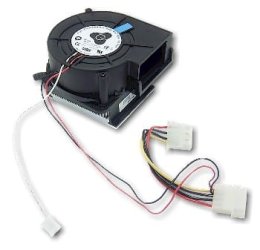
Sorry, this is as close as I can find,It looks to set over processor w/heat sink?

  • [FONT=&quot]e2100 / e4100 Hornet Cooling Fan with Heatsink[/FONT]
  • [FONT=&quot]Used on Gateway Desktop Computers with e2100 / e4100 Hornet Chassis[/FONT]
  • [FONT=&quot]Manufacturer - AVC Model F9733B12LE Dual Ball Bearing DC 12V, 0.72A[/FONT]
  • [FONT=&quot]Condition - Refurbished, 30 Day Warranty.[/FONT]
[FONT=&quot]Part Numbers: [/FONT][FONT=&quot]8006994, 8006995, 8008594, F9733B12LE
(Multiple P/N's are interchangeable and ship based on availability) [/FONT]
 

Attachments

  • Fan Part.jpg
    Fan Part.jpg
    12.3 KB · Views: 7

My Computer

Computer type
PC/Desktop
Computer Manufacturer/Model Number
Gateway GT 5676
OS
Windows 7 Home premium 64bit SP 1
CPU
AMD Phenom Quad Core 9600 2.3 GHz
Motherboard
4006272R - Foxconn (Bengal) RS780 Motherboard
Memory
8GB of DDR2
Graphics Card(s)
Integrated ATI Radeon HD 3200 video /Sapphire Radeon HD 3470
Sound Card
Integrated ALC888S HD codec 7.1
Monitor(s) Displays
19" Samsung SyncMaster
Screen Resolution
1440x900
Hard Drives
One Internal Samsung 500GB SSD 850EVO
One Internal 320 GB 7200 RPM SATA II hard drives
One Toshiba 1TB External
PSU
Ultra LSP 650W
Case
Gateway 5-Bay uATX Computer Case (Carbon Fiber)
Cooling
CPU - Arctic Cooler Freezer 64
Keyboard
HP
Mouse
Logitech Laser
Internet Speed
Down 54.0Mbps Up 5.8Mbps Charter (Spectrum)
Antivirus
avast Pro
Browser
FireFox 40.02
I have no idea if that Hornet fan is what you have, but..........if the Gateway has always been noisy, then the existing fan may be still performing well.

On the other hand, if the Gateway used to be quiet, but has recently become noisy, then maybe a replacement is worthwhile.

I'd be reluctant to fiddle with it unless you KNOW you have a proper replacement and unless you use the PC a lot and therefore have to listen to it constantly.

Any 60mm fan designed to cool a PC is likely to be high RPM and therefore noisy by definition.
 

My Computer

Computer type
PC/Desktop
Computer Manufacturer/Model Number
Ignatz Special; 4 speed manual gearbox; factory air conditioning; one of one
OS
Windows 7 Home Premium SP1, 64-bit
CPU
Intel Skylake i5-6600K, not overclocked
Motherboard
AsRock Z170M Extreme 4, micro ATX
Memory
8 GB HyperX DDR4-2666 (2 x 4 GB)
Graphics Card(s)
none; graphics are integrated on CPU
Sound Card
onboard: Realtek ALC1150; external: USB Behringer UF0-202
Monitor(s) Displays
Dell S2340M 23 inch IPS
Screen Resolution
1600 x 900
Hard Drives
System: Crucial MX100 series SSD, 128 GB;
Data: Samsung Spinpoint 103SJ, 1 TB;
Backup: WD Caviar Green WD30EZRX-00D8PB0, 3 TB
PSU
Rosewill SilentNight 500 watt fanless, semi-modular
Case
Antec Solo II
Cooling
Noctua NH-U12S; Noctua F12 intake, Noctua S12A exhaust
Keyboard
Microsoft 200 6JH-00001 USB
Mouse
Dell or Microsoft optical wired; USB
Antivirus
Microsoft Security Essentials and Malwarebytes Premium
Browser
Pale Moon
Other Info
All fans PWM; speeds at idle: CPU circa 500 rpm; intake circa 600 rpm; exhaust circa 600 rpm; CPU temps 27 idle and 47 C load in a warm room (27 C/81 F) when running Intel Extreme Tuning Utility stress test.
When was the last time you cleaned the fins and fan with compressed air? Likely the reason it's louder is because it's trying to push more air over dirty fins.
 

My Computer

Computer type
PC/Desktop
Computer Manufacturer/Model Number
A blend of brains, brawn and dumb luck.
OS
Windows 7 Ultimate 64
CPU
i7 3770k OC'd 4.6 @ 1.17v, also FX 8120 & i5 miniITX
Motherboard
MSI P67A-GD80 b3
Memory
32 gb G.Skill Sniper DDR3 10-12-12-31 @ 2133
Graphics Card(s)
XFX Radeon 7870 2GB DDR5
Sound Card
Sound Blaster Z Series Card
Monitor(s) Displays
(2) LG LED 23" 1920 x 1080 2ms Monitors via mini d-port
Screen Resolution
1680 X 1050 p
Hard Drives
Samsung 256 gb 830 SSD sata III
(1) 1 tb WD Black
(2) 1 tb Hitachi deskmates/sata II
(2) 1 tb WD green/sata II
(2) 3 tb Seagate Barracuda
(1) 120 gb OCZ Vertex SS
(1) Drobo 5N w/5 Seagate 3tb
PSU
EVGA modular 1000G2 80% gold rating & APC 1200 RS
Case
CoolerMaster Storm Styker
Cooling
7 case fans 140mm & 120mm, NZXT Kraken X60
Keyboard
(2) Logitech Illuminated Keyboards (1) usb (1) wireless
Mouse
Logitech G700 & T-BC21 - nano nx for the laptop
Internet Speed
Basic 120mbps down
Antivirus
Trend Micro Titanium Max Security & Malwarebytes Premium
Browser
Chrome and IE 10
Other Info
5 Noctua case fans + 3 Noctua in p/p on NZXT cooler
Integrated hot swap drive bays for 2.5" Drives
(2) Lite-on dvd/cd/Blu Ray optical 22X
Integrated fan controller and led on/off
HP Officejet Pro 8630 all-n-one
Hot-swappable 3.5" hard drive bay
Netgear Nighthawk router
Asus USB 3 & sata 6 PCIe card
Vantec IDE to sata adptr./Ultra sata adptr
Lenovo L420 i5 lappy with m sata
Drobo 5N advanced NAS

My Computer

Computer type
PC/Desktop
Computer Manufacturer/Model Number
Gateway GT 5676
OS
Windows 7 Home premium 64bit SP 1
CPU
AMD Phenom Quad Core 9600 2.3 GHz
Motherboard
4006272R - Foxconn (Bengal) RS780 Motherboard
Memory
8GB of DDR2
Graphics Card(s)
Integrated ATI Radeon HD 3200 video /Sapphire Radeon HD 3470
Sound Card
Integrated ALC888S HD codec 7.1
Monitor(s) Displays
19" Samsung SyncMaster
Screen Resolution
1440x900
Hard Drives
One Internal Samsung 500GB SSD 850EVO
One Internal 320 GB 7200 RPM SATA II hard drives
One Toshiba 1TB External
PSU
Ultra LSP 650W
Case
Gateway 5-Bay uATX Computer Case (Carbon Fiber)
Cooling
CPU - Arctic Cooler Freezer 64
Keyboard
HP
Mouse
Logitech Laser
Internet Speed
Down 54.0Mbps Up 5.8Mbps Charter (Spectrum)
Antivirus
avast Pro
Browser
FireFox 40.02
I'm sure you could relatively easily mount a slim 80~92mm fan to the case side, and use artic epoxy to glue on a heatsink to the CPU, and if you used the positive rails to rig that to 7 volts instead of 12 then you'd have a very much quieter solution - but I'd say you'd need to punch the case out for a grill in order to do that... but it'd make things a lot quieter :)
 

My Computer

Computer Manufacturer/Model Number
Custom built machine
OS
W7 x64
CPU
Intel Q9300 2.5Ghz Quad LGA775 (Would like Q9650)
Motherboard
Gigabyte GA-EP45T-UD3R (F6 Bios)
Memory
4Gb OCZ Gold 1,333Mhz
Graphics Card(s)
Palit HD4850 O/C Sonic 512Mb DDR3, Dual DViD's
Sound Card
Azalia to twin Samson 50w Studio Monitors
Monitor(s) Displays
Twin Dell (E-IPS) U2311H 23.6" Screens
Screen Resolution
1920 x 1080 @ 60Hz
Hard Drives
Crucial M4 SSD, archives on twin Western Digital Caviar Black WD2002FAEX, 2TB, 7200rpm HDD's, Samsung Ritemaster CD/DVD Burner...
PSU
OCZ 600w
Case
Lian-Li PC8 acoustifoamed' aluminium tower
Cooling
Scythe 140mm Zipang
Keyboard
Cherry PS/2 custom model
Mouse
Lenovo USB laser "Thinkpad" Mouse
Internet Speed
ADSL2+ @14Mbps downstream & Cat6 Gigabit Ethernet
Antivirus
NOD32
Browser
Opera
Other Info
Silicon Dust HD Homerun Dual FTA (Ethernet) TV Tuners, Dray Tek Vigor 2850Vn router and 8x HP Gigabit Switch. Lian-Li CR26 Card Reader, Canon MF4430 iSensys laser printer/scanner.
Noisy Multi Speed Snail fan

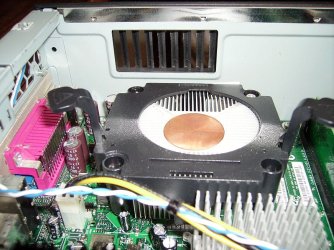
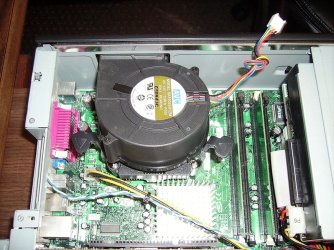
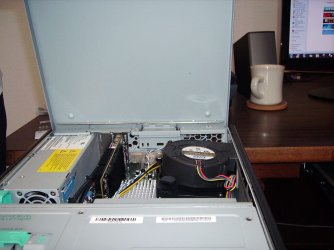
Qdos, I removed the stock fan and cleaned it, it really wasn't bad a little dusty and of course the dust that is always stuck on the fins, but not that bad. While apart I took a few pics so you could see the configuration. There is already a vent hole, which could be enlarged possibly with tin snips (so I wouldn't have to gut the box).
The present hole sits in the upper part of the case and it's dimensions are 2 5/8'" wide (66.7mm) x 1 1/4" (28.6mm) high. The dimension from the heat sink to the inside of the case is 3/8" (9.53mm) and from the top of the mother board to the top of the case 3 1/8" (79.4mm).

While it would nice to keep the case stock, as I was getting these pictures, It struck me, I have acres of room in the top or side removable cover (last Picture) that I could punch a hole in and mount almost any fan! Duh...
I wouldn't begin to know how to wire for the 7 volts you recommended, but if I went the route of mounting the fan in the removable case cover, would there be a quiet 12V fan out there and what brand would you recommend?
With the stock snail fan removed I have 1 3/4" (44.4mm) from the top of the heat sink to the inside of the cover.
Thanks....N2
 

Attachments

  • IMGP0424.JPG
    IMGP0424.JPG
    187.7 KB · Views: 3
  • IMGP0425.JPG
    IMGP0425.JPG
    137.6 KB · Views: 2
  • IMGP0426.JPG
    IMGP0426.JPG
    156.2 KB · Views: 3
  • IMGP0427.JPG
    IMGP0427.JPG
    84.1 KB · Views: 2
  • IMGP0428.JPG
    IMGP0428.JPG
    81.6 KB · Views: 2

My Computer

Computer type
PC/Desktop
Computer Manufacturer/Model Number
Gateway GT 5676
OS
Windows 7 Home premium 64bit SP 1
CPU
AMD Phenom Quad Core 9600 2.3 GHz
Motherboard
4006272R - Foxconn (Bengal) RS780 Motherboard
Memory
8GB of DDR2
Graphics Card(s)
Integrated ATI Radeon HD 3200 video /Sapphire Radeon HD 3470
Sound Card
Integrated ALC888S HD codec 7.1
Monitor(s) Displays
19" Samsung SyncMaster
Screen Resolution
1440x900
Hard Drives
One Internal Samsung 500GB SSD 850EVO
One Internal 320 GB 7200 RPM SATA II hard drives
One Toshiba 1TB External
PSU
Ultra LSP 650W
Case
Gateway 5-Bay uATX Computer Case (Carbon Fiber)
Cooling
CPU - Arctic Cooler Freezer 64
Keyboard
HP
Mouse
Logitech Laser
Internet Speed
Down 54.0Mbps Up 5.8Mbps Charter (Spectrum)
Antivirus
avast Pro
Browser
FireFox 40.02
If I understand you correctly, you are considering completely removing the CPU fan and then installing a case fan?

So you would have nothing directly cooling the CPU and would hope that the new case fan would adequately replace the removed CPU fan, with lower noise?

Would you be removing just a fan, or also a heatsink?

That might work, but I'd wonder about the resulting CPU temps.
 

My Computer

Computer type
PC/Desktop
Computer Manufacturer/Model Number
Ignatz Special; 4 speed manual gearbox; factory air conditioning; one of one
OS
Windows 7 Home Premium SP1, 64-bit
CPU
Intel Skylake i5-6600K, not overclocked
Motherboard
AsRock Z170M Extreme 4, micro ATX
Memory
8 GB HyperX DDR4-2666 (2 x 4 GB)
Graphics Card(s)
none; graphics are integrated on CPU
Sound Card
onboard: Realtek ALC1150; external: USB Behringer UF0-202
Monitor(s) Displays
Dell S2340M 23 inch IPS
Screen Resolution
1600 x 900
Hard Drives
System: Crucial MX100 series SSD, 128 GB;
Data: Samsung Spinpoint 103SJ, 1 TB;
Backup: WD Caviar Green WD30EZRX-00D8PB0, 3 TB
PSU
Rosewill SilentNight 500 watt fanless, semi-modular
Case
Antec Solo II
Cooling
Noctua NH-U12S; Noctua F12 intake, Noctua S12A exhaust
Keyboard
Microsoft 200 6JH-00001 USB
Mouse
Dell or Microsoft optical wired; USB
Antivirus
Microsoft Security Essentials and Malwarebytes Premium
Browser
Pale Moon
Other Info
All fans PWM; speeds at idle: CPU circa 500 rpm; intake circa 600 rpm; exhaust circa 600 rpm; CPU temps 27 idle and 47 C load in a warm room (27 C/81 F) when running Intel Extreme Tuning Utility stress test.
Not knowing much about this, I thought, leave the stock heat sink and mount a fan above, I think that's going to be the simplest.
I doing some research, I found a Cooler Master SLC-S41-U1-GP, that would replace the heat sink and fan, then I guess I would just have to cut a vent hole above it? This would probably be the best idea,
but the way I use this box, the exhaust would always be facing up and would be prone to collect falling dust!

I have no idea what I'm looking for, but the present fan is a four pin 12V and after all this work would want something quiet.
I will try to find a sone or decibel level for the stock fan.
Thanks...N2
 

My Computer

Computer type
PC/Desktop
Computer Manufacturer/Model Number
Gateway GT 5676
OS
Windows 7 Home premium 64bit SP 1
CPU
AMD Phenom Quad Core 9600 2.3 GHz
Motherboard
4006272R - Foxconn (Bengal) RS780 Motherboard
Memory
8GB of DDR2
Graphics Card(s)
Integrated ATI Radeon HD 3200 video /Sapphire Radeon HD 3470
Sound Card
Integrated ALC888S HD codec 7.1
Monitor(s) Displays
19" Samsung SyncMaster
Screen Resolution
1440x900
Hard Drives
One Internal Samsung 500GB SSD 850EVO
One Internal 320 GB 7200 RPM SATA II hard drives
One Toshiba 1TB External
PSU
Ultra LSP 650W
Case
Gateway 5-Bay uATX Computer Case (Carbon Fiber)
Cooling
CPU - Arctic Cooler Freezer 64
Keyboard
HP
Mouse
Logitech Laser
Internet Speed
Down 54.0Mbps Up 5.8Mbps Charter (Spectrum)
Antivirus
avast Pro
Browser
FireFox 40.02
Not knowing much about this, I thought, leave the stock heat sink and mount a fan above, I think that's going to be the simplest.
I doing some research, I found a Cooler Master SLC-S41-U1-GP, that would replace the heat sink and fan, then I guess I would just have to cut a vent hole above it? This would probably be the best idea,

If this Coolermaster you found is a CPU cooler per se, a direct replacement that mounts on the CPU itself--not on the case---I wouldn't think that a vent hole would be much additional help. And the Coolermaster might not be any quieter than what you have now.

You might (??) be able to find a fanless large heat sink that would mount directly on the CPU, and then maybe add a large diameter (92 mm or 120mm) relatively slow RPM (under 2000) case fan nearby--but you may have to cut a hole in the case to mount this new case fan?
 

My Computer

Computer type
PC/Desktop
Computer Manufacturer/Model Number
Ignatz Special; 4 speed manual gearbox; factory air conditioning; one of one
OS
Windows 7 Home Premium SP1, 64-bit
CPU
Intel Skylake i5-6600K, not overclocked
Motherboard
AsRock Z170M Extreme 4, micro ATX
Memory
8 GB HyperX DDR4-2666 (2 x 4 GB)
Graphics Card(s)
none; graphics are integrated on CPU
Sound Card
onboard: Realtek ALC1150; external: USB Behringer UF0-202
Monitor(s) Displays
Dell S2340M 23 inch IPS
Screen Resolution
1600 x 900
Hard Drives
System: Crucial MX100 series SSD, 128 GB;
Data: Samsung Spinpoint 103SJ, 1 TB;
Backup: WD Caviar Green WD30EZRX-00D8PB0, 3 TB
PSU
Rosewill SilentNight 500 watt fanless, semi-modular
Case
Antec Solo II
Cooling
Noctua NH-U12S; Noctua F12 intake, Noctua S12A exhaust
Keyboard
Microsoft 200 6JH-00001 USB
Mouse
Dell or Microsoft optical wired; USB
Antivirus
Microsoft Security Essentials and Malwarebytes Premium
Browser
Pale Moon
Other Info
All fans PWM; speeds at idle: CPU circa 500 rpm; intake circa 600 rpm; exhaust circa 600 rpm; CPU temps 27 idle and 47 C load in a warm room (27 C/81 F) when running Intel Extreme Tuning Utility stress test.
If you have that much clearance I'd just check an 80mm x 25mm (slimline) fan has the same screw hole patterns as your heatsink, and bolt it on there without the plastic shroud. You will need some longer screws, which are trimmed so as not to be over-length.

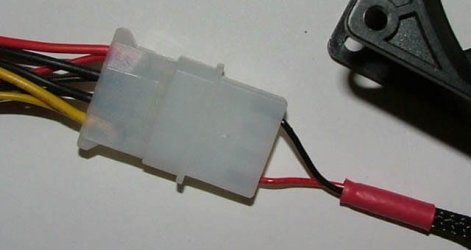
You can seven volt the fan by powering it from the +12v and +5v rails (just requires a multimeter to check which is which) and monitor CPU temps for a time without knocking a hole through the case.

I'd also clean up the heatsink and CPU die, and bed it back down using Arctic Céramique thermal paste instead of the OEM paste or a thermal pad.

If temps rise then cut a hole over the fan, and fit a case grille. There is no reason the fan cannot be set to pick up air through the heatsink instead of blowing down into the heatsink.

CPU wise it will hang on what the thermal rating of the CPU actually is. If that's a socket 478 Intel CPU then this will depend on whether it's the cooler running Northwood type processor; or the hotter Prescott chip.

Fan wise Scythe make some very quiet, reliable units. So do Noctua, just as a heads up. Costs of all this will be relatively tiny too - and it will certainly be far less noisy than at present.
 

My Computer

Computer Manufacturer/Model Number
Custom built machine
OS
W7 x64
CPU
Intel Q9300 2.5Ghz Quad LGA775 (Would like Q9650)
Motherboard
Gigabyte GA-EP45T-UD3R (F6 Bios)
Memory
4Gb OCZ Gold 1,333Mhz
Graphics Card(s)
Palit HD4850 O/C Sonic 512Mb DDR3, Dual DViD's
Sound Card
Azalia to twin Samson 50w Studio Monitors
Monitor(s) Displays
Twin Dell (E-IPS) U2311H 23.6" Screens
Screen Resolution
1920 x 1080 @ 60Hz
Hard Drives
Crucial M4 SSD, archives on twin Western Digital Caviar Black WD2002FAEX, 2TB, 7200rpm HDD's, Samsung Ritemaster CD/DVD Burner...
PSU
OCZ 600w
Case
Lian-Li PC8 acoustifoamed' aluminium tower
Cooling
Scythe 140mm Zipang
Keyboard
Cherry PS/2 custom model
Mouse
Lenovo USB laser "Thinkpad" Mouse
Internet Speed
ADSL2+ @14Mbps downstream & Cat6 Gigabit Ethernet
Antivirus
NOD32
Browser
Opera
Other Info
Silicon Dust HD Homerun Dual FTA (Ethernet) TV Tuners, Dray Tek Vigor 2850Vn router and 8x HP Gigabit Switch. Lian-Li CR26 Card Reader, Canon MF4430 iSensys laser printer/scanner.
Qdos, I'm lost about the +12v and +5V rails? Are you talking about the four post pin connection that is mounted to the moBoard?
I have never delt with mounting a CPU, so how does one go about cleaning the old paste off in a safe manner?
Where do I aquire the "Arctic Céramique thermal paste" and how much is to be used?
Also any shopping sites you can recommend for the fan and paste?
Last question, how do I go about monitoring case temps?
 

My Computer

Computer type
PC/Desktop
Computer Manufacturer/Model Number
Gateway GT 5676
OS
Windows 7 Home premium 64bit SP 1
CPU
AMD Phenom Quad Core 9600 2.3 GHz
Motherboard
4006272R - Foxconn (Bengal) RS780 Motherboard
Memory
8GB of DDR2
Graphics Card(s)
Integrated ATI Radeon HD 3200 video /Sapphire Radeon HD 3470
Sound Card
Integrated ALC888S HD codec 7.1
Monitor(s) Displays
19" Samsung SyncMaster
Screen Resolution
1440x900
Hard Drives
One Internal Samsung 500GB SSD 850EVO
One Internal 320 GB 7200 RPM SATA II hard drives
One Toshiba 1TB External
PSU
Ultra LSP 650W
Case
Gateway 5-Bay uATX Computer Case (Carbon Fiber)
Cooling
CPU - Arctic Cooler Freezer 64
Keyboard
HP
Mouse
Logitech Laser
Internet Speed
Down 54.0Mbps Up 5.8Mbps Charter (Spectrum)
Antivirus
avast Pro
Browser
FireFox 40.02
Qdos, I'm lost about the +12v and +5V rails? Are you talking about the four post pin connection that is mounted to the moBoard?

Attach a picture of how to get 7v to a fan from any molex block. However if you were to buy a 800rpm 12v unit it'd be unnecessary (my thinking is buy a faster one, say 1,500rpm, use 7v on it... and you can always revert to 12v to gain more cooling if needs be...)

I have never delt with mounting a CPU, so how does one go about cleaning the old paste off in a safe manner?

Personally I use ordinary rubbing alcohol, or pure cellulose thinners. You can buy a solvent from computer stores for a hugely inflated price, but it does not do any better a job ;)

Where do I aquire the "Arctic Céramique thermal paste" and how much is to be used? Also any shopping sites you can recommend for the fan and paste?

I'm not in the USA, but take a look at Kustom PC's website. It'll give you an idea of the sorts of mods and accessories that can be found - although all your US stock tends to cost less than we pay over here for the same...

Kustom - Gaming | Modding | Lifestyle

Thermal paste needs to be spread thinly. A blob about the size of a small pea is as much as is usually needed.

Last question, how do I go about monitoring case temps?

A little freeware program called CoreTemp should take care of that, but there are loads of alternative freeware temperature monitors... :cool:

Core Temp
 

Attachments

  • 7v Fans.jpg
    7v Fans.jpg
    21.9 KB · Views: 2

My Computer

Computer Manufacturer/Model Number
Custom built machine
OS
W7 x64
CPU
Intel Q9300 2.5Ghz Quad LGA775 (Would like Q9650)
Motherboard
Gigabyte GA-EP45T-UD3R (F6 Bios)
Memory
4Gb OCZ Gold 1,333Mhz
Graphics Card(s)
Palit HD4850 O/C Sonic 512Mb DDR3, Dual DViD's
Sound Card
Azalia to twin Samson 50w Studio Monitors
Monitor(s) Displays
Twin Dell (E-IPS) U2311H 23.6" Screens
Screen Resolution
1920 x 1080 @ 60Hz
Hard Drives
Crucial M4 SSD, archives on twin Western Digital Caviar Black WD2002FAEX, 2TB, 7200rpm HDD's, Samsung Ritemaster CD/DVD Burner...
PSU
OCZ 600w
Case
Lian-Li PC8 acoustifoamed' aluminium tower
Cooling
Scythe 140mm Zipang
Keyboard
Cherry PS/2 custom model
Mouse
Lenovo USB laser "Thinkpad" Mouse
Internet Speed
ADSL2+ @14Mbps downstream & Cat6 Gigabit Ethernet
Antivirus
NOD32
Browser
Opera
Other Info
Silicon Dust HD Homerun Dual FTA (Ethernet) TV Tuners, Dray Tek Vigor 2850Vn router and 8x HP Gigabit Switch. Lian-Li CR26 Card Reader, Canon MF4430 iSensys laser printer/scanner.
I have never delt with mounting a CPU, so how does one go about cleaning the old paste off in a safe manner?

Where do I aquire the "Arctic Céramique thermal paste" and how much is to be used?

Also any shopping sites you can recommend for the fan and paste?

Last question, how do I go about monitoring case temps?

You can use q-tips and alcohol, be careful not to leak any off the side of the CPU down into the socket. Take your time and be thorough.

Thermal paste probably isn't sold in Meeteetse or Worland. Maybe not even in Thermop or Riverton. Radio Shack may carry thermal paste. Pretty much any will do--"Arctic Silver 5" is a common and good paste. As a last resort, go online and buy it from Newegg.com

Newegg for fans also. Post back in this thread once you know your fan needs--diameter, etc.

HWInfo32 is a good downloadable app to monitor temps and fan speeds.

You need to use very little paste. Likely no more than a BB sized drop.

Consult arcticsilver.com for their recommendations for your particular processor. It varies a bit, depending which you have. Some its best to put a drop; others a thin line, etc.

7-volting a fan is usually used to slow it down and thereby reduce noise. It's likely not needed if you buy a quality low noise fan of the right RPM to begin with.
 

My Computer

Computer type
PC/Desktop
Computer Manufacturer/Model Number
Ignatz Special; 4 speed manual gearbox; factory air conditioning; one of one
OS
Windows 7 Home Premium SP1, 64-bit
CPU
Intel Skylake i5-6600K, not overclocked
Motherboard
AsRock Z170M Extreme 4, micro ATX
Memory
8 GB HyperX DDR4-2666 (2 x 4 GB)
Graphics Card(s)
none; graphics are integrated on CPU
Sound Card
onboard: Realtek ALC1150; external: USB Behringer UF0-202
Monitor(s) Displays
Dell S2340M 23 inch IPS
Screen Resolution
1600 x 900
Hard Drives
System: Crucial MX100 series SSD, 128 GB;
Data: Samsung Spinpoint 103SJ, 1 TB;
Backup: WD Caviar Green WD30EZRX-00D8PB0, 3 TB
PSU
Rosewill SilentNight 500 watt fanless, semi-modular
Case
Antec Solo II
Cooling
Noctua NH-U12S; Noctua F12 intake, Noctua S12A exhaust
Keyboard
Microsoft 200 6JH-00001 USB
Mouse
Dell or Microsoft optical wired; USB
Antivirus
Microsoft Security Essentials and Malwarebytes Premium
Browser
Pale Moon
Other Info
All fans PWM; speeds at idle: CPU circa 500 rpm; intake circa 600 rpm; exhaust circa 600 rpm; CPU temps 27 idle and 47 C load in a warm room (27 C/81 F) when running Intel Extreme Tuning Utility stress test.
OK, so rather than plugging this fan into the four post pin attachment on the mother board, I would just utilize an extra molex power connector? could it be any power connector from the power supply?

The fan I was considering was the Scythe S-FLEX SFF80D 80 x 80 x 25mm Fan w/ S-FDB Bearing (2800rpm)

Part Number: SFF80D
RPM: 2800+-420
Noise Level: 32.4 dB
Air Flow: 40.2 CFM
Rated Current: 0.20 A
MTBF: 150,000 hrs
Rated Voltage: 12v

Does this seem OK? or to fast? it is listed as a 12v so it should plug right in, but whats the advantage to 7v over 12v?

Would you go with a "fan siliencer" (Gasket between the fan and heat sink?)

Stock operating temperature specifications show 10° to 32°C (50° to 90°F) does this sound right? I will load the program you spoke of and see where I am now.

I have included a word doc of my shopping list, incase I have forgotten anything.
Thanks again for all the help!
I really appreciate it!.......N2
 

Attachments

My Computer

Computer type
PC/Desktop
Computer Manufacturer/Model Number
Gateway GT 5676
OS
Windows 7 Home premium 64bit SP 1
CPU
AMD Phenom Quad Core 9600 2.3 GHz
Motherboard
4006272R - Foxconn (Bengal) RS780 Motherboard
Memory
8GB of DDR2
Graphics Card(s)
Integrated ATI Radeon HD 3200 video /Sapphire Radeon HD 3470
Sound Card
Integrated ALC888S HD codec 7.1
Monitor(s) Displays
19" Samsung SyncMaster
Screen Resolution
1440x900
Hard Drives
One Internal Samsung 500GB SSD 850EVO
One Internal 320 GB 7200 RPM SATA II hard drives
One Toshiba 1TB External
PSU
Ultra LSP 650W
Case
Gateway 5-Bay uATX Computer Case (Carbon Fiber)
Cooling
CPU - Arctic Cooler Freezer 64
Keyboard
HP
Mouse
Logitech Laser
Internet Speed
Down 54.0Mbps Up 5.8Mbps Charter (Spectrum)
Antivirus
avast Pro
Browser
FireFox 40.02
Back
Top