JavaScript is disabled. For a better experience, please enable JavaScript in your browser before proceeding.
You are using an out of date browser. It may not display this or other websites correctly.
You should upgrade or use an
alternative browser .
Non executable drivers in compatibility mode
מעשוגע פ
Guru
I'm trying to resolve an issue I've previously posted about
here .
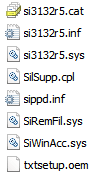
I'm wondering if there is a way to install non-executable drivers in compatibility mode. The drivers I'm using look like this:
Computer Manufacturer/Model Number Apple Macbook Pro (April 2009) OS W7 Ult. x64 | OS X CPU Intel Mobile Core 2 Duo 2.93Ghz [T9800 Penryn] Motherboard NVIDIA nForce 730i Rev. B1 [Mac-F2268EC8 (U2E1)] Memory 4096MB Samsung DDR3 Dual Channel [PC3-8500F 1066Mhz] Graphics Card(s) NVIDIA GeForce 9600M GT 512MB [G96M Rev. C1] Sound Card SB X-Fi Surround 5.1 USB | Onboard Realtek (Disabled) Monitor(s) Displays Acer x223wbd 22" | Apple Anti-Glare 17" (Disabled) Screen Resolution {Current} 1440x900 {Acer} 1680x1050 {Apple} 1920x1200 Hard Drives {Internal} PSU Magsafe Case Aluminum/Unibody (MBP52) Cooling 2 x 6000 RPM Fans Keyboard Logitech G-15v2 [PN 920-000379] Mouse Logitech G-9 [PN 910-000338] Internet Speed 12Mbps/2.5Mbps w/ 24Mbps Speed Boost [Comcast] Other Info Logitech X-540 Speakers [PN 970223-0122]
I'm trying to resolve an issue I've previously posted about
here .
I'm wondering if there is a way to install non-executable drivers in compatibility mode. The drivers I'm using look like this:
View attachment 66272
I am unsure that those drivers (non signed) can be installed at all. After all it is a mac.
Computer Manufacturer/Model Number HP Pavillion dv-7 1005 Tx OS Win 8 Release candidate 8400 CPU [email protected] Memory 4 gigs Graphics Card(s) Nvidia 9600M Sound Card HD built-in Monitor(s) Displays 17" Wxga Screen Resolution 1440x900 Cooling none Internet Speed 45Mb down 5Mb up
מעשוגע פ
Guru
Thread Starter
They can be installed, I've done it multiple times. There's also an Autorun.INF and ICO file in the top directory (two above that folder).
Here's a link to the drivers in question, they're the x64 ones.
http://www.sonnettech.com/support/downloads/software/TSATAII-E342P_win_v1.5.16.0.zip
BTW, 99% of the time using a mac makes no difference at all. All of my hardware is compatible with Windows natively other than a few small things like iSight and my onboard keyboard/mouse. The K&M even function minimally without drivers. The only portion of my computer that is completely foreign to Windows is the EFI aka BIOS.
Computer Manufacturer/Model Number Apple Macbook Pro (April 2009) OS W7 Ult. x64 | OS X CPU Intel Mobile Core 2 Duo 2.93Ghz [T9800 Penryn] Motherboard NVIDIA nForce 730i Rev. B1 [Mac-F2268EC8 (U2E1)] Memory 4096MB Samsung DDR3 Dual Channel [PC3-8500F 1066Mhz] Graphics Card(s) NVIDIA GeForce 9600M GT 512MB [G96M Rev. C1] Sound Card SB X-Fi Surround 5.1 USB | Onboard Realtek (Disabled) Monitor(s) Displays Acer x223wbd 22" | Apple Anti-Glare 17" (Disabled) Screen Resolution {Current} 1440x900 {Acer} 1680x1050 {Apple} 1920x1200 Hard Drives {Internal} PSU Magsafe Case Aluminum/Unibody (MBP52) Cooling 2 x 6000 RPM Fans Keyboard Logitech G-15v2 [PN 920-000379] Mouse Logitech G-9 [PN 910-000338] Internet Speed 12Mbps/2.5Mbps w/ 24Mbps Speed Boost [Comcast] Other Info Logitech X-540 Speakers [PN 970223-0122]