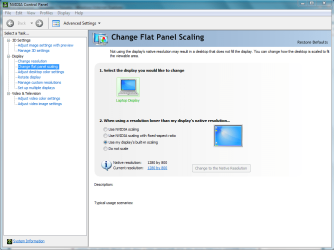
When I use non-native resolution I have black borders around the game.
What can I do to so that my game stretch to full screen.
I found this, but i dont have this option on my Nvidia CPL
http://i911.photobucket.com/albums/ac320/warlocklw/9-2-200911-14-49PM.png
Like this(but in games)
http://theonbutton.files.wordpress.com/2010/05/p1020985.jpg?w=499&h=281
What can I do to so that my game stretch to full screen.
I found this, but i dont have this option on my Nvidia CPL
http://i911.photobucket.com/albums/ac320/warlocklw/9-2-200911-14-49PM.png
Like this(but in games)
http://theonbutton.files.wordpress.com/2010/05/p1020985.jpg?w=499&h=281
My Computer
- Computer type
- PC/Desktop
- Computer Manufacturer/Model Number
- Custom build
- OS
- Windows 7 SP1 x64 Ultimate
- CPU
- FX 8320 4ghz
- Motherboard
- Gigabyte 970A UD3P
- Memory
- Crucial Ballistix Tactical 8GB 240-Pin DDR3 1600 Mhz
- Graphics Card(s)
- Sapphire R9 270 Dual X
- Sound Card
- VIA HD Audio
- Monitor(s) Displays
- Samsung SyncMaster 2032BW
- Screen Resolution
- 1680 * 1050
- Hard Drives
- WD Blue WD10EZEX
- PSU
- Energon 650w
- Case
- Aerocool Strike X One
- Cooling
- Xigmatek Dark Knight SD1283 Night Hawk Edition
- Keyboard
- Typhoon CarbonKey
- Mouse
- Trust GXT 25 Gaming Mouse
- Internet Speed
- 120mb/4mb
- Antivirus
- Comodo Internet Security 8.1
- Browser
- Firefox
- Other Info
- CfosSpeed 10