
Non OS Hard Drive Transfer

Muilisx

New member
Local time
1:10 AM
Messages
26
Location
Long Island
Alright so I decided to warranty the drive that gave me an issue yesterday because after doing a CHKDSK it had some unreadable sectors. I want to transfer everything off to the new one before it's too late.

Since this drive is just a storage drive and DOES NOT have the OS on it can I simply just plug it in, add it as a new volume, and just drag, and drop everything from the other drive on it? Then once it's done, just change the letter of the drive to the letter of the other one, and be done? Or, is there another faster way I should be copying everything over to the new drive?

Thanks
 

My Computer

Computer type
PC/Desktop
Computer Manufacturer/Model Number
Custom Build
OS
Windows 7 64-Bit
CPU
AMD Athlon X4 760K 3.8Ghz
Motherboard
MSI FM2-A75MA-E35
Memory
Kingston 8GB DDR3 PC3-12800
Graphics Card(s)
AMD Radeon R7 200 2GB GDDR5
Sound Card
Onboard
Monitor(s) Displays
Acer 24" LED HDMI
Screen Resolution
1920X1080
Hard Drives
Samsung 840 Evo 128GB SSD ( OS )
WD Black 1TB 7200RPM 16MB Cache ( Main Storage Drive )
HGST 500GB 5400RPM 8MB Cache ( 2nd Hard Drive From PS4 )
PSU
Insignia 400W
Case
Thermaltake V3 Black Edition
Cooling
Stock
Keyboard
Logitech K120
Mouse
Zelotes Gaming Mouse
Internet Speed
T-Mobile Tethering
Antivirus
ESET NOD32 + Malwarebytes Pro (All You Need + Common Sense)
Browser
Firefox 64-Bit
Other Info
This is a low / mid gaming rig which cost about $450 to build, and I LOVE IT. It does what I need it to do. I don't feel the need to drop $3,000 on a computer. I get 60FPS in WoW, and around the same in other games on mid settings, and I'm OK with that. However, my next build I plan to spend closer to a grand.
If there's not to much data on it, just create a folder on your OS drive, copy the contents and when your new one turns up just send it there.

As it has bad sectors DO NOT copy/clone the COMPLETE drive as they will be moved as well.

Roy
 

My Computer

Computer type
PC/Desktop
Computer Manufacturer/Model Number
medionl/Aspire 6930G/acer x55a
OS
W7 home premium 32bit/W7HP 64bit/w10 tp insider ring
CPU
E5300 dual core
Motherboard
medion MS7366
Memory
3gb
Graphics Card(s)
Nvidia Geforce 7100 Nforce 630i
Monitor(s) Displays
avixc
Internet Speed
n (isp resticted to 72)
Antivirus
mse/pands
Browser
palemoon
Other Info
Belkin Fd7050 n USB using Railink RT2870 drivers, more upto date
If there's not to much data on it, just create a folder on your OS drive, copy the contents and when your new one turns up just send it there.

As it has bad sectors DO NOT copy/clone the COMPLETE drive as they will be moved as well.

Roy

Yes there's a lot of data on it. There's 623GB of data on it. Games, applications, videos, music, pictures which all need to be moved over which is why I was asking if I can just drag and drop everything, and reassign the drive letter so the paths are all the same.

I can't create a folder on my OS drive. My OS drive is a 120GB SSD. Even if my OS drive had the room I wouldn't transfer all that stuff over to it, and then move it to the new drive. That's double the work. If I'm going to just copy everything over then I'll plug up the new drive , set it as a new volume, drag and drop everything over, and reassign the drive letter. Shut down, remove the defected drive, put the new one in its place, and start it back up.

I was just assuming there was a better way to copy it over without dragging and dropping as that will take hours.

When you say the COMPLETE drive what exactly do you mean? Like do a clone / image of the drive? I need to be able to move over every single file that is on there so I guess drag and drop is my only choice. I would really hate to have to reinstall everything from scratch which is what I'm trying to avoid.

If worse comes to worst I will just copy over my documents, pictures, and videos, and create a list of all the applications I have installed. I will then install the applications one by one which I really don't want to do but if that's the case then so be it. I just don't know how that will work because when you install applications on a non OS drive it still copies information to the OS drive so not sure how reinstalling stuff on a new storage drive would effect the information on the OS drive. Would it just overwrite it? I really just want to be able to drag and drop everything.

I just googled it and I'm reading that bad sectors are NOT copied that bad sectors are property of the physical material in the drive
 

My Computer

Computer type
PC/Desktop
Computer Manufacturer/Model Number
Custom Build
OS
Windows 7 64-Bit
CPU
AMD Athlon X4 760K 3.8Ghz
Motherboard
MSI FM2-A75MA-E35
Memory
Kingston 8GB DDR3 PC3-12800
Graphics Card(s)
AMD Radeon R7 200 2GB GDDR5
Sound Card
Onboard
Monitor(s) Displays
Acer 24" LED HDMI
Screen Resolution
1920X1080
Hard Drives
Samsung 840 Evo 128GB SSD ( OS )
WD Black 1TB 7200RPM 16MB Cache ( Main Storage Drive )
HGST 500GB 5400RPM 8MB Cache ( 2nd Hard Drive From PS4 )
PSU
Insignia 400W
Case
Thermaltake V3 Black Edition
Cooling
Stock
Keyboard
Logitech K120
Mouse
Zelotes Gaming Mouse
Internet Speed
T-Mobile Tethering
Antivirus
ESET NOD32 + Malwarebytes Pro (All You Need + Common Sense)
Browser
Firefox 64-Bit
Other Info
This is a low / mid gaming rig which cost about $450 to build, and I LOVE IT. It does what I need it to do. I don't feel the need to drop $3,000 on a computer. I get 60FPS in WoW, and around the same in other games on mid settings, and I'm OK with that. However, my next build I plan to spend closer to a grand.
May I suggest an alternative? Download Macrium Reflect and create a Macrium Reflect usb or dvd boot [best to do this on another computer]. Have MR do a full image [do not check sector copy] on your data partition onto any reliable external media. Then, restore said full image onto your replacement HD. Now, if your data folders and files reside on the same partition as your OS on the source problematic HD --- then you're going to have to find a free utility that will do data folders instead of a full image. I think I remember reading EaseUS or AOMEI has freeware that will do data folders instead of only full images.
 

My Computer

Computer type
PC/Desktop
Computer Manufacturer/Model Number
Antec desktop; Acer Aspire laptops
OS
Windows 7 Professional 64-bit
CPU
Desktop i5; Acers i5 & i7
Memory
desktop 16GB; 1 Acer 8GB & 1 Acer 16GB
Hard Drives
1TB split into 2 equal partitions [OS and data] usable by RJS
Internet Speed
AT&T DSL
Browser
FF, GChrome, msIE
Other Info
Windows 7 Firewall, Emsisoft AM/AV, MSE [scan-only], SpywareBlaster, Ruiware/BillP combine
May I suggest an alternative? Download Macrium Reflect and create a Macrium Reflect usb or dvd boot [best to do this on another computer]. Have MR do a full image [do not check sector copy] on your data partition onto any reliable external media. Then, restore said full image onto your replacement HD. Now, if your data folders and files reside on the same partition as your OS on the source problematic HD --- then you're going to have to find a free utility that will do data folders instead of a full image. I think I remember reading EaseUS or AOMEI has freeware that will do data folders instead of only full images.

In my OP i state that my OS is NOT on this drive. It's just applications, documents, pictures, and videos.

I do not have an external USB hard drive nor another computer.

That is why I mentioned copying it over and reassigning the letter to what the old drive is.

I did download Macrium to have a look at it and there is a clone and image option but I would need the replacement drive hooked up which I don't have yet. However, the other member said the bad sectors would copy as well but I'm finding conflicting information on that.
 

My Computer

Computer type
PC/Desktop
Computer Manufacturer/Model Number
Custom Build
OS
Windows 7 64-Bit
CPU
AMD Athlon X4 760K 3.8Ghz
Motherboard
MSI FM2-A75MA-E35
Memory
Kingston 8GB DDR3 PC3-12800
Graphics Card(s)
AMD Radeon R7 200 2GB GDDR5
Sound Card
Onboard
Monitor(s) Displays
Acer 24" LED HDMI
Screen Resolution
1920X1080
Hard Drives
Samsung 840 Evo 128GB SSD ( OS )
WD Black 1TB 7200RPM 16MB Cache ( Main Storage Drive )
HGST 500GB 5400RPM 8MB Cache ( 2nd Hard Drive From PS4 )
PSU
Insignia 400W
Case
Thermaltake V3 Black Edition
Cooling
Stock
Keyboard
Logitech K120
Mouse
Zelotes Gaming Mouse
Internet Speed
T-Mobile Tethering
Antivirus
ESET NOD32 + Malwarebytes Pro (All You Need + Common Sense)
Browser
Firefox 64-Bit
Other Info
This is a low / mid gaming rig which cost about $450 to build, and I LOVE IT. It does what I need it to do. I don't feel the need to drop $3,000 on a computer. I get 60FPS in WoW, and around the same in other games on mid settings, and I'm OK with that. However, my next build I plan to spend closer to a grand.
so....clone or drag n drop????
 

My Computer

Computer type
PC/Desktop
Computer Manufacturer/Model Number
Custom Build
OS
Windows 7 64-Bit
CPU
AMD Athlon X4 760K 3.8Ghz
Motherboard
MSI FM2-A75MA-E35
Memory
Kingston 8GB DDR3 PC3-12800
Graphics Card(s)
AMD Radeon R7 200 2GB GDDR5
Sound Card
Onboard
Monitor(s) Displays
Acer 24" LED HDMI
Screen Resolution
1920X1080
Hard Drives
Samsung 840 Evo 128GB SSD ( OS )
WD Black 1TB 7200RPM 16MB Cache ( Main Storage Drive )
HGST 500GB 5400RPM 8MB Cache ( 2nd Hard Drive From PS4 )
PSU
Insignia 400W
Case
Thermaltake V3 Black Edition
Cooling
Stock
Keyboard
Logitech K120
Mouse
Zelotes Gaming Mouse
Internet Speed
T-Mobile Tethering
Antivirus
ESET NOD32 + Malwarebytes Pro (All You Need + Common Sense)
Browser
Firefox 64-Bit
Other Info
This is a low / mid gaming rig which cost about $450 to build, and I LOVE IT. It does what I need it to do. I don't feel the need to drop $3,000 on a computer. I get 60FPS in WoW, and around the same in other games on mid settings, and I'm OK with that. However, my next build I plan to spend closer to a grand.
"...In my OP i state that my OS is NOT on this drive..." You're right! I was aiming part of my post for those who do have OS and data together -- later on, these threads are searched by those with similar but not exactly the same situation :)
 

My Computer

Computer type
PC/Desktop
Computer Manufacturer/Model Number
Antec desktop; Acer Aspire laptops
OS
Windows 7 Professional 64-bit
CPU
Desktop i5; Acers i5 & i7
Memory
desktop 16GB; 1 Acer 8GB & 1 Acer 16GB
Hard Drives
1TB split into 2 equal partitions [OS and data] usable by RJS
Internet Speed
AT&T DSL
Browser
FF, GChrome, msIE
Other Info
Windows 7 Firewall, Emsisoft AM/AV, MSE [scan-only], SpywareBlaster, Ruiware/BillP combine
so....clone or drag n drop????
If you do the drag and drop, just do a few folders at a time; for giant content folders, consider doing one giant folder at a time. I have used TeraCopy quite successfully for copyNpaste operations. It's best to not be doing other major things during such large copying and/or moving operations, whether dragNdrop or copyNpaste.
 
Last edited:

My Computer

Computer type
PC/Desktop
Computer Manufacturer/Model Number
Antec desktop; Acer Aspire laptops
OS
Windows 7 Professional 64-bit
CPU
Desktop i5; Acers i5 & i7
Memory
desktop 16GB; 1 Acer 8GB & 1 Acer 16GB
Hard Drives
1TB split into 2 equal partitions [OS and data] usable by RJS
Internet Speed
AT&T DSL
Browser
FF, GChrome, msIE
Other Info
Windows 7 Firewall, Emsisoft AM/AV, MSE [scan-only], SpywareBlaster, Ruiware/BillP combine
If you drag and drop, just do a few folders at a time; for giant content folders, consider doing one giant folder at a time. I have used TeraCopy quite successfully for copyNpaste operations. It's best to not be doing other major things during such large copying and/or moving operations, whether dragNdrop or copyNpaste.

I was going to do it overnight so I dont have to sit and monitor 630g of data being moved.
 

My Computer

Computer type
PC/Desktop
Computer Manufacturer/Model Number
Custom Build
OS
Windows 7 64-Bit
CPU
AMD Athlon X4 760K 3.8Ghz
Motherboard
MSI FM2-A75MA-E35
Memory
Kingston 8GB DDR3 PC3-12800
Graphics Card(s)
AMD Radeon R7 200 2GB GDDR5
Sound Card
Onboard
Monitor(s) Displays
Acer 24" LED HDMI
Screen Resolution
1920X1080
Hard Drives
Samsung 840 Evo 128GB SSD ( OS )
WD Black 1TB 7200RPM 16MB Cache ( Main Storage Drive )
HGST 500GB 5400RPM 8MB Cache ( 2nd Hard Drive From PS4 )
PSU
Insignia 400W
Case
Thermaltake V3 Black Edition
Cooling
Stock
Keyboard
Logitech K120
Mouse
Zelotes Gaming Mouse
Internet Speed
T-Mobile Tethering
Antivirus
ESET NOD32 + Malwarebytes Pro (All You Need + Common Sense)
Browser
Firefox 64-Bit
Other Info
This is a low / mid gaming rig which cost about $450 to build, and I LOVE IT. It does what I need it to do. I don't feel the need to drop $3,000 on a computer. I get 60FPS in WoW, and around the same in other games on mid settings, and I'm OK with that. However, my next build I plan to spend closer to a grand.
I was going to do it overnight so I dont have to sit and monitor 630g of data being moved.
I don't recommend attempting to move such large quantity of data. For data safety and reliability of operations sake, I recommend you copy "chunks" at a time; one giant folder at a time, several small folders at a time; after confirming via Properties that all bytes on the source and on the target are accounted for, then delete the source material. Unseen moving can become problematic in a real hurry; however, your call.
 
Last edited:

My Computer

Computer type
PC/Desktop
Computer Manufacturer/Model Number
Antec desktop; Acer Aspire laptops
OS
Windows 7 Professional 64-bit
CPU
Desktop i5; Acers i5 & i7
Memory
desktop 16GB; 1 Acer 8GB & 1 Acer 16GB
Hard Drives
1TB split into 2 equal partitions [OS and data] usable by RJS
Internet Speed
AT&T DSL
Browser
FF, GChrome, msIE
Other Info
Windows 7 Firewall, Emsisoft AM/AV, MSE [scan-only], SpywareBlaster, Ruiware/BillP combine
I don't recommend attempting to move such large quantity of data. For data safety and reliability of operations sake, I recommend you copy "chunks" at a time; one giant folder at a time, several small folders at a time; after confirming via Properties that all bytes source to target are accounted for, then delete the source material. Unseen moving can become problematic in a real hurry; however, your call.

Alright....what about a clone?
 

My Computer

Computer type
PC/Desktop
Computer Manufacturer/Model Number
Custom Build
OS
Windows 7 64-Bit
CPU
AMD Athlon X4 760K 3.8Ghz
Motherboard
MSI FM2-A75MA-E35
Memory
Kingston 8GB DDR3 PC3-12800
Graphics Card(s)
AMD Radeon R7 200 2GB GDDR5
Sound Card
Onboard
Monitor(s) Displays
Acer 24" LED HDMI
Screen Resolution
1920X1080
Hard Drives
Samsung 840 Evo 128GB SSD ( OS )
WD Black 1TB 7200RPM 16MB Cache ( Main Storage Drive )
HGST 500GB 5400RPM 8MB Cache ( 2nd Hard Drive From PS4 )
PSU
Insignia 400W
Case
Thermaltake V3 Black Edition
Cooling
Stock
Keyboard
Logitech K120
Mouse
Zelotes Gaming Mouse
Internet Speed
T-Mobile Tethering
Antivirus
ESET NOD32 + Malwarebytes Pro (All You Need + Common Sense)
Browser
Firefox 64-Bit
Other Info
This is a low / mid gaming rig which cost about $450 to build, and I LOVE IT. It does what I need it to do. I don't feel the need to drop $3,000 on a computer. I get 60FPS in WoW, and around the same in other games on mid settings, and I'm OK with that. However, my next build I plan to spend closer to a grand.
"...doing a CHKDSK it had some unreadable sectors..." Remember Torchwood's earlier post, bad sectors will be copied as well. I just remembered one possible benefit of using TeraCopy: if set to "more" -- it will generate a report that only appears on the screen until TeraCopy is closed -- that report could possibly alert you if TeraCopy stumbles upon bad sectors and does not copy or at least red-flags certain files. I don't know for sure because I have not attempted to copy data off of a HD with bad sectors.
 

My Computer

Computer type
PC/Desktop
Computer Manufacturer/Model Number
Antec desktop; Acer Aspire laptops
OS
Windows 7 Professional 64-bit
CPU
Desktop i5; Acers i5 & i7
Memory
desktop 16GB; 1 Acer 8GB & 1 Acer 16GB
Hard Drives
1TB split into 2 equal partitions [OS and data] usable by RJS
Internet Speed
AT&T DSL
Browser
FF, GChrome, msIE
Other Info
Windows 7 Firewall, Emsisoft AM/AV, MSE [scan-only], SpywareBlaster, Ruiware/BillP combine
"...doing a CHKDSK it had some unreadable sectors..." Remember Torchwood's earlier post, bad sectors will be copied as well.

I googled that and I read a ton of stuff saying that bad sectors are physical to the drive that sectors can't be copied so not sure which is correct. The replacement drive will be here Friday. I just don't like the fact that I have to do little by little. It's going to take a while, and I'll be stuck sitting here on top of it.
 

My Computer

Computer type
PC/Desktop
Computer Manufacturer/Model Number
Custom Build
OS
Windows 7 64-Bit
CPU
AMD Athlon X4 760K 3.8Ghz
Motherboard
MSI FM2-A75MA-E35
Memory
Kingston 8GB DDR3 PC3-12800
Graphics Card(s)
AMD Radeon R7 200 2GB GDDR5
Sound Card
Onboard
Monitor(s) Displays
Acer 24" LED HDMI
Screen Resolution
1920X1080
Hard Drives
Samsung 840 Evo 128GB SSD ( OS )
WD Black 1TB 7200RPM 16MB Cache ( Main Storage Drive )
HGST 500GB 5400RPM 8MB Cache ( 2nd Hard Drive From PS4 )
PSU
Insignia 400W
Case
Thermaltake V3 Black Edition
Cooling
Stock
Keyboard
Logitech K120
Mouse
Zelotes Gaming Mouse
Internet Speed
T-Mobile Tethering
Antivirus
ESET NOD32 + Malwarebytes Pro (All You Need + Common Sense)
Browser
Firefox 64-Bit
Other Info
This is a low / mid gaming rig which cost about $450 to build, and I LOVE IT. It does what I need it to do. I don't feel the need to drop $3,000 on a computer. I get 60FPS in WoW, and around the same in other games on mid settings, and I'm OK with that. However, my next build I plan to spend closer to a grand.
When a physical sector of the drive is bad, the data that shared that bad sector could also be corrupted. You really won't know until you have done the transfer and then check and see if their is corruption.

That is why many do backups/clones before a drive goes bad.

Thanks for the reminder. It time for me to do another backup/clone.

Jack
 

My Computer

Computer type
PC/Desktop
Computer Manufacturer/Model Number
Home made Desktop
OS
Windows 10 Pro. 64/ version 1709 Windows 7 Pro/64
CPU
Intel i7-6800K @ 4.3
Motherboard
ASUS X-99 Deluxe II
Memory
Corsair Platinum 16 gig @2400
Graphics Card(s)
EVGA GTX 1070 OC
Monitor(s) Displays
Asus 27" LED LCD/VE278Q
Screen Resolution
1920-1080 or 1280-720 HDMI
Hard Drives
INTEL SSD 730-240 Gb Sata 3.0/
PSU
EVGA Platium 1200W
Case
Phanteks Luxe Tempered Glass 8 fans/ one radiator
Cooling
XSPC/ Water Cooled CPU
Keyboard
Das 4 Professional
Mouse
Logitech M705/MX Anywhere 2-S
Internet Speed
100 mbits
Antivirus
Microsoft Security Essentials/ Malwarebytes Premium 3.0/ SAS
Browser
I.E. 11 default/Firefox/ ISP Time Warner Cable/Spectrum
Other Info
LG BluRay Burner/
Sound system-KLipsch-THX/
Icy Dock ssd Hot Swap bays.
That is why many do backups/clones before a drive goes bad.

Yeah, kind of hard for me to do that though because I don't have a external hard drive or any form of media big enough to do a backup nor do I have the space on my in use drives to store a backup. Also, this is my first western digital to have an issue in all my life of owning WD drives. Just never had the thought it would start to fail. Now, if my drive was a seagate which it would never be then I would have most likely bought something to make backups. WD drives usually never fail. I know it could always happen but it's rare for WD.
 

My Computer

Computer type
PC/Desktop
Computer Manufacturer/Model Number
Custom Build
OS
Windows 7 64-Bit
CPU
AMD Athlon X4 760K 3.8Ghz
Motherboard
MSI FM2-A75MA-E35
Memory
Kingston 8GB DDR3 PC3-12800
Graphics Card(s)
AMD Radeon R7 200 2GB GDDR5
Sound Card
Onboard
Monitor(s) Displays
Acer 24" LED HDMI
Screen Resolution
1920X1080
Hard Drives
Samsung 840 Evo 128GB SSD ( OS )
WD Black 1TB 7200RPM 16MB Cache ( Main Storage Drive )
HGST 500GB 5400RPM 8MB Cache ( 2nd Hard Drive From PS4 )
PSU
Insignia 400W
Case
Thermaltake V3 Black Edition
Cooling
Stock
Keyboard
Logitech K120
Mouse
Zelotes Gaming Mouse
Internet Speed
T-Mobile Tethering
Antivirus
ESET NOD32 + Malwarebytes Pro (All You Need + Common Sense)
Browser
Firefox 64-Bit
Other Info
This is a low / mid gaming rig which cost about $450 to build, and I LOVE IT. It does what I need it to do. I don't feel the need to drop $3,000 on a computer. I get 60FPS in WoW, and around the same in other games on mid settings, and I'm OK with that. However, my next build I plan to spend closer to a grand.
Personally I have never had a Seagate or W/D ever fail. But it does happen.

Because I have so little to backup I use Intel 530 and 730 ssd's. In my opinion the best you can buy. But yet I did have one of the ssd's fail. The good news is the failed ssd was RMA in a week. I just popped in another ssd with a clone installed and I was up and running. One never knows.

But we all live and learn. I just complete my Clone and Backup. Small but nice and neat and labeled.

Image and Clone 1 13 17.PNG

The backup was verified and the Clone boots and works as it should.

Their are many that make two or more backups on 2 or more drives just in case of super problems.


Happy computing.

Jack
 

My Computer

Computer type
PC/Desktop
Computer Manufacturer/Model Number
Home made Desktop
OS
Windows 10 Pro. 64/ version 1709 Windows 7 Pro/64
CPU
Intel i7-6800K @ 4.3
Motherboard
ASUS X-99 Deluxe II
Memory
Corsair Platinum 16 gig @2400
Graphics Card(s)
EVGA GTX 1070 OC
Monitor(s) Displays
Asus 27" LED LCD/VE278Q
Screen Resolution
1920-1080 or 1280-720 HDMI
Hard Drives
INTEL SSD 730-240 Gb Sata 3.0/
PSU
EVGA Platium 1200W
Case
Phanteks Luxe Tempered Glass 8 fans/ one radiator
Cooling
XSPC/ Water Cooled CPU
Keyboard
Das 4 Professional
Mouse
Logitech M705/MX Anywhere 2-S
Internet Speed
100 mbits
Antivirus
Microsoft Security Essentials/ Malwarebytes Premium 3.0/ SAS
Browser
I.E. 11 default/Firefox/ ISP Time Warner Cable/Spectrum
Other Info
LG BluRay Burner/
Sound system-KLipsch-THX/
Icy Dock ssd Hot Swap bays.
My replacement arrived today. I'm just going to drag and drop to avoid any issues with the sectors. I will just do little by little. Once it's done, I'm going to invest in a small external hard drive so I can do a backup.
 

My Computer

Computer type
PC/Desktop
Computer Manufacturer/Model Number
Custom Build
OS
Windows 7 64-Bit
CPU
AMD Athlon X4 760K 3.8Ghz
Motherboard
MSI FM2-A75MA-E35
Memory
Kingston 8GB DDR3 PC3-12800
Graphics Card(s)
AMD Radeon R7 200 2GB GDDR5
Sound Card
Onboard
Monitor(s) Displays
Acer 24" LED HDMI
Screen Resolution
1920X1080
Hard Drives
Samsung 840 Evo 128GB SSD ( OS )
WD Black 1TB 7200RPM 16MB Cache ( Main Storage Drive )
HGST 500GB 5400RPM 8MB Cache ( 2nd Hard Drive From PS4 )
PSU
Insignia 400W
Case
Thermaltake V3 Black Edition
Cooling
Stock
Keyboard
Logitech K120
Mouse
Zelotes Gaming Mouse
Internet Speed
T-Mobile Tethering
Antivirus
ESET NOD32 + Malwarebytes Pro (All You Need + Common Sense)
Browser
Firefox 64-Bit
Other Info
This is a low / mid gaming rig which cost about $450 to build, and I LOVE IT. It does what I need it to do. I don't feel the need to drop $3,000 on a computer. I get 60FPS in WoW, and around the same in other games on mid settings, and I'm OK with that. However, my next build I plan to spend closer to a grand.
Hi

Physical bad sectors on original HDD and copy to another HDD.

When the system encountered the bad sector during copying process, it may take a very long time to read and write, if possible.

And even it can write to the another HDD, the file itself may give some errors.
This happen when the system cannot read the file properly and may give an error.
In other word, some files on bad sectors are unable to retrieve &or read.
Even if it can retrieve and write to another HDD, it may not be able to access & read properly, and may slow down the system.

There is another method.
Go to Start --> input cmd in the search and will be in the DOS screen.
change to the HDD to be check.
input chkdsk /f
This will list the available option when doing chkdsk
For option F is to fixed the error, if unable to then it will marked as error and may rename the file which is useless.
As for other options, i never use it before, so cannot advice you.

This procedure is up to you, that is you are prepared to loose some files on the bad sectors.
Or wait for anyone to advice you otherwise.

Yes, I've tried that already and it just hangs on 5% for hours and hours and hours, and the drive stops responding. I'm just going to transfer what I still can, and get rid of the drive. That's how I discovered the issue to begin with. I did a defrag, and computer didn't notice the drive. After some messing around I got it to recognize it, and I did a CHKDSK, and it would just hang forever. I went out to stores for about hours, and the number it was on was exactly the same. It didn't move one digit.
 

My Computer

Computer type
PC/Desktop
Computer Manufacturer/Model Number
Custom Build
OS
Windows 7 64-Bit
CPU
AMD Athlon X4 760K 3.8Ghz
Motherboard
MSI FM2-A75MA-E35
Memory
Kingston 8GB DDR3 PC3-12800
Graphics Card(s)
AMD Radeon R7 200 2GB GDDR5
Sound Card
Onboard
Monitor(s) Displays
Acer 24" LED HDMI
Screen Resolution
1920X1080
Hard Drives
Samsung 840 Evo 128GB SSD ( OS )
WD Black 1TB 7200RPM 16MB Cache ( Main Storage Drive )
HGST 500GB 5400RPM 8MB Cache ( 2nd Hard Drive From PS4 )
PSU
Insignia 400W
Case
Thermaltake V3 Black Edition
Cooling
Stock
Keyboard
Logitech K120
Mouse
Zelotes Gaming Mouse
Internet Speed
T-Mobile Tethering
Antivirus
ESET NOD32 + Malwarebytes Pro (All You Need + Common Sense)
Browser
Firefox 64-Bit
Other Info
This is a low / mid gaming rig which cost about $450 to build, and I LOVE IT. It does what I need it to do. I don't feel the need to drop $3,000 on a computer. I get 60FPS in WoW, and around the same in other games on mid settings, and I'm OK with that. However, my next build I plan to spend closer to a grand.
Regarding bad sectors and Macrium Reflect.

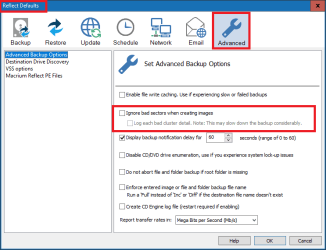
Macrium Reflect free does offer the option to ignore bad sectors when creating images.
I've never used it, so i don't know how well/fast/reliable it works.
I'm just pointing this out as an fyi, if you're interested in creating a backup image using this feature.

Here's a snip from the Macrium backup default options:

MacriumDefaults_02.png
 

My Computer

Computer type
PC/Desktop
Computer Manufacturer/Model Number
home built
OS
Multi-Boot W7_Pro_x64 W8.1_Pro_x64 W10_Pro_x64 +Linux_VMs +Chromium_VM
CPU
AMD Athlon II x4 620
Motherboard
Gigabyte GA-MA785G-UD3H
Memory
6GB GSkill DDR2 800
Graphics Card(s)
AMD 4670 GPU + AMD 4200 IGP
Sound Card
on board Realtek ALC889A
Monitor(s) Displays
RCA 40" LCD TV, Insignia 32" LCD TV, HP 15" LCD monitor
Screen Resolution
1680 x 1050
Hard Drives
OCZ Vertex 3 120GB,
Samsung F3 1TB (3),
Several others - WD, Seagate, Hitachi, ...
PSU
Corsair 500 W
Case
Rosewill mid tower
Cooling
CM 90mm rifle
Keyboard
Gyration wireless, Logitech wireless, Dell USB wired
Mouse
Gyration wireless, Logitech wireless, V7 USB wired
Internet Speed
Spectrum - 100Mbps D / 10Mbps U
Antivirus
Avast, MBAM3, EMET, WinPatrol
Browser
Pale Moon, Firefox, IE
Other Info
2 multi-boot PC's
Mainly HTPC/Office/Gen purpose (no gaming).
Trendnet USB KVM.
LG DVD burner/Blue Ray Player.
Tray system for removable SATA backup drives.

Not currently OCd, under-volted.
I use Hybrid sleep, rarely re-boot or shutdown.

Hauppauge HD-PVR, Avermedia PCIe TV Tuner, Hauppauge PCI TV Tuner.
I'm having an issue.

BIOS shows the new HDD but it's not showing in disk management so I can't set a new volume, and access it.

What can I do?
 

My Computer

Computer type
PC/Desktop
Computer Manufacturer/Model Number
Custom Build
OS
Windows 7 64-Bit
CPU
AMD Athlon X4 760K 3.8Ghz
Motherboard
MSI FM2-A75MA-E35
Memory
Kingston 8GB DDR3 PC3-12800
Graphics Card(s)
AMD Radeon R7 200 2GB GDDR5
Sound Card
Onboard
Monitor(s) Displays
Acer 24" LED HDMI
Screen Resolution
1920X1080
Hard Drives
Samsung 840 Evo 128GB SSD ( OS )
WD Black 1TB 7200RPM 16MB Cache ( Main Storage Drive )
HGST 500GB 5400RPM 8MB Cache ( 2nd Hard Drive From PS4 )
PSU
Insignia 400W
Case
Thermaltake V3 Black Edition
Cooling
Stock
Keyboard
Logitech K120
Mouse
Zelotes Gaming Mouse
Internet Speed
T-Mobile Tethering
Antivirus
ESET NOD32 + Malwarebytes Pro (All You Need + Common Sense)
Browser
Firefox 64-Bit
Other Info
This is a low / mid gaming rig which cost about $450 to build, and I LOVE IT. It does what I need it to do. I don't feel the need to drop $3,000 on a computer. I get 60FPS in WoW, and around the same in other games on mid settings, and I'm OK with that. However, my next build I plan to spend closer to a grand.
Back
Top