NooB wireless question?

BomberAF

New member
I currently have a G wireless adapter card which seems to max out at 20Mbs even though I have 50Mbs broadband, and the router is only 2 meters away from the card.

I have been looking at buying an N wireless card as they say they have a capacity of 300Mbs, but the card I currently have says it has 54Mbs. Now I presume that the reason my current card isn't getting anywhere near the 54Mbs is because of all the other traffic on the 2.4Ghz, but will the N wireless router allow me to use my full 50Mbs broadband wirelesly?
 

My Computer

Computer Manufacturer/Model Number
Dell Inspiron
OS
Windows 7
CPU
2.4 GHz Intel i3 cpu
Memory
8GB
Mouse
MS Explorer Mouse
Internet Speed
100 Mb/s
Have you tried switching channels? Are you using WPA(2) encryption?
 

My Computer

Computer type
PC/Desktop
Computer Manufacturer/Model Number
dell precision t3400 tower
OS
Linux Lite 3.2 x64; Windows 7, 8.1
CPU
Core2Duo 2.4
Memory
6GB ddr2
Graphics Card(s)
nVidia
Hard Drives
120gb SSD, 1TB HD, 2TB HD; sata II
Internet Speed
12/2
Browser
Vivaldi, Slimjet (Chromium) x64
I currently have a G wireless adapter card which seems to max out at 20Mbs even though I have 50Mbs broadband, and the router is only 2 meters away from the card.

I have been looking at buying an N wireless card as they say they have a capacity of 300Mbs, but the card I currently have says it has 54Mbs. Now I presume that the reason my current card isn't getting anywhere near the 54Mbs is because of all the other traffic on the 2.4Ghz, but will the N wireless router allow me to use my full 50Mbs broadband wirelesly?

IIRC, 300mb is a theoretical maximum. You will never actually achieve 300mb.

I have had several n-series routers, and they typically run at 40mbs (we don't have a lot of dependency on wireless, so I've not actually tried to get better than that). You have to make several adjustments to your router to configure it for 300mb. I currently have a D-Link DIR 655, and apart from having limited ACL functionality is has worked well for me.

The settings are brand and model specific. I guess you can expect better performance than a G-Series router, though. I'm told one of the key benefits of the N-Series routers is the "range" for which you can get a signal. I can get a good 80% signal at 35-40 feet, whereas with my G-series I have a few years ago I had about 17 - 20%.
 

My Computer

Computer type
PC/Desktop
Computer Manufacturer/Model Number
Home Made
OS
Linux Mint 17 Cinnamon | Win 7 Ult x64
CPU
Intel I7-3770K @ 4.2ghz
Motherboard
ASRock Extreme 4
Memory
32GB G-Skill C10Q
Graphics Card(s)
EVGA GTX 670 2GB SC
Sound Card
Creative Fatality ExtremeGamer
Monitor(s) Displays
LG E2742V x 2
Screen Resolution
1920x1080
Hard Drives
256GB Vertex 4 SSD
2TB Seagate ST2000DM001
1TB Seagate ST1000DM003
PSU
Corsair HX 650
Case
HAF 932 advanced
Cooling
Corsair H100i liquid cooler
Keyboard
Logitech Wireless
Mouse
Logitech Wireless
Internet Speed
OptusNet NBN 100/40
Antivirus
Malwarebytes
Browser
Firefox 30
Other Info
Router: Sagemcom F@st 3846 Crippled by Optus.
Since found at that it is 300Mbs half duplex which mean that the bandwidth is split between the up and download i.e. 150 up and 150 down. I have been told that with an N router that is 300Mbs you should be able to get about 130 Mbs download.

I have ordered a Linksys WMP 600 N Wireless-N Dual Band Adapter Dual-Band; Wireless-N; PCI.

This seems to be a good adapter but how do you tweek them to get the best out of them?
 

My Computer

Computer Manufacturer/Model Number
Dell Inspiron
OS
Windows 7
CPU
2.4 GHz Intel i3 cpu
Memory
8GB
Mouse
MS Explorer Mouse
Internet Speed
100 Mb/s
Since found at that it is 300Mbs half duplex which mean that the bandwidth is split between the up and download i.e. 150 up and 150 down. I have been told that with an N router that is 300Mbs you should be able to get about 130 Mbs download.

I have ordered a Linksys WMP 600 N Wireless-N Dual Band Adapter Dual-Band; Wireless-N; PCI.

This seems to be a good adapter but how do you tweek them to get the best out of them?

I've tested the actual transfer rate with my 300Mbps connection and had 175Mpbs max with average being a bit lower. With this connection I can stream HD movies with no problems at all. That is using my D-link DAP1522 which has 2.4 or 5GHz spectrums, set up as an access point.

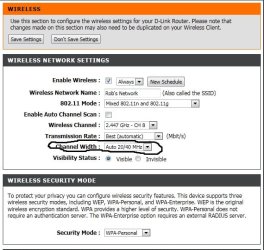
If your talking about getting the most bandwidth from your router or AP you can use channel bonding to get a bit more.

It's turned on by choosing the 20-40 channel width rather than just 20Mhz channel width. The link below explains how channel bonding works. Channel selection is the important part as the link below describes the process and how it works.

Wireless Networking — What is channel bonding?
 

Attachments

  • channel bonding circled.jpg
    channel bonding circled.jpg
    110.3 KB · Views: 25

My Computer

Computer type
PC/Desktop
Computer Manufacturer/Model Number
Home built
OS
Windows 7 Ult, Windows 8.1 Pro,
CPU
Q9650-4.275GHz, E8600 4.5GHz, E6750-3.8GHz
Motherboard
Evga 780i FTW
Memory
G.Skill PC2 9600 1200Mhz 5 5 5 15 2T
Graphics Card(s)
GTX480
Sound Card
Asus Xonar D2
Monitor(s) Displays
HannsG
Screen Resolution
1680X1050
Hard Drives
GSkill Phoenix Pro 120GB SSD
PSU
ThermalTake Toughpower 1000Watt modular
Case
ThermalTake XaserV
Cooling
Xigmatek S1283
Keyboard
Logitech G15
Mouse
Logitech G9
Internet Speed
T1
Back
Top