Solved Norton internet security 2011 file updates ?

baxxter

New member
Member
VIP
Local time
12:31 AM
Messages
266

My Computer

Computer Manufacturer/Model Number
Dell Insporon N7110
OS
Windows 7 Ultimate SP1 64 Bit
CPU
Intel Core i7-2630QM 2.00GHz
Memory
4 Gb ddr3
Graphics Card(s)
Nvidia 520 1G
Monitor(s) Displays
1600 X 900
Screen Resolution
1440*900
Hard Drives
500 GB + 500 GB
Internet Speed
1 mb
Hi baxxter,

Norton Internet Security 2011 automatically gives you updates via Pulse Updates and LiveUpdate. Pulse Updates delivers the latest virus definitions every few minutes (hence "pulse") and LiveUpdate also gives you software/program/engine updates, updates for IPS etc every few hours. To run LiveUpdate manually (if you are feeling impatient):
open Norton Internet Security 2011 and click on "Run LiveUpdate".
picture.php


I checked your link, and that is the wrong one - it is for Symantec products, not for Norton ones. Norton products and Symantec products are not the same thing. Norton products are for home customers and Symantec products (like Endpoint) are for corporate/business customers.

For Norton Internet Security 2011:
If you have to manually install the updates/definitions, you should only do this if you are having connection problems. You can use the Intelligent Updater to manually download the definitions (make sure to choose the right set for your operating system):
http://us.norton.com/support/kb/web...b&selected_nav=&pvid=&docurl=20080407145621EN

You can also find more info on how to use the IntelligentUpdater to update your Norton Internet Security definitions over here:
http://us.norton.com/support/kb/web_view.jsp?wv_type=public_web&docurl=20080421125614EN

General information:
http://us.norton.com/security_response/definitions.jsp

Please post back to tell us if this helped. Thanks :-)
 

My Computer

OS
-
Norton.JPG
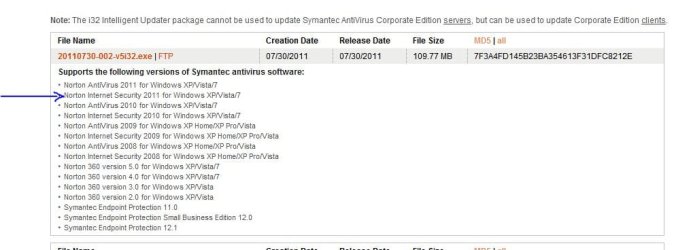
Thanks for reply :).I think you was wrong,Your link took me to the link i had post ,and look at the picture you will see what i downloaded before
 

My Computer

Computer Manufacturer/Model Number
Dell Insporon N7110
OS
Windows 7 Ultimate SP1 64 Bit
CPU
Intel Core i7-2630QM 2.00GHz
Memory
4 Gb ddr3
Graphics Card(s)
Nvidia 520 1G
Monitor(s) Displays
1600 X 900
Screen Resolution
1440*900
Hard Drives
500 GB + 500 GB
Internet Speed
1 mb
I had another look at your image - in this case, the definitions are valid for both NIS 2011 and Symantec Endpoint Protection 11.0.
picture.php


You can download it - make sure the definitions correspond to not only your operating system but also to the bit version (32-bit; 64-bit).

What happened was that your link leads to a page titled Symantec Endpoint Protection / Symantec Antivirus Corporate Edition, and mine to the same page, but with the header Norton AntiVirus for Windows 2000/XP/Vista/7.
In other words, some of the Symantec and Norton products do share definitions, but it's always best to use the page which explicitly says (via the header/title/summary) that the definitions are for the product you are using.

Whether you use LiveUpdate or the IntelligentUpdater - you will have to be patient when downloading big updates :-)
 

My Computer

OS
-
But the problem is when I installed the updates (installed correctly) the NIS 2011 need 119 mb of updates ?!
So whast the point of file I had install ?
 

My Computer

Computer Manufacturer/Model Number
Dell Insporon N7110
OS
Windows 7 Ultimate SP1 64 Bit
CPU
Intel Core i7-2630QM 2.00GHz
Memory
4 Gb ddr3
Graphics Card(s)
Nvidia 520 1G
Monitor(s) Displays
1600 X 900
Screen Resolution
1440*900
Hard Drives
500 GB + 500 GB
Internet Speed
1 mb
But the problem is when I installed the updates (installed correctly) the NIS 2011 need 119 mb of updates ?!
So whast the point of file I had install ?
So what's the problem? Just run the updates from Norton's interface and move on...
 

My Computer

Computer Manufacturer/Model Number
Home Grown
OS
Windows 7 Ultimate (64)
CPU
i7-2600K
Motherboard
Asus P8P67-M Pro
Memory
G.SKILL Ripjaws X Series 8GB (2 x 4GB)
Graphics Card(s)
ATI 5750
Sound Card
On-Board
Monitor(s) Displays
LG W2486L
Screen Resolution
1920X1080
Hard Drives
Intel X-25M 80 Gig SSD | Intel X-25M 160 Gig SSD | WD Black 500MB - External eSata
PSU
Zalman ZM770-XT 770 Watts
Case
Antec 180 mini
Cooling
Cooler Master V8
Internet Speed
15MB - Cable
Other Info
Sissy OC - 4.6 @ 1.3175 24/7 | 18' Idle - 55' Load

My Computer

Computer type
PC/Desktop
Computer Manufacturer/Model Number
Alienware® ALX X58
OS
Win 7 Ult SP1/Win 10 Pro (all x64)
CPU
Intel® Core™ i7-975 Extreme O/C to 4.02 GHz, 8MB Cache
Motherboard
Asus® P6T Deluxe V2 X58 LGA1366
Memory
24GB Corsair Vengeance DDR3 SDRAM at 1600MHz - 6 x 4096MB
Graphics Card(s)
1792 MB NVIDIA® GeForce® GTX 295 Dual Core
Sound Card
Onboard Soundmax® High-Definition 7.1 Performance Audio
Monitor(s) Displays
Samsung XL2370 LED backlit 23" W/S 2ms response time
Screen Resolution
1920 X 1080
Hard Drives
2 x 500gb SATA II
1 x 1TB SATA II
1 external eSATA LaCie 3TB
(Non-RAID)
PSU
Alienware® 1200 Watt Multi-GPU
Case
Alienware® P2 ALX Chassis with AlienIce™ 3.0 Video Cooling
Cooling
Alienware® High-Perf. Liquid Cooling + Acoustic Dampening
Keyboard
Microsoft® Wireless Entertainment 8000 + Logitech® G15 Wired
Mouse
Microsoft® Wireless Laser 8000 + Logitech® G9 Wired
Internet Speed
1Gb/s
Antivirus
McAfee LiveSafe
Browser
Firefox - latest
Other Info
Using non-RAID on purpose as I find RAID to be too temperamental.
Now set to AHCI
I think the issue is that the program was released some time ago and the included database relates to the time it was released. It needs that download to bring it up to date. Future downloads of virus definitions will be much lower.
 

My Computer

Computer type
Laptop
Computer Manufacturer/Model Number
Hewlett-Packard/G62-107SA Notebook
OS
Microsoft Windows 7 Home Premium 64-bit Service Pack 1
CPU
Intel(R) Core(TM) i3 CPU M 330 @ 2.13GHz
Motherboard
Hewlett-Packard 1425
Memory
8 GB DDR3
Graphics Card(s)
Intel(R) HD Graphics
Sound Card
Realtek High Definition Audio
Monitor(s) Displays
Builtin
Screen Resolution
1366 x 768 x 32 bits (4294967296 colors) @ 60 Hz
Hard Drives
250 GB SATA Hard Disk Drive 7200 rpm
2TB Seagate GoFlex USB 2 Drive
1TB Iomega Prestige USB 2 Drive
1.5TB Iomega Prestige USB 2 Drive (Samsung)
2TB WD MyBook Live NAS.
Mouse
Logitech Anywhere MX
Internet Speed
152 Mbs download 10 Mbs upload
Antivirus
Norton 360
Browser
Chrome
As kado897 said: if you installed NIS 2011from a CD or the vanity link, then the first time you run LiveUpdate, the download will usually be quite big. As I mentioned before: if you have a stable internet connection, let LiveUpdate do its job (you don't need the IntelligentUpdater) and please be patient. Usually, only the Norton Update Center has Norton products which contain the latest updates/databases - obviously of no use in your case, since you have already got NIS 2011 installed. The updates following that first big download will be so small that you won't notice anything (Pulse Updates every few minutes, LiveUpdate every few hours). It is always strongly recommended that you run LiveUpdate as soon as you have installed NIS 2011 in order to get the latest updates and protection.

Ex_Brit: your link is for Symantec (corporate) products. The user is running Norton Internet Security ;-)

baxxter: If you need more help with your Norton product, then you've got two options; you can contact Norton Customer Support at this link (for USA/Canada) and use the chat feature for fastest results. It is also free of charge and available around the clock:
Norton Support - Contact Us

Option two: you can sign up for free in the Norton Community (user-to-user support) and post your question to the Norton Internet Security/Norton AntiVirus board:
Norton Community - Norton Community

However, if your Norton product is indicating its status as "Secure" (Norton icon with green tick in system tray), you should be fine; if it is sporting an orange exclamation mark (usually because the virus and engine definitions are out of date), then you can open Norton and click on "Fix now"...and be patient...

 

My Computer

OS
-
OK thanks all :)
 

My Computer

Computer Manufacturer/Model Number
Dell Insporon N7110
OS
Windows 7 Ultimate SP1 64 Bit
CPU
Intel Core i7-2630QM 2.00GHz
Memory
4 Gb ddr3
Graphics Card(s)
Nvidia 520 1G
Monitor(s) Displays
1600 X 900
Screen Resolution
1440*900
Hard Drives
500 GB + 500 GB
Internet Speed
1 mb
No problem Baxxter.
 

My Computer

Computer type
Laptop
Computer Manufacturer/Model Number
Hewlett-Packard/G62-107SA Notebook
OS
Microsoft Windows 7 Home Premium 64-bit Service Pack 1
CPU
Intel(R) Core(TM) i3 CPU M 330 @ 2.13GHz
Motherboard
Hewlett-Packard 1425
Memory
8 GB DDR3
Graphics Card(s)
Intel(R) HD Graphics
Sound Card
Realtek High Definition Audio
Monitor(s) Displays
Builtin
Screen Resolution
1366 x 768 x 32 bits (4294967296 colors) @ 60 Hz
Hard Drives
250 GB SATA Hard Disk Drive 7200 rpm
2TB Seagate GoFlex USB 2 Drive
1TB Iomega Prestige USB 2 Drive
1.5TB Iomega Prestige USB 2 Drive (Samsung)
2TB WD MyBook Live NAS.
Mouse
Logitech Anywhere MX
Internet Speed
152 Mbs download 10 Mbs upload
Antivirus
Norton 360
Browser
Chrome
I uninstalled Norton then I reinstall it again then I installed the updates file and it works :)
 

My Computer

Computer Manufacturer/Model Number
Dell Insporon N7110
OS
Windows 7 Ultimate SP1 64 Bit
CPU
Intel Core i7-2630QM 2.00GHz
Memory
4 Gb ddr3
Graphics Card(s)
Nvidia 520 1G
Monitor(s) Displays
1600 X 900
Screen Resolution
1440*900
Hard Drives
500 GB + 500 GB
Internet Speed
1 mb
Back
Top