Solved Not a backup if you dont know you can use it

DonM123

New member
Member
VIP
Local time
5:04 AM
Messages
140
Anyone who has a way to backup added files to a USB external drive on a nightly basis
I need to find backup strategies that do not back files up to named archives that I cannot prove good without a lot of hassle.
Maybe a windows 7 copy method that copies recent files. I have been burned by backup programs that have high support fees and high rates of not being able to restore files from the backup file that the program created.
The manual copy of my external usb takes 3 days and I cant do that every eve !

I would hope to find a program that might mirror my USB drive onto another USB drive so I have them backed up.
I need a backup program that does not change the form of my files or folders.
I lost faith in windows backup a long time ago but maybe it now works ?
Anyone have a tried and true proven method that they know works that they can share with me..

THANK YOU !
 

My Computer My Computer

At a glance

win7proi716GTX 980 TI
Computer type
PC/Desktop
Computer Manufacturer/Model Number
Gigibyte Custom build
OS
win7pro
CPU
i7
Memory
16
Graphics Card(s)
GTX 980 TI
Hard Drives
ssd 4t 750gig
Antivirus
norton pain

My Computer My Computer

At a glance

Windows 10 Pro x64 ; Xubuntu x64Intel i7 860 @ 2.80 GHz O/C'ed to 4.0GHz16GB Corsair Vengance DDR3 @ 661 MHz Dual Cha...EVGA NVidia GTX 560 1024MB
Computer type
PC/Desktop
Computer Manufacturer/Model Number
Golden Mk. I.4
OS
Windows 10 Pro x64 ; Xubuntu x64
CPU
Intel i7 860 @ 2.80 GHz O/C'ed to 4.0GHz
Motherboard
Gigabyte P55A-UD3R Rev.1. Award BIOS F13
Memory
16GB Corsair Vengance DDR3 @ 661 MHz Dual Channel (9-9-9-24)
Graphics Card(s)
EVGA NVidia GTX 560 1024MB
Sound Card
Realtek Integrated
Monitor(s) Displays
Dual Samsung SyncMaster 2494HS
Screen Resolution
1920*1080 and 1920*1080
Hard Drives
1*Samsung 840 EVO 120GB SSD;
1*OCZ Vertex 2 60GB SSD;
2*Samsung F3 SpinPoint 1TB in RAID0;
1*Samsung F1 SpinPoint 1TB;
2*Western Digital 1TB External USB 3.0
1*Western Digital 500GB External USB 3.0
1*Seagate 500GB External USB 2.0
PSU
Thermaltake ToughPower QFan 750W
Case
Thermaltake Element S VK60001W2Z
Cooling
Corsair H60 Water Cooling, 2*230mm and 2*80mm case fans
Keyboard
Logitech G110
Mouse
Logitech MX518
Backup software comparison - SyncBackPro, SyncBackSE and SyncBackFree

Here's another. I use the free version with no complaints.

I've used 4 or 5 different backup apps over the last 15 years. They all offer a "mirror" capability. The interfaces differ and some of them are confusing. Some are more difficult to configure than others. They all give you considerable control over what you want to include and exclude, but I've found that the include/exclude choices can be problematic for some programs.

But I haven't yet had any trouble with SyncBackFree after 6 months. I back up about 700 GB a couple of times a day to a second internal drive. Takes 2 minutes at most. The backed up files remain in their original format.
 

My Computer My Computer

At a glance

Windows 7 Home Premium SP1, 64-bitIntel Skylake i5-6600K, not overclocked8 GB HyperX DDR4-2666 (2 x 4 GB)none; graphics are integrated on CPU
Computer type
PC/Desktop
Computer Manufacturer/Model Number
Ignatz Special; 4 speed manual gearbox; factory air conditioning; one of one
OS
Windows 7 Home Premium SP1, 64-bit
CPU
Intel Skylake i5-6600K, not overclocked
Motherboard
AsRock Z170M Extreme 4, micro ATX
Memory
8 GB HyperX DDR4-2666 (2 x 4 GB)
Graphics Card(s)
none; graphics are integrated on CPU
Sound Card
onboard: Realtek ALC1150; external: USB Behringer UF0-202
Monitor(s) Displays
Dell S2340M 23 inch IPS
Screen Resolution
1600 x 900
Hard Drives
System: Crucial MX100 series SSD, 128 GB;
Data: Samsung Spinpoint 103SJ, 1 TB;
Backup: WD Caviar Green WD30EZRX-00D8PB0, 3 TB
PSU
Rosewill SilentNight 500 watt fanless, semi-modular
Case
Antec Solo II
Cooling
Noctua NH-U12S; Noctua F12 intake, Noctua S12A exhaust
Keyboard
Microsoft 200 6JH-00001 USB
Mouse
Dell or Microsoft optical wired; USB
Antivirus
Microsoft Security Essentials and Malwarebytes Premium
Browser
Pale Moon
Other Info
All fans PWM; speeds at idle: CPU circa 500 rpm; intake circa 600 rpm; exhaust circa 600 rpm; CPU temps 27 idle and 47 C load in a warm room (27 C/81 F) when running Intel Extreme Tuning Utility stress test.

My Computer My Computer

At a glance

Windows 7 Home Premium x64Intel Dual Pentium E2180 2 GHz4 GBIntegrated Intel G33
Computer type
PC/Desktop
OS
Windows 7 Home Premium x64
CPU
Intel Dual Pentium E2180 2 GHz
Memory
4 GB
Graphics Card(s)
Integrated Intel G33
Thank you !
 

My Computer My Computer

At a glance

win7proi716GTX 980 TI
Computer type
PC/Desktop
Computer Manufacturer/Model Number
Gigibyte Custom build
OS
win7pro
CPU
i7
Memory
16
Graphics Card(s)
GTX 980 TI
Hard Drives
ssd 4t 750gig
Antivirus
norton pain
Anyway if anyone does know of a backup program that really does work or knows of a method to manually do this... I will be so greatfull for your sharing.

Is there some reason you have not investigated the choices mentioned in this thread?

You don't need Acronis.

You don't want incrementals or anything to do with imaging.

You want an ordinary file by file backup program that will give you an exact replica of your data files, in their original format. Just as if you had copied with the mouse or keyboard.

There are a dozen or more choices. Some paid and some free. Some of them mentioned in this thread.
 

My Computer My Computer

At a glance

Windows 7 Home Premium SP1, 64-bitIntel Skylake i5-6600K, not overclocked8 GB HyperX DDR4-2666 (2 x 4 GB)none; graphics are integrated on CPU
Computer type
PC/Desktop
Computer Manufacturer/Model Number
Ignatz Special; 4 speed manual gearbox; factory air conditioning; one of one
OS
Windows 7 Home Premium SP1, 64-bit
CPU
Intel Skylake i5-6600K, not overclocked
Motherboard
AsRock Z170M Extreme 4, micro ATX
Memory
8 GB HyperX DDR4-2666 (2 x 4 GB)
Graphics Card(s)
none; graphics are integrated on CPU
Sound Card
onboard: Realtek ALC1150; external: USB Behringer UF0-202
Monitor(s) Displays
Dell S2340M 23 inch IPS
Screen Resolution
1600 x 900
Hard Drives
System: Crucial MX100 series SSD, 128 GB;
Data: Samsung Spinpoint 103SJ, 1 TB;
Backup: WD Caviar Green WD30EZRX-00D8PB0, 3 TB
PSU
Rosewill SilentNight 500 watt fanless, semi-modular
Case
Antec Solo II
Cooling
Noctua NH-U12S; Noctua F12 intake, Noctua S12A exhaust
Keyboard
Microsoft 200 6JH-00001 USB
Mouse
Dell or Microsoft optical wired; USB
Antivirus
Microsoft Security Essentials and Malwarebytes Premium
Browser
Pale Moon
Other Info
All fans PWM; speeds at idle: CPU circa 500 rpm; intake circa 600 rpm; exhaust circa 600 rpm; CPU temps 27 idle and 47 C load in a warm room (27 C/81 F) when running Intel Extreme Tuning Utility stress test.
The simplest if you only backing up docs etc is to use google drive you just save files to it on your pc and it backs it upi
on its own to google so you can get it any where in the world MS one drive does the same safer than usb which can be lost corrupt etc
 

My Computer My Computer

At a glance

win 8 32 bit
Computer type
PC/Desktop
OS
win 8 32 bit
OK so Robocopy it is. Do run it in powershell as an administrator ? any I have windows 7 64 bit prof.
I did open powershell and did find robocopy.exe
Should I use the Powershell ISA option to make a "batch file" or better to use notepad ? if so what do I name the extension ?
Should I bother updating powershell ? it says I have PS 2 ??

I am guessing now I can type in c:\windows\system\"Robocopy d: *.* e:\realbackofdriveD /mir /copyall /dcopy:T /e /mot:1440
?????
It seams that mir might not need the /e ?? what confuses me is when I copy something like this but it stops because it wants to know if i should overwrite or merge a folder

Also it seams that the /mot: option might not be in effect after reboot or after closing the powershell windows. - ?

Thank you !
 

My Computer My Computer

At a glance

win7proi716GTX 980 TI
Computer type
PC/Desktop
Computer Manufacturer/Model Number
Gigibyte Custom build
OS
win7pro
CPU
i7
Memory
16
Graphics Card(s)
GTX 980 TI
Hard Drives
ssd 4t 750gig
Antivirus
norton pain
ignatzatsonic Aspiring Gnome: IT appears that your recommendation of SyncBackFree is a good one. Id did install it and its help works and it has a nice pdf manual. If I want to buy it has a modest price of 54$
I did schedule a backup of a folder. I was confused why it did not let me choose the whole drive when I setup a backup profile.
thanks for your recommendation.
I am new to this forum and I replied and posted when the page was not updated. Sorry for the confusion.
It is so awesome to get this kind of information Im grateful for the time this forum has saved me.. THank you!
 

My Computer My Computer

At a glance

win7proi716GTX 980 TI
Computer type
PC/Desktop
Computer Manufacturer/Model Number
Gigibyte Custom build
OS
win7pro
CPU
i7
Memory
16
Graphics Card(s)
GTX 980 TI
Hard Drives
ssd 4t 750gig
Antivirus
norton pain
The simplest if you only backing up docs etc is to use google drive you just save files to it on your pc and it backs it upi
on its own to google so you can get it any where in the world MS one drive does the same safer than usb which can be lost corrupt etc

I would NOT trust Google drive. Besides Google being too snoopy for my tastes, Google has a nasty habit of discontinuing services with inadequate to no warning. Even though it's not free (and it's not very expensive), Carbonite.com is much safer and more reliable. Crashplan and Backblaze are also supposed to be good although I've heard Crashplan's upload speeds tend to be slower.

Also, just using the one service for backups is a gamble. One should have at least two backups, preferably one onsite and one offsite. A cloud backup service can be used for offsite backups. I maintain two onsite and two offsite backups for each HDD in my computer and swap them out at least once a month. I also maintain a Carbonite backup to use to recover files that have been added or changed since the last time I updated my offsite backups in case I should lose my original data and my onsite backups.
 

My Computer My Computer

At a glance

Win 7 Ultimate 64 bitIntel i7-3930KKingston HyperX Genesis 32GB Kit (8x4GB Modul...MSI R7850 Twin Frozr 2GD5/OC Radeon HD 7850 2...
Computer type
PC/Desktop
Computer Manufacturer/Model Number
Custom Build
OS
Win 7 Ultimate 64 bit
CPU
Intel i7-3930K
Motherboard
ASUS P9X79 WS
Memory
Kingston HyperX Genesis 32GB Kit (8x4GB Modules) 1600MHz DDR
Graphics Card(s)
MSI R7850 Twin Frozr 2GD5/OC Radeon HD 7850 2GB 256-bit GDDR
Sound Card
Asus Xonar Essence STX
Monitor(s) Displays
3x Asus VG248QE 24", Vizio 32" TV
Screen Resolution
1920 x 1080, ?
Hard Drives
Samsung 128GB 840 Pro SSD (1),
Samsung 4TB 850 EVO SSDs (4)
Samsung 4TB 850 EVO SSDs (16) external backup drives used in 2.5" hot swap bays in the computer.
PSU
Corsair HX750w
Case
Antec Two Hundred v2 (modified)
Cooling
Cooler Master GeminII S524 120mm (fan replaced with a 140mm)
Keyboard
Logitech G510s
Mouse
Logitech M525 (two in use)
Internet Speed
=< 32Mbps down, 8Mbps up
Antivirus
AVAST!, MBAM, SAS, Spybot S&D (all but MBAM free) Glary Util
Browser
IE11
Other Info
LSI 9211-8i HBA card (8 SATA III ports), 2.5" & 3.5" Hot Swap Bays, HooToo HT-CR001 PCI-E to USB 3.0 Internal Hub + 6 Slot Card Reader, and LG Model CH12LS28 BD-ROM Optical Drive. Also, ScanSnap S1500 ADF duplexing scanner, Canon 9000F flat bed scanner, Corsair SP2500 2.1 speakers, Samsung CLP 415nw laser color printer, Cyberpower PP2200SW UPS
ignatzatsonic Aspiring Gnome: IT appears that your recommendation of SyncBackFree is a good one. Id did install it and its help works and it has a nice pdf manual. If I want to buy it has a modest price of 54$
I did schedule a backup of a folder. I was confused why it did not let me choose the whole drive when I setup a backup profile.
thanks for your recommendation.
I am new to this forum and I replied and posted when the page was not updated. Sorry for the confusion.
It is so awesome to get this kind of information Im grateful for the time this forum has saved me.. THank you!

One reason I like FreeFileSync is it allows me to specify an entire drive in a backup profile. It also allows me to specify the drive name instead of the drive letter in a backup profile which is handy since the drive letters of removable external drives can change without warning.
 

My Computer My Computer

At a glance

Win 7 Ultimate 64 bitIntel i7-3930KKingston HyperX Genesis 32GB Kit (8x4GB Modul...MSI R7850 Twin Frozr 2GD5/OC Radeon HD 7850 2...
Computer type
PC/Desktop
Computer Manufacturer/Model Number
Custom Build
OS
Win 7 Ultimate 64 bit
CPU
Intel i7-3930K
Motherboard
ASUS P9X79 WS
Memory
Kingston HyperX Genesis 32GB Kit (8x4GB Modules) 1600MHz DDR
Graphics Card(s)
MSI R7850 Twin Frozr 2GD5/OC Radeon HD 7850 2GB 256-bit GDDR
Sound Card
Asus Xonar Essence STX
Monitor(s) Displays
3x Asus VG248QE 24", Vizio 32" TV
Screen Resolution
1920 x 1080, ?
Hard Drives
Samsung 128GB 840 Pro SSD (1),
Samsung 4TB 850 EVO SSDs (4)
Samsung 4TB 850 EVO SSDs (16) external backup drives used in 2.5" hot swap bays in the computer.
PSU
Corsair HX750w
Case
Antec Two Hundred v2 (modified)
Cooling
Cooler Master GeminII S524 120mm (fan replaced with a 140mm)
Keyboard
Logitech G510s
Mouse
Logitech M525 (two in use)
Internet Speed
=< 32Mbps down, 8Mbps up
Antivirus
AVAST!, MBAM, SAS, Spybot S&D (all but MBAM free) Glary Util
Browser
IE11
Other Info
LSI 9211-8i HBA card (8 SATA III ports), 2.5" & 3.5" Hot Swap Bays, HooToo HT-CR001 PCI-E to USB 3.0 Internal Hub + 6 Slot Card Reader, and LG Model CH12LS28 BD-ROM Optical Drive. Also, ScanSnap S1500 ADF duplexing scanner, Canon 9000F flat bed scanner, Corsair SP2500 2.1 speakers, Samsung CLP 415nw laser color printer, Cyberpower PP2200SW UPS
see comments:

Id did install it and its help works and it has a nice pdf manual. If I want to buy it has a modest price of 54$

Sync Back Free is free. Not $54.

There are paid versions that have added features that you probably would not need. There is a "feature comparison" page at the developer's web site.

Here:

Backup software comparison - SyncBackPro, SyncBackSE and SyncBackFree

If you would just as soon pay for an application, then you should also look at "Second Copy", from Centered Systems. I think it is $30 with a 30 day free trial. Superb interface and been around a long time. I used it for close to 10 years.


I did schedule a backup of a folder. I was confused why it did not let me choose the whole drive when I setup a backup profile.


Not sure where you went wrong, but you can back up a whole drive. That's exactly what I do. I have 4 profiles: All data (700 GB, entire D drive), most important data (22 GB, certain folders and file types on D drive), Thunderbird Email (one folder on C drive), and browser bookmarks (one folder on C drive). All run manually and individually on demand with a single mouse click.

There is nothing wrong with Robocopy, but.................................it is a very powerful tool that can be confusing for the inexperienced. If you don't know exactly what you are doing, it can have a disastrous outcome.


My Computer My Computer

At a glance

Windows 7 Home Premium SP1, 64-bitIntel Skylake i5-6600K, not overclocked8 GB HyperX DDR4-2666 (2 x 4 GB)none; graphics are integrated on CPU
Computer type
PC/Desktop
Computer Manufacturer/Model Number
Ignatz Special; 4 speed manual gearbox; factory air conditioning; one of one
OS
Windows 7 Home Premium SP1, 64-bit
CPU
Intel Skylake i5-6600K, not overclocked
Motherboard
AsRock Z170M Extreme 4, micro ATX
Memory
8 GB HyperX DDR4-2666 (2 x 4 GB)
Graphics Card(s)
none; graphics are integrated on CPU
Sound Card
onboard: Realtek ALC1150; external: USB Behringer UF0-202
Monitor(s) Displays
Dell S2340M 23 inch IPS
Screen Resolution
1600 x 900
Hard Drives
System: Crucial MX100 series SSD, 128 GB;
Data: Samsung Spinpoint 103SJ, 1 TB;
Backup: WD Caviar Green WD30EZRX-00D8PB0, 3 TB
PSU
Rosewill SilentNight 500 watt fanless, semi-modular
Case
Antec Solo II
Cooling
Noctua NH-U12S; Noctua F12 intake, Noctua S12A exhaust
Keyboard
Microsoft 200 6JH-00001 USB
Mouse
Dell or Microsoft optical wired; USB
Antivirus
Microsoft Security Essentials and Malwarebytes Premium
Browser
Pale Moon
Other Info
All fans PWM; speeds at idle: CPU circa 500 rpm; intake circa 600 rpm; exhaust circa 600 rpm; CPU temps 27 idle and 47 C load in a warm room (27 C/81 F) when running Intel Extreme Tuning Utility stress test.
I am using the SyncBackFree Program I can not figure out how to tell it to remove the files I delete off of the source. LIke if I clean up junk files from the source - I also want them to be removed from the backup. I dont see an option for this in the "Decisions " part of the profile.
 

My Computer My Computer

At a glance

win7proi716GTX 980 TI
Computer type
PC/Desktop
Computer Manufacturer/Model Number
Gigibyte Custom build
OS
win7pro
CPU
i7
Memory
16
Graphics Card(s)
GTX 980 TI
Hard Drives
ssd 4t 750gig
Antivirus
norton pain
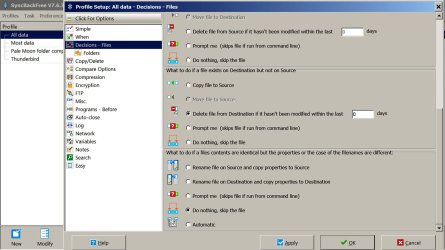
I am using the SyncBackFree Program I can not figure out how to tell it to remove the files I delete off of the source.

Look at the 2 pictures below.

In the first picture, you'll see all 4 of my profiles on the far left, with "all data" highlighted.

In the middle column, you will see "decisions - files" highlighted.

In the far right column, notice the section entitled "what to do if a file exists on Destination, but not on Source"

In that section, notice that I have enabled the radio button for "Delete file from Destination if it has not been modified within the last 0 days".

That setting forces a "mirror" outcome, in which the destination drive matches the source drive. If a file is deleted from source, it is also deleted from destination.

This is confirmed in the second picture of the profile setup for the "all data" profile. Notice the red "deleted" in the far right column ("files only on Destination are deleted").

You should be able to make any necessary changes to a profile by using the "modify" button at the bottom of the interface.
 

Attachments

  • sync back free.jpg
    sync back free.jpg
    160.7 KB · Views: 1
  • sync back free 2.jpg
    sync back free 2.jpg
    167.1 KB · Views: 1

My Computer My Computer

At a glance

Windows 7 Home Premium SP1, 64-bitIntel Skylake i5-6600K, not overclocked8 GB HyperX DDR4-2666 (2 x 4 GB)none; graphics are integrated on CPU
Computer type
PC/Desktop
Computer Manufacturer/Model Number
Ignatz Special; 4 speed manual gearbox; factory air conditioning; one of one
OS
Windows 7 Home Premium SP1, 64-bit
CPU
Intel Skylake i5-6600K, not overclocked
Motherboard
AsRock Z170M Extreme 4, micro ATX
Memory
8 GB HyperX DDR4-2666 (2 x 4 GB)
Graphics Card(s)
none; graphics are integrated on CPU
Sound Card
onboard: Realtek ALC1150; external: USB Behringer UF0-202
Monitor(s) Displays
Dell S2340M 23 inch IPS
Screen Resolution
1600 x 900
Hard Drives
System: Crucial MX100 series SSD, 128 GB;
Data: Samsung Spinpoint 103SJ, 1 TB;
Backup: WD Caviar Green WD30EZRX-00D8PB0, 3 TB
PSU
Rosewill SilentNight 500 watt fanless, semi-modular
Case
Antec Solo II
Cooling
Noctua NH-U12S; Noctua F12 intake, Noctua S12A exhaust
Keyboard
Microsoft 200 6JH-00001 USB
Mouse
Dell or Microsoft optical wired; USB
Antivirus
Microsoft Security Essentials and Malwarebytes Premium
Browser
Pale Moon
Other Info
All fans PWM; speeds at idle: CPU circa 500 rpm; intake circa 600 rpm; exhaust circa 600 rpm; CPU temps 27 idle and 47 C load in a warm room (27 C/81 F) when running Intel Extreme Tuning Utility stress test.
ignatzatsonic - Thanks! When I was looking the decisions files part I overlooked the bar on the side that lets you see more options. But now I see it and this makes sense to me. I brings comfort when it makes sense !
Also I realized that when I click on folder in the destination / source folder it wont let me choose a whole drive there but i can put in the drive with a ( E:\ )
I am glad to have a handle now on this backup situation for home and work it will save me grief.
 

My Computer My Computer

At a glance

win7proi716GTX 980 TI
Computer type
PC/Desktop
Computer Manufacturer/Model Number
Gigibyte Custom build
OS
win7pro
CPU
i7
Memory
16
Graphics Card(s)
GTX 980 TI
Hard Drives
ssd 4t 750gig
Antivirus
norton pain
Back
Top