
Not able to change mp4 file assn

Doubtingthomas

New member
Member
Local time
2:24 PM
Messages
31
Hi,
I am not able to change the mp4 file assn which always opens with MPlayer.

The context menu by right clicking a file and choosing "open with". See the Mplayer is not all listed and "Always use the selected.." checkbox is muted. Needless to say selecting any program does not work here. Image-1 snap4-2011-06-29_232932.gif
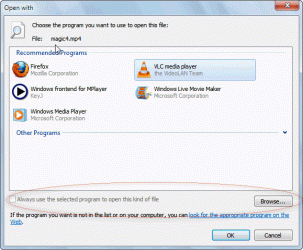

Next what is listed in Control Panel>> set assn.See Mplayer listed there. Image-2 snap5-2011-06-29_233004.gif


Further clicking that brings a similiar screen.Here too clicking on any other program does not help. Image-3 snap6-2011-06-29_233019.gif
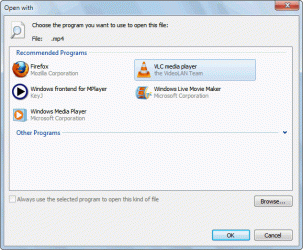
 

My Computer My Computer

At a glance

Windows 7 SP1 64
OS
Windows 7 SP1 64
Hi, what program do you want MP4 to open with ?
 

My Computer My Computer

At a glance

Win7 H.Prem. 32bit+SP1
Computer Manufacturer/Model Number
Look in my Signature.
OS
Win7 H.Prem. 32bit+SP1
Hi,
I am not able to change the mp4 file assn which always opens with MPlayer.

The context menu by right clicking a file and choosing "open with". See the Mplayer is not all listed and "Always use the selected.." checkbox is muted. Needless to say selecting any program does not work here. Image-1 View attachment 162466


Next what is listed in Control Panel>> set assn.See Mplayer listed there. Image-2 View attachment 162467


Further clicking that brings a similiar screen.Here too clicking on any other program does not help. Image-3 View attachment 162468

On your Open With window, try click Other Programs. Is Mplayer listed somewhere there?
 

My Computer My Computer

At a glance

Windows 7 Home Premium 64-bit, SP1Intel Pentium P6200, Cores 2, 2.13 GHz4 GBIntel HD
Computer Manufacturer/Model Number
Acer Aspire 7741Z
OS
Windows 7 Home Premium 64-bit, SP1
CPU
Intel Pentium P6200, Cores 2, 2.13 GHz
Memory
4 GB
Graphics Card(s)
Intel HD
Sound Card
unknown
Monitor(s) Displays
17.3 inches
Screen Resolution
1600 x 900
Hard Drives
640 GB, 5400 PRM
Hi,
I am not able to change the mp4 file assn which always opens with MPlayer.

The context menu by right clicking a file and choosing "open with". See the Mplayer is not all listed and "Always use the selected.." checkbox is muted. Needless to say selecting any program does not work here. Image-1 View attachment 162466


Next what is listed in Control Panel>> set assn.See Mplayer listed there. Image-2 View attachment 162467


Further clicking that brings a similiar screen.Here too clicking on any other program does not help. Image-3 View attachment 162468

Adding.....

Wonder what will happen if you uninstall VLC ?
 

My Computer My Computer

At a glance

Windows 7 Home Premium 64-bit, SP1Intel Pentium P6200, Cores 2, 2.13 GHz4 GBIntel HD
Computer Manufacturer/Model Number
Acer Aspire 7741Z
OS
Windows 7 Home Premium 64-bit, SP1
CPU
Intel Pentium P6200, Cores 2, 2.13 GHz
Memory
4 GB
Graphics Card(s)
Intel HD
Sound Card
unknown
Monitor(s) Displays
17.3 inches
Screen Resolution
1600 x 900
Hard Drives
640 GB, 5400 PRM
You can go to the "Browse" button and find the .exe of the program you wish to use in Program Files.
 

My Computer My Computer

At a glance

Vista, Windows7, Mint Mate, Zorin, Windows 8from 1.6GHz Duo to i7
Computer Manufacturer/Model Number
HP, Dell, Gateway, Toshiba - 4 laptops and 2 desktops
OS
Vista, Windows7, Mint Mate, Zorin, Windows 8
CPU
from 1.6GHz Duo to i7
Monitor(s) Displays
2x HP w2207
Hard Drives
5x HDD, 7x SSD, 12x Externals
Keyboard
with trackball - no mices
Mouse
Trackball mice
Internet Speed
DSL 6000
Hi,
I am not able to change the mp4 file assn which always opens with MPlayer.

The context menu by right clicking a file and choosing "open with". See the Mplayer is not all listed and "Always use the selected.." checkbox is muted. Needless to say selecting any program does not work here.

Did you try removing the association from within Mplayer itself? I never actually used it, so I wouldn't know if these settings exist within the program itself. Try to remove the association, then use the method you tried at first.
 

My Computer My Computer

At a glance

Windows 7 Home Premium x64Intel Core i5 2500K8GB DDR3nVidia GeForce GTX650 Ti BOOST
Computer type
Laptop
Computer Manufacturer/Model Number
Custom
OS
Windows 7 Home Premium x64
CPU
Intel Core i5 2500K
Motherboard
MSI MS-7750
Memory
8GB DDR3
Graphics Card(s)
nVidia GeForce GTX650 Ti BOOST
Sound Card
Realtek
Monitor(s) Displays
21' Philips
Screen Resolution
Full HD
Hard Drives
1TB
PSU
500W
Hi everyone,
Mplayer is the technical backend for the frontend "MPUI Player". Both are shipped together.
So ineffect Mplayer has no options , has a DOS console window displaying the clip frames info etc real time, and stays on screen only as long as the clip runs and then collapses.
I think it is a MP4 extension bug which gets stuck to it.
Also I tried deleting MPlayer and running a mp4 clip. It goes into the context menu.I clicked VLC player and it played.And for the next clip too the context appears.
 

My Computer My Computer

At a glance

Windows 7 SP1 64
OS
Windows 7 SP1 64
If there is a filetype error, it sometimes helps to convert e.g. from MP4 to MP4. The converted file most likely ends up with a correct setting. I have successfully done that a few times with Format Factory - Free media file format converter
 

My Computer My Computer

At a glance

Vista, Windows7, Mint Mate, Zorin, Windows 8from 1.6GHz Duo to i7
Computer Manufacturer/Model Number
HP, Dell, Gateway, Toshiba - 4 laptops and 2 desktops
OS
Vista, Windows7, Mint Mate, Zorin, Windows 8
CPU
from 1.6GHz Duo to i7
Monitor(s) Displays
2x HP w2207
Hard Drives
5x HDD, 7x SSD, 12x Externals
Keyboard
with trackball - no mices
Mouse
Trackball mice
Internet Speed
DSL 6000
Converting is not really an option, unless the expected result is just streams copied from the original file to a new one. And even for that, something like Format Factory or whatever definitely couldn't get the job done as good as muxers, which were specifically written for that.

Thomas, seeing as how the video is MP4, I'll just go right ahead and assume that the video stream is H264. H264 can be found within multiple containers (such as MP4, MKV, M4V, MOV, HDMOV), so if you have problems with one, it takes no more than a few minutes to remux the streams into a new container. By remuxing you will NOT loose any quality whatsoever, and it is certainly a million times faster than converting the file. if you're interested, I (or anyone else knowledgeable in muxing) can give you the tips and tricks; it's really easy but does take time to write down, so I'd rather ask first than write it all right away ;)
 

My Computer My Computer

At a glance

Windows 7 Home Premium x64Intel Core i5 2500K8GB DDR3nVidia GeForce GTX650 Ti BOOST
Computer type
Laptop
Computer Manufacturer/Model Number
Custom
OS
Windows 7 Home Premium x64
CPU
Intel Core i5 2500K
Motherboard
MSI MS-7750
Memory
8GB DDR3
Graphics Card(s)
nVidia GeForce GTX650 Ti BOOST
Sound Card
Realtek
Monitor(s) Displays
21' Philips
Screen Resolution
Full HD
Hard Drives
1TB
PSU
500W
Back
Top