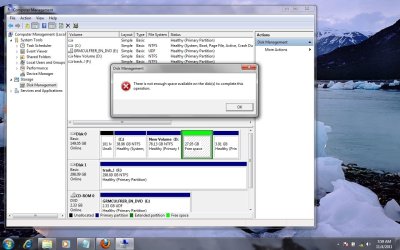
I am try to create a new volume from a free space disk which was earlier have ubuntu installed in it.
I delete the partition and then right click on it and select "New Simple Volume".
I select drive "G" and select format as NTFS.
When I click on finish, it give me error "Not enough disk space to perform this operation".
It shows as Free Space which tells me it is already a partition. If this was a Linux partition it may need to be deleted and then should show as Unallocated. Then a new partition can be made. May have to delete it through Linux and not Windows but I am not familiar with Linux.
Jim
My Computer
Computer type
PC/Desktop
Computer Manufacturer/Model Number
Home Built
OS
Windows 8.1 Pro w/Media Center 64bit, Windows 7 HP 64bit
CPU
Phenom II X6 1100T
Motherboard
ASUS M5A99X EVO
Memory
Crucial Balistic 8gb DDR3-1866 CL9
Graphics Card(s)
MSI R6850 Cyclone IGD5 PE
Sound Card
On Board
Monitor(s) Displays
ASUS VE258Q 25" LED with DVI-HDMI-DisplayPort
Screen Resolution
1920 x 1080
Hard Drives
Two WD Cavier Black 2TB Sata III, WD My Book Essential 2TB USB 3.0
PSU
Seasonic X650 80 Plus GOLD Modular
Case
Corsair 400R
Cooling
Antec Kuhler H2O 620, Two 120mm and four 140mm
Keyboard
Logitech K120
Mouse
Logitech Marble Mouse USB, Logitech Precision Game Pad
Internet Speed
15MB
Antivirus
Norton IS 2013, Malwarebytes Pro Beta 2
Browser
IE-11, FF-27
Other Info
APC UPS ES 750, Netgear WNR3500L Gigabit & Wireless N Router with SamKnows Test Program, Motorola SB6120 Gigabit Cable Modem. Brother HL-2170W Laser Printer, Epson V300 Scanner
What's on the 3.91 unlettered partition to the right of the logical Free Space? If it isn't being used (since it doesn't have a letter) then I'd delete it, too. You can rightclick in DIsk Mgmt. to Explore it.
Rightclick again on the Free Space to Delete Volume which should then make it Unallocated Space. Then rightclick to create a New partition there. If you keep the 3.91 primary partition to its right (why?) it should offer a Logical data partition, if you delete the 3.91 gb useless partition it should offer you a second Primary since you can have 3 before it forces you to take a Logical.
May I make another suggestion? Your WIn7 OS partition is way too small for most uses. I would consider using free Partition Wizard bootable CD to Resize the left border of D to the right, to make space to Extend C to the right to about 50+ gb at least. Then you can slide the left border of C to take up the 101mb space.
Once you decide exactly what you want to do based on these recommendations, we can give you more specific steps to get it all done safely after backing up your files and a Win7 backup image.
Take a look at this Tutorial. It basically says to right click on the Free Space and select Delete Volume and it should then show as Unallocated. Try it a couple of times and see if it will delete.