not able to run age of empire 3 in window 7 ultimate 32 bit

vikrantkarn007

New member
Local time
11:50 PM
Messages
26
hey friends i m not able to run age of empire 3 game on my computer which runs on window 7 ultimate 32 bit having intel chipset g33/g31 and graphics of intel gma 3100. when i run this game a dialoge box with notification that this game is not compatible with this oshttp://cssimg.sevenforumscdn.com/images/smilies/confused.gif
 

My Computer My Computer

At a glance

windows 7 ultimate x84
OS
windows 7 ultimate x84
Hello Vik, and welcome to Seven Forums

Strange, I run that game fine on my Windows 7. Perhaps the problem is you do not have all the expansion packs and updates (Believing that expansion packs add compatability stability). Is there a way to update the game after you install it by the menu (a button that says update)?

You can try it in compatability mode: http://www.sevenforums.com/tutorials/316-compatibility-mode.html
 

My Computer My Computer

At a glance

Microsoft Windows 8.1 Pro 64-bitIntel(R) Core(TM) i3-4130 CPU @ 3.40GHz8.00 GBNone
Computer type
PC/Desktop
Computer Manufacturer/Model Number
Custom Asus Build
OS
Microsoft Windows 8.1 Pro 64-bit
CPU
Intel(R) Core(TM) i3-4130 CPU @ 3.40GHz
Motherboard
B85M-E
Memory
8.00 GB
Graphics Card(s)
None
Sound Card
Realtek High Definition Audio
Monitor(s) Displays
Asus 23.6" Monitor
Screen Resolution
1920 x 1080 x 32 bits (4294967296 colors) @ 60 Hz
Hard Drives
INTEL SSDSC2BW180A4
Samsung SSD 840 PRO Series
PSU
Seasonic S12II-380Bronze
Case
Lian Li
Cooling
Fan, Passive
Keyboard
Logitech K120
Mouse
Microsoft Touch Mouse
Internet Speed
4ms Ping, 19.0 Mbps Download, 19.0 Mbps Upload
Antivirus
Eset Endpoint
Browser
Internet Explorer, Chrome
could u suggest me any web link for compatible mode for this game
 

My Computer My Computer

At a glance

windows 7 ultimate x84
OS
windows 7 ultimate x84

My Computer My Computer

At a glance

Microsoft Windows 8.1 Pro 64-bitIntel(R) Core(TM) i3-4130 CPU @ 3.40GHz8.00 GBNone
Computer type
PC/Desktop
Computer Manufacturer/Model Number
Custom Asus Build
OS
Microsoft Windows 8.1 Pro 64-bit
CPU
Intel(R) Core(TM) i3-4130 CPU @ 3.40GHz
Motherboard
B85M-E
Memory
8.00 GB
Graphics Card(s)
None
Sound Card
Realtek High Definition Audio
Monitor(s) Displays
Asus 23.6" Monitor
Screen Resolution
1920 x 1080 x 32 bits (4294967296 colors) @ 60 Hz
Hard Drives
INTEL SSDSC2BW180A4
Samsung SSD 840 PRO Series
PSU
Seasonic S12II-380Bronze
Case
Lian Li
Cooling
Fan, Passive
Keyboard
Logitech K120
Mouse
Microsoft Touch Mouse
Internet Speed
4ms Ping, 19.0 Mbps Download, 19.0 Mbps Upload
Antivirus
Eset Endpoint
Browser
Internet Explorer, Chrome
when i open the compatiblity mode of age of empire 3 it doesn't show the option for window 7
 

My Computer My Computer

At a glance

windows 7 ultimate x84
OS
windows 7 ultimate x84
I am sorry i just wanted to add my own opinion me and my friends play this same game AGE III and the expansions. It runs well on Vista 64bit, Vista 32bit, Windows 7 32 bit.

We didn't need to do any special permissions or change compatability modes.

ADDED
@vikrantkarn007 change it for windows xp mode
 

My Computer My Computer

At a glance

Windows 8 64 bit PROAMD Phenom X4 9100e2GB X2 DDR2Sapphire HD 6850
Computer type
PC/Desktop
Computer Manufacturer/Model Number
Gateway / Slight Modifications
OS
Windows 8 64 bit PRO
CPU
AMD Phenom X4 9100e
Motherboard
Gateway RS780
Memory
2GB X2 DDR2
Graphics Card(s)
Sapphire HD 6850
Sound Card
Integrated
Monitor(s) Displays
Gateway 19" + Dell 19"
Screen Resolution
1440X900 sometimes 2880 by 900
Hard Drives
WD 80GB
WD 640GB
WD 1,000GB
PSU
Antec BP 550watts
Case
Antec 300
Cooling
Stock Cooling
Keyboard
Saitek Eclipse II
Mouse
Gigabyte GM-M6800
Internet Speed
D: 30Mbps U:4Mbps
Antivirus
Avast version 8
Browser
Internet Explorer ver 10 64 bit
Other Info
This is my work computer.
I have another laptop running Windows 7 64 bit.
Another PC running Windows 8 64 bit pro.
Total of 3
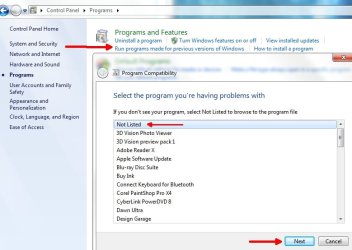
Use this method:
e (2).jpg
 

My Computer My Computer

At a glance

Microsoft Windows 8.1 Pro 64-bitIntel(R) Core(TM) i3-4130 CPU @ 3.40GHz8.00 GBNone
Computer type
PC/Desktop
Computer Manufacturer/Model Number
Custom Asus Build
OS
Microsoft Windows 8.1 Pro 64-bit
CPU
Intel(R) Core(TM) i3-4130 CPU @ 3.40GHz
Motherboard
B85M-E
Memory
8.00 GB
Graphics Card(s)
None
Sound Card
Realtek High Definition Audio
Monitor(s) Displays
Asus 23.6" Monitor
Screen Resolution
1920 x 1080 x 32 bits (4294967296 colors) @ 60 Hz
Hard Drives
INTEL SSDSC2BW180A4
Samsung SSD 840 PRO Series
PSU
Seasonic S12II-380Bronze
Case
Lian Li
Cooling
Fan, Passive
Keyboard
Logitech K120
Mouse
Microsoft Touch Mouse
Internet Speed
4ms Ping, 19.0 Mbps Download, 19.0 Mbps Upload
Antivirus
Eset Endpoint
Browser
Internet Explorer, Chrome
thanks guys for your opinion . now i can run age of empire 3
 

My Computer My Computer

At a glance

windows 7 ultimate x84
OS
windows 7 ultimate x84
cool! :thumbsup:
 

My Computer My Computer

At a glance

Microsoft Windows 8.1 Pro 64-bitIntel(R) Core(TM) i3-4130 CPU @ 3.40GHz8.00 GBNone
Computer type
PC/Desktop
Computer Manufacturer/Model Number
Custom Asus Build
OS
Microsoft Windows 8.1 Pro 64-bit
CPU
Intel(R) Core(TM) i3-4130 CPU @ 3.40GHz
Motherboard
B85M-E
Memory
8.00 GB
Graphics Card(s)
None
Sound Card
Realtek High Definition Audio
Monitor(s) Displays
Asus 23.6" Monitor
Screen Resolution
1920 x 1080 x 32 bits (4294967296 colors) @ 60 Hz
Hard Drives
INTEL SSDSC2BW180A4
Samsung SSD 840 PRO Series
PSU
Seasonic S12II-380Bronze
Case
Lian Li
Cooling
Fan, Passive
Keyboard
Logitech K120
Mouse
Microsoft Touch Mouse
Internet Speed
4ms Ping, 19.0 Mbps Download, 19.0 Mbps Upload
Antivirus
Eset Endpoint
Browser
Internet Explorer, Chrome
unable to create installdriver instance

Dear All,
I need help for installing my Age Of empire 3,
when I try to install it..It cannot work.
in my screen, appears "1608 : unable to create installdriver instance " return code:-2147024894 "

can you guys help me ???
i miss this game so much...love this game...
I want it installed on my ASUS K40iJ badly. :(:(

I've tried some for fixing it, but still cannot be installed.
look forward...;)


thanks,

regards
Michael Helmi
 

My Computer My Computer

At a glance

Windows 7 Ultimate x86Intel(R) Core(TM) 2Duo CPU T6570 2.1Ghz2048 BM RAM
Computer Manufacturer/Model Number
ASUSTek Computer Inc/K40IJ
OS
Windows 7 Ultimate x86
CPU
Intel(R) Core(TM) 2Duo CPU T6570 2.1Ghz
Motherboard
ASUS
Memory
2048 BM RAM
Sound Card
-
Monitor(s) Displays
Mobile Intel(R) 4 series Express Chipset Family
Hello Michael, and welcome to Sevenforums!

It is usually best to start your own thread up in a forum, but I will try to help you if I can.

Go to this website and make sure you have all the drivers installed: ASUSTeK Computer Inc. - Notebooks- ASUS K40IJ
Remove previous ones first if you have them (but keep the wireless driver until after you've finished downloading the newer wireless software because you will lose internet connection if you uninstall the driver).

Make sure you have all windows updates installed

after all that, restart the computer and try again.

What antivirus are you running? It doesn't happen to be McAfee, does it?
 

My Computer My Computer

At a glance

Microsoft Windows 8.1 Pro 64-bitIntel(R) Core(TM) i3-4130 CPU @ 3.40GHz8.00 GBNone
Computer type
PC/Desktop
Computer Manufacturer/Model Number
Custom Asus Build
OS
Microsoft Windows 8.1 Pro 64-bit
CPU
Intel(R) Core(TM) i3-4130 CPU @ 3.40GHz
Motherboard
B85M-E
Memory
8.00 GB
Graphics Card(s)
None
Sound Card
Realtek High Definition Audio
Monitor(s) Displays
Asus 23.6" Monitor
Screen Resolution
1920 x 1080 x 32 bits (4294967296 colors) @ 60 Hz
Hard Drives
INTEL SSDSC2BW180A4
Samsung SSD 840 PRO Series
PSU
Seasonic S12II-380Bronze
Case
Lian Li
Cooling
Fan, Passive
Keyboard
Logitech K120
Mouse
Microsoft Touch Mouse
Internet Speed
4ms Ping, 19.0 Mbps Download, 19.0 Mbps Upload
Antivirus
Eset Endpoint
Browser
Internet Explorer, Chrome
Hello Dustsailor,
thanks for your reply,
I'm now trying to update drivers I have,
I'm not using wireless now...using cable.(DSL)
next time I will do on my own thread..

antivirus, I'm using Norton 360 Premier..is it OK or what ?

regards,
Michael Helmi:)
 

My Computer My Computer

At a glance

Windows 7 Ultimate x86Intel(R) Core(TM) 2Duo CPU T6570 2.1Ghz2048 BM RAM
Computer Manufacturer/Model Number
ASUSTek Computer Inc/K40IJ
OS
Windows 7 Ultimate x86
CPU
Intel(R) Core(TM) 2Duo CPU T6570 2.1Ghz
Motherboard
ASUS
Memory
2048 BM RAM
Sound Card
-
Monitor(s) Displays
Mobile Intel(R) 4 series Express Chipset Family
By the way Dustsailor,
there are many Drivers links You've given to me,
which drivers should I download and install ?

icon_+.gif
EMI and Safety (6)

icon_+.gif
BIOS (8)

icon_+.gif
Chipset (1)

icon_+.gif
ATK (5)

icon_+.gif
AUDIO (2)

icon_+.gif
VGA (2)

icon_+.gif
LAN (1)

icon_+.gif
Card Reader (1)

icon_+.gif
TouchPad (2)

icon_+.gif
Utilities (29)

icon_+.gif
Wireless (5)

icon_+.gif
BlueTooth (3)

icon_+.gif
Camera (4)

icon_+.gif
Others (4)

icon_+.gif
Manual (37)


Im looking forward from You.:)
thanks you


warmest regards,
Michael Helmi
 

My Computer My Computer

At a glance

Windows 7 Ultimate x86Intel(R) Core(TM) 2Duo CPU T6570 2.1Ghz2048 BM RAM
Computer Manufacturer/Model Number
ASUSTek Computer Inc/K40IJ
OS
Windows 7 Ultimate x86
CPU
Intel(R) Core(TM) 2Duo CPU T6570 2.1Ghz
Motherboard
ASUS
Memory
2048 BM RAM
Sound Card
-
Monitor(s) Displays
Mobile Intel(R) 4 series Express Chipset Family
Dear Dustsailor,
my drivers is all newer than drivers @ASUS link you gave,
so ?
is there any other solution for my problem ?
thanks a lot


regards,
Michael Helmi
 

My Computer My Computer

At a glance

Windows 7 Ultimate x86Intel(R) Core(TM) 2Duo CPU T6570 2.1Ghz2048 BM RAM
Computer Manufacturer/Model Number
ASUSTek Computer Inc/K40IJ
OS
Windows 7 Ultimate x86
CPU
Intel(R) Core(TM) 2Duo CPU T6570 2.1Ghz
Motherboard
ASUS
Memory
2048 BM RAM
Sound Card
-
Monitor(s) Displays
Mobile Intel(R) 4 series Express Chipset Family
Michael, you only have the bare minimum when it comes to graphics cards. I am not sure if it can handle the game, but I could be wrong here.

Did you visit the Device Manager and see if there were any exclaimation marks near drivers? If so, you will need to update those drivers (can right click driver, and click update, and have it search online).

Do you have all windows updates installed? After the installation, are you able to get to the main menu for AoEIII? If you can, you will be able to update the game from that menu (I believe), which you should do.

Restart the computer and try again.

Other than this, I am not sure what may be wrong. You might start your own thread and ask this question again, or search online for others who may have similar trouble.
 

My Computer My Computer

At a glance

Microsoft Windows 8.1 Pro 64-bitIntel(R) Core(TM) i3-4130 CPU @ 3.40GHz8.00 GBNone
Computer type
PC/Desktop
Computer Manufacturer/Model Number
Custom Asus Build
OS
Microsoft Windows 8.1 Pro 64-bit
CPU
Intel(R) Core(TM) i3-4130 CPU @ 3.40GHz
Motherboard
B85M-E
Memory
8.00 GB
Graphics Card(s)
None
Sound Card
Realtek High Definition Audio
Monitor(s) Displays
Asus 23.6" Monitor
Screen Resolution
1920 x 1080 x 32 bits (4294967296 colors) @ 60 Hz
Hard Drives
INTEL SSDSC2BW180A4
Samsung SSD 840 PRO Series
PSU
Seasonic S12II-380Bronze
Case
Lian Li
Cooling
Fan, Passive
Keyboard
Logitech K120
Mouse
Microsoft Touch Mouse
Internet Speed
4ms Ping, 19.0 Mbps Download, 19.0 Mbps Upload
Antivirus
Eset Endpoint
Browser
Internet Explorer, Chrome
Dear Dustsailor,
thank you for your kindness giving attention for my problem.
I once installed this game and work properly on my ASUS Laptop when I used Windows 7 Professional x86,
but for one reason , I uninstalled it. i've finished the game.

Now, Im using windows 7 ultimate x86,
and I really miss the game ,,,n' want to play the game badly,
I have all windows update installed.
but still,
I cant install it with problem "1608 : unable to create install driver instance"

when I read the compability mode for windows 7,
there is named Age of Empire 3 Gold compatible with windows 7 ultimate x86,
I've donwloaded,
but still..I find the same problem.

i feel desperate with the problem.
so please help.

I will do your suggestion for writing the problem as a new thread up to the forum.

thank you,
regards.
Michael Helmi
 

My Computer My Computer

At a glance

Windows 7 Ultimate x86Intel(R) Core(TM) 2Duo CPU T6570 2.1Ghz2048 BM RAM
Computer Manufacturer/Model Number
ASUSTek Computer Inc/K40IJ
OS
Windows 7 Ultimate x86
CPU
Intel(R) Core(TM) 2Duo CPU T6570 2.1Ghz
Motherboard
ASUS
Memory
2048 BM RAM
Sound Card
-
Monitor(s) Displays
Mobile Intel(R) 4 series Express Chipset Family
Dear Dust sailor,
I'm following your suggestion making my own thread,
but I received staff note that I made "rule violation" said : This is a friendly reminder to stop creating multiple threads on the same issue. You need to keep all of this in your original thread below instead.

I don't understand why..I'm newcomer...
whats wrong with my thread ??

thanks


regards,
michael helmi
 

My Computer My Computer

At a glance

Windows 7 Ultimate x86Intel(R) Core(TM) 2Duo CPU T6570 2.1Ghz2048 BM RAM
Computer Manufacturer/Model Number
ASUSTek Computer Inc/K40IJ
OS
Windows 7 Ultimate x86
CPU
Intel(R) Core(TM) 2Duo CPU T6570 2.1Ghz
Motherboard
ASUS
Memory
2048 BM RAM
Sound Card
-
Monitor(s) Displays
Mobile Intel(R) 4 series Express Chipset Family
Hi mike,

I am not sure myself, but if they want you to keep using this thread, then that's what I'd do.

I can try and help some more, but I'm not sure what that error actually is. aside from googling it,

try going back to the top of this thread and making sure you tried everything suggested. Just to get this straight, are you having trouble installing the game or running it? If installing, then are you having trouble installing anything else? Or is it currently installed?

- While we wait around for someone who may know more about this error than I do, I will try and troubleshoot some more with you.
 

My Computer My Computer

At a glance

Microsoft Windows 8.1 Pro 64-bitIntel(R) Core(TM) i3-4130 CPU @ 3.40GHz8.00 GBNone
Computer type
PC/Desktop
Computer Manufacturer/Model Number
Custom Asus Build
OS
Microsoft Windows 8.1 Pro 64-bit
CPU
Intel(R) Core(TM) i3-4130 CPU @ 3.40GHz
Motherboard
B85M-E
Memory
8.00 GB
Graphics Card(s)
None
Sound Card
Realtek High Definition Audio
Monitor(s) Displays
Asus 23.6" Monitor
Screen Resolution
1920 x 1080 x 32 bits (4294967296 colors) @ 60 Hz
Hard Drives
INTEL SSDSC2BW180A4
Samsung SSD 840 PRO Series
PSU
Seasonic S12II-380Bronze
Case
Lian Li
Cooling
Fan, Passive
Keyboard
Logitech K120
Mouse
Microsoft Touch Mouse
Internet Speed
4ms Ping, 19.0 Mbps Download, 19.0 Mbps Upload
Antivirus
Eset Endpoint
Browser
Internet Explorer, Chrome
Back
Top