Not Able To Send Web Page By E-Mail

charliemae

New member
Local time
6:03 AM
Messages
6
64 Bit, Windows 7, Windows Mail

I find everything "okay" for now, with one exception. I am no longer able to "send a web page by e-mail". When I attempt, I get the following:

First, I get the pop up about the "Protected Mode" .. I instruct it to "allow" .. then, I get the following:

There is no email program associated to perform the requested action. Please install an email program or, if one is already installed, create an association in the
Default Programs control panel.

I have an e-mail program, Windows Mail. It is set as default mail program. I mean, I am at a total loss and completely frustrated. Also, I know nada, squat and diddly about "computers" or "operating systems" .. my thing is graphic art and graphic programs .. gosh, any help I can get on this would be more than deeply appreciated.
Thank you.
Charlie
 

My Computer My Computer

Computer Manufacturer/Model Number
HP Pavilion Entertainment PC
OS
Windows 7
There is no "Windows Mail" in Win 7. You will need to download Windows Live Mail:
Mail - Windows Live
 

My Computer My Computer

Computer type
PC/Desktop
Computer Manufacturer/Model Number
Bruce ... somewhere in his 40's
OS
Windows 7 Ultimate 32bit SP1
CPU
Intel(R) Core(TM)2 Quad CPU @ 2.40GHz, 2400 MHz
Motherboard
INTEL/D975XBX2
Memory
4 GB
Graphics Card(s)
ATI Radeon HD 2600 Pro
Monitor(s) Displays
Samsung SyncMaster 914v
Screen Resolution
1280 x 1024
Hard Drives
2/500GB each ... ST3500630AS ATA Device.
One is not connected
PSU
Rocketfish 700 W
Case
G.Skill Gigabyte Chassis
Keyboard
Standard PS/2 Keyboard
Mouse
Microsoft PS/2 Mouse
Internet Speed
DSL
Antivirus
Avira Internet Security
Browser
IE 11
Other Info
ATI HDMI Audio
I have a 64 bit system, with Windows 7 and I have Windows Mail, which I want to keep for a number of reasons. It is set as the default mail and I need information from anyone who has a 64 bit system, with Windows 7 and Windows Mail as to whether or not they have been able to send a web page as an email.
Windows Live Mail was removed and Windows Mail was installed. I followed all instructions for doing that and everything is functioning as far as my stationery and e-mail. The only thing I am not able to do is to send a web page as an e-mail and I am hoping that it is some darned setting that I haven't caught.
Thank you.
Charlie
 

My Computer My Computer

Computer Manufacturer/Model Number
HP Pavilion Entertainment PC
OS
Windows 7
Charlie, if you are using IE as your browser, click on Tools and select Internet Options. Under Internet Options click on the Programs tab and look at the last entry, Internet Programs. Click on the Set programs button. From there follow the bouncing ball to make sure your email program is set as the default for IE. It is kind of a cumbersome process.
 

My Computer My Computer

Computer Manufacturer/Model Number
Home built
OS
Windows 7 Ultimate 32 bit
CPU
Intel(R) Pentium(R) 4 CPU 3.00GHz
Motherboard
ASUS P4P800-VM Motherboard Chipset: Intel 865G + ICH5
Memory
2.50 GB RAM
Graphics Card(s)
NVIDIA GeForce 7600 GS
Sound Card
SoundMax Integrated Digital Audio (Chip)
Monitor(s) Displays
ViewSonic VX 1962 wm
Screen Resolution
1680 X 1050
Hard Drives
Seagate Barracuda 7200.10 80 GB
ST380215A ATA Device 18.6 GB
Western Digital "My Book" external hard drive 750 GB
Cooling
Fan based
Keyboard
Microsoft Comfort Curve Keyboard 2000 v10 USB
Mouse
Logitec optic USB
Internet Speed
3.01 Mb/s download 0.64 Mb/s upload
THIS is where I get lost ... I get to the default thing .. I select Set Programs .. from there, I click on the one that says "Set your default Programs" and then I see
Windows Mail and when I open that it tells me that it has all its defaults. and when I click the Choose The Defaults for this program, in there is Windows Mai E-Mail Messagel, Mail To Protocol and Send Mail Command.
So it all "seems" to be set at where it should be .. but .. still no can do!
Thank you.
Charlie
 

My Computer My Computer

Computer Manufacturer/Model Number
HP Pavilion Entertainment PC
OS
Windows 7
You can try to see if 'set associations' works:
click on associate a file type or protocal with a program. Scroll down to .eml.... is it set to Windows Mail?
 

My Computer My Computer

Computer type
PC/Desktop
Computer Manufacturer/Model Number
Bruce ... somewhere in his 40's
OS
Windows 7 Ultimate 32bit SP1
CPU
Intel(R) Core(TM)2 Quad CPU @ 2.40GHz, 2400 MHz
Motherboard
INTEL/D975XBX2
Memory
4 GB
Graphics Card(s)
ATI Radeon HD 2600 Pro
Monitor(s) Displays
Samsung SyncMaster 914v
Screen Resolution
1280 x 1024
Hard Drives
2/500GB each ... ST3500630AS ATA Device.
One is not connected
PSU
Rocketfish 700 W
Case
G.Skill Gigabyte Chassis
Keyboard
Standard PS/2 Keyboard
Mouse
Microsoft PS/2 Mouse
Internet Speed
DSL
Antivirus
Avira Internet Security
Browser
IE 11
Other Info
ATI HDMI Audio
Yes, it is.
 

My Computer My Computer

Computer Manufacturer/Model Number
HP Pavilion Entertainment PC
OS
Windows 7
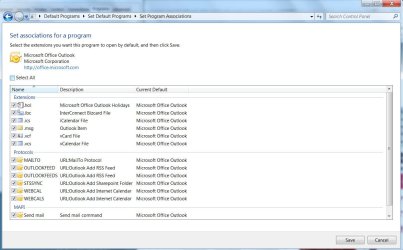
I rarely use IE and I don't use Windows mail; but here is a shot of how Outlook is set up on my computer.

Check your settings under choose defaults for this program, particularly the mailto protocol
 

Attachments

  • Capture.JPG
    Capture.JPG
    103.7 KB · Views: 112

My Computer My Computer

Computer Manufacturer/Model Number
Home built
OS
Windows 7 Ultimate 32 bit
CPU
Intel(R) Pentium(R) 4 CPU 3.00GHz
Motherboard
ASUS P4P800-VM Motherboard Chipset: Intel 865G + ICH5
Memory
2.50 GB RAM
Graphics Card(s)
NVIDIA GeForce 7600 GS
Sound Card
SoundMax Integrated Digital Audio (Chip)
Monitor(s) Displays
ViewSonic VX 1962 wm
Screen Resolution
1680 X 1050
Hard Drives
Seagate Barracuda 7200.10 80 GB
ST380215A ATA Device 18.6 GB
Western Digital "My Book" external hard drive 750 GB
Cooling
Fan based
Keyboard
Microsoft Comfort Curve Keyboard 2000 v10 USB
Mouse
Logitec optic USB
Internet Speed
3.01 Mb/s download 0.64 Mb/s upload
There is no Microsoft Office on this computer ... when we set it up, all programs like that were removed because the only thing the computer is used for is graphic work .. and sending things via e-mail.
Do I have to have Office in order to be able to send a web page via an e-mail????
Thanks
 

My Computer My Computer

Computer Manufacturer/Model Number
HP Pavilion Entertainment PC
OS
Windows 7
No, not all. I use Outlook. But your email client should be set up similarly to mine in regards to the MAILTO protocol. That is what drives sending an email from IE.
 

My Computer My Computer

Computer Manufacturer/Model Number
Home built
OS
Windows 7 Ultimate 32 bit
CPU
Intel(R) Pentium(R) 4 CPU 3.00GHz
Motherboard
ASUS P4P800-VM Motherboard Chipset: Intel 865G + ICH5
Memory
2.50 GB RAM
Graphics Card(s)
NVIDIA GeForce 7600 GS
Sound Card
SoundMax Integrated Digital Audio (Chip)
Monitor(s) Displays
ViewSonic VX 1962 wm
Screen Resolution
1680 X 1050
Hard Drives
Seagate Barracuda 7200.10 80 GB
ST380215A ATA Device 18.6 GB
Western Digital "My Book" external hard drive 750 GB
Cooling
Fan based
Keyboard
Microsoft Comfort Curve Keyboard 2000 v10 USB
Mouse
Logitec optic USB
Internet Speed
3.01 Mb/s download 0.64 Mb/s upload
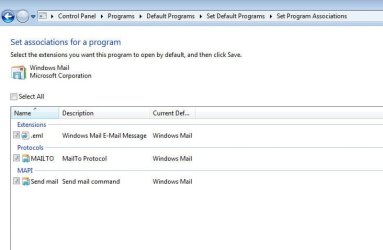
attached is a clip of mine ... these are all the programs that I have in and under Windows Mail
 

Attachments

  • Image7.jpg
    Image7.jpg
    30.6 KB · Views: 24

My Computer My Computer

Computer Manufacturer/Model Number
HP Pavilion Entertainment PC
OS
Windows 7
Darn, Charlie; it looks like it is set properly to me. Mailto is set to Windows Mail. I am fresh opt of ideas. Someone more knowledgeable than I, especially regarding IE, will have to come along. I'm sorry I was unable to help.
 

My Computer My Computer

Computer Manufacturer/Model Number
Home built
OS
Windows 7 Ultimate 32 bit
CPU
Intel(R) Pentium(R) 4 CPU 3.00GHz
Motherboard
ASUS P4P800-VM Motherboard Chipset: Intel 865G + ICH5
Memory
2.50 GB RAM
Graphics Card(s)
NVIDIA GeForce 7600 GS
Sound Card
SoundMax Integrated Digital Audio (Chip)
Monitor(s) Displays
ViewSonic VX 1962 wm
Screen Resolution
1680 X 1050
Hard Drives
Seagate Barracuda 7200.10 80 GB
ST380215A ATA Device 18.6 GB
Western Digital "My Book" external hard drive 750 GB
Cooling
Fan based
Keyboard
Microsoft Comfort Curve Keyboard 2000 v10 USB
Mouse
Logitec optic USB
Internet Speed
3.01 Mb/s download 0.64 Mb/s upload
Back
Top