Not able to use bitlocker, why?

blakenowazdi

Banned
Local time
10:08 AM
Messages
21
Thank you for taking the time to help me.

I installed Windows 7 Ultimate on my computer that used to be running Vista. It is the Sager NP2096.

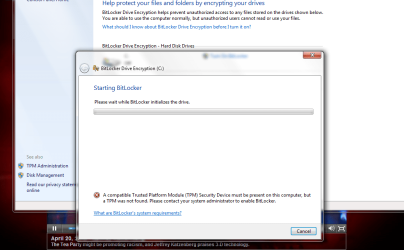
I want to enable bitlocker but it wont let me. Can I do anything?

If I can get it to work, will enabling it possibly erase my files or setting?

see attached pic.


Thank you :D
 

Attachments

  • Capture.PNG
    Capture.PNG
    49.4 KB · Views: 55

My Computer

OS
Windows 7

My Computer

Computer Manufacturer/Model Number
Custom
OS
Windows 7 Professional x64
CPU
Intel i7 2600K OC'd @ 4620 MHz
Motherboard
Asus P8Z68-V Pro
Memory
16GB GSkill Sniper 2133 Mhz (4x4GB)
Graphics Card(s)
EVGA GeForce GTX 480 SuperClocked+
Sound Card
Realtek High Definition Audio
Monitor(s) Displays
2x Acer S273HLbmii 27"
Screen Resolution
2 x 1920x1080
Hard Drives
64GB Crucial M4 SSD

Storage: Hitachi 1TB 5400RPM, Samsung 1.5TB 5400RPM
PSU
Corsair HW Series 750w (modular)
Case
Cooler Master HAF 932 Advanced Blue Edition
Cooling
CM Hyper 212+ CPU cooler, 3x 230mm + 1x 140mm case fans
Keyboard
Logitech MK320 (wireless)
Mouse
Logitech MK320 (wireless)
Internet Speed
30 Mb/s : 2 Mb/s

My Computer

Computer Manufacturer/Model Number
Custom
OS
Windows 7 Professional x64
CPU
Intel i7 2600K OC'd @ 4620 MHz
Motherboard
Asus P8Z68-V Pro
Memory
16GB GSkill Sniper 2133 Mhz (4x4GB)
Graphics Card(s)
EVGA GeForce GTX 480 SuperClocked+
Sound Card
Realtek High Definition Audio
Monitor(s) Displays
2x Acer S273HLbmii 27"
Screen Resolution
2 x 1920x1080
Hard Drives
64GB Crucial M4 SSD

Storage: Hitachi 1TB 5400RPM, Samsung 1.5TB 5400RPM
PSU
Corsair HW Series 750w (modular)
Case
Cooler Master HAF 932 Advanced Blue Edition
Cooling
CM Hyper 212+ CPU cooler, 3x 230mm + 1x 140mm case fans
Keyboard
Logitech MK320 (wireless)
Mouse
Logitech MK320 (wireless)
Internet Speed
30 Mb/s : 2 Mb/s

My Computer

OS
Windows 7
Hi! blakenowazdi, welcome to SF :)

I was offered this Hotfix, and am passing it on to you in case you will need it.

A computer stops responding during shutdown if BitLocker is enabled on the system drive on a computer that is running Windows 7 Ulitimate or Windows Server 2008 R2


Two reasons I didn't install are:
  • I don't use Bitlocker
  • And have win7 home premium
From your description you can't get Bitlocker enabled, and this fix is for PC that stops running after you do get it running. :shock:

Anak

Edit:

blakenowazdi,

That 70gb external drive wouldn't be a
fat32HDD would it? most come with that as the default format maybe if you went to NTFS, it''ll take.

Read here:
http://www.sevenforums.com/system-security/43095-can-not-use-bitlocker-why.html
 
Last edited:

My Computer

Computer type
PC/Desktop
Computer Manufacturer/Model Number
Gateway DX4831-01e (Mid-Tower Desktop)
OS
Originally Win 7 Hm Prem x64 Ver 6.1.7600 Build 7601-SP1 | Upgraded to Windows 10 December 14, 2019
CPU
Intel i3 530 2.93GHz, 2933MHz 2 Cores 4 Logical Processors
Motherboard
Gateway H57M01 133 megahertz
Memory
6GB of 1,333MHz DDR3 SDRAM
Graphics Card(s)
32MB Intel Graphics Media Accelerator HD IGChip
Sound Card
Realtek High Definition Audio
Monitor(s) Displays
Gateway HX2000 20inch TFT active matrix TN
Screen Resolution
1600 x 900 x 59 hertz
Hard Drives
WDC WD10EADS-00M2B0 [HDD] (1000.20 GB) -- drive 0,
HL-DT-ST DVDRAM GH41N [CD-ROM dr]
Four card readers, and Four USB 2.0
PSU
300watts.
Case
Mid-Tower Desktop
Cooling
Stock from Gateway
Keyboard
Natural Ergonomic Keyboard 4000, see Other Info
Mouse
Orig. Gateway wore out now using Insignia USB wired optical
Internet Speed
Vz FIOS 10ms png 57.64Mbps down 65.53Mbps up Speedtest.org
Antivirus
Zamana Anti-logger with Anti-malware, MSE, Windows Firewall,
Browser
IE11.0.9600.19399-Upd ver11.0.135, Firefox 68.0.1 x64
Other Info
System Specs by Belarc.

BIOS: American Megatrends Inc. P01-A0 11/17/2009

Replaced the MS 'Natural' Standard PS/2 Enhanced 101-102 Keyboard with a new Natural Ergonomic Keyboard 4000 on August 1st 2014.

Canon Pixma MG3222 Printer.

Updated to IE11 on 12102015 | Fios Quantum Router g1100

Additional AV: SpywareBlaster, manual Mbam, SAS
I can't imagine, but a backup is always a good idea, even in non-risk situations.

See this tutorial on creating a system image: http://www.sevenforums.com/tutorials/663-backup-complete-computer-create-image-backup.html

lol, thanks for the back-up advice but it says I need over 200GB to do it and I don't have that type of space lying around. The most I have is a 70GB external drive and it already has my valuable files stored on it. O well....
How big is your used space on C - 200GB sounds very, very large. If it is less than 100GB, I will make another suggestion.
 

My Computer

Computer Manufacturer/Model Number
HP, Dell, Gateway, Toshiba - 4 laptops and 2 desktops
OS
Vista, Windows7, Mint Mate, Zorin, Windows 8
CPU
from 1.6GHz Duo to i7
Monitor(s) Displays
2x HP w2207
Hard Drives
5x HDD, 7x SSD, 12x Externals
Keyboard
with trackball - no mices
Mouse
Trackball mice
Internet Speed
DSL 6000
I can't imagine, but a backup is always a good idea, even in non-risk situations.

See this tutorial on creating a system image: http://www.sevenforums.com/tutorials/663-backup-complete-computer-create-image-backup.html

lol, thanks for the back-up advice but it says I need over 200GB to do it and I don't have that type of space lying around. The most I have is a 70GB external drive and it already has my valuable files stored on it. O well....
How big is your used space on C - 200GB sounds very, very large. If it is less than 100GB, I will make another suggestion.

used space is something like 191Gb free of a 250GB disk. I cant tell for sure because Bitlocker is currently encrypting my drive.
 

My Computer

OS
Windows 7
Hi! blakenowazdi, welcome to SF :)

I was offered this Hotfix, and am passing it on to you in case you will need it.

A computer stops responding during shutdown if BitLocker is enabled on the system drive on a computer that is running Windows 7 Ulitimate or Windows Server 2008 R2


Two reasons I didn't install are:
  • I don't use Bitlocker
  • And have win7 home premium
From your description you can't get Bitlocker enabled, and this fix is for PC that stops running after you do get it running. :shock:

Anak

thank you, i hope i wont have that problem
 

My Computer

OS
Windows 7
lol, thanks for the back-up advice but it says I need over 200GB to do it and I don't have that type of space lying around. The most I have is a 70GB external drive and it already has my valuable files stored on it. O well....
How big is your used space on C - 200GB sounds very, very large. If it is less than 100GB, I will make another suggestion.

used space is something like 191Gb free of a 250GB disk. I cant tell for sure because Bitlocker is currently encrypting my drive.
That means you have 59GB used space on C. The image should not take more than 35GBs - at least with Macrium. But since you are already running Bitlocker, I guess it is too late for an image. Next time you want to image, have a look at my imaging tutorials.
 

My Computer

Computer Manufacturer/Model Number
HP, Dell, Gateway, Toshiba - 4 laptops and 2 desktops
OS
Vista, Windows7, Mint Mate, Zorin, Windows 8
CPU
from 1.6GHz Duo to i7
Monitor(s) Displays
2x HP w2207
Hard Drives
5x HDD, 7x SSD, 12x Externals
Keyboard
with trackball - no mices
Mouse
Trackball mice
Internet Speed
DSL 6000
How big is your used space on C - 200GB sounds very, very large. If it is less than 100GB, I will make another suggestion.

used space is something like 191Gb free of a 250GB disk. I cant tell for sure because Bitlocker is currently encrypting my drive.
That means you have 59GB used space on C. The image should not take more than 35GBs - at least with Macrium. But since you are already running Bitlocker, I guess it is too late for an image. Next time you want to image, have a look at my imaging tutorials.

thank you
 

My Computer

OS
Windows 7
UPDATE:

BTlocker has completed encrypting my C drive and everything seems to be working as it should. I am also not experiencing any issues when shutting down my machine!


Thank you to everybody that helped.


After BTlocker finished its work I decided to go ahead and use Macrium to create a disk image of C. It worked very well. Thank you again.
 

My Computer

OS
Windows 7
UPDATE:

BTlocker has completed encrypting my C drive and everything seems to be working as it should. I am also not experiencing any issues when shutting down my machine!


Thank you to everybody that helped.


After BTlocker finished its work I decided to go ahead and use Macrium to create a disk image of C. It worked very well. Thank you again.
Just a little question. How big is your Macrium image - was my guess of 35GBs in the ballpark?
 

My Computer

Computer Manufacturer/Model Number
HP, Dell, Gateway, Toshiba - 4 laptops and 2 desktops
OS
Vista, Windows7, Mint Mate, Zorin, Windows 8
CPU
from 1.6GHz Duo to i7
Monitor(s) Displays
2x HP w2207
Hard Drives
5x HDD, 7x SSD, 12x Externals
Keyboard
with trackball - no mices
Mouse
Trackball mice
Internet Speed
DSL 6000
UPDATE:

BTlocker has completed encrypting my C drive and everything seems to be working as it should. I am also not experiencing any issues when shutting down my machine!


Thank you to everybody that helped.


After BTlocker finished its work I decided to go ahead and use Macrium to create a disk image of C. It worked very well. Thank you again.
Just a little question. How big is your Macrium image - was my guess of 35GBs in the ballpark?

C drive actual size was 42GB +100MB system reserve---disk image is 25.6Gb

the file is a 970C268A916AFE6D-00-00.mrimg (does that sound right)
 

My Computer

OS
Windows 7
That sounds right. I was going with the assumption that your C has 59MBs of data. The compression ratio is such that you end up with appr. 55% of the original size. And the filename looks very familiar.
PS: have a look at your other thread. I left some reading material.
 

My Computer

Computer Manufacturer/Model Number
HP, Dell, Gateway, Toshiba - 4 laptops and 2 desktops
OS
Vista, Windows7, Mint Mate, Zorin, Windows 8
CPU
from 1.6GHz Duo to i7
Monitor(s) Displays
2x HP w2207
Hard Drives
5x HDD, 7x SSD, 12x Externals
Keyboard
with trackball - no mices
Mouse
Trackball mice
Internet Speed
DSL 6000
Back
Top