Not detecting second screen

flawless

New member
Local time
9:16 PM
Messages
99
Last edited:

My Computer

Computer Manufacturer/Model Number
Acer
OS
Windows 7
CPU
Intel(R) Core(TM)2 Quad CPU Q9300 @ 2.50GHz 2.50 GHz
Memory
4 GB
Graphics Card(s)
GeForce GTX 470
Sound Card
Realtek Digital Output (Realtek High Definition Audio)
Monitor(s) Displays
24" samsung
Screen Resolution
1920 x 1080
Case
Aspire M7711
Keyboard
Razer Lycosa
Mouse
Logitech G9
Internet Speed
20 MB
How is each monitor hooked up?
 

My Computer

Computer Manufacturer/Model Number
Pugh Technologies
OS
W7 Professional x64
CPU
AMD Athlon II X3 445 Rana 3.10 GHz
Motherboard
MSI 870A-G54
Memory
PNY XLR DDR3 1600 4x2GB
Graphics Card(s)
NVIDIA GeForce GTS 450 (fermi) 1GB GDDR5
Sound Card
Realtek ALC892 onboard
Monitor(s) Displays
ASUS VE205t, Viewsonic VX2035WM
Screen Resolution
1600x900, 1600x1050
Hard Drives
977GB Hitachi Hitachi HDS721010CLA332
244GB Western Digital WDC WD2500AAJS-65B4A0
488GB Western Digital WDC WD5000AAJS-00A8B0
488GB Western Digital WDC WD5000AAKS-00UU3A0
PSU
Antec EarthWatts EA650 650W
Case
ThermalTake Armor A90 Mid Tower
Cooling
3x 120mm in, 1x 120mm & 200mm out, self built hydro-cooler

Keyboard
Logitec 55
Mouse
Razer Deathadder
Internet Speed
20 Mbps D/L, 9 Mbps U/L
Both are using vga to dvi. both vga's are going to the screens and the dvi ends are into the computer.
 

My Computer

Computer Manufacturer/Model Number
Acer
OS
Windows 7
CPU
Intel(R) Core(TM)2 Quad CPU Q9300 @ 2.50GHz 2.50 GHz
Memory
4 GB
Graphics Card(s)
GeForce GTX 470
Sound Card
Realtek Digital Output (Realtek High Definition Audio)
Monitor(s) Displays
24" samsung
Screen Resolution
1920 x 1080
Case
Aspire M7711
Keyboard
Razer Lycosa
Mouse
Logitech G9
Internet Speed
20 MB
I believe that you cannot use two VGA-DVI adapters.
 

My Computer

Computer Manufacturer/Model Number
Pugh Technologies
OS
W7 Professional x64
CPU
AMD Athlon II X3 445 Rana 3.10 GHz
Motherboard
MSI 870A-G54
Memory
PNY XLR DDR3 1600 4x2GB
Graphics Card(s)
NVIDIA GeForce GTS 450 (fermi) 1GB GDDR5
Sound Card
Realtek ALC892 onboard
Monitor(s) Displays
ASUS VE205t, Viewsonic VX2035WM
Screen Resolution
1600x900, 1600x1050
Hard Drives
977GB Hitachi Hitachi HDS721010CLA332
244GB Western Digital WDC WD2500AAJS-65B4A0
488GB Western Digital WDC WD5000AAJS-00A8B0
488GB Western Digital WDC WD5000AAKS-00UU3A0
PSU
Antec EarthWatts EA650 650W
Case
ThermalTake Armor A90 Mid Tower
Cooling
3x 120mm in, 1x 120mm & 200mm out, self built hydro-cooler
Keyboard
Logitec 55
Mouse
Razer Deathadder
Internet Speed
20 Mbps D/L, 9 Mbps U/L
Well i had the exact same setup for my last pc and it worked fine. Also, there is no vga in the back of my pc so its the only possible way.
 

My Computer

Computer Manufacturer/Model Number
Acer
OS
Windows 7
CPU
Intel(R) Core(TM)2 Quad CPU Q9300 @ 2.50GHz 2.50 GHz
Memory
4 GB
Graphics Card(s)
GeForce GTX 470
Sound Card
Realtek Digital Output (Realtek High Definition Audio)
Monitor(s) Displays
24" samsung
Screen Resolution
1920 x 1080
Case
Aspire M7711
Keyboard
Razer Lycosa
Mouse
Logitech G9
Internet Speed
20 MB
Your card has one DVI-I and one DVI-D. VGA is analog so you can't run two VGA monitors unless you use a displayport to VGA adapter, or a digital LCD monitor, not analog, and just hook up the DVI.
 

My Computer

Computer Manufacturer/Model Number
Pugh Technologies
OS
W7 Professional x64
CPU
AMD Athlon II X3 445 Rana 3.10 GHz
Motherboard
MSI 870A-G54
Memory
PNY XLR DDR3 1600 4x2GB
Graphics Card(s)
NVIDIA GeForce GTS 450 (fermi) 1GB GDDR5
Sound Card
Realtek ALC892 onboard
Monitor(s) Displays
ASUS VE205t, Viewsonic VX2035WM
Screen Resolution
1600x900, 1600x1050
Hard Drives
977GB Hitachi Hitachi HDS721010CLA332
244GB Western Digital WDC WD2500AAJS-65B4A0
488GB Western Digital WDC WD5000AAJS-00A8B0
488GB Western Digital WDC WD5000AAKS-00UU3A0
PSU
Antec EarthWatts EA650 650W
Case
ThermalTake Armor A90 Mid Tower
Cooling
3x 120mm in, 1x 120mm & 200mm out, self built hydro-cooler
Keyboard
Logitec 55
Mouse
Razer Deathadder
Internet Speed
20 Mbps D/L, 9 Mbps U/L
i have hdmi ports in both the computer and on one of my screens. when i link that up the quailty is poor and the screen size is a little smaller than it should be. By using the hdmi i can link my second monitor to the working dvi port and get the dual screen working. only problem is the bad quality on the hdmi screen.
 

My Computer

Computer Manufacturer/Model Number
Acer
OS
Windows 7
CPU
Intel(R) Core(TM)2 Quad CPU Q9300 @ 2.50GHz 2.50 GHz
Memory
4 GB
Graphics Card(s)
GeForce GTX 470
Sound Card
Realtek Digital Output (Realtek High Definition Audio)
Monitor(s) Displays
24" samsung
Screen Resolution
1920 x 1080
Case
Aspire M7711
Keyboard
Razer Lycosa
Mouse
Logitech G9
Internet Speed
20 MB
You have a monitor with VGA and HDMI, but no DVI? :what:
 

My Computer

Computer Manufacturer/Model Number
Pugh Technologies
OS
W7 Professional x64
CPU
AMD Athlon II X3 445 Rana 3.10 GHz
Motherboard
MSI 870A-G54
Memory
PNY XLR DDR3 1600 4x2GB
Graphics Card(s)
NVIDIA GeForce GTS 450 (fermi) 1GB GDDR5
Sound Card
Realtek ALC892 onboard
Monitor(s) Displays
ASUS VE205t, Viewsonic VX2035WM
Screen Resolution
1600x900, 1600x1050
Hard Drives
977GB Hitachi Hitachi HDS721010CLA332
244GB Western Digital WDC WD2500AAJS-65B4A0
488GB Western Digital WDC WD5000AAJS-00A8B0
488GB Western Digital WDC WD5000AAKS-00UU3A0
PSU
Antec EarthWatts EA650 650W
Case
ThermalTake Armor A90 Mid Tower
Cooling
3x 120mm in, 1x 120mm & 200mm out, self built hydro-cooler
Keyboard
Logitec 55
Mouse
Razer Deathadder
Internet Speed
20 Mbps D/L, 9 Mbps U/L
One of the monitors have a dvi. What am i meant to do with it?

One monitor has a hdmi port and a vga port. the other has vga and dvi.
 

My Computer

Computer Manufacturer/Model Number
Acer
OS
Windows 7
CPU
Intel(R) Core(TM)2 Quad CPU Q9300 @ 2.50GHz 2.50 GHz
Memory
4 GB
Graphics Card(s)
GeForce GTX 470
Sound Card
Realtek Digital Output (Realtek High Definition Audio)
Monitor(s) Displays
24" samsung
Screen Resolution
1920 x 1080
Case
Aspire M7711
Keyboard
Razer Lycosa
Mouse
Logitech G9
Internet Speed
20 MB
this might sound weird, and i dont think it is me being stupid but the dvi will not fit into the back of my screen. the 4 little pins around the biggest pin on the dvi wont fit in the screen :rolleyes:
 

My Computer

Computer Manufacturer/Model Number
Acer
OS
Windows 7
CPU
Intel(R) Core(TM)2 Quad CPU Q9300 @ 2.50GHz 2.50 GHz
Memory
4 GB
Graphics Card(s)
GeForce GTX 470
Sound Card
Realtek Digital Output (Realtek High Definition Audio)
Monitor(s) Displays
24" samsung
Screen Resolution
1920 x 1080
Case
Aspire M7711
Keyboard
Razer Lycosa
Mouse
Logitech G9
Internet Speed
20 MB
If it's possible can you take a picture and post it of the end of your cable, and the DVI port on the monitor?

It would be best to hook up the monitor with VGA to the adapter, and use the second DVI port on the card to the DVI port on the monitor.
 

My Computer

Computer Manufacturer/Model Number
Pugh Technologies
OS
W7 Professional x64
CPU
AMD Athlon II X3 445 Rana 3.10 GHz
Motherboard
MSI 870A-G54
Memory
PNY XLR DDR3 1600 4x2GB
Graphics Card(s)
NVIDIA GeForce GTS 450 (fermi) 1GB GDDR5
Sound Card
Realtek ALC892 onboard
Monitor(s) Displays
ASUS VE205t, Viewsonic VX2035WM
Screen Resolution
1600x900, 1600x1050
Hard Drives
977GB Hitachi Hitachi HDS721010CLA332
244GB Western Digital WDC WD2500AAJS-65B4A0
488GB Western Digital WDC WD5000AAJS-00A8B0
488GB Western Digital WDC WD5000AAKS-00UU3A0
PSU
Antec EarthWatts EA650 650W
Case
ThermalTake Armor A90 Mid Tower
Cooling
3x 120mm in, 1x 120mm & 200mm out, self built hydro-cooler
Keyboard
Logitec 55
Mouse
Razer Deathadder
Internet Speed
20 Mbps D/L, 9 Mbps U/L
I would try that but the dvi doesnt fit into the monitor. I will take some pictures now.

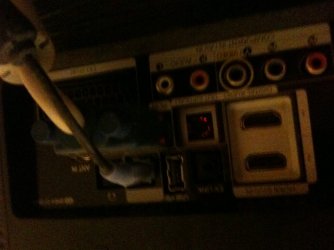
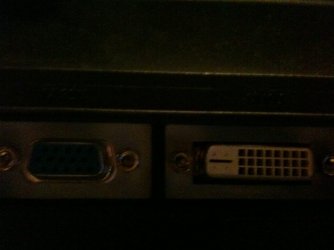
Screen one, Screen two and the dvi cable

On the dvi port you can see the big pin and the 4 small pins around it. on the monitor it has the same 4 holes around the big pin but they are too small
 

Attachments

  • IMG_0087.jpg
    IMG_0087.jpg
    313.7 KB · Views: 9
  • IMG_0086.JPG
    IMG_0086.JPG
    213.6 KB · Views: 12
  • IMG_0085.JPG
    IMG_0085.JPG
    149.3 KB · Views: 8

My Computer

Computer Manufacturer/Model Number
Acer
OS
Windows 7
CPU
Intel(R) Core(TM)2 Quad CPU Q9300 @ 2.50GHz 2.50 GHz
Memory
4 GB
Graphics Card(s)
GeForce GTX 470
Sound Card
Realtek Digital Output (Realtek High Definition Audio)
Monitor(s) Displays
24" samsung
Screen Resolution
1920 x 1080
Case
Aspire M7711
Keyboard
Razer Lycosa
Mouse
Logitech G9
Internet Speed
20 MB
Ah. The inexpensive route I would say, is just pick up a new DVI cable that doesn't have those four pins.
 

My Computer

Computer Manufacturer/Model Number
Pugh Technologies
OS
W7 Professional x64
CPU
AMD Athlon II X3 445 Rana 3.10 GHz
Motherboard
MSI 870A-G54
Memory
PNY XLR DDR3 1600 4x2GB
Graphics Card(s)
NVIDIA GeForce GTS 450 (fermi) 1GB GDDR5
Sound Card
Realtek ALC892 onboard
Monitor(s) Displays
ASUS VE205t, Viewsonic VX2035WM
Screen Resolution
1600x900, 1600x1050
Hard Drives
977GB Hitachi Hitachi HDS721010CLA332
244GB Western Digital WDC WD2500AAJS-65B4A0
488GB Western Digital WDC WD5000AAJS-00A8B0
488GB Western Digital WDC WD5000AAKS-00UU3A0
PSU
Antec EarthWatts EA650 650W
Case
ThermalTake Armor A90 Mid Tower
Cooling
3x 120mm in, 1x 120mm & 200mm out, self built hydro-cooler
Keyboard
Logitec 55
Mouse
Razer Deathadder
Internet Speed
20 Mbps D/L, 9 Mbps U/L
Does it have a special name so i know what i am looking for? Also, will that definitely work?
 

My Computer

Computer Manufacturer/Model Number
Acer
OS
Windows 7
CPU
Intel(R) Core(TM)2 Quad CPU Q9300 @ 2.50GHz 2.50 GHz
Memory
4 GB
Graphics Card(s)
GeForce GTX 470
Sound Card
Realtek Digital Output (Realtek High Definition Audio)
Monitor(s) Displays
24" samsung
Screen Resolution
1920 x 1080
Case
Aspire M7711
Keyboard
Razer Lycosa
Mouse
Logitech G9
Internet Speed
20 MB
Do you have a Hdmi Monitor if so use DVI on one and HDMI on the other you can get a HDMI cable short of 10 bucks if you shop around


it is more Benificial that way i think never had issues since just a idea nothing is set in stone
 

My Computer

Computer type
PC/Desktop
Computer Manufacturer/Model Number
CoreI7-6700K MrFingerIII Special Builds
OS
Windows 10 Home Premium 64bit sp1
CPU
Intel I7-6700K @ 4.6 Ghz 1.344 volts everyday OC
Motherboard
Asrock Fatality K6 Z170 Socket 1151
Memory
32GB G-Skill TridentZ 3200mhz 16-18-18-38 DDR4
Graphics Card(s)
Sli Gigabyte Windforce GTX 980 G1
Sound Card
AC97 Creative Rage Tactic 3D Headphones Bluetooth
Monitor(s) Displays
27" Asus ROG Swift PG278Q G-Sync 48" Vizio Smart HD TV
Screen Resolution
2560x1440p 27"- 48" Currently Gaming at 2560x1440p Res 2K
Hard Drives
250GB Samsung Evo840SSD Seagate baracuda 500 GB WD Mybook 500Gb 1TB Seagate Barracuda
PSU
HX1050w Corsair Silver 80plus certified crosfire/sli
Case
Enthod Pro Full Tower
Cooling
Corsair H110i GT 280 mm High Performance WaterBlock
Keyboard
Logitech wireless keyboard
Mouse
Logitech wireless mouse
Internet Speed
Cox Cable 100+ mb
Antivirus
WebRoot Spysweeper with Antivirus
Browser
IE-10, Chrome, Opera
Other Info
My Other Rig is a AMD FX8320E @4.6Ghz 16GB Ballistic Sport Ram
Mobo Asrock Fatality 990FX 120GB OCZ SSD 1TB Seagate Barracuda Corsair H75 Cooling PSU Corsair CX750
GPU GTX Gigabyte 970G1
I tried the hdmi wire and the highest resolution is 1600. I want to use 1920 like my other screen.
 

My Computer

Computer Manufacturer/Model Number
Acer
OS
Windows 7
CPU
Intel(R) Core(TM)2 Quad CPU Q9300 @ 2.50GHz 2.50 GHz
Memory
4 GB
Graphics Card(s)
GeForce GTX 470
Sound Card
Realtek Digital Output (Realtek High Definition Audio)
Monitor(s) Displays
24" samsung
Screen Resolution
1920 x 1080
Case
Aspire M7711
Keyboard
Razer Lycosa
Mouse
Logitech G9
Internet Speed
20 MB

My Computer

Computer Manufacturer/Model Number
Acer
OS
Windows 7
CPU
Intel(R) Core(TM)2 Quad CPU Q9300 @ 2.50GHz 2.50 GHz
Memory
4 GB
Graphics Card(s)
GeForce GTX 470
Sound Card
Realtek Digital Output (Realtek High Definition Audio)
Monitor(s) Displays
24" samsung
Screen Resolution
1920 x 1080
Case
Aspire M7711
Keyboard
Razer Lycosa
Mouse
Logitech G9
Internet Speed
20 MB
It doesn't. The problem with the two DVI's is they are different. One supports a VGA adapter and one does not.
 

My Computer

Computer Manufacturer/Model Number
Pugh Technologies
OS
W7 Professional x64
CPU
AMD Athlon II X3 445 Rana 3.10 GHz
Motherboard
MSI 870A-G54
Memory
PNY XLR DDR3 1600 4x2GB
Graphics Card(s)
NVIDIA GeForce GTS 450 (fermi) 1GB GDDR5
Sound Card
Realtek ALC892 onboard
Monitor(s) Displays
ASUS VE205t, Viewsonic VX2035WM
Screen Resolution
1600x900, 1600x1050
Hard Drives
977GB Hitachi Hitachi HDS721010CLA332
244GB Western Digital WDC WD2500AAJS-65B4A0
488GB Western Digital WDC WD5000AAJS-00A8B0
488GB Western Digital WDC WD5000AAKS-00UU3A0
PSU
Antec EarthWatts EA650 650W
Case
ThermalTake Armor A90 Mid Tower
Cooling
3x 120mm in, 1x 120mm & 200mm out, self built hydro-cooler
Keyboard
Logitec 55
Mouse
Razer Deathadder
Internet Speed
20 Mbps D/L, 9 Mbps U/L
so i just need to buy a dvi to dvi, one of them not having the 4 pins. Does the dvi without the 4 pins have a specific name?

So its a dvi-d to dvi-i cable. Does anyone know where i can buy this from in england? Ive looked every where.
 
Last edited:

My Computer

Computer Manufacturer/Model Number
Acer
OS
Windows 7
CPU
Intel(R) Core(TM)2 Quad CPU Q9300 @ 2.50GHz 2.50 GHz
Memory
4 GB
Graphics Card(s)
GeForce GTX 470
Sound Card
Realtek Digital Output (Realtek High Definition Audio)
Monitor(s) Displays
24" samsung
Screen Resolution
1920 x 1080
Case
Aspire M7711
Keyboard
Razer Lycosa
Mouse
Logitech G9
Internet Speed
20 MB
Just humor me:
Plug in your monitors.
Open Device Manager, expand Monitors and tell me what you see. Are there 2 monitor devices showing or just one?

If you switch the cable from your 1st monitor with the cable used to connect the 2nd monitor, does the 1st monitor still work?

Do the same for the 2nd monitor. Does the 2nd monitor work?
 

My Computer

OS
Windows 7 Enterprise x64 SP1
Back
Top