Not getting any sound to my 5.1 from Digi Optical cable

If you look at the optical port without anything plugged in, is there any visual indication of port activity? Do you see a red light?
 

My Computer My Computer

At a glance

Windows 8.1 Pro RTM x64Intel Core-i5-3570K 4-core @ 3.4GHz (Ivy Brid...4 x 4GB DDR3-1600 Corsair Vengeance CMZ8GX3M2...MSI GeForce GTX770 Gaming OC 2GB
Computer type
PC/Desktop
Computer Manufacturer/Model Number
Dwarf Dwf/11/2012 r09/2013
OS
Windows 8.1 Pro RTM x64
CPU
Intel Core-i5-3570K 4-core @ 3.4GHz (Ivy Bridge) (OC 4.4GHz)
Motherboard
ASRock Z77 Extreme4-M
Memory
4 x 4GB DDR3-1600 Corsair Vengeance CMZ8GX3M2A1600C9B (16GB)
Graphics Card(s)
MSI GeForce GTX770 Gaming OC 2GB
Sound Card
Realtek High Definition on board solution (ALC 898)
Monitor(s) Displays
ViewSonic VA1912w Widescreen (VGA)
Screen Resolution
1440x900
Hard Drives
OCZ Agility 3 SSD 120GB SATA III x2 (RAID 0)
Samsung HD501LJ 500GB SATA II x2
Hitachi HDS721010CLA332 1TB SATA II
Iomega 1.5TB Ext USB 2.0
WD 2.0TB Ext USB 3.0
PSU
XFX Pro Series 850W Semi-Modular
Case
Gigabyte IF233
Cooling
1 x 120mm Front Inlet 1 x 120mm Rear Exhaust
Keyboard
Microsoft Comfort Curve Keyboard 3000 (USB)
Mouse
Microsoft Comfort Mouse 3000 for Business (USB)
Internet Speed
NetGear DG834Gv3 ADSL Modem/Router (Ethernet) ~4.0 Mb/s (O2)
Antivirus
Avast! 8.0.1497
Browser
IE 11
Other Info
Optical Drive: HL-DT-ST BD-RE BH10LS30 SATA Bluray
Lexmark S305 Printer/Scanner/Copier (USB)
WEI Score: 8.1/8.1/8.5/8.5/8.25
Asus Eee PC 1011PX Netbook (Windows 7 x86 Starter)
If you look at the optical port without anything plugged in, is there any visual indication of port activity? Do you see a red light?

No there isnt any light, but I thin k thats normal for my card?

I'm still totally stuck on this one... I'm still working on trying to disable the mobo sound without disabling the HD sound like I had the issue with before.

I dont understand if the 3.5mm jack works out of the card, why isnt sound being produced to the s/pdif thats on the same card? (and is now on & activated in the turtle beach riviera control panel)
 

My Computer My Computer

At a glance

Windows 7 64 & Ubuntu 64Intel Quad Core Q6600 2.40GHz8gNvidia 9600 GT & 9800 GT
Computer Manufacturer/Model Number
Built it myself
OS
Windows 7 64 & Ubuntu 64
CPU
Intel Quad Core Q6600 2.40GHz
Motherboard
Asus
Memory
8g
Graphics Card(s)
Nvidia 9600 GT & 9800 GT
Sound Card
Turtle Beach 5.1
Monitor(s) Displays
Three 19" Dell's & one 46" Samsung 750
I'm still working on trying to disable the mobo sound without disabling the HD sound like I had the issue with before.

Don't why you're doing that, they are one and the same; all of those things listed as "HD Audio Device" back in those screen shots of yours are the onboard audio, just without the proper drivers installed. Disable the onboard audio and don't worry about the missing "HD Audio Device" as it can't and won't make any difference to your sound card.

No there isnt any light, but I think thats normal for my card?

No it isn't. your card only has an optical digital out pot,

Turtle Beach Riviera - In Detail

and if there isn't a light showing in it (usually red), then it either isn't enabled or is faulty.
 

My Computer My Computer

At a glance

Win 7 Ultimate x64FX-8350 @ 4.6 GHz so farADATA XPG V1 Series Black 8GB DDR3 1600Sapphire R9 270x Dual-X
Computer type
PC/Desktop
Computer Manufacturer/Model Number
Me
OS
Win 7 Ultimate x64
CPU
FX-8350 @ 4.6 GHz so far
Motherboard
Asus M5A97 EVO
Memory
ADATA XPG V1 Series Black 8GB DDR3 1600
Graphics Card(s)
Sapphire R9 270x Dual-X
Sound Card
Xonar DGX w/ Corsair Vengence 1300
Monitor(s) Displays
Acer S232HL Abid
Screen Resolution
1920x1080
Hard Drives
120 GB OCZ Vertex 3
500 GB Seagate 7200.12
PSU
Antec Earthwatts 650W Green
Case
Antec Three Hundred
Cooling
Cooler Master 212 EVO
Keyboard
Logitech G510
Mouse
Logitech G500s
Internet Speed
35000/3000
I'm still working on trying to disable the mobo sound without disabling the HD sound like I had the issue with before.

Don't why you're doing that, they are one and the same; all of those things listed as "HD Audio Device" back in those screen shots of yours are the onboard audio, just without the proper drivers installed. Disable the onboard audio and don't worry about the missing "HD Audio Device" as it can't and won't make any difference to your sound card.

No there isnt any light, but I think thats normal for my card?

No it isn't. your card only has an optical digital out pot,

Turtle Beach Riviera - In Detail

and if there isn't a light showing in it (usually red), then it either isn't enabled or is faulty.

Ok I went back into the onboard sound & disabled what was listed as HD whatever.

I came back to windows & played a cd in the actual dvd 5.1 itself & gets sound perfect, but when I switch it over to SAT, nothing coming out via the s/pdif but it is coming out of my little computer 3.5mm speaker.

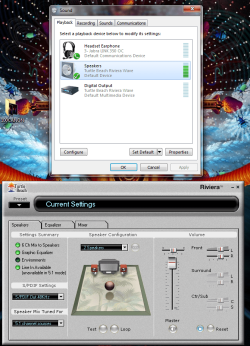
Heres an updated screen shot, I have the s/pdif set up to be on...
 

Attachments

  • Untitled7.png
    Untitled7.png
    169 KB · Views: 91

My Computer My Computer

At a glance

Windows 7 64 & Ubuntu 64Intel Quad Core Q6600 2.40GHz8gNvidia 9600 GT & 9800 GT
Computer Manufacturer/Model Number
Built it myself
OS
Windows 7 64 & Ubuntu 64
CPU
Intel Quad Core Q6600 2.40GHz
Motherboard
Asus
Memory
8g
Graphics Card(s)
Nvidia 9600 GT & 9800 GT
Sound Card
Turtle Beach 5.1
Monitor(s) Displays
Three 19" Dell's & one 46" Samsung 750
I also just downloaded the newest win7 64 driver here:

Turtle Beach :: Knowledgebase / Download

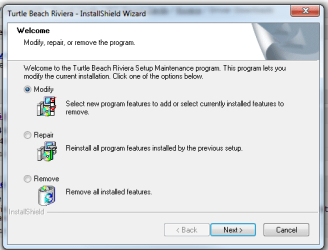
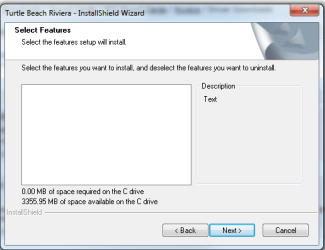
When I tried to install it, Modify was what defaulted, but there was nothing to actually select as you can see in the picture:

So instead I did Repair, it ran through a process & required me to restart my computer.

I still have no sound through the s/pdif

I know the card works fine as I used to have it set up this way before I moved with XP Pro.
 

Attachments

  • Untitled8.png
    Untitled8.png
    15.5 KB · Views: 9
  • Untitled9.png
    Untitled9.png
    12.3 KB · Views: 1

My Computer My Computer

At a glance

Windows 7 64 & Ubuntu 64Intel Quad Core Q6600 2.40GHz8gNvidia 9600 GT & 9800 GT
Computer Manufacturer/Model Number
Built it myself
OS
Windows 7 64 & Ubuntu 64
CPU
Intel Quad Core Q6600 2.40GHz
Motherboard
Asus
Memory
8g
Graphics Card(s)
Nvidia 9600 GT & 9800 GT
Sound Card
Turtle Beach 5.1
Monitor(s) Displays
Three 19" Dell's & one 46" Samsung 750
Heres an updated screen shot, I have the s/pdif set up to be on...

One thing missing from that screen shot, you didn't set the SPDIF as the default device in the Windows settings.
 

My Computer My Computer

At a glance

Win 7 Ultimate x64FX-8350 @ 4.6 GHz so farADATA XPG V1 Series Black 8GB DDR3 1600Sapphire R9 270x Dual-X
Computer type
PC/Desktop
Computer Manufacturer/Model Number
Me
OS
Win 7 Ultimate x64
CPU
FX-8350 @ 4.6 GHz so far
Motherboard
Asus M5A97 EVO
Memory
ADATA XPG V1 Series Black 8GB DDR3 1600
Graphics Card(s)
Sapphire R9 270x Dual-X
Sound Card
Xonar DGX w/ Corsair Vengence 1300
Monitor(s) Displays
Acer S232HL Abid
Screen Resolution
1920x1080
Hard Drives
120 GB OCZ Vertex 3
500 GB Seagate 7200.12
PSU
Antec Earthwatts 650W Green
Case
Antec Three Hundred
Cooling
Cooler Master 212 EVO
Keyboard
Logitech G510
Mouse
Logitech G500s
Internet Speed
35000/3000
Heres an updated screen shot, I have the s/pdif set up to be on...

One thing missing from that screen shot, you didn't set the SPDIF as the default device in the Windows settings.

When I disabled the HD onboard sound from bios it took away the s/pdif setting for me to enable?

And when I switch it to that digital output, it just comes back out of the 3.5mm speaker, but in like a different tone or something its weird, but still not the 5.1?
 
Last edited:

My Computer My Computer

At a glance

Windows 7 64 & Ubuntu 64Intel Quad Core Q6600 2.40GHz8gNvidia 9600 GT & 9800 GT
Computer Manufacturer/Model Number
Built it myself
OS
Windows 7 64 & Ubuntu 64
CPU
Intel Quad Core Q6600 2.40GHz
Motherboard
Asus
Memory
8g
Graphics Card(s)
Nvidia 9600 GT & 9800 GT
Sound Card
Turtle Beach 5.1
Monitor(s) Displays
Three 19" Dell's & one 46" Samsung 750
That optical output setting is the same as SPDIF, SPDIF and optical are both digital.

Try this, unplug both the speakers and the USB headphones and then try using just the optical connection. If it still doesn't work then I have a feeling it will be down to the TB drivers that are causing the problem.

Also,

[FONT=arial, veranda]No Sound - Optical Connection:
Make sure that you set the system for 2 speakers, select the S/PDIF
and the Optical Connection should work.
[/FONT]

No Sound - Turtle Beach :: Knowledgebase
 

My Computer My Computer

At a glance

Win 7 Ultimate x64FX-8350 @ 4.6 GHz so farADATA XPG V1 Series Black 8GB DDR3 1600Sapphire R9 270x Dual-X
Computer type
PC/Desktop
Computer Manufacturer/Model Number
Me
OS
Win 7 Ultimate x64
CPU
FX-8350 @ 4.6 GHz so far
Motherboard
Asus M5A97 EVO
Memory
ADATA XPG V1 Series Black 8GB DDR3 1600
Graphics Card(s)
Sapphire R9 270x Dual-X
Sound Card
Xonar DGX w/ Corsair Vengence 1300
Monitor(s) Displays
Acer S232HL Abid
Screen Resolution
1920x1080
Hard Drives
120 GB OCZ Vertex 3
500 GB Seagate 7200.12
PSU
Antec Earthwatts 650W Green
Case
Antec Three Hundred
Cooling
Cooler Master 212 EVO
Keyboard
Logitech G510
Mouse
Logitech G500s
Internet Speed
35000/3000
That optical output setting is the same as SPDIF, SPDIF and optical are both digital.

Try this, unplug both the speakers and the USB headphones and then try using just the optical connection. If it still doesn't work then I have a feeling it will be down to the TB drivers that are causing the problem.

Also,

[FONT=arial, veranda]No Sound - Optical Connection:
Make sure that you set the system for 2 speakers, select the S/PDIF
and the Optical Connection should work.
[/FONT]

No Sound - Turtle Beach :: Knowledgebase

Ok I put it on the Digital Output, unplugged the 3.5mm cable & even checked the master sound in the mixer of Turtle beach control panel & still nothing?

Perhaps I'll have to contact TB?
 

My Computer My Computer

At a glance

Windows 7 64 & Ubuntu 64Intel Quad Core Q6600 2.40GHz8gNvidia 9600 GT & 9800 GT
Computer Manufacturer/Model Number
Built it myself
OS
Windows 7 64 & Ubuntu 64
CPU
Intel Quad Core Q6600 2.40GHz
Motherboard
Asus
Memory
8g
Graphics Card(s)
Nvidia 9600 GT & 9800 GT
Sound Card
Turtle Beach 5.1
Monitor(s) Displays
Three 19" Dell's & one 46" Samsung 750
You set it to stereo/2.0/2.1?
 

My Computer My Computer

At a glance

Win 7 Ultimate x64FX-8350 @ 4.6 GHz so farADATA XPG V1 Series Black 8GB DDR3 1600Sapphire R9 270x Dual-X
Computer type
PC/Desktop
Computer Manufacturer/Model Number
Me
OS
Win 7 Ultimate x64
CPU
FX-8350 @ 4.6 GHz so far
Motherboard
Asus M5A97 EVO
Memory
ADATA XPG V1 Series Black 8GB DDR3 1600
Graphics Card(s)
Sapphire R9 270x Dual-X
Sound Card
Xonar DGX w/ Corsair Vengence 1300
Monitor(s) Displays
Acer S232HL Abid
Screen Resolution
1920x1080
Hard Drives
120 GB OCZ Vertex 3
500 GB Seagate 7200.12
PSU
Antec Earthwatts 650W Green
Case
Antec Three Hundred
Cooling
Cooler Master 212 EVO
Keyboard
Logitech G510
Mouse
Logitech G500s
Internet Speed
35000/3000
You set it to stereo/2.0/2.1?

Yeah see the pic above where I have the Turtle Beach control panel, its set to 2 speakers in the middle there...
 

My Computer My Computer

At a glance

Windows 7 64 & Ubuntu 64Intel Quad Core Q6600 2.40GHz8gNvidia 9600 GT & 9800 GT
Computer Manufacturer/Model Number
Built it myself
OS
Windows 7 64 & Ubuntu 64
CPU
Intel Quad Core Q6600 2.40GHz
Motherboard
Asus
Memory
8g
Graphics Card(s)
Nvidia 9600 GT & 9800 GT
Sound Card
Turtle Beach 5.1
Monitor(s) Displays
Three 19" Dell's & one 46" Samsung 750
Back
Top