
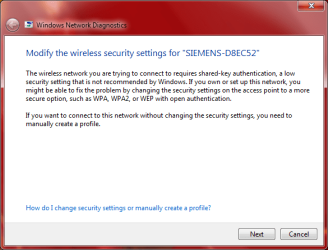
not recommended by windows?

samersalem

New member
Local time
1:06 AM
Messages
10
hey everybody God bless u
i have a problem with the connection in my laptop..it's maybe 2 months old laptop:D
and i was connecting to my borther's computer in the house but lately when i try to connect i have a problem
this pic will tell u everything
Capture.PNG

i tried a lot to fix it but maybe i don't know the right solution, so i really wish u can help me
thank you very much and i'll wait ur respond..God Bless u and merry christmas
 

My Computer

OS
Windows 7 Home Premium 32bit
That message tells you that the wireless network is using a very weak encryption. You should configure the router to use WPA2 with AES encryption instead of WEP.

Is this your router at your house?
 

My Computer

Computer Manufacturer/Model Number
Dell XPS 15 L502x
OS
Windows 7 Ultimate x64 SP1
CPU
Core i7-2670QM
Memory
8GB DDR3 PC3-10600
Graphics Card(s)
Intel HD Graphics 3000 + GeForce GT 540M
Screen Resolution
1920x1080
Hard Drives
1TB 5400RPM Seagate
yes it is but the problem that i don't remember my username and password to change the security settings!

i have SIEMENS SL2-141
so what ur advice brother?

and thank u so much for ur reply
 

My Computer

OS
Windows 7 Home Premium 32bit
First, you should download and read the manual for your router. That way you'll understand how to change the encryption from WEP to WPA or WPA2.

Next, contact your ISP about your admin user/password for the router. Usually you can do a hard reset on the router, and that will reset your user/pass to the default values. However, I don't know if you'll lose your ADSL settings, which is why I recommend you call your ISP and ask for help.
 

My Computer

Computer Manufacturer/Model Number
Dell XPS 15 L502x
OS
Windows 7 Ultimate x64 SP1
CPU
Core i7-2670QM
Memory
8GB DDR3 PC3-10600
Graphics Card(s)
Intel HD Graphics 3000 + GeForce GT 540M
Screen Resolution
1920x1080
Hard Drives
1TB 5400RPM Seagate
Back
Top