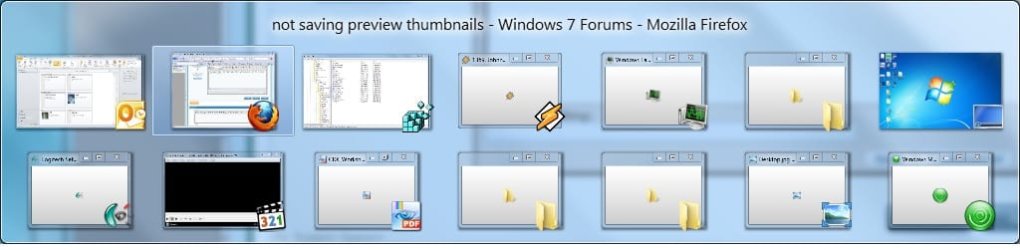
not saving preview thumbnails

hocuspocus

New member
Local time
10:23 AM
Messages
18
Aero Peek not working as intended

two questions.

1. Is there anyway to make the previews/aero peek work as intended?

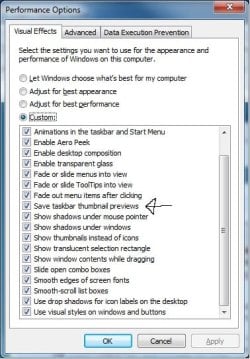
This happens to me daily and is very annoying, it makes all the preview functions of aero useless. This usually happens after playing a full screen game or after computer goes to sleep etc.. I have already ticked "save taskbar thumbnail previews" :(

2. I doubt this is possible, but is there anyway to make the previews live when app is minimized?
 

Attachments
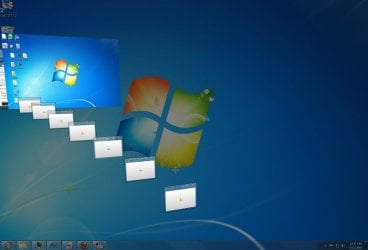
  • Desktop.jpg
    Desktop.jpg
    29.4 KB · Views: 25

My Computer

OS
win7 Ultimate x64
CPU
e6600
Motherboard
abit awd9 max
Memory
4GB
Graphics Card(s)
8800gt
Sound Card
realtek HD
Hard Drives
raid 0
PSU
antec
two questions.

1. Is there anyway to make the previews/aero peek work as intended?

This happens to me daily and is very annoying, it makes all the preview functions of aero useless. This usually happens after playing a full screen game or after computer goes to sleep etc.. I have already ticked "save taskbar thumbnail previews" :(

2. I doubt this is possible, but is there anyway to make the previews live when app is minimized?
Welcome

Right click on task bar and choose how you want windows shown. Ihave nothing checked and it works as expected.
 

My Computer

Computer type
PC/Desktop
Computer Manufacturer/Model Number
Dell XPS 420
OS
Windows 10, Home Clean Install
CPU
Intel Core2 processsor Q8200(2.33Ghz 1333FSB) Quad Core Tech
Motherboard
Dell
Memory
6 gb
Graphics Card(s)
ATI Radeon 256MB HD3650
Sound Card
Intergrated 7.1 Channel Audio
Monitor(s) Displays
Dell SP2009W 20"
Hard Drives
640 GB Serial ATA Hard drive
Cooling
Fan
Keyboard
Dell USB Keyboard
Mouse
Dell Premium Optical USB
Internet Speed
DSL 2.85
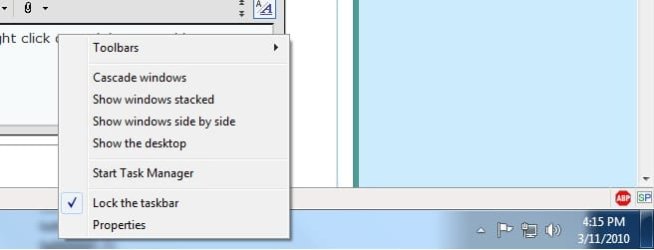
I appreciate the reply, but i have no idea what you are talking about... right click on task bar nets this menu:
As you can see I have nothing checked on this menu besides "lock taskbar"

Desktop2.jpg

Also here is another example of the problem.

Untitled3.jpg
 

My Computer

OS
win7 Ultimate x64
CPU
e6600
Motherboard
abit awd9 max
Memory
4GB
Graphics Card(s)
8800gt
Sound Card
realtek HD
Hard Drives
raid 0
PSU
antec
1. Is there anyway to make the previews/aero peek work as intended?
It is working as attended. It just happens it cannot hold onto the required information during gaming or sleeping. I am assuming you are using WDDM 1.1 drivers.

2. I doubt this is possible, but is there anyway to make the previews live when app is minimized?

Application level control. Freezing the previews for minimized applications saves resources.
 

My Computer

Computer type
PC/Desktop
Computer Manufacturer/Model Number
Alienware Aurora ALX R4
OS
Windows 10 Pro (x64)
CPU
Intel Core i7-3930K (3.2GHz - 4.5GHz)
Motherboard
Alienware Aurora-R4 x79
Memory
4x Samsung 4GB PC3-12800 DDR3 (16GB 1600MHz)
Graphics Card(s)
Nvidia Geforce GTX 690
Sound Card
SteelSeries Siberia Elite
Monitor(s) Displays
Dell UltraSharp U3011
Screen Resolution
2560x1600
Hard Drives
Samsung 850 Pro 256 GB, Seagate 1TB Desktop Hybrid HDD, 2x Western Digital 4TB Green HDD
PSU
875W Some Dell PSU <.<
Case
Alienware Aurora ALX
Cooling
Custom Liquid Cooling (EK CPU & GPU blocks) dual EK 480RAD
Keyboard
Logitech G710+ Mechanical
Mouse
Logitech G700s
Internet Speed
Verizon Fios (50 mbps average)
Other Info
Server: Intel NUC D54250WYK: i5-4250U, 16GB, 256 GB mSATA, Windows Server 2012 R2
1. Is there anyway to make the previews/aero peek work as intended?
It is working as attended. It just happens it cannot hold onto the required information during gaming or sleeping. I am assuming you are using WDDM 1.1 drivers.

Thanks for the reply.

Is wddm the graphics driver? if so im using the newest nvidia driver. Maybe it has that driver cooked into it? other than that i dont know how to check what im using.

I really have a hard timing believing this is how the app is intended to work. because it makes aero peek useless under these circumstances. I feel like its just a nasty side effect of how the previews were coded. Its def possible to write code so that minimized apps aren't actively processed, but during a call to preview it will wake up the app.

I was hoping there was a registry to key to do this, or at the very least it could save a snapshot preview that it could go back to if no current data was available.

you can see here, that the latter feature was intended to work.

Desktop4.jpg

If either of my hopes can be accomplished someone please let me know how.

However if my problem is caused by outdated wddm drivers then someone please tell me how to update... thnx in advance to an awesome win7 forum.
 
Last edited:

My Computer

OS
win7 Ultimate x64
CPU
e6600
Motherboard
abit awd9 max
Memory
4GB
Graphics Card(s)
8800gt
Sound Card
realtek HD
Hard Drives
raid 0
PSU
antec
bump for justice
 

My Computer

OS
win7 Ultimate x64
CPU
e6600
Motherboard
abit awd9 max
Memory
4GB
Graphics Card(s)
8800gt
Sound Card
realtek HD
Hard Drives
raid 0
PSU
antec
last attempt for an answer :(
 

My Computer

OS
win7 Ultimate x64
CPU
e6600
Motherboard
abit awd9 max
Memory
4GB
Graphics Card(s)
8800gt
Sound Card
realtek HD
Hard Drives
raid 0
PSU
antec
last attempt for an answer :(

Did you not get your answer a few days ago? Anyways, let's try to diagnose your problem, shall we?

Which version of Windows 7 are you using?

You mentioned this happens after playing afull screen game. Which game?

What graphics card do you have?
Is it certified as Aero compatible?
How much memory does it have?

How much system memory does your computer have?
 

My Computer

Computer type
PC/Desktop
Computer Manufacturer/Model Number
Virtual Machine
OS
Windows 7 Professional 32-bit SP1
CPU
AMD A4/A6
Motherboard
Intel Corporation 440BX Desktop Reference Platform
Memory
3.00GB EDO
Graphics Card(s)
VMware SVGA 3D
Sound Card
High Definition Audio Device
Monitor(s) Displays
Generic Non-PnP Monitor on VMware SVGA 3D
Screen Resolution
1440x900
Hard Drives
1 x 60GB VMware Virtual SATA Hard Drive ATA Device
Antivirus
Kaspersky Total Security
last attempt for an answer :(

Did you not get your answer a few days ago? Anyways, let's try to diagnose your problem, shall we?

Which version of Windows 7 are you using?

You mentioned this happens after playing afull screen game. Which game?

What graphics card do you have?
Is it certified as Aero compatible?
How much memory does it have?

How much system memory does your computer have?

thanks for the reply, i appreciate it.

i get the same problem in both my win7 machines

my specs are: desktop | laptop
OS & RAM: win7 unltimate x64 4GB ram | win7 professional x64 4GB
GPU: 8800gt 512mb | i3 , both with latest official drivers.

game shouldn't matter, but its happened with every game Ive played... ut2004, quake3, bioshock, bioshock2, crysis... the list goes on.

this system is much more than needed to run aero correctly imo.

The problem happens when you play any game full screen because aero gets temporarily turned off. You can duplicate this easily by opening a couple of windows. then keep some of them opened and minimize some of them. Now turn aero off and then back on again. all the minimized windows will not have a preview now. because they aren't being actively drawn.

this is exactly what happens when you play a fullscreen game. however im not exactly sure what causes this problem during a deep sleep. I'm sure it is similar.

Windows should be "saving screen shots" (if you have that box ticked that i posted earlier) that will be used in a situation like this, but it doesn't.
 

My Computer

OS
win7 Ultimate x64
CPU
e6600
Motherboard
abit awd9 max
Memory
4GB
Graphics Card(s)
8800gt
Sound Card
realtek HD
Hard Drives
raid 0
PSU
antec
Open DXDIAG (Start [WinKey] > type "dxdiag" enter) Go to the Display tab, right side box "Drivers" which "Driver Model" is listed? WDDM 1.0 or WDDM 1.1? To me it appears your problem is nothing more then video memory being cleared for your games and during sleep. Using WDDM 1.1 drivers video memory is exclusively used versus WDDM 1.0 where a synced duplicate is kept in system memory.

But no, there is no setting.
 

My Computer

Computer type
PC/Desktop
Computer Manufacturer/Model Number
Alienware Aurora ALX R4
OS
Windows 10 Pro (x64)
CPU
Intel Core i7-3930K (3.2GHz - 4.5GHz)
Motherboard
Alienware Aurora-R4 x79
Memory
4x Samsung 4GB PC3-12800 DDR3 (16GB 1600MHz)
Graphics Card(s)
Nvidia Geforce GTX 690
Sound Card
SteelSeries Siberia Elite
Monitor(s) Displays
Dell UltraSharp U3011
Screen Resolution
2560x1600
Hard Drives
Samsung 850 Pro 256 GB, Seagate 1TB Desktop Hybrid HDD, 2x Western Digital 4TB Green HDD
PSU
875W Some Dell PSU <.<
Case
Alienware Aurora ALX
Cooling
Custom Liquid Cooling (EK CPU & GPU blocks) dual EK 480RAD
Keyboard
Logitech G710+ Mechanical
Mouse
Logitech G700s
Internet Speed
Verizon Fios (50 mbps average)
Other Info
Server: Intel NUC D54250WYK: i5-4250U, 16GB, 256 GB mSATA, Windows Server 2012 R2
it shows wddm 1.1.

did you reproduce the results using the method i posted?

are you sure about sure about aero saving the thumbnails to video memory? It seems like thats where they would go after you minimize a window. If you ticked "save taskbar thumbnail previews" they should get saved to hard disk, otherwise the "save taskbar thumbnail previews" feature would be useless; as saving them to video memory is how aero works without ticking that option.
 

My Computer

OS
win7 Ultimate x64
CPU
e6600
Motherboard
abit awd9 max
Memory
4GB
Graphics Card(s)
8800gt
Sound Card
realtek HD
Hard Drives
raid 0
PSU
antec
There is no information on what "save taskbar thumbnail previews" actually does. So saying it should be doing this or not cannot be said. However, there is nothing to do here. Turning off Aero empties the buffer which removes the previews. They are also removed periodically because resources are not infinite. Everything is working as designed.

EDIT: The setting in question changes this Registry value: "AlwaysHibernateThumbnails"
 

My Computer

Computer type
PC/Desktop
Computer Manufacturer/Model Number
Alienware Aurora ALX R4
OS
Windows 10 Pro (x64)
CPU
Intel Core i7-3930K (3.2GHz - 4.5GHz)
Motherboard
Alienware Aurora-R4 x79
Memory
4x Samsung 4GB PC3-12800 DDR3 (16GB 1600MHz)
Graphics Card(s)
Nvidia Geforce GTX 690
Sound Card
SteelSeries Siberia Elite
Monitor(s) Displays
Dell UltraSharp U3011
Screen Resolution
2560x1600
Hard Drives
Samsung 850 Pro 256 GB, Seagate 1TB Desktop Hybrid HDD, 2x Western Digital 4TB Green HDD
PSU
875W Some Dell PSU <.<
Case
Alienware Aurora ALX
Cooling
Custom Liquid Cooling (EK CPU & GPU blocks) dual EK 480RAD
Keyboard
Logitech G710+ Mechanical
Mouse
Logitech G700s
Internet Speed
Verizon Fios (50 mbps average)
Other Info
Server: Intel NUC D54250WYK: i5-4250U, 16GB, 256 GB mSATA, Windows Server 2012 R2
okay ill agree to disagree. I just cant believe that aero peek is intended not to show a preview after playing a game. Imho, peek is not working as intended. Saying that it is, is nonsense. Its designed to let you peek into a window from the taskbar and its not allowing that to happen after playing a game. Its just unwanted side affect of how the "peek" code was written or a bug. As I stated many post ago, It would be quite simple to write code so that a call to peek into a minimized window without any current "peek" data would either:

A. wake up the app.
B. use a saved snapshot of the app.

OSX has been doing this for years with its expose app, its not new territory.
 

My Computer

OS
win7 Ultimate x64
CPU
e6600
Motherboard
abit awd9 max
Memory
4GB
Graphics Card(s)
8800gt
Sound Card
realtek HD
Hard Drives
raid 0
PSU
antec
This is Windows not OS X. Windows does not update applications, applications update windows.
You have two choices, you either keep DWM active with a full buffer and steal resources from your game. Or you turn off DWM clearing its buffer giving the game all resources. So which do you want?

And what you think is simple is not simple. Because it is not possible to do that. To "wake up" a minimized application is not part of the communication chain. A application decides when it issues a new "paint" to the underpinnings.
 

My Computer

Computer type
PC/Desktop
Computer Manufacturer/Model Number
Alienware Aurora ALX R4
OS
Windows 10 Pro (x64)
CPU
Intel Core i7-3930K (3.2GHz - 4.5GHz)
Motherboard
Alienware Aurora-R4 x79
Memory
4x Samsung 4GB PC3-12800 DDR3 (16GB 1600MHz)
Graphics Card(s)
Nvidia Geforce GTX 690
Sound Card
SteelSeries Siberia Elite
Monitor(s) Displays
Dell UltraSharp U3011
Screen Resolution
2560x1600
Hard Drives
Samsung 850 Pro 256 GB, Seagate 1TB Desktop Hybrid HDD, 2x Western Digital 4TB Green HDD
PSU
875W Some Dell PSU <.<
Case
Alienware Aurora ALX
Cooling
Custom Liquid Cooling (EK CPU & GPU blocks) dual EK 480RAD
Keyboard
Logitech G710+ Mechanical
Mouse
Logitech G700s
Internet Speed
Verizon Fios (50 mbps average)
Other Info
Server: Intel NUC D54250WYK: i5-4250U, 16GB, 256 GB mSATA, Windows Server 2012 R2
solid information here my good friend. Im am curious to how the software engineers behind osx can pull off this feat if its impossible to do. my experience with coding is anything is possible. for example you could write code that makes the application think that its been restored so it 'issues a new "paint" to the underpinnings'. the impossible becomes possible if you think outside the box.

so how do i set DWM to stay active? Id like to use this feature for any of my games older than 2 years old.
 

My Computer

OS
win7 Ultimate x64
CPU
e6600
Motherboard
abit awd9 max
Memory
4GB
Graphics Card(s)
8800gt
Sound Card
realtek HD
Hard Drives
raid 0
PSU
antec
Ill also be honest with you as a fellow programmer just because something happens does NOT mean its intended. If i write a application to talk to other people over aol instant messenger and it saves resources by not telling you that you have incoming messages while my app is minimized that is not a feature. I'm trying to save resources and accidentally made the the app not function as intended. ITS a bug. Overall im saving cycles but in the big scheme of thing my app is broken.
 

My Computer

OS
win7 Ultimate x64
CPU
e6600
Motherboard
abit awd9 max
Memory
4GB
Graphics Card(s)
8800gt
Sound Card
realtek HD
Hard Drives
raid 0
PSU
antec
solid information here my good friend. Im am curious to how the software engineers behind osx can pull off this feat if its impossible to do....

OS X uses a different windowing model then what is used in Windows. It is up to the application whether it repaints itself while minimized.

so how do i set DWM to stay active? Id like to use this feature for any of my games older than 2 years old.

Run it in window mode.
 

My Computer

Computer type
PC/Desktop
Computer Manufacturer/Model Number
Alienware Aurora ALX R4
OS
Windows 10 Pro (x64)
CPU
Intel Core i7-3930K (3.2GHz - 4.5GHz)
Motherboard
Alienware Aurora-R4 x79
Memory
4x Samsung 4GB PC3-12800 DDR3 (16GB 1600MHz)
Graphics Card(s)
Nvidia Geforce GTX 690
Sound Card
SteelSeries Siberia Elite
Monitor(s) Displays
Dell UltraSharp U3011
Screen Resolution
2560x1600
Hard Drives
Samsung 850 Pro 256 GB, Seagate 1TB Desktop Hybrid HDD, 2x Western Digital 4TB Green HDD
PSU
875W Some Dell PSU <.<
Case
Alienware Aurora ALX
Cooling
Custom Liquid Cooling (EK CPU & GPU blocks) dual EK 480RAD
Keyboard
Logitech G710+ Mechanical
Mouse
Logitech G700s
Internet Speed
Verizon Fios (50 mbps average)
Other Info
Server: Intel NUC D54250WYK: i5-4250U, 16GB, 256 GB mSATA, Windows Server 2012 R2
i tried to rep you again it wouldnt let me.

thx for the info.
 

My Computer

OS
win7 Ultimate x64
CPU
e6600
Motherboard
abit awd9 max
Memory
4GB
Graphics Card(s)
8800gt
Sound Card
realtek HD
Hard Drives
raid 0
PSU
antec
Back
Top