not sure about ram timings

ganjiry

Gamer
Guru
Gold Member
VIP
Local time
10:24 PM
Messages
3,026
Location
Droitwich spa uk
hi all.
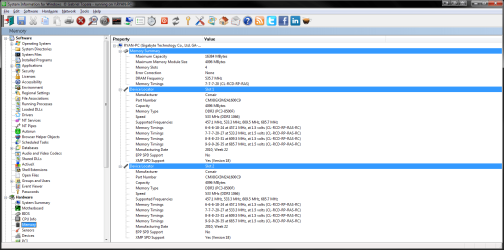
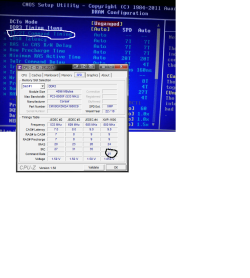
this is the ram im using 8Ghz 2x4 corsair CMX8GX3M2A1600C9. everywhere ive looked online says the speed is 1600 timings 9-9-9-24. but looking at my speeds n timings mine is runnin at 1066 7-7-7-20. is this just down to my mobo? should i change it and would there b any noticeable increase in performance?
cheers folks:thumbsup:
 

Attachments

  • siw ram.png
    siw ram.png
    61.3 KB · Views: 47

My Computer My Computer

At a glance

Win7 Home Premium x64 SP1i7 4770k8Gb Kingston HyperX Beast 2400MHz @2133MHz 11...MSI GTX 780ti Gaming Oc x2
Computer type
PC/Desktop
Computer Manufacturer/Model Number
Custom build
OS
Win7 Home Premium x64 SP1
CPU
i7 4770k
Motherboard
Asus maximus VI Hero
Memory
8Gb Kingston HyperX Beast 2400MHz @2133MHz 11-12-11-30
Graphics Card(s)
MSI GTX 780ti Gaming Oc x2
Sound Card
Onboard ROG SupremeFX
Monitor(s) Displays
Asus VG248QE
Screen Resolution
3840X1080 144Hz
Hard Drives
Samung Evo 256Gb, OCZ Agility4 128Gb
1x1TB hitachi storage
PSU
EVGA Supernova 1000w Platinum
Case
Corsair Air 540
Cooling
Corsair H100i
Keyboard
Coolermaster Quickfire Pro
Mouse
Corsair M65 RGB
Internet Speed
74mb dwn/16up
Antivirus
MSE,Malwarebytes
Browser
Chrome
1. That is an 1600mhz RAM so you can set it manually in the bios to 1600, mine is a 1600 hyperx and when i installed my mobob thought it was a 1333mhz ram, so enabled XMP (which is only kingston stuff, but you can set 1600mhz with no worries)
2. Those other numbers are called latency timings, those define the time between the actions. Therefore you actually overclock your RAM by decreasing those lateny numbers. here is the explanation
You should not overclock your RAM with those, all in all, If you are sure about that product number, you should set those timings and frequency.
 

My Computer My Computer

At a glance

Windows 7 Ultimate 64 bit SP1Intel(R) Core(TM) i5-2500K12GB Kingston Hyperx 1600MHzAsus GTS 450
Computer type
PC/Desktop
Computer Manufacturer/Model Number
Custom Built PC
OS
Windows 7 Ultimate 64 bit SP1
CPU
Intel(R) Core(TM) i5-2500K
Motherboard
Gigabyte Technology Co., Ltd. Z68X-UD3-B3
Memory
12GB Kingston Hyperx 1600MHz
Graphics Card(s)
Asus GTS 450
PSU
500W Coolink
Other Info
Genius G-Pen F610 (PenPad)
hi speedgamer.
cheers for the quick reply. ive just had a look at the mod num on the sticks n its deffo CMX8GX3M2A1600C9. so i should b ok with changing it. ive never bothered with the bios much b4 n timings. its all pretty straight 4ward tho isnt it?
 

My Computer My Computer

At a glance

Win7 Home Premium x64 SP1i7 4770k8Gb Kingston HyperX Beast 2400MHz @2133MHz 11...MSI GTX 780ti Gaming Oc x2
Computer type
PC/Desktop
Computer Manufacturer/Model Number
Custom build
OS
Win7 Home Premium x64 SP1
CPU
i7 4770k
Motherboard
Asus maximus VI Hero
Memory
8Gb Kingston HyperX Beast 2400MHz @2133MHz 11-12-11-30
Graphics Card(s)
MSI GTX 780ti Gaming Oc x2
Sound Card
Onboard ROG SupremeFX
Monitor(s) Displays
Asus VG248QE
Screen Resolution
3840X1080 144Hz
Hard Drives
Samung Evo 256Gb, OCZ Agility4 128Gb
1x1TB hitachi storage
PSU
EVGA Supernova 1000w Platinum
Case
Corsair Air 540
Cooling
Corsair H100i
Keyboard
Coolermaster Quickfire Pro
Mouse
Corsair M65 RGB
Internet Speed
74mb dwn/16up
Antivirus
MSE,Malwarebytes
Browser
Chrome
hi all
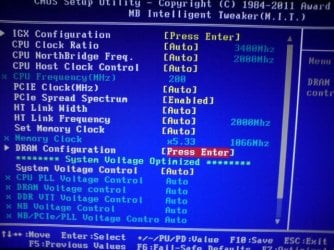
ive just checked in my bios. i did the changes just to check but didnt save them. if i change the set mem clock to manual instead of auto.
change the multiplier from 5.33 to 8 somethin it shows as 1600. is that all i have to do? i dont want to overclock just run at the right speed.
thanks:thumbsup:
 

My Computer My Computer

At a glance

Win7 Home Premium x64 SP1i7 4770k8Gb Kingston HyperX Beast 2400MHz @2133MHz 11...MSI GTX 780ti Gaming Oc x2
Computer type
PC/Desktop
Computer Manufacturer/Model Number
Custom build
OS
Win7 Home Premium x64 SP1
CPU
i7 4770k
Motherboard
Asus maximus VI Hero
Memory
8Gb Kingston HyperX Beast 2400MHz @2133MHz 11-12-11-30
Graphics Card(s)
MSI GTX 780ti Gaming Oc x2
Sound Card
Onboard ROG SupremeFX
Monitor(s) Displays
Asus VG248QE
Screen Resolution
3840X1080 144Hz
Hard Drives
Samung Evo 256Gb, OCZ Agility4 128Gb
1x1TB hitachi storage
PSU
EVGA Supernova 1000w Platinum
Case
Corsair Air 540
Cooling
Corsair H100i
Keyboard
Coolermaster Quickfire Pro
Mouse
Corsair M65 RGB
Internet Speed
74mb dwn/16up
Antivirus
MSE,Malwarebytes
Browser
Chrome
All of the bios(es) (LOL) are different, but esentially if you know what the options mean you cant get lost, just dont touch anything, only change those settings that u are familiar with. Dont overclock now :D
Here is an article, what the 4 numbers are, in your case:
CL
= 9,
tRCD
= 9,
tRP 9,
tRAS = 9
Your bios will be similar to this.
I'm looking forward to ur results :)
 

My Computer My Computer

At a glance

Windows 7 Ultimate 64 bit SP1Intel(R) Core(TM) i5-2500K12GB Kingston Hyperx 1600MHzAsus GTS 450
Computer type
PC/Desktop
Computer Manufacturer/Model Number
Custom Built PC
OS
Windows 7 Ultimate 64 bit SP1
CPU
Intel(R) Core(TM) i5-2500K
Motherboard
Gigabyte Technology Co., Ltd. Z68X-UD3-B3
Memory
12GB Kingston Hyperx 1600MHz
Graphics Card(s)
Asus GTS 450
PSU
500W Coolink
Other Info
Genius G-Pen F610 (PenPad)
ive just looked in the bios on how to change it. i know how to change it to 1600 as in my above post. do i need to change the timings aswell or leave those?? cheers
 

My Computer My Computer

At a glance

Win7 Home Premium x64 SP1i7 4770k8Gb Kingston HyperX Beast 2400MHz @2133MHz 11...MSI GTX 780ti Gaming Oc x2
Computer type
PC/Desktop
Computer Manufacturer/Model Number
Custom build
OS
Win7 Home Premium x64 SP1
CPU
i7 4770k
Motherboard
Asus maximus VI Hero
Memory
8Gb Kingston HyperX Beast 2400MHz @2133MHz 11-12-11-30
Graphics Card(s)
MSI GTX 780ti Gaming Oc x2
Sound Card
Onboard ROG SupremeFX
Monitor(s) Displays
Asus VG248QE
Screen Resolution
3840X1080 144Hz
Hard Drives
Samung Evo 256Gb, OCZ Agility4 128Gb
1x1TB hitachi storage
PSU
EVGA Supernova 1000w Platinum
Case
Corsair Air 540
Cooling
Corsair H100i
Keyboard
Coolermaster Quickfire Pro
Mouse
Corsair M65 RGB
Internet Speed
74mb dwn/16up
Antivirus
MSE,Malwarebytes
Browser
Chrome
Yes you should change them, if now they are really set to 7 7 7 20, then it's a dirty overclocking.
 

My Computer My Computer

At a glance

Windows 7 Ultimate 64 bit SP1Intel(R) Core(TM) i5-2500K12GB Kingston Hyperx 1600MHzAsus GTS 450
Computer type
PC/Desktop
Computer Manufacturer/Model Number
Custom Built PC
OS
Windows 7 Ultimate 64 bit SP1
CPU
Intel(R) Core(TM) i5-2500K
Motherboard
Gigabyte Technology Co., Ltd. Z68X-UD3-B3
Memory
12GB Kingston Hyperx 1600MHz
Graphics Card(s)
Asus GTS 450
PSU
500W Coolink
Other Info
Genius G-Pen F610 (PenPad)
ok this is how they r at the min. i havent changed anythin as yet. still stock at 1066.
CAS# LATENCY = 7,
RAS#TO CAS# = 7,
RAS# PRECHARGE 7,
tRAS = 20

do i just change them to what they r shown as in the online specs?

CAS# LATENCY = 9,
RAS#TO CAS# = 9,
RAS# PRECHARGE 9,
tRAS 24

Does tRC have to b changed?
also the voltage says at 1600 it is 1.65v instead of 1.50. does that hav to b changed aswell or leave on auto?.
sorry 4 all the questions but im fairly new to pc's and havet had to deal with the bios or changing these kind of settings
 

Attachments

  • Untitled.png
    Untitled.png
    13.5 KB · Views: 24
Last edited:

My Computer My Computer

At a glance

Win7 Home Premium x64 SP1i7 4770k8Gb Kingston HyperX Beast 2400MHz @2133MHz 11...MSI GTX 780ti Gaming Oc x2
Computer type
PC/Desktop
Computer Manufacturer/Model Number
Custom build
OS
Win7 Home Premium x64 SP1
CPU
i7 4770k
Motherboard
Asus maximus VI Hero
Memory
8Gb Kingston HyperX Beast 2400MHz @2133MHz 11-12-11-30
Graphics Card(s)
MSI GTX 780ti Gaming Oc x2
Sound Card
Onboard ROG SupremeFX
Monitor(s) Displays
Asus VG248QE
Screen Resolution
3840X1080 144Hz
Hard Drives
Samung Evo 256Gb, OCZ Agility4 128Gb
1x1TB hitachi storage
PSU
EVGA Supernova 1000w Platinum
Case
Corsair Air 540
Cooling
Corsair H100i
Keyboard
Coolermaster Quickfire Pro
Mouse
Corsair M65 RGB
Internet Speed
74mb dwn/16up
Antivirus
MSE,Malwarebytes
Browser
Chrome
I did a little research, and 1.65 volts seems to be Ok.
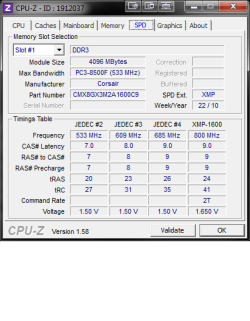
Yes, you should change tRC as well (according to that XMP-1600 profile in CPUZ)
I figured out that all of these memory modules are similar, so if it has 9-9-9-24 timings then it was built on the xmp profile, which determines that the tRC is 41! Your ram is still runnig because you have a chip which is capable of overclocking (not on the long run XD), and your timings are wrong because you probably have a factory BIOS version, which tends to be outdated even at new boards, and your mobo doesn't heard of your exact RAM model.
Your mobo have set a RAM profile (JEDEC #2), which is used in DDR2 RAMs, all u have to do is adjust your timings to the XMP profile, or simply enable X.M.P. profile in the BIOS :) cheers!
 

My Computer My Computer

At a glance

Windows 7 Ultimate 64 bit SP1Intel(R) Core(TM) i5-2500K12GB Kingston Hyperx 1600MHzAsus GTS 450
Computer type
PC/Desktop
Computer Manufacturer/Model Number
Custom Built PC
OS
Windows 7 Ultimate 64 bit SP1
CPU
Intel(R) Core(TM) i5-2500K
Motherboard
Gigabyte Technology Co., Ltd. Z68X-UD3-B3
Memory
12GB Kingston Hyperx 1600MHz
Graphics Card(s)
Asus GTS 450
PSU
500W Coolink
Other Info
Genius G-Pen F610 (PenPad)
ok this is how they r at the min. i havent changed anythin as yet. still stock at 1066.
CAS# LATENCY = 7,
RAS#TO CAS# = 7,
RAS# PRECHARGE 7,
tRAS = 20

do i just change them to what they r shown as in the online specs?

CAS# LATENCY = 9,
RAS#TO CAS# = 9,
RAS# PRECHARGE 9,
tRAS 24

Does tRC have to b changed?
also the voltage says at 1600 it is 1.65v instead of 1.50. does that hav to b changed aswell or leave on auto?.
sorry 4 all the questions but im fairly new to pc's and havet had to deal with the bios or changing these kind of settings

Your CPU-Z shows that your RAM is capable of running 1600MHz @ 9-9-9-24 @1.65 volts.

Now if you want to run your RAM at 1600MHz, then yes you'll need to up the voltage else you'll get RAM errors as the RAM isn't getting enough voltage for that speed.

Two ways you can get your RAM to run @1600MHz, @1.65 volts.....

1- Use the XMP profile - to do this you MB's BIOS must have an XMP setting that can be enabled.

2- Manually set the RAM's paremeters in the BIOS.

I personallymanually set my settings even though I can use XMP on my board as I find other voltages get set a little high as well when enabling XMP; but that's another story for another time.

Anyway see these posts to get an idea of where I'm coming from....

Here - http://www.sevenforums.com/crashes-debugging/138554-new-rig-radeon-6950-trouble-2.html#post1191297 and http://www.sevenforums.com/crashes-debugging/138554-new-rig-radeon-6950-trouble-2.html#post1191432

Also here http://www.sevenforums.com/performance-maintenance/173261-ram-performance-5.html#post1486149 and http://www.sevenforums.com/performance-maintenance/173261-ram-performance-5.html#post1486377
 

My Computer My Computer

At a glance

Windows 10 ProIntel Core i7-4770K (3.5Ghz)32 gig Corsair Dominator Platinum (4x8Gig)Sapphire Tri-X R9 Fury
Computer type
PC/Desktop
Computer Manufacturer/Model Number
Custom built by me.
OS
Windows 10 Pro
CPU
Intel Core i7-4770K (3.5Ghz)
Motherboard
Gigabyte G1 Sniper 5 (F10 Bios)
Memory
32 gig Corsair Dominator Platinum (4x8Gig)
Graphics Card(s)
Sapphire Tri-X R9 Fury
Sound Card
Soundblaster ZXR
Monitor(s) Displays
NEC PA242W 24" LCD Monitor
Screen Resolution
1920 x 1200
Hard Drives
Primary - Samsung 850 Pro (512gig), Samsung 840 Pro (256gig), 2TB WD Caviar Black.
PSU
EVGA Supernova 1000 G2
Case
Cooler Master HAF X
Cooling
Corsair H100i with Corsair Air Series SP120 Quiet Fans
Keyboard
Logitech Wireless Wave
Mouse
Logitech Performance MX
Internet Speed
High Speed Cable
Antivirus
Norton Security
Browser
IE11
Other Info
Memory Timings - 1866MHz @ 9-9-9-27-1T @ 1.5 volts
hi n thanks for lookin into it 4 me. sorry 4 draggin it out folks. ive just never had to mess in the bios n i know things get get fkt in there. only had a pc 18mnths lol. wen u say just adjust the timings. does that mean timings alone not the muliplier? or with the multiplier?
i couldnt see any mention of XMP profile
ive done a couple of pics
1; MB intelligent tweaker
2;change multiplier to 8... or straight into DRAM config. no muliplier
3;DRAM config
4;DDR3 timing items to manual
5;CL = 9,
tRCD = 9,
tRP 9,
tRAS 24
tRC 41
the last number comand rate 2T. is that TwTr comand delay or RAS to RAS delay
6; change syst voltage control to manual.
7; change to 1.650v
save n exit
i missed steps 6n 7 in pics cos i didnt know about em then lol
sorry foks gotta get it sunk in then il leave it till i ent had a smoke tomoz
why do they put an old bios with a new model mobo. bit daft enit

also i thought upping the numbers was underclockin it. or is that not the case cos my ram is running below spec

thanks again:o

edit this is my bios version

BIOS= award software international, inc
version FE
date 03.04/2011
 

Attachments

  • bios.jpg
    bios.jpg
    169.1 KB · Views: 22
Last edited:

My Computer My Computer

At a glance

Win7 Home Premium x64 SP1i7 4770k8Gb Kingston HyperX Beast 2400MHz @2133MHz 11...MSI GTX 780ti Gaming Oc x2
Computer type
PC/Desktop
Computer Manufacturer/Model Number
Custom build
OS
Win7 Home Premium x64 SP1
CPU
i7 4770k
Motherboard
Asus maximus VI Hero
Memory
8Gb Kingston HyperX Beast 2400MHz @2133MHz 11-12-11-30
Graphics Card(s)
MSI GTX 780ti Gaming Oc x2
Sound Card
Onboard ROG SupremeFX
Monitor(s) Displays
Asus VG248QE
Screen Resolution
3840X1080 144Hz
Hard Drives
Samung Evo 256Gb, OCZ Agility4 128Gb
1x1TB hitachi storage
PSU
EVGA Supernova 1000w Platinum
Case
Corsair Air 540
Cooling
Corsair H100i
Keyboard
Coolermaster Quickfire Pro
Mouse
Corsair M65 RGB
Internet Speed
74mb dwn/16up
Antivirus
MSE,Malwarebytes
Browser
Chrome
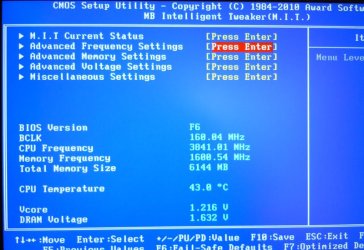
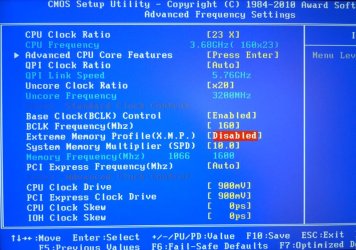
Depending on your BIOS/BIOS version, you may or my not have an XMP mode. Here's mine (Gigabyte motherboard). To get to it you have to go to M.I.T., then Advance Frequency Settings.....

DSCN0687.jpg

DSCN0688.jpg

Anyway it appears you didn't check the links in my previous post explaining timings and speed.

You can run your timings at 7-7-7, but you may not be able to run them at that setting with a speed of 1600MHz. That's because at that speed, those timings may not be possible. This is where a little overclocking comes into play.

Anyway I urge you to look through the links I linked to before progressing further.
As for XMP, if you don't have that setting in the BIOS then you'll have to manually input the parameters you're RAM states - 9-9-9-24, 1600MHz, 1.65volts. After that, if you feel you want to try lowering (tightening) timings, you can try, but to be honest, I doubt you'll achieve those timings at that (1600MHz) speed.

For reference I run my memory at 1600MHz, 8-8-8-20 @1.65 volts and if I try to run at 7-7-7 or even 7-8-7, I can't post.

Like all things this depends on the memory build, just like some i7-920 processors for example can achieve higher overclock speeds while others can't, memory modules are the same - It's the luck of the draw.

So which is better - Speed or timings? I'd go for speed - 1600MHz @ 9-9-9 than 1066 @ 7-7-7. Others may disagree, but I think 1600MHz @ 9-9-9 is faster than 1066 @ 7-7-7. Now if you can get 1600MHz @ 8-8-8 that closes the gap, but then again, that depends on the memory ;)

My two cents.
 

My Computer My Computer

At a glance

Windows 10 ProIntel Core i7-4770K (3.5Ghz)32 gig Corsair Dominator Platinum (4x8Gig)Sapphire Tri-X R9 Fury
Computer type
PC/Desktop
Computer Manufacturer/Model Number
Custom built by me.
OS
Windows 10 Pro
CPU
Intel Core i7-4770K (3.5Ghz)
Motherboard
Gigabyte G1 Sniper 5 (F10 Bios)
Memory
32 gig Corsair Dominator Platinum (4x8Gig)
Graphics Card(s)
Sapphire Tri-X R9 Fury
Sound Card
Soundblaster ZXR
Monitor(s) Displays
NEC PA242W 24" LCD Monitor
Screen Resolution
1920 x 1200
Hard Drives
Primary - Samsung 850 Pro (512gig), Samsung 840 Pro (256gig), 2TB WD Caviar Black.
PSU
EVGA Supernova 1000 G2
Case
Cooler Master HAF X
Cooling
Corsair H100i with Corsair Air Series SP120 Quiet Fans
Keyboard
Logitech Wireless Wave
Mouse
Logitech Performance MX
Internet Speed
High Speed Cable
Antivirus
Norton Security
Browser
IE11
Other Info
Memory Timings - 1866MHz @ 9-9-9-27-1T @ 1.5 volts
hi thanks. i did hav a look through the posts linked but not all of it. ive bookmarked em to go through it all with a straight head 2moz.
obviously anyone with any sense would go for speed first lol. no brainer. as u said i havent read through properly yet. its all new to me so i dont wanna be makin mistakes. i dont want to overclock. just for things to run as they r meant to.
its all here n bookmarked for me to get sorted with a clear head(no weed) in the mornin.
thanks loads for takin the time to help. its much apreciated. cheers:)
 

My Computer My Computer

At a glance

Win7 Home Premium x64 SP1i7 4770k8Gb Kingston HyperX Beast 2400MHz @2133MHz 11...MSI GTX 780ti Gaming Oc x2
Computer type
PC/Desktop
Computer Manufacturer/Model Number
Custom build
OS
Win7 Home Premium x64 SP1
CPU
i7 4770k
Motherboard
Asus maximus VI Hero
Memory
8Gb Kingston HyperX Beast 2400MHz @2133MHz 11-12-11-30
Graphics Card(s)
MSI GTX 780ti Gaming Oc x2
Sound Card
Onboard ROG SupremeFX
Monitor(s) Displays
Asus VG248QE
Screen Resolution
3840X1080 144Hz
Hard Drives
Samung Evo 256Gb, OCZ Agility4 128Gb
1x1TB hitachi storage
PSU
EVGA Supernova 1000w Platinum
Case
Corsair Air 540
Cooling
Corsair H100i
Keyboard
Coolermaster Quickfire Pro
Mouse
Corsair M65 RGB
Internet Speed
74mb dwn/16up
Antivirus
MSE,Malwarebytes
Browser
Chrome
It's not a lot of reading or technical jargon, it just helps clarify some things.

Anyway good luck and keep us informed.
 

My Computer My Computer

At a glance

Windows 10 ProIntel Core i7-4770K (3.5Ghz)32 gig Corsair Dominator Platinum (4x8Gig)Sapphire Tri-X R9 Fury
Computer type
PC/Desktop
Computer Manufacturer/Model Number
Custom built by me.
OS
Windows 10 Pro
CPU
Intel Core i7-4770K (3.5Ghz)
Motherboard
Gigabyte G1 Sniper 5 (F10 Bios)
Memory
32 gig Corsair Dominator Platinum (4x8Gig)
Graphics Card(s)
Sapphire Tri-X R9 Fury
Sound Card
Soundblaster ZXR
Monitor(s) Displays
NEC PA242W 24" LCD Monitor
Screen Resolution
1920 x 1200
Hard Drives
Primary - Samsung 850 Pro (512gig), Samsung 840 Pro (256gig), 2TB WD Caviar Black.
PSU
EVGA Supernova 1000 G2
Case
Cooler Master HAF X
Cooling
Corsair H100i with Corsair Air Series SP120 Quiet Fans
Keyboard
Logitech Wireless Wave
Mouse
Logitech Performance MX
Internet Speed
High Speed Cable
Antivirus
Norton Security
Browser
IE11
Other Info
Memory Timings - 1866MHz @ 9-9-9-27-1T @ 1.5 volts
will do cheers
 

My Computer My Computer

At a glance

Win7 Home Premium x64 SP1i7 4770k8Gb Kingston HyperX Beast 2400MHz @2133MHz 11...MSI GTX 780ti Gaming Oc x2
Computer type
PC/Desktop
Computer Manufacturer/Model Number
Custom build
OS
Win7 Home Premium x64 SP1
CPU
i7 4770k
Motherboard
Asus maximus VI Hero
Memory
8Gb Kingston HyperX Beast 2400MHz @2133MHz 11-12-11-30
Graphics Card(s)
MSI GTX 780ti Gaming Oc x2
Sound Card
Onboard ROG SupremeFX
Monitor(s) Displays
Asus VG248QE
Screen Resolution
3840X1080 144Hz
Hard Drives
Samung Evo 256Gb, OCZ Agility4 128Gb
1x1TB hitachi storage
PSU
EVGA Supernova 1000w Platinum
Case
Corsair Air 540
Cooling
Corsair H100i
Keyboard
Coolermaster Quickfire Pro
Mouse
Corsair M65 RGB
Internet Speed
74mb dwn/16up
Antivirus
MSE,Malwarebytes
Browser
Chrome
mornin folks.
right clear head on 2day. ive read ur links sygnus21. im pretty sure ive got it sussed. just a couple of things im not sure of. so bare with me plz. i got a bit confused as the diiferent clocks r called slightly different things. but ive sussed that i think. right!
1; change mem clock multiplier from 5.33 to 8 somethin(cnt remeber exactly)
2;CAS latency =9
3;RAS to CAS R/W delay =9
4;Row precharge time=9
5;min RAS active time=24
6;Row cycle time = 41 but reading the wiki it says that TRC = TRAS +TRP. if this is right then wouldnt it be 33 not 41?
7;CR=comand timing =2T should this b left to auto or do i change it ?
8; change voltage to 1.650v
next in my MB manual it says support for DDR3 1866(oc)/ 1333/ 1066. but nothing about 1600?
would i not be better off at 1333mhz as i wouldnt need to up the voltage?
finally after reading shed loads ive noticed that after all is done the increase in performance isnt noticable. is there realy any point in me doing this? or will it damage my ram in the long term runnin at present settings
again thanks very much 4 all ur help and sorry for draggin it out so much:D
 

Attachments

  • bios ram timings.png
    bios ram timings.png
    184.6 KB · Views: 9

My Computer My Computer

At a glance

Win7 Home Premium x64 SP1i7 4770k8Gb Kingston HyperX Beast 2400MHz @2133MHz 11...MSI GTX 780ti Gaming Oc x2
Computer type
PC/Desktop
Computer Manufacturer/Model Number
Custom build
OS
Win7 Home Premium x64 SP1
CPU
i7 4770k
Motherboard
Asus maximus VI Hero
Memory
8Gb Kingston HyperX Beast 2400MHz @2133MHz 11-12-11-30
Graphics Card(s)
MSI GTX 780ti Gaming Oc x2
Sound Card
Onboard ROG SupremeFX
Monitor(s) Displays
Asus VG248QE
Screen Resolution
3840X1080 144Hz
Hard Drives
Samung Evo 256Gb, OCZ Agility4 128Gb
1x1TB hitachi storage
PSU
EVGA Supernova 1000w Platinum
Case
Corsair Air 540
Cooling
Corsair H100i
Keyboard
Coolermaster Quickfire Pro
Mouse
Corsair M65 RGB
Internet Speed
74mb dwn/16up
Antivirus
MSE,Malwarebytes
Browser
Chrome
You wont feel any performance difference, your first configuration had OCd timings an underclocked frequency, RAM OCing really makes no sense, but it can kill the modules on the long run, so yes it is important to set the factory speeds :)
You dont have to up the voltage. Wether your mobo has a stock 1600mhz profile or not, the voltage will be the same, cause the settings are the same.
if i were you i would stick to that xmp profile shown in cpuz
edit:if you reached the 1600mhz by upping the multiplier of the ram and not the base clock(fsb), then the mobo supports 1600mhz
 

My Computer My Computer

At a glance

Windows 7 Ultimate 64 bit SP1Intel(R) Core(TM) i5-2500K12GB Kingston Hyperx 1600MHzAsus GTS 450
Computer type
PC/Desktop
Computer Manufacturer/Model Number
Custom Built PC
OS
Windows 7 Ultimate 64 bit SP1
CPU
Intel(R) Core(TM) i5-2500K
Motherboard
Gigabyte Technology Co., Ltd. Z68X-UD3-B3
Memory
12GB Kingston Hyperx 1600MHz
Graphics Card(s)
Asus GTS 450
PSU
500W Coolink
Other Info
Genius G-Pen F610 (PenPad)
You wont feel any performance difference, your first configuration had OCd timings an underclocked frequency, RAM OCing really makes no sense, but it can kill the modules on the long run, so yes it is important to set the factory speeds :)
You dont have to up the voltage. Wether your mobo has a stock 1600mhz profile or not, the voltage will be the same, cause the settings are the same.
if i were you i would stick to that xmp profile shown in cpuz
edit:if you reached the 1600mhz by upping the multiplier of the ram and not the base clock(fsb), then the mobo supports 1600mhz

hi speedgamer
okey dokey so it needs to b done lol. u say that i dont need to up the voltage but the xmp prof shown on cpu-z says it has to b 1.650v. so id prob have probs with it at 1.50 wouldnt i? as i would have changed the settins. or would it b ok(work) if left at auto? its just my luck that i get a bios without the xmp to make life difficult:mad:

i reached the 1600 by changing the memory clock multiplier.( in pic above DRAM config)i didnt set anythin just looked. is that the multiplier u mean?
would u check my previous post n comfirm if i have got it all right with which settings im gonna change plz as id be gutted if i killed anythin after spendin all this money :cry:

thanks:thumbsup: bet u had enough of me by now lol

edit; if im doing it through the clocks. i leave the multiplier alone?????
 

Attachments

  • DSC00358.JPG
    DSC00358.JPG
    76.3 KB · Views: 2

My Computer My Computer

At a glance

Win7 Home Premium x64 SP1i7 4770k8Gb Kingston HyperX Beast 2400MHz @2133MHz 11...MSI GTX 780ti Gaming Oc x2
Computer type
PC/Desktop
Computer Manufacturer/Model Number
Custom build
OS
Win7 Home Premium x64 SP1
CPU
i7 4770k
Motherboard
Asus maximus VI Hero
Memory
8Gb Kingston HyperX Beast 2400MHz @2133MHz 11-12-11-30
Graphics Card(s)
MSI GTX 780ti Gaming Oc x2
Sound Card
Onboard ROG SupremeFX
Monitor(s) Displays
Asus VG248QE
Screen Resolution
3840X1080 144Hz
Hard Drives
Samung Evo 256Gb, OCZ Agility4 128Gb
1x1TB hitachi storage
PSU
EVGA Supernova 1000w Platinum
Case
Corsair Air 540
Cooling
Corsair H100i
Keyboard
Coolermaster Quickfire Pro
Mouse
Corsair M65 RGB
Internet Speed
74mb dwn/16up
Antivirus
MSE,Malwarebytes
Browser
Chrome
:roflmao: Sorry, obviously i meant 1.65 volts not 1.5, then ok yes you have to up it to 1.65
"1; change mem clock multiplier from 5.33 to 8 somethin
2;CAS latency =9
3;RAS to CAS R/W delay =9
4;Row precharge time=9
5;min RAS active time=24
6;Row cycle time = 41
7;CR=comand timing =2T
8; change voltage to 1.650v"

ps. i am not sure about that CR command timing, i could not see it on ur bios-shot, It would be better to be verified by another user, again i'm not sure about CR

edit: please name which clock u are changing, anyhow you should do it by changing the multiplyr, if u can

ps#2 u could upgrade ur bios, maybe it would have xmp :roflmao:
 

My Computer My Computer

At a glance

Windows 7 Ultimate 64 bit SP1Intel(R) Core(TM) i5-2500K12GB Kingston Hyperx 1600MHzAsus GTS 450
Computer type
PC/Desktop
Computer Manufacturer/Model Number
Custom Built PC
OS
Windows 7 Ultimate 64 bit SP1
CPU
Intel(R) Core(TM) i5-2500K
Motherboard
Gigabyte Technology Co., Ltd. Z68X-UD3-B3
Memory
12GB Kingston Hyperx 1600MHz
Graphics Card(s)
Asus GTS 450
PSU
500W Coolink
Other Info
Genius G-Pen F610 (PenPad)
hi its 1T/2T comand timing below DDR3 timing items. i just thought it was to do with the comand rate at the bottom of the xmp prof in cpu-z......i take it that i dont need to touch that?

edit; lmao! i dont wanna be flashin the bios. so apart from the CR ive got it right yeah? i should of started to suss pc's a bit earlier in life lol
 

Attachments

  • b.png
    b.png
    127.7 KB · Views: 13

My Computer My Computer

At a glance

Win7 Home Premium x64 SP1i7 4770k8Gb Kingston HyperX Beast 2400MHz @2133MHz 11...MSI GTX 780ti Gaming Oc x2
Computer type
PC/Desktop
Computer Manufacturer/Model Number
Custom build
OS
Win7 Home Premium x64 SP1
CPU
i7 4770k
Motherboard
Asus maximus VI Hero
Memory
8Gb Kingston HyperX Beast 2400MHz @2133MHz 11-12-11-30
Graphics Card(s)
MSI GTX 780ti Gaming Oc x2
Sound Card
Onboard ROG SupremeFX
Monitor(s) Displays
Asus VG248QE
Screen Resolution
3840X1080 144Hz
Hard Drives
Samung Evo 256Gb, OCZ Agility4 128Gb
1x1TB hitachi storage
PSU
EVGA Supernova 1000w Platinum
Case
Corsair Air 540
Cooling
Corsair H100i
Keyboard
Coolermaster Quickfire Pro
Mouse
Corsair M65 RGB
Internet Speed
74mb dwn/16up
Antivirus
MSE,Malwarebytes
Browser
Chrome
Back
Top