Hi
I recently purchased a second Sapphire 6870 to add to my original Sapphire 6870. I have set up the cards in my motherboard properly (I think), the original card in a x16 PCI-e slot and the second in what I believe is a x4 PCI-e slot. I have connected the CrossfireX bridge cable thing, and powered them properly with an Antec 750W PSU.
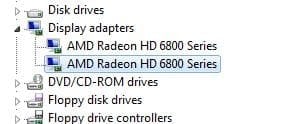
I removed the original drivers and installed the ATI catalyst drivers including the CrossfireX Application Profiles, and windows detected the second card (both are visible in device manager). CCC also detected it and now allows me to check and uncheck "Enable CrossfireX", and to view the CrossfireX diagnostics. However, the diagnostics page is blank and clicking Identify GPU does nothing obvious, other than putting a big "1" on my single monitor.
Playing Crisis 1 used to be around 35 FPS average and I see no performance improvements from adding the second card, however other games do see significant performance improvements.
MOBO - GA-P55-USB3
PSU - Antec 750W
CPU - i5 760 (sometimes overclocked to 3.7Ghz, sometimes not)
My question is how will I tell if crossfire is actually working because the diagnostics page is blank (although I think it should be unless there are errors) and when running games the first GPU heats up whereas the second one does not. Also, the second GPU shows 0% activity.
Also I have been having issues with the display driver crashing and recovering.
Any suggestions?
I recently purchased a second Sapphire 6870 to add to my original Sapphire 6870. I have set up the cards in my motherboard properly (I think), the original card in a x16 PCI-e slot and the second in what I believe is a x4 PCI-e slot. I have connected the CrossfireX bridge cable thing, and powered them properly with an Antec 750W PSU.
I removed the original drivers and installed the ATI catalyst drivers including the CrossfireX Application Profiles, and windows detected the second card (both are visible in device manager). CCC also detected it and now allows me to check and uncheck "Enable CrossfireX", and to view the CrossfireX diagnostics. However, the diagnostics page is blank and clicking Identify GPU does nothing obvious, other than putting a big "1" on my single monitor.
Playing Crisis 1 used to be around 35 FPS average and I see no performance improvements from adding the second card, however other games do see significant performance improvements.
MOBO - GA-P55-USB3
PSU - Antec 750W
CPU - i5 760 (sometimes overclocked to 3.7Ghz, sometimes not)
My question is how will I tell if crossfire is actually working because the diagnostics page is blank (although I think it should be unless there are errors) and when running games the first GPU heats up whereas the second one does not. Also, the second GPU shows 0% activity.
Also I have been having issues with the display driver crashing and recovering.
Any suggestions?
Last edited:
My Computer
At a glance
Windows 7 Home Premium 64bit OEMIntel Core i5 760 OC to 3.50GHz8 Gb DDR3 1333MhzGTX 680 OC
- Computer Manufacturer/Model Number
- Self built
- OS
- Windows 7 Home Premium 64bit OEM
- CPU
- Intel Core i5 760 OC to 3.50GHz
- Motherboard
- Gigabyte GA-P55-USB3
- Memory
- 8 Gb DDR3 1333Mhz
- Graphics Card(s)
- GTX 680 OC
- Monitor(s) Displays
- Benq G2420HD
- Screen Resolution
- 1920*1080
- Hard Drives
- OCZ Vertex 60Gb SSD
Samsung 1tb 7200 rpm
WD 1tb 7200 rpm
- PSU
- Antec True Power 750W
- Case
- HAF-X
- Cooling
- V8
- Keyboard
- Filco Majestouch CherryMX Brown mechanical
- Mouse
- Razer Imperator
- Other Info
- Linux is awesome