
Solved Not to beat a dead horse, but XP and 7 sharing...

Holy Moses

Banned
Local time
8:37 PM
Messages
92
Location
Ft. St. John
I have been searching for an answer to my questions, I have tried every suggestion, and have even tried other forums. My problem is this...simplified.

I have 1 Win7 Pro machine, 3 Vista HP machines, and 1 XP machine (laptop on WiFi),
1 BOX 360, and 2 PS3's.

All the Vista machines and the 7 machine see eachother, and share as permissions allow. All sharing/discovery is working with the 360 to them as well. My PS3's don't show up in the map, but they are "seen" and communicate as well perfectly thru various media servers, even with cross shared libraries, AS WELL as my BlueTooth subnet running good for cell phones etc.

Basically, all my networking appears to be solid, even with various cross shares and multiple devices.

The only computer not visible is the XP machine. It doesn't appear on the maps of the 7 machine or the Vista machines, and I can't see the other machines from the XP laptop.

The REAL strange thing is that I have WMP on all the machines in the house and all allowed to share eachothers libraries. ALL machines see the XP's WMP library and can access it.
The XP WMP CANNOT see the other WMP libraries.

I just don't understand what to do here. I have even gone as far as completely disabling all av's and firewalls, making sure to double check all media sharing and such.
I have tried manual static ips, I have tried DHCP Reservation.....all the same resuts

So all sharing with 7 and Vista are good, even with gaming/media consoles. My router's DHCP Reservation Table is showing ALL devices with proper ips and full discovery.

XP just won't agree with them. I believe I have tried everything possible....maybe someone can point me to the right link, I think I have GOOGIFIED myself and am lost on where to go from here. I have a great, nearly flawless network that gives me little to no grief, but the OS's are having a lover's quarrel or something.:sarc:
 

My Computer My Computer

At a glance

Windows 7 Professional 32-bit///Vista Home Pr...3GB RAM///2GB RAMBuilt-in, crap///NVIDIA GeForce 6150SE nForce...
Computer Manufacturer/Model Number
Acer Aspire 6930///Compaq Presario SR5152NX
OS
Windows 7 Professional 32-bit///Vista Home Premium 32-bit
Memory
3GB RAM///2GB RAM
Graphics Card(s)
Built-in, crap///NVIDIA GeForce 6150SE nForce 430
Sound Card
Built-in, alright///Realtek HD audio
Monitor(s) Displays
Built in and 26" LCD/40" LCD (VGA splitter)
Screen Resolution
Laptop: 1366X768 26"Mon: 1366X768 40"Mon:1920X1080
Hard Drives
Internal 350GB///250GB
2 Seagate 1TB HDD Ext.
1 Verbatim 500GB HDD Ext.
Cooling
Stock fans
Keyboard
Intelli-Type Wireless multimedia keyboard
Mouse
MS Wireless Notebook Optical Mouse 3000
Internet Speed
15Mbps Telus DSL
Other Info
2 PS3's, 1 XBOX360, and a Panasonic Blu-Ray player rendering media to various locations in house via PS3 Media Server*****
DIR-655 Xtreme N Gb router w/DAP-1522 bridge/access point******Using Input Director to share keyboard and mouse across all screens and PC's in my room.
Are you using HomeGroup or a Workgroup?
 

My Computer My Computer

At a glance

Windows 7 Enterprise (x64); Windows Server 20...16GB
Computer type
PC/Desktop
Computer Manufacturer/Model Number
Dell OP7010
OS
Windows 7 Enterprise (x64); Windows Server 2008 R2 (x64)
Memory
16GB
Monitor(s) Displays
4 Dell 24" LCD
Screen Resolution
1280x1024
Keyboard
Dell
Mouse
Dell Optical
Internet Speed
40meg
sorry should have elaborated.

Workgroup--->all computers on network in "workgroup"

All computers have same user account with same password.

Homegroup is disabled on the Win 7 machine.

As far as I can tell it has something to do with network discovery. Though all aspects of that are enabled across the board.

I have full internet access with the XP laptop, it just can't see or access the other computers in the network and they can't see it.

The only signs of any recognition between the computers is in WMP. For some reason the XP's library shows up across the network and is fully accesible. But it can't see any other WMP libraries.

Which is the whole reason I need to figure this out. I need a mobile PC for various rooms which can access all network media.
 
Last edited:

My Computer My Computer

At a glance

Windows 7 Professional 32-bit///Vista Home Pr...3GB RAM///2GB RAMBuilt-in, crap///NVIDIA GeForce 6150SE nForce...
Computer Manufacturer/Model Number
Acer Aspire 6930///Compaq Presario SR5152NX
OS
Windows 7 Professional 32-bit///Vista Home Premium 32-bit
Memory
3GB RAM///2GB RAM
Graphics Card(s)
Built-in, crap///NVIDIA GeForce 6150SE nForce 430
Sound Card
Built-in, alright///Realtek HD audio
Monitor(s) Displays
Built in and 26" LCD/40" LCD (VGA splitter)
Screen Resolution
Laptop: 1366X768 26"Mon: 1366X768 40"Mon:1920X1080
Hard Drives
Internal 350GB///250GB
2 Seagate 1TB HDD Ext.
1 Verbatim 500GB HDD Ext.
Cooling
Stock fans
Keyboard
Intelli-Type Wireless multimedia keyboard
Mouse
MS Wireless Notebook Optical Mouse 3000
Internet Speed
15Mbps Telus DSL
Other Info
2 PS3's, 1 XBOX360, and a Panasonic Blu-Ray player rendering media to various locations in house via PS3 Media Server*****
DIR-655 Xtreme N Gb router w/DAP-1522 bridge/access point******Using Input Director to share keyboard and mouse across all screens and PC's in my room.
I'm not sure why you keep using the term Librarys to describe the files on the XP machine?

First you mention that you aren't using Librarys then you keep saying that the XP machine has a Library? XP can be in the same workgroup as your Win7 machine which should allow you to share files between them but they can't use or access Librarys.

If you are using the same User name on the XP machine as on another machine then change the User name on the XP machine. Matching User names will cause problems with seeing other machines and sharing between them.

Try this fix in the link below, you might want to disable UAC also.
Error message when you try to access a Windows XP-based network computer: "You might not have permission to use this network resource"

You can also try this method on the Windows 7 machine.

Goto... Control Panel > Administrative Tools > Local Security Policy > Local Policies > Security Options

Scroll down to... Network Access: Sharing and security model for local accounts

Select... Guest only and not Classic.

There is also this walkthough that might help.
How to make Windows 7 work with older Windows versions for networking and file sharing.

As for XP not showing up on network map, try this link.
http://www.sevenforums.com/tutorials/67636-xp-computers-windows-7-network-map.html
 

My Computer My Computer

At a glance

Windows 7 Ult, Windows 8.1 Pro,Q9650-4.275GHz, E8600 4.5GHz, E6750-3.8GHzG.Skill PC2 9600 1200Mhz 5 5 5 15 2TGTX480
Computer type
PC/Desktop
Computer Manufacturer/Model Number
Home built
OS
Windows 7 Ult, Windows 8.1 Pro,
CPU
Q9650-4.275GHz, E8600 4.5GHz, E6750-3.8GHz
Motherboard
Evga 780i FTW
Memory
G.Skill PC2 9600 1200Mhz 5 5 5 15 2T
Graphics Card(s)
GTX480
Sound Card
Asus Xonar D2
Monitor(s) Displays
HannsG
Screen Resolution
1680X1050
Hard Drives
GSkill Phoenix Pro 120GB SSD
PSU
ThermalTake Toughpower 1000Watt modular
Case
ThermalTake XaserV
Cooling
Xigmatek S1283
Keyboard
Logitech G15
Mouse
Logitech G9
Internet Speed
T1
I was using the term libraries as in WMP....wrong terminology I gues...I can see why confused.

1st link doesn't apply. I don't get errors, I don't see anything on the map or in the "network" folder.

2nd link....will have to read.

3rd link....saying "setup has detected that the Service Pack version of this system is newer than the update you are applying" Which means I should have the LLTP installed already in this XP machine? So why it won't work I have no idea.....I hope the 2nd link might help.
 

My Computer My Computer

At a glance

Windows 7 Professional 32-bit///Vista Home Pr...3GB RAM///2GB RAMBuilt-in, crap///NVIDIA GeForce 6150SE nForce...
Computer Manufacturer/Model Number
Acer Aspire 6930///Compaq Presario SR5152NX
OS
Windows 7 Professional 32-bit///Vista Home Premium 32-bit
Memory
3GB RAM///2GB RAM
Graphics Card(s)
Built-in, crap///NVIDIA GeForce 6150SE nForce 430
Sound Card
Built-in, alright///Realtek HD audio
Monitor(s) Displays
Built in and 26" LCD/40" LCD (VGA splitter)
Screen Resolution
Laptop: 1366X768 26"Mon: 1366X768 40"Mon:1920X1080
Hard Drives
Internal 350GB///250GB
2 Seagate 1TB HDD Ext.
1 Verbatim 500GB HDD Ext.
Cooling
Stock fans
Keyboard
Intelli-Type Wireless multimedia keyboard
Mouse
MS Wireless Notebook Optical Mouse 3000
Internet Speed
15Mbps Telus DSL
Other Info
2 PS3's, 1 XBOX360, and a Panasonic Blu-Ray player rendering media to various locations in house via PS3 Media Server*****
DIR-655 Xtreme N Gb router w/DAP-1522 bridge/access point******Using Input Director to share keyboard and mouse across all screens and PC's in my room.
Not working. I have followed all advice in the second link

How to make Windows 7 work with older Windows versions for networking and file sharing.

In fact all suggestions in this link were set previously.

---------------------------------------------------------------------

1. First, know what the Computer name is and what Workgroup it belongs to.

The Workgroup name needs to be the same on all PC’s that are being networked; no matter the OS on each system. This is already setup, even if only by default, in the setup process while installing each OS.

Verify what the Windows 7 computer and workgroup names are by going to Control Panel > System and Security > System > and read information under “Computer name, domain, and workgroup settings” (The third category down).

If the names need to be changed go to Change settings in that category or Advanced System Settings in left pane. Then, Computer Name Tab > Change, type the Computer Name and Workgroup Name. > OK. Make the computer name meaningful to aid recognition. The computer should restart.

Confirmed across all computers. All in WORKGROUP

2. Second, adjust Win7 settings to allow for sharing with older OS on other networked systems.

Now go to Control Panel > Network and Internet > Network and Sharing Center > Change Advanced Sharing Settings (side panel). Make sure Network Discovery, File and Printer Sharing, and Public Folder Sharing are all set to “on” and Password Protected Sharing is set to “off”.

Note: I recommend leaving Media sharing set to “on” and under Windows HomeGroup connections select “Allow Windows HomeGroup to manage homegroup connections (recommended)”.

Confirmed.


3. Third, choose which folders to share on the network and adjust properties to do so.

Drag any folders to be shared to the Public folder.

Or…

To share a specific Windows 7 folder or additional drives on the system, right-click it > Properties > Sharing Tab > Advanced Sharing > tick box for Share this folder > Apply > OK > Close. You only need to share the highest level folder, not every sub-folder. Two little people should appear on the icons of the folders that are shared.

Conirmed across all computers/drives

4. Now, you MUST follow this step or the folders will not be shared despite previous steps followed!!!

Because Password Protected Sharing turned off, the security permissions have to be changed on the folder(s) to allow Everyone access. Right-click the shared folder > Properties > Security Tab > Edit > Add and type “Everyone” (not the quotes) into the box and select OK. Tick the boxes next to the permissions you want to allow (e.g. Read or Write, etc.) then Apply > OK. Some messages may appear: “An error occurred while applying…” This is not unusual and can be ignored by clicking Continue.

Confirmed. I already use the "everyone" method for all my shares. My network is just myself and my roommates'. We just keep our personal stuff in locked down folders and "everyone" is set for permissions on ALL other drives/folders that are to be shared. It's all media sorted categorically on various drives

5. Windows firewall is normally set to allow file and printer sharing but if you have a third-party firewall make sure file and printer sharing are enabled so that each machine can talk to the other(s). Do not disable the Windows firewall if it’s the only one running.

Confirmed and no 3rd party FW, only Windows FW on all computers. I have even disconnected the internet, then disabled all firewalls on all PC's at the same time with all these ideas, and no luck.

6. To see or copy files, click the Windows Orb (Start) > Network and the computers/folders/files should appear. Use two windows to drag files from one PC to another

Would love for this to be confirmed, but sadly no.

This is the only thing that works, but it's useless because th XP machine holds no media. Media is on all other machines.
WMP.PNG
 
Last edited:

My Computer My Computer

At a glance

Windows 7 Professional 32-bit///Vista Home Pr...3GB RAM///2GB RAMBuilt-in, crap///NVIDIA GeForce 6150SE nForce...
Computer Manufacturer/Model Number
Acer Aspire 6930///Compaq Presario SR5152NX
OS
Windows 7 Professional 32-bit///Vista Home Premium 32-bit
Memory
3GB RAM///2GB RAM
Graphics Card(s)
Built-in, crap///NVIDIA GeForce 6150SE nForce 430
Sound Card
Built-in, alright///Realtek HD audio
Monitor(s) Displays
Built in and 26" LCD/40" LCD (VGA splitter)
Screen Resolution
Laptop: 1366X768 26"Mon: 1366X768 40"Mon:1920X1080
Hard Drives
Internal 350GB///250GB
2 Seagate 1TB HDD Ext.
1 Verbatim 500GB HDD Ext.
Cooling
Stock fans
Keyboard
Intelli-Type Wireless multimedia keyboard
Mouse
MS Wireless Notebook Optical Mouse 3000
Internet Speed
15Mbps Telus DSL
Other Info
2 PS3's, 1 XBOX360, and a Panasonic Blu-Ray player rendering media to various locations in house via PS3 Media Server*****
DIR-655 Xtreme N Gb router w/DAP-1522 bridge/access point******Using Input Director to share keyboard and mouse across all screens and PC's in my room.
Is the user group or the user name added with permissions on the security tab? If you ONLY have the Administrators group or you have a deny Everyone permissions on the security tab you will not be able to access the share.
 

My Computer My Computer

At a glance

Windows 7 Enterprise (x64); Windows Server 20...16GB
Computer type
PC/Desktop
Computer Manufacturer/Model Number
Dell OP7010
OS
Windows 7 Enterprise (x64); Windows Server 2008 R2 (x64)
Memory
16GB
Monitor(s) Displays
4 Dell 24" LCD
Screen Resolution
1280x1024
Keyboard
Dell
Mouse
Dell Optical
Internet Speed
40meg
I think I may have figured it out. :huh:

My "server" service was stopped. I found a post that caught my eye here.....

http://www.sevenforums.com/tutorials/67636-xp-computers-windows-7-network-map-2.html

Specifically this, in Barman's post about 5 or 6 down....

As for setting the network things to watch are

network set as Home or Work (not public)
All systems on same IPv4 network segment, and member of same workgroup.
Firewall set to allow sharing
network discovery and file and printer sharing both on
Identical username on all systems and at least one folder shared using advanced sharing
Password controlled sharing is optional but recommended


I realized I hadn't set up a shared network folder myself on the XP machine (it has no media, so I didn't think to do this). So I then tried to do so. That's when I was told via pop up window that the action could not be completed because the "server service was stopped".

I went into Services.msc, then started the service (server), and set it to automatically start upon boot up. As soon as I did this, the XP machine showed up on in the network folders of at least 2 machines.....1 Vista and 1 Seven.

Unfortunately I hit shutdown to see if it would auto-start, and Windows update is now doing a bunch of stuff so I can't yet confirm FULL visibility everywhere, but I think I am nearly there.:p

Once the updates are complete, I will post back with confirmation. Thanks for your valiant efforts though.:D
 

My Computer My Computer

At a glance

Windows 7 Professional 32-bit///Vista Home Pr...3GB RAM///2GB RAMBuilt-in, crap///NVIDIA GeForce 6150SE nForce...
Computer Manufacturer/Model Number
Acer Aspire 6930///Compaq Presario SR5152NX
OS
Windows 7 Professional 32-bit///Vista Home Premium 32-bit
Memory
3GB RAM///2GB RAM
Graphics Card(s)
Built-in, crap///NVIDIA GeForce 6150SE nForce 430
Sound Card
Built-in, alright///Realtek HD audio
Monitor(s) Displays
Built in and 26" LCD/40" LCD (VGA splitter)
Screen Resolution
Laptop: 1366X768 26"Mon: 1366X768 40"Mon:1920X1080
Hard Drives
Internal 350GB///250GB
2 Seagate 1TB HDD Ext.
1 Verbatim 500GB HDD Ext.
Cooling
Stock fans
Keyboard
Intelli-Type Wireless multimedia keyboard
Mouse
MS Wireless Notebook Optical Mouse 3000
Internet Speed
15Mbps Telus DSL
Other Info
2 PS3's, 1 XBOX360, and a Panasonic Blu-Ray player rendering media to various locations in house via PS3 Media Server*****
DIR-655 Xtreme N Gb router w/DAP-1522 bridge/access point******Using Input Director to share keyboard and mouse across all screens and PC's in my room.
Solved!! :party:

Thanks to those who tried to help. :cool:
 

My Computer My Computer

At a glance

Windows 7 Professional 32-bit///Vista Home Pr...3GB RAM///2GB RAMBuilt-in, crap///NVIDIA GeForce 6150SE nForce...
Computer Manufacturer/Model Number
Acer Aspire 6930///Compaq Presario SR5152NX
OS
Windows 7 Professional 32-bit///Vista Home Premium 32-bit
Memory
3GB RAM///2GB RAM
Graphics Card(s)
Built-in, crap///NVIDIA GeForce 6150SE nForce 430
Sound Card
Built-in, alright///Realtek HD audio
Monitor(s) Displays
Built in and 26" LCD/40" LCD (VGA splitter)
Screen Resolution
Laptop: 1366X768 26"Mon: 1366X768 40"Mon:1920X1080
Hard Drives
Internal 350GB///250GB
2 Seagate 1TB HDD Ext.
1 Verbatim 500GB HDD Ext.
Cooling
Stock fans
Keyboard
Intelli-Type Wireless multimedia keyboard
Mouse
MS Wireless Notebook Optical Mouse 3000
Internet Speed
15Mbps Telus DSL
Other Info
2 PS3's, 1 XBOX360, and a Panasonic Blu-Ray player rendering media to various locations in house via PS3 Media Server*****
DIR-655 Xtreme N Gb router w/DAP-1522 bridge/access point******Using Input Director to share keyboard and mouse across all screens and PC's in my room.
Contrary to what it says you do not need to use the same User name and passwords on all machines, in fact doing this caused me nothing but problems in the past.

I set up sharing with my old XP machines countless times and never had a single problem and I certainly never needed to use the same User name and passwords. I think it's interesting how many people seem to have trouble doing this procedure.

From my point of view, I think it's pretty tough, if not impossible, to figure out exactly which procedure they forgot to perform.

I thought it was obvious that at least one folder needs to be shared in order for the machine to show up? It's the same for Windows 7 also and always has been that way far as I know.
 

My Computer My Computer

At a glance

Windows 7 Ult, Windows 8.1 Pro,Q9650-4.275GHz, E8600 4.5GHz, E6750-3.8GHzG.Skill PC2 9600 1200Mhz 5 5 5 15 2TGTX480
Computer type
PC/Desktop
Computer Manufacturer/Model Number
Home built
OS
Windows 7 Ult, Windows 8.1 Pro,
CPU
Q9650-4.275GHz, E8600 4.5GHz, E6750-3.8GHz
Motherboard
Evga 780i FTW
Memory
G.Skill PC2 9600 1200Mhz 5 5 5 15 2T
Graphics Card(s)
GTX480
Sound Card
Asus Xonar D2
Monitor(s) Displays
HannsG
Screen Resolution
1680X1050
Hard Drives
GSkill Phoenix Pro 120GB SSD
PSU
ThermalTake Toughpower 1000Watt modular
Case
ThermalTake XaserV
Cooling
Xigmatek S1283
Keyboard
Logitech G15
Mouse
Logitech G9
Internet Speed
T1
Contrary to what it says you do not need to use the same User name and passwords on all machines, in fact doing this caused me nothing but problems in the past.

I set up sharing with my old XP machines countless times and never had a single problem and I certainly never needed to use the same User name and passwords. I think it's interesting how many people seem to have trouble doing this procedure.

From my point of view, I think it's pretty tough, if not impossible, to figure out exactly which procedure they forgot to perform.

I thought it was obvious that at least one folder needs to be shared in order for the machine to show up? It's the same for Windows 7 also and always has been that way far as I know.

I agree. Sometimes these sharing issues are hard to figure out. I assumed that the "Server" service was running. UGH!
 

My Computer My Computer

At a glance

Windows 7 Enterprise (x64); Windows Server 20...16GB
Computer type
PC/Desktop
Computer Manufacturer/Model Number
Dell OP7010
OS
Windows 7 Enterprise (x64); Windows Server 2008 R2 (x64)
Memory
16GB
Monitor(s) Displays
4 Dell 24" LCD
Screen Resolution
1280x1024
Keyboard
Dell
Mouse
Dell Optical
Internet Speed
40meg
I thought it was obvious that at least one folder needs to be shared in order for the machine to show up? It's the same for Windows 7 also and always has been that way far as I know.

The problem was that I assumed there was a shared folder....but because of the lack of really anything on this laptop, I didn't check its layout. :o

I have since changed the passwords but left the account names the same....and no problems since the fix.


I agree. Sometimes these sharing issues are hard to figure out. I assumed that the "Server" service was running. UGH!


Me too....I kind of know XP, but have been on Vista an 7 so long, I missed some things apparently.

Plus this PC came from my parents. They were going to toss it out. Its an old Toshiba Satellite.
It only has 256 MB Ram....lol. Intel Celeron 1.80GHz. I need to use a slot card Wifi adapter on it. (Ancient but I am in scavenge mode lately to gobble up older systems and try different OS's on them. I currently have 1 XP, 1 Vista and 1 Seven machine in my bedroom, plus a PS3 Slim and a 360.)
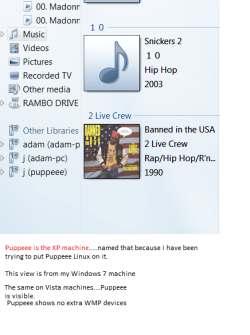
map3.PNG

I told them I wanted to use it to try Puppy Linux on it. Which works fine, until it tells me I am not connected to the internet even though I am connected to my network.

So I kinda put Puppy on the back burner and tried booting into XP. Got it up and running then ran into this. So who knows what my parents did to it before I got it.

You know the old addage about "assuming things" lol.....:o:D

I would LOVE to be able to get Puppy running on it though.....so snappy on this old clunker.
 

My Computer My Computer

At a glance

Windows 7 Professional 32-bit///Vista Home Pr...3GB RAM///2GB RAMBuilt-in, crap///NVIDIA GeForce 6150SE nForce...
Computer Manufacturer/Model Number
Acer Aspire 6930///Compaq Presario SR5152NX
OS
Windows 7 Professional 32-bit///Vista Home Premium 32-bit
Memory
3GB RAM///2GB RAM
Graphics Card(s)
Built-in, crap///NVIDIA GeForce 6150SE nForce 430
Sound Card
Built-in, alright///Realtek HD audio
Monitor(s) Displays
Built in and 26" LCD/40" LCD (VGA splitter)
Screen Resolution
Laptop: 1366X768 26"Mon: 1366X768 40"Mon:1920X1080
Hard Drives
Internal 350GB///250GB
2 Seagate 1TB HDD Ext.
1 Verbatim 500GB HDD Ext.
Cooling
Stock fans
Keyboard
Intelli-Type Wireless multimedia keyboard
Mouse
MS Wireless Notebook Optical Mouse 3000
Internet Speed
15Mbps Telus DSL
Other Info
2 PS3's, 1 XBOX360, and a Panasonic Blu-Ray player rendering media to various locations in house via PS3 Media Server*****
DIR-655 Xtreme N Gb router w/DAP-1522 bridge/access point******Using Input Director to share keyboard and mouse across all screens and PC's in my room.
To get the XP machine in the map when using SP3, you must install version six of the Hotfix described in KB922120.

WindowsXP-KB922120-v6-x86-ENU.exe

This is what you get back if you request the Hotfix.
 

My Computer My Computer

At a glance

Windows 10 Pro x64, Windows 8.1 Pro x64, Wind...INTEL i9-7920X LGA 206664 GB (4 X 16 GB) G-Skill V Series DDR4 3200 ...EVGA GTX 1060 SC 3 GB
Computer type
PC/Desktop
Computer Manufacturer/Model Number
Custom Built
OS
Windows 10 Pro x64, Windows 8.1 Pro x64, Windows 7 Ultimate x64 SP1,
CPU
INTEL i9-7920X LGA 2066
Motherboard
Gigabyte X299-WU8 F3
Memory
64 GB (4 X 16 GB) G-Skill V Series DDR4 3200 Quad Channel
Graphics Card(s)
EVGA GTX 1060 SC 3 GB
Sound Card
Realtek Onboard ALC1220
Monitor(s) Displays
2 x Samsung S27E310
Screen Resolution
1920x1080
Hard Drives
Samsung 2 x 970 EVO Plus 500 GB NVMe
1 x 6TB WD 6003FZBX SATA
1 x 6TB WD 60EFRX SATA
12 x 3TB WD 30EFRX SATA
PSU
Seasonic X-1050
Case
Thermaltake Armor+
Cooling
Corsair H80i V2 Liquid AOI Cooler
Keyboard
Logitech G510s
Mouse
Logitech MX Master 2S
Internet Speed
200 Mb/s
Antivirus
ESET NOD32 13.1
Browser
EDGE (Dev, Canary, Beta), Chrome
Other Info
ASUS RT-AC68U router
Malwarebytes 4.0.4
To get the XP machine in the map when using SP3, you must install version six of the Hotfix described in KB922120.

WindowsXP-KB922120-v6-x86-ENU.exe

I do understand that.....the problem was the "server" service was stopped, and set to manual, and there wasn't a network shared folder....as I said in my last post.

It has since been solved, but thanks though.:D
 

My Computer My Computer

At a glance

Windows 7 Professional 32-bit///Vista Home Pr...3GB RAM///2GB RAMBuilt-in, crap///NVIDIA GeForce 6150SE nForce...
Computer Manufacturer/Model Number
Acer Aspire 6930///Compaq Presario SR5152NX
OS
Windows 7 Professional 32-bit///Vista Home Premium 32-bit
Memory
3GB RAM///2GB RAM
Graphics Card(s)
Built-in, crap///NVIDIA GeForce 6150SE nForce 430
Sound Card
Built-in, alright///Realtek HD audio
Monitor(s) Displays
Built in and 26" LCD/40" LCD (VGA splitter)
Screen Resolution
Laptop: 1366X768 26"Mon: 1366X768 40"Mon:1920X1080
Hard Drives
Internal 350GB///250GB
2 Seagate 1TB HDD Ext.
1 Verbatim 500GB HDD Ext.
Cooling
Stock fans
Keyboard
Intelli-Type Wireless multimedia keyboard
Mouse
MS Wireless Notebook Optical Mouse 3000
Internet Speed
15Mbps Telus DSL
Other Info
2 PS3's, 1 XBOX360, and a Panasonic Blu-Ray player rendering media to various locations in house via PS3 Media Server*****
DIR-655 Xtreme N Gb router w/DAP-1522 bridge/access point******Using Input Director to share keyboard and mouse across all screens and PC's in my room.
I'm glad you got it fixed.
 

My Computer My Computer

At a glance

Windows 10 Pro x64, Windows 8.1 Pro x64, Wind...INTEL i9-7920X LGA 206664 GB (4 X 16 GB) G-Skill V Series DDR4 3200 ...EVGA GTX 1060 SC 3 GB
Computer type
PC/Desktop
Computer Manufacturer/Model Number
Custom Built
OS
Windows 10 Pro x64, Windows 8.1 Pro x64, Windows 7 Ultimate x64 SP1,
CPU
INTEL i9-7920X LGA 2066
Motherboard
Gigabyte X299-WU8 F3
Memory
64 GB (4 X 16 GB) G-Skill V Series DDR4 3200 Quad Channel
Graphics Card(s)
EVGA GTX 1060 SC 3 GB
Sound Card
Realtek Onboard ALC1220
Monitor(s) Displays
2 x Samsung S27E310
Screen Resolution
1920x1080
Hard Drives
Samsung 2 x 970 EVO Plus 500 GB NVMe
1 x 6TB WD 6003FZBX SATA
1 x 6TB WD 60EFRX SATA
12 x 3TB WD 30EFRX SATA
PSU
Seasonic X-1050
Case
Thermaltake Armor+
Cooling
Corsair H80i V2 Liquid AOI Cooler
Keyboard
Logitech G510s
Mouse
Logitech MX Master 2S
Internet Speed
200 Mb/s
Antivirus
ESET NOD32 13.1
Browser
EDGE (Dev, Canary, Beta), Chrome
Other Info
ASUS RT-AC68U router
Malwarebytes 4.0.4
Back
Top