Notebook in reboot loop

iversa

New member
Local time
5:18 PM
Messages
26
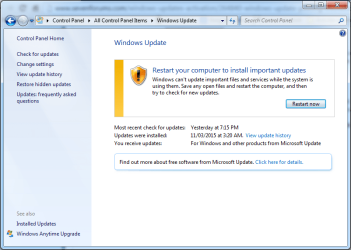
My notebook in reboot loop from windows update. I have followed the instructions here

When I'm logged in to the computer at one point it reboots and if I don't login it reboots every 5 minutes. If logged in the reboot reminder pops up where I can postpone the reboot. But if I walk away it does reboot on its own at one point (not sure how long). If I get up in the morning it is in a reboot loop.

I have no errors on the Windows Update screen

Attached are the CBS log collections.

I have already tried the following
Troubleshoot problems with installing updates - Windows Help
How do I reset Windows Update components?
Please help!
 

Attachments
  • Windows Update.png
    Windows Update.png
    39.5 KB · Views: 2

My Computer

Computer type
Laptop
Computer Manufacturer/Model Number
Dell
OS
Windows 7 Pro 64bit
Memory
8GB
Hard Drives
750 GB 7200 RPM
Antivirus
MS Security Essentails
Browser
Chrome
There are no errors in either SFC or CheckSUR logs.

I had to go back to one of the earlier CBSPersist logs to find any error - and got this one...
Code:
2015-03-26 06:04:35, Info                  CBS    Failed to open online software key. [HRESULT = 0x80070013 - ERROR_WRITE_PROTECT]
2015-03-26 06:04:35, Info                  CBS    Failed to get SOFTWARE registry key. [HRESULT = 0x80070013 - ERROR_WRITE_PROTECT]
2015-03-26 06:04:35, Info                  CBS    SQM: Failed to get SOFTWARE key from session. [HRESULT = 0x80070013 - ERROR_WRITE_PROTECT]
2015-03-26 06:04:35, Info                  CBS    Warning: Failed to apply SQM sample policy for package: Package_119_for_KB3004375~31bf3856ad364e35~amd64~~6.1.3.1 [HRESULT = 0x80070013 - ERROR_WRITE_PROTECT]
2015-03-26 06:04:35, Info                  CBS    Failed to open online package store: Packages\Package_119_for_KB3004375~31bf3856ad364e35~amd64~~6.1.3.1. [HRESULT = 0x80070013 - ERROR_WRITE_PROTECT]
2015-03-26 06:04:35, Info                  CBS    Failed to get key for store object type: 2 [HRESULT = 0x80070013 - ERROR_WRITE_PROTECT]
2015-03-26 06:04:35, Info                  CBS    Failed to get out of package store package: Package_119_for_KB3004375~31bf3856ad364e35~amd64~~6.1.3.1 [HRESULT = 0x80070013 - ERROR_WRITE_PROTECT]
2015-03-26 06:04:35, Info                  CBS    Failed while trying to find package: Package_119_for_KB3004375~31bf3856ad364e35~amd64~~6.1.3.1 [HRESULT = 0x80070013 - ERROR_WRITE_PROTECT]
2015-03-26 06:04:35, Info                  CBS    Failed to set state of Package and Updates while finishing initialization. [HRESULT = 0x80070013 - ERROR_WRITE_PROTECT]
2015-03-26 06:04:35, Info                  CBS    Failed to initialize package: Package_119_for_KB3004375~31bf3856ad364e35~amd64~~6.1.3.1, from path: [URL="file://\\?\C:\Windows\Servicing\Packages\Package_119_for_KB3004375~31bf3856ad364e35~amd64~~6.1.3.1.mum"]\\?\C:\Windows\Servicing\Packages\Package_119_for_KB3004375~31bf3856ad364e35~amd64~~6.1.3.1.mum[/URL], existing package: 1 [HRESULT = 0x80070013 - ERROR_WRITE_PROTECT]
2015-03-26 06:04:35, Info                  CBS    Failed to resolve package [HRESULT = 0x80070013 - ERROR_WRITE_PROTECT]
2015-03-26 06:04:35, Info                  CBS    Failed to populate children. [HRESULT = 0x80070013 - ERROR_WRITE_PROTECT]
2015-03-26 06:04:35, Info                  CBS    Failed to initialize internal package for package: Microsoft-Windows-Foundation-Package~31bf3856ad364e35~amd64~~6.1.7601.17514 [HRESULT = 0x80070013 - ERROR_WRITE_PROTECT]
2015-03-26 06:04:35, Info                  CBS    Delay load failed for package: Package_for_KB976932~31bf3856ad364e35~amd64~~6.1.1.17514 [HRESULT = 0x80070013 - ERROR_WRITE_PROTECT]
2015-03-26 06:04:35, Error                 CBS    Delay Initialization Failed [HRESULT = 0x80070013 - ERROR_WRITE_PROTECT]

I suspect that this error implies that the SOFTWARE registry hive is corrupt, rather than there are actually permissions problems.

If that is the case, then it's likely that you will need at least a repair install. However, I haven't seen an error of this type before and need to do some research first.
 

My Computer

Computer type
Laptop
Computer Manufacturer/Model Number
Asus K52F or Lenovo B51-80
OS
Win 7 x64 Home Premium (and x86 VirtualBox VM)/Win10
CPU
i3 370M/i7 6500U
Motherboard
Asus/Lenovo
Memory
8GB - finally :)/8GB
Graphics Card(s)
it's an i3, dude!/dual Intel&nVidia
Sound Card
onboard
Monitor(s) Displays
15.6" built-in
Screen Resolution
1366x768/1920x1080
Hard Drives
750GB Seagate internal
Sundry external drives attached to other computers on the local network
1TB SSD on the Lenovo
PSU
n/a
Internet Speed
as much as I can get - usually on a dongle/phone, so <1MB/s
Antivirus
MSE/Defender
Browser
IE11/12/Edge/Chrome/FF(if I must)
OK - it looks as if there may neither permissions or corruption problems in the registry.


in the left pane, navigate to
"HKey_Local_Machine\SOFTWARE\Microsoft\Windows\CurrentVersion\Component Based Servicing\Packages"
Right-click on the 'Services' key and select Export
Select to export to the Desktop
in the File name box type 'packs'
at the 'File Type' box, select 'Registry Hive Files'
and save the file
Close Regedit
Compress the packs file and upload the compressed file to your reply.

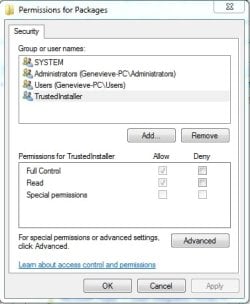
Also, right-click on the Packages folder, and select Permissions - please post a screenshot of the window with the TrustedInstaller entry highlighted.
 

My Computer

Computer type
Laptop
Computer Manufacturer/Model Number
Asus K52F or Lenovo B51-80
OS
Win 7 x64 Home Premium (and x86 VirtualBox VM)/Win10
CPU
i3 370M/i7 6500U
Motherboard
Asus/Lenovo
Memory
8GB - finally :)/8GB
Graphics Card(s)
it's an i3, dude!/dual Intel&nVidia
Sound Card
onboard
Monitor(s) Displays
15.6" built-in
Screen Resolution
1366x768/1920x1080
Hard Drives
750GB Seagate internal
Sundry external drives attached to other computers on the local network
1TB SSD on the Lenovo
PSU
n/a
Internet Speed
as much as I can get - usually on a dongle/phone, so <1MB/s
Antivirus
MSE/Defender
Browser
IE11/12/Edge/Chrome/FF(if I must)
I should have replied sooner. The problem went away on its own. It must of rebooted tenths of times and no matter what I did it would not stop to reboot on it own or keep on prompting me to reboot.

Then i came back a few days ago and the problem was gone. It didn't prompt to reboot and either is it rebooting on its own again.
 

My Computer

Computer type
Laptop
Computer Manufacturer/Model Number
Dell
OS
Windows 7 Pro 64bit
Memory
8GB
Hard Drives
750 GB 7200 RPM
Antivirus
MS Security Essentails
Browser
Chrome
Wow! - Windows must have sorted at least some of the problems itself, then!

Glad it seems fixed, now, anyway.

Good luck!
 

My Computer

Computer type
Laptop
Computer Manufacturer/Model Number
Asus K52F or Lenovo B51-80
OS
Win 7 x64 Home Premium (and x86 VirtualBox VM)/Win10
CPU
i3 370M/i7 6500U
Motherboard
Asus/Lenovo
Memory
8GB - finally :)/8GB
Graphics Card(s)
it's an i3, dude!/dual Intel&nVidia
Sound Card
onboard
Monitor(s) Displays
15.6" built-in
Screen Resolution
1366x768/1920x1080
Hard Drives
750GB Seagate internal
Sundry external drives attached to other computers on the local network
1TB SSD on the Lenovo
PSU
n/a
Internet Speed
as much as I can get - usually on a dongle/phone, so <1MB/s
Antivirus
MSE/Defender
Browser
IE11/12/Edge/Chrome/FF(if I must)
Same problem is back again. No rebooting for a few weeks and now it started to do it over and over again

Here is the registry key and screenshot as per your request.
 

Attachments

  • packs.zip
    packs.zip
    521.4 KB · Views: 1
  • packs permissions.jpg
    packs permissions.jpg
    24.5 KB · Views: 12

My Computer

Computer type
Laptop
Computer Manufacturer/Model Number
Dell
OS
Windows 7 Pro 64bit
Memory
8GB
Hard Drives
750 GB 7200 RPM
Antivirus
MS Security Essentails
Browser
Chrome
There doesn't appear to be any problem with the registry key I was concerned about - so it may be that the file itself is tagged as read-only - let's take a close look at it....

Open an Elevated Command Prompt and run the following commands.

ICACLS C:\Windows\servicing\Packages
ICACLS C:\Windows\servicing\Packages\Package_119_for_KB3004375~31bf3856ad364e35~amd64~~6.1.3.1.* /T
ATTRIB C:\Windows\servicing\Packages\Package_119_for_KB3004375~31bf3856ad364e35~amd64~~6.1.3.1.*


post the results.

Here are some instructions to make life easier :)
1) To open an Elevated Command Prompt Window (the ECP window), click on Start, All Programs, Accessories – then right-click on Command Prompt, and select Run as Administrator. Accept the UAC prompt.
2) To run the commands easier, highlight the block of commands, and right-click on the highlight – select Copy. In the CP Window, click on the black/white icon at top left – select Paste. The commands will run but may not complete the last command, so hit the Enter Key once.
3) To copy the results... click on the Black/White icon in the top left, and select Edit... 'Select All', and hit the Enter key - then use Ctrl+V or r-click+Paste to paste it into your response.
 

My Computer

Computer type
Laptop
Computer Manufacturer/Model Number
Asus K52F or Lenovo B51-80
OS
Win 7 x64 Home Premium (and x86 VirtualBox VM)/Win10
CPU
i3 370M/i7 6500U
Motherboard
Asus/Lenovo
Memory
8GB - finally :)/8GB
Graphics Card(s)
it's an i3, dude!/dual Intel&nVidia
Sound Card
onboard
Monitor(s) Displays
15.6" built-in
Screen Resolution
1366x768/1920x1080
Hard Drives
750GB Seagate internal
Sundry external drives attached to other computers on the local network
1TB SSD on the Lenovo
PSU
n/a
Internet Speed
as much as I can get - usually on a dongle/phone, so <1MB/s
Antivirus
MSE/Defender
Browser
IE11/12/Edge/Chrome/FF(if I must)
Here are the results

Code:
C:\Windows\system32>ICACLS C:\Windows\servicing\Packages
C:\Windows\servicing\Packages NT SERVICE\TrustedInstaller:(I)(F)
                              NT SERVICE\TrustedInstaller:(I)(OI)(CI)(IO)(F)
                              NT AUTHORITY\SYSTEM:(I)(RX)
                              NT AUTHORITY\SYSTEM:(I)(OI)(CI)(IO)(GR,GE)
                              BUILTIN\Administrators:(I)(RX)
                              BUILTIN\Administrators:(I)(OI)(CI)(IO)(GR,GE)
                              BUILTIN\Users:(I)(RX)
                              BUILTIN\Users:(I)(OI)(CI)(IO)(GR,GE)

Successfully processed 1 files; Failed processing 0 files

C:\Windows\system32>ICACLS C:\Windows\servicing\Packages\Package_119_for_KB30043
75~31bf3856ad364e35~amd64~~6.1.3.1.* /T
C:\Windows\servicing\Packages\Package_119_for_KB3004375~31bf3856ad364e35~amd64~~
6.1.3.1.cat NT SERVICE\TrustedInstaller:(I)(F)

            NT AUTHORITY\SYSTEM:(I)(RX)

            BUILTIN\Administrators:(I)(RX)

            BUILTIN\Users:(I)(RX)

C:\Windows\servicing\Packages\Package_119_for_KB3004375~31bf3856ad364e35~amd64~~
6.1.3.1.mum NT SERVICE\TrustedInstaller:(I)(F)

            NT AUTHORITY\SYSTEM:(I)(RX)

            BUILTIN\Administrators:(I)(RX)

            BUILTIN\Users:(I)(RX)

Successfully processed 2 files; Failed processing 0 files

C:\Windows\system32>ATTRIB C:\Windows\servicing\Packages\Package_119_for_KB30043
75~31bf3856ad364e35~amd64~~6.1.3.1.*
A            C:\Windows\servicing\Packages\Package_119_for_KB3004375~31bf3856ad3
64e35~amd64~~6.1.3.1.cat
A            C:\Windows\servicing\Packages\Package_119_for_KB3004375~31bf3856ad3
64e35~amd64~~6.1.3.1.mum

C:\Windows\system32>
 

My Computer

Computer type
Laptop
Computer Manufacturer/Model Number
Dell
OS
Windows 7 Pro 64bit
Memory
8GB
Hard Drives
750 GB 7200 RPM
Antivirus
MS Security Essentails
Browser
Chrome
That all looks perfectly normal to me.
Maybe we'd better have some new logs...


Please follow the Windows Update Posting Instructions and post the requested data

If the file is too large (8MB compressed), remove the older CBSPersist cab files until the final file is below the limit - you can always post them separately after zipping them. (the forum doesn't allow the upload of bare CAB files, for a number of reasons)

Please also post the C:\Windows\windowsudpate.log file


Open Event Viewer
click on the Windows logs entry in the left pane to expand it.
Now click on the Application entry - wait while it loads.
Click on 'File' in the menu bar and select Save...
Save the file as Appevt.evtx
Repeat for the System log
then zip both, and upload them.
 

My Computer

Computer type
Laptop
Computer Manufacturer/Model Number
Asus K52F or Lenovo B51-80
OS
Win 7 x64 Home Premium (and x86 VirtualBox VM)/Win10
CPU
i3 370M/i7 6500U
Motherboard
Asus/Lenovo
Memory
8GB - finally :)/8GB
Graphics Card(s)
it's an i3, dude!/dual Intel&nVidia
Sound Card
onboard
Monitor(s) Displays
15.6" built-in
Screen Resolution
1366x768/1920x1080
Hard Drives
750GB Seagate internal
Sundry external drives attached to other computers on the local network
1TB SSD on the Lenovo
PSU
n/a
Internet Speed
as much as I can get - usually on a dongle/phone, so <1MB/s
Antivirus
MSE/Defender
Browser
IE11/12/Edge/Chrome/FF(if I must)
Here is the requested information
 

My Computer

Computer type
Laptop
Computer Manufacturer/Model Number
Dell
OS
Windows 7 Pro 64bit
Memory
8GB
Hard Drives
750 GB 7200 RPM
Antivirus
MS Security Essentails
Browser
Chrome
I can't find any SFC data in there?
CheckSUR is clear.
There are some interesting errors here...
Code:
2015-04-10 07:23:33, Info                  CBS    Failed to initialize package: Package_104_for_KB3011780~31bf3856ad364e35~amd64~~6.1.1.5, from path: [URL="file://\\?\C:\Windows\Servicing\Packages\Package_104_for_KB3011780~31bf3856ad364e35~amd64~~6.1.1.5.mum"]\\?\C:\Windows\Servicing\Packages\Package_104_for_KB3011780~31bf3856ad364e35~amd64~~6.1.1.5.mum[/URL], existing package: 1 [HRESULT = 0x80070013 - ERROR_WRITE_PROTECT]
2015-04-10 07:23:33, Info                  CBS    Failed to resolve package [HRESULT = 0x80070013 - ERROR_WRITE_PROTECT]
2015-04-10 07:23:33, Info                  CBS    Failed to populate children. [HRESULT = 0x80070013 - ERROR_WRITE_PROTECT]
2015-04-10 07:23:33, Info                  CBS    Failed to initialize internal package for package: Microsoft-Windows-Foundation-Package~31bf3856ad364e35~amd64~~6.1.7601.17514 [HRESULT = 0x80070013 - ERROR_WRITE_PROTECT]
2015-04-10 07:23:33, Info                  CBS    Delay load failed for package: Package_for_KB976932~31bf3856ad364e35~amd64~~6.1.1.17514 [HRESULT = 0x80070013 - ERROR_WRITE_PROTECT]
2015-04-10 07:23:33, Error                 CBS    Delay Initialization Failed [HRESULT = 0x80070013 - ERROR_WRITE_PROTECT]
2015-04-10 07:23:33, Info                  CBS    Ending the TrustedInstaller main loop.

The Event logs show some interesting errors - try applying this Fixit... https://support.microsoft.com/en-us/kb/2545227/
Note that the above events can also be caused by rootkit virus/worms.
There are also other errors which may indicate the presence of something that is attempting to modify your AV's settings.

Your HD may be on its way out - a CHKDSK log from November shows a bad sector, and recent entries suggest that this is spreading. You should back up your data to external media, and run a full CHKDSK /R
 

My Computer

Computer type
Laptop
Computer Manufacturer/Model Number
Asus K52F or Lenovo B51-80
OS
Win 7 x64 Home Premium (and x86 VirtualBox VM)/Win10
CPU
i3 370M/i7 6500U
Motherboard
Asus/Lenovo
Memory
8GB - finally :)/8GB
Graphics Card(s)
it's an i3, dude!/dual Intel&nVidia
Sound Card
onboard
Monitor(s) Displays
15.6" built-in
Screen Resolution
1366x768/1920x1080
Hard Drives
750GB Seagate internal
Sundry external drives attached to other computers on the local network
1TB SSD on the Lenovo
PSU
n/a
Internet Speed
as much as I can get - usually on a dongle/phone, so <1MB/s
Antivirus
MSE/Defender
Browser
IE11/12/Edge/Chrome/FF(if I must)
The Microsoft fix it. Unless it will come back again like it last time.

I also have a full backup in case the hdd will go. I make backups on regular basis.
 

My Computer

Computer type
Laptop
Computer Manufacturer/Model Number
Dell
OS
Windows 7 Pro 64bit
Memory
8GB
Hard Drives
750 GB 7200 RPM
Antivirus
MS Security Essentails
Browser
Chrome
I'm still experiencing this issue. Is there anyone who can help me with this?
 

My Computer

Computer type
Laptop
Computer Manufacturer/Model Number
Dell
OS
Windows 7 Pro 64bit
Memory
8GB
Hard Drives
750 GB 7200 RPM
Antivirus
MS Security Essentails
Browser
Chrome
Please follow the Windows Update Posting Instructions and post the requested data

If the file is too large (8MB compressed), remove the older CBSPersist cab files until the final file is below the limit - you can always post them separately after zipping them. (the forum doesn't allow the upload of bare CAB files, for a number of reasons)

Please also post the C:\Windows\windowsudpate.log file
 

My Computer

Computer type
Laptop
Computer Manufacturer/Model Number
Asus K52F or Lenovo B51-80
OS
Win 7 x64 Home Premium (and x86 VirtualBox VM)/Win10
CPU
i3 370M/i7 6500U
Motherboard
Asus/Lenovo
Memory
8GB - finally :)/8GB
Graphics Card(s)
it's an i3, dude!/dual Intel&nVidia
Sound Card
onboard
Monitor(s) Displays
15.6" built-in
Screen Resolution
1366x768/1920x1080
Hard Drives
750GB Seagate internal
Sundry external drives attached to other computers on the local network
1TB SSD on the Lenovo
PSU
n/a
Internet Speed
as much as I can get - usually on a dongle/phone, so <1MB/s
Antivirus
MSE/Defender
Browser
IE11/12/Edge/Chrome/FF(if I must)
Back
Top