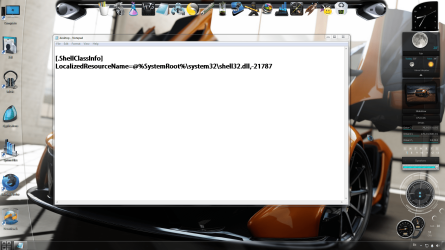
Solved Notepad appearing on startup with a code

MoeX

New member
Member
VIP
Local time
2:12 AM
Messages
185
Hi there ,
Whenever i run my pc a notepab automatically appears how do i stop or remove this ? and why is it appearing
thanks.
 

Attachments

  • Untitled.png
    Untitled.png
    421 KB · Views: 21

My Computer

Computer type
PC/Desktop
Computer Manufacturer/Model Number
AlienWare x51
OS
Windows 7 Home Premium 64bit SP1
CPU
Intel Core i7-3770 3.4GHz (8MB Cache)
Memory
8GB Dual Channel DDR3 at 1600MHz
Graphics Card(s)
Nvidia GeForce GTX 660 1.5GB
Sound Card
Realtek High Definiton Audio
Monitor(s) Displays
LG 3D HDTV 1080p
Screen Resolution
1920 x 1080
Hard Drives
1 TB
Click here DDS

:ar: Click on Download Now button

:ar: When the download is complete . Drag the DDS program from the Downloads folder to your Desktop

:ar: Double click the DDS icon on the Desktop then click the Run button to run the tool.

:ar: Place a check next to attact.txt and click Start . When done, DDS will open two logs
  • DDS.txt
  • Attach.txt

:ar: Save two logs onto your desktop and upload them with your reply
 

My Computer

Computer Manufacturer/Model Number
Custom Built
OS
Windows 7 Ultimate 32-Bit & Windows 7 Ultimate 64-Bit
CPU
Intel Core i7 CPU 950 @ 3.07GHz
Motherboard
ASUS P6T DELUXE V2
Memory
OCZ 6GB (3 x 2GB) 240-Pin DDR3 SDRAM DDR3 1600 OCZ3X1600R2
Graphics Card(s)
ATI Radeon HD 5700 Series
Sound Card
OnBoard
Hard Drives
WD6400AACS-00M3B0 (640GB SATA )
PSU
CORSAIR 850w
Case
NZXT LEXA
Cooling
Intel Stock Heatsink Fan
Keyboard
Microsoft Wireless Laser Keyboard 7000
Mouse
Microsoft Wireless Laser Mouse 7000

My Computer

Computer type
PC/Desktop
Computer Manufacturer/Model Number
Novatech iRush Pro
OS
Windows 7 Ultimate SP1 - 64 Bit
CPU
Intel Core i5 2500k
Motherboard
Foxconn H67M-S/H67M-V/H67
Memory
2x4GB DDR3 1333Hz
Graphics Card(s)
Ati Radeon 6770
Sound Card
None
Monitor(s) Displays
Samsung S22B150
Screen Resolution
1920x1080
Hard Drives
2x500GB
PSU
500W
Cooling
Fan
Keyboard
HP KU0316
Mouse
Wireless Logitech M185
Internet Speed
20MB/s
Antivirus
Avast Free
Browser
Google Chrome
Other Info
Logitech M185 Mouse
KU-M316 Keyboard
@OP,
When following the steps in the link quoted above - IF you opt to fix it yourself (instead of using the fix-it tool), then I would suggest using the File > Save As feature within Notepad to determine which of the locations mentioned in the link above is housing the offending desktop.ini file. In fact, the offending file can be deleted (per method 1) using that same Save As dialog box; just select the file and press the delete key, then close notepad without saving the text.
 

My Computer

Computer type
Laptop
Computer Manufacturer/Model Number
Employer provided Dell Latitude
OS
W7 Pro SP1 64bit
CPU
i7
Memory
8GB
Graphics Card(s)
Intel HD Graphics
Hard Drives
crappy SSD
Antivirus
Employer mandated Symantec Endpoint Protection
Browser
Pale Moon 64bit, IE11 64bit & Chrome 64bit
@OP,
When following the steps in the link quoted above - IF you opt to fix it yourself (instead of using the fix-it tool), then I would suggest using the File > Save As feature within Notepad to determine which of the locations mentioned in the link above is housing the offending desktop.ini file. In fact, the offending file can be deleted (per method 1) using that same Save As dialog box; just select the file and press the delete key, then close notepad without saving the text.
Sure is did the same way faster and easier thanks
 

My Computer

Computer type
PC/Desktop
Computer Manufacturer/Model Number
AlienWare x51
OS
Windows 7 Home Premium 64bit SP1
CPU
Intel Core i7-3770 3.4GHz (8MB Cache)
Memory
8GB Dual Channel DDR3 at 1600MHz
Graphics Card(s)
Nvidia GeForce GTX 660 1.5GB
Sound Card
Realtek High Definiton Audio
Monitor(s) Displays
LG 3D HDTV 1080p
Screen Resolution
1920 x 1080
Hard Drives
1 TB
You are welcome.

The desktop.ini file should be recreated by the Operating System (OS) or an app if and when it is needed. Hopefully, the OS or app will assign the correct file attributes to keep the ini file from opening with each boot. Sometimes apps will remove those file attributes and change the file's contents while the app is being installed or uninstalled... then the installer program fails to replace the file attributes :-(
 

My Computer

Computer type
Laptop
Computer Manufacturer/Model Number
Employer provided Dell Latitude
OS
W7 Pro SP1 64bit
CPU
i7
Memory
8GB
Graphics Card(s)
Intel HD Graphics
Hard Drives
crappy SSD
Antivirus
Employer mandated Symantec Endpoint Protection
Browser
Pale Moon 64bit, IE11 64bit & Chrome 64bit
Back
Top