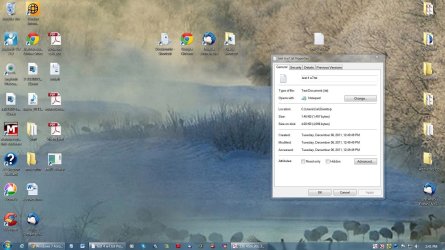
Notepad icon on desktop is generic

Cel01

New member
Local time
5:55 PM
Messages
20
Icon is just a white blank icon.

Works accessing program. In task bar and on programs list is proper. Only icon like this. On both admin and user account

i have been searched forum, and lots of places on internet. Wow this is a tuffy to figure out. :(
 

My Computer

Computer Manufacturer/Model Number
HP Pavillion
OS
Windows 7 Home Premium x64 SP1
CPU
Intel Core i5-2400CPU@3/10GHz.
Memory
8 Gigs
Graphics Card(s)
NVIDIA GeForce GT 520 on board
Sound Card
NVIDIA High Definition Audio
Monitor(s) Displays
AUSUS
Hello Cel01,

Could you post a screenshot of this just so that we could verify which icon is white blank since there's the main Notepad icon and a shortcut arrow overlay on the icon? If the shortcut arrow overlay is blank, then it could just be almost covering up all of the main icon making it appear to be the Notepad icon when it's really the overlay. :)
 

My Computer

Computer type
PC/Desktop
Computer Manufacturer/Model Number
Self built custom
OS
64-bit Windows 11 Pro for Workstations
CPU
Intel i7-8700K OC'd to 5 GHz
Motherboard
ASUS ROG Maximus XI Formula Z390
Memory
64 GB (4x16GB) G.SKILL TridentZ RGB DDR4 3600 MHz
Graphics Card(s)
ASUS ROG-STRIX-GTX1080TI-O11G-GAMING
Sound Card
Integrated
Monitor(s) Displays
2 x Samsung Odyssey G7 27"
Screen Resolution
2560x1440
Hard Drives
1TB Samsung 990 PRO M.2,
4TB Samsung 990 PRO PRO M.2,
TerraMaster F8 SSD Plus NAS
PSU
Seasonic Prime Titanium 850W
Case
Thermaltake Core P3
Cooling
Corsair Hydro H115i
Keyboard
Logitech wireless K800
Mouse
Logitech MX Master 4
Internet Speed
2 Gb/s Download and 100 Mb/s Upload
Antivirus
Malwarebyte Anti-Malware Premium
Browser
Google Chrome
Other Info
Logitech Z625 speaker system,
Logitech BRIO 4K Pro webcam,
HP Color LaserJet Pro MFP M477fdn,
APC SMART-UPS RT 1000 XL - SURT1000XLI,
Galaxy S23 Plus phone
Hope this helps

Note: bkground is one I put on. I changed bk to MS one and no change in icon.
 

Attachments

  • Screenshot blank icon.jpg
    Screenshot blank icon.jpg
    130.6 KB · Views: 197
Last edited by a moderator:

My Computer

Computer Manufacturer/Model Number
HP Pavillion
OS
Windows 7 Home Premium x64 SP1
CPU
Intel Core i5-2400CPU@3/10GHz.
Memory
8 Gigs
Graphics Card(s)
NVIDIA GeForce GT 520 on board
Sound Card
NVIDIA High Definition Audio
Monitor(s) Displays
AUSUS
Blank paper icon has been an on again off again bug on Windows forever. Sometimes if you go into shortcut and do Change Icon, select the exe file, then hit Apply it will show up. I get this using Standalone Stacks. About 1 out of 10 the icon is blank paper. I extract the icon from the exe and stick it in a folder I have for icons. Do change icon, then navigate to the .ico file I made. It's one of those things you're never going to fix it completely.
 

My Computer

Computer Manufacturer/Model Number
HP Media Center
OS
Windows 7 32 bit
CPU
AMD 5200+ dual core
Memory
2 GB
Graphics Card(s)
NVidia GeForce 6150SE 128 MB
Monitor(s) Displays
CRT
Screen Resolution
1280x1024
Hard Drives
500 GB Sata internal :

SIIG USB 3.0 docking stations w/WD Caviar Black 6 Gb/s drives
Keyboard
PS/2
Mouse
PS/2 Wheel Mouse
Other Info
SIIG USB 3.0 PCIexpress card.

My Computer

Computer Manufacturer/Model Number
Hewlett packard/p6512uk
OS
Microsoft Windows 7 Home Premium 64-bit 7600
CPU
IIx4 amd athelon 635 processor
Motherboard
FOXCONN 2AA9
Memory
2x2gb
Graphics Card(s)
ati radeon HD 5450
Sound Card
(1) Realtek High Definition Audio (2) AMD High Definition
Monitor(s) Displays
samsung lcd tv 32"
Screen Resolution
1360x 768
Hard Drives
(1) WDC WD10 01FAES-60Z2A0 SATA Disk Device (2) Maxtor OneTouch USB Device (3) ST310003 33AS USB Device (4) WD My Book 1111 USB Device
PSU
?
Cooling
air!
Keyboard
wireless hp
Mouse
wireless Hp,optical
Internet Speed
1.10mb/s
Antivirus
MSE
Browser
Firefox
Thanks for the guidance. I tried both but it didn't help. This is a stinker of a problem isn't it?
 

My Computer

Computer Manufacturer/Model Number
HP Pavillion
OS
Windows 7 Home Premium x64 SP1
CPU
Intel Core i5-2400CPU@3/10GHz.
Memory
8 Gigs
Graphics Card(s)
NVIDIA GeForce GT 520 on board
Sound Card
NVIDIA High Definition Audio
Monitor(s) Displays
AUSUS
Shortcut

If it is in fact a shortcut. I have solved this by finding the *.exe file in win explorer and creating a new shortcut to the desk top by rightclicking. Once you have the short cut created you can delete the funky one.
 

My Computer

Computer Manufacturer/Model Number
BGC (Bob's Garage Crew)
OS
win 7 X64 Ultimate SP1
CPU
I3770K
Motherboard
Asus P8Z77-V Deluxe
Memory
G Skill F3-14900CL9-4GBXL x 4
Graphics Card(s)
NVIDIA GeForce GTX670 + Intel 4000
Sound Card
Realtek HD 5.1 (MOB)
Monitor(s) Displays
Asus VW224T (1)
Screen Resolution
1920 x 1080
Hard Drives
SATA Corsair Force GT 2.5" 180GB (System) Sata 3
OCZ Vertex3 120GB
OCZ Vertex 2 120GB 2.5" SATA II
ST31000524AS 1000.2GB
WD15EARS (External)
PSU
CoolerMaster 1000 Watt
Case
CoolerMaster HAF X
Cooling
CPU -- CoolerMaster 520N
Keyboard
MS Wireless 3000 V2
Mouse
MS Wireless 3000 V2
Internet Speed
Cable
Antivirus
Norton Internet Security
Browser
IE9
Other Info
AMI Bios 1805
OC'd 3%
Hope this helps

Note: bkground is one I put on. I changed bk to MS one and no change in icon.

This is not a shortcut to Notepad, but a .txt file that opens with Notepad instead. :)

The icon that I see in this screenshot is the normal icon as below for a text (.txt) file. That's the one that's suppose to be for it.

Am I missing something? :confused:

Text_File.png
 

My Computer

Computer type
PC/Desktop
Computer Manufacturer/Model Number
Self built custom
OS
64-bit Windows 11 Pro for Workstations
CPU
Intel i7-8700K OC'd to 5 GHz
Motherboard
ASUS ROG Maximus XI Formula Z390
Memory
64 GB (4x16GB) G.SKILL TridentZ RGB DDR4 3600 MHz
Graphics Card(s)
ASUS ROG-STRIX-GTX1080TI-O11G-GAMING
Sound Card
Integrated
Monitor(s) Displays
2 x Samsung Odyssey G7 27"
Screen Resolution
2560x1440
Hard Drives
1TB Samsung 990 PRO M.2,
4TB Samsung 990 PRO PRO M.2,
TerraMaster F8 SSD Plus NAS
PSU
Seasonic Prime Titanium 850W
Case
Thermaltake Core P3
Cooling
Corsair Hydro H115i
Keyboard
Logitech wireless K800
Mouse
Logitech MX Master 4
Internet Speed
2 Gb/s Download and 100 Mb/s Upload
Antivirus
Malwarebyte Anti-Malware Premium
Browser
Google Chrome
Other Info
Logitech Z625 speaker system,
Logitech BRIO 4K Pro webcam,
HP Color LaserJet Pro MFP M477fdn,
APC SMART-UPS RT 1000 XL - SURT1000XLI,
Galaxy S23 Plus phone
Am I missing something?
Didn't Windows used to use the icon from the associated text editor? Like a green notepad icon for EditPadLite? Or is that my memory playing tricks?
 

My Computer

Computer Manufacturer/Model Number
HP Media Center
OS
Windows 7 32 bit
CPU
AMD 5200+ dual core
Memory
2 GB
Graphics Card(s)
NVidia GeForce 6150SE 128 MB
Monitor(s) Displays
CRT
Screen Resolution
1280x1024
Hard Drives
500 GB Sata internal :

SIIG USB 3.0 docking stations w/WD Caviar Black 6 Gb/s drives
Keyboard
PS/2
Mouse
PS/2 Wheel Mouse
Other Info
SIIG USB 3.0 PCIexpress card.
For a .txt file, it's always been the icon in my post above as the default one. If you change the default program for .txt files to be a 3rd party program instead of Notepad, then it might change the icon to be that of the 3rd party program though.
 

My Computer

Computer type
PC/Desktop
Computer Manufacturer/Model Number
Self built custom
OS
64-bit Windows 11 Pro for Workstations
CPU
Intel i7-8700K OC'd to 5 GHz
Motherboard
ASUS ROG Maximus XI Formula Z390
Memory
64 GB (4x16GB) G.SKILL TridentZ RGB DDR4 3600 MHz
Graphics Card(s)
ASUS ROG-STRIX-GTX1080TI-O11G-GAMING
Sound Card
Integrated
Monitor(s) Displays
2 x Samsung Odyssey G7 27"
Screen Resolution
2560x1440
Hard Drives
1TB Samsung 990 PRO M.2,
4TB Samsung 990 PRO PRO M.2,
TerraMaster F8 SSD Plus NAS
PSU
Seasonic Prime Titanium 850W
Case
Thermaltake Core P3
Cooling
Corsair Hydro H115i
Keyboard
Logitech wireless K800
Mouse
Logitech MX Master 4
Internet Speed
2 Gb/s Download and 100 Mb/s Upload
Antivirus
Malwarebyte Anti-Malware Premium
Browser
Google Chrome
Other Info
Logitech Z625 speaker system,
Logitech BRIO 4K Pro webcam,
HP Color LaserJet Pro MFP M477fdn,
APC SMART-UPS RT 1000 XL - SURT1000XLI,
Galaxy S23 Plus phone
For a .txt file, it's always been the icon in my post above as the default one. If you change the default program for .txt files to be a 3rd party program instead of Notepad, then it might change the icon to be that of the 3rd party program though.

That's why I was wondering. Because I did "open with" to use EditPadLite and it's still the lined paper. I think in some Windows flavors it did as you say. But now I'm confused if it's still supposed to change with the app or if there's a "standard" text document type or what the deal is.
 

My Computer

Computer Manufacturer/Model Number
HP Media Center
OS
Windows 7 32 bit
CPU
AMD 5200+ dual core
Memory
2 GB
Graphics Card(s)
NVidia GeForce 6150SE 128 MB
Monitor(s) Displays
CRT
Screen Resolution
1280x1024
Hard Drives
500 GB Sata internal :

SIIG USB 3.0 docking stations w/WD Caviar Black 6 Gb/s drives
Keyboard
PS/2
Mouse
PS/2 Wheel Mouse
Other Info
SIIG USB 3.0 PCIexpress card.
well spotted brink, i just enlarged the txt file in the screenshot and it is lined with the perforated top of page,
it looks blank in a smaller image. and of course was described as blank.

as a test the op could right click and select open with / select default program and choose word pad then it will be an obvious change, then op can change back.
 

My Computer

Computer Manufacturer/Model Number
Hewlett packard/p6512uk
OS
Microsoft Windows 7 Home Premium 64-bit 7600
CPU
IIx4 amd athelon 635 processor
Motherboard
FOXCONN 2AA9
Memory
2x2gb
Graphics Card(s)
ati radeon HD 5450
Sound Card
(1) Realtek High Definition Audio (2) AMD High Definition
Monitor(s) Displays
samsung lcd tv 32"
Screen Resolution
1360x 768
Hard Drives
(1) WDC WD10 01FAES-60Z2A0 SATA Disk Device (2) Maxtor OneTouch USB Device (3) ST310003 33AS USB Device (4) WD My Book 1111 USB Device
PSU
?
Cooling
air!
Keyboard
wireless hp
Mouse
wireless Hp,optical
Internet Speed
1.10mb/s
Antivirus
MSE
Browser
Firefox
For a .txt file, it's always been the icon in my post above as the default one. If you change the default program for .txt files to be a 3rd party program instead of Notepad, then it might change the icon to be that of the 3rd party program though.

That's why I was wondering. Because I did "open with" to use EditPadLite and it's still the lined paper. I think in some Windows flavors it did as you say. But now I'm confused if it's still supposed to change with the app or if there's a "standard" text document type or what the deal is.

I just installed EditPadLite to test it, and it uses the same default .txt file icon for me as well. It appears that EditPadLite just happens to not change the icon. However, most 3rd party programs do though.
 

My Computer

Computer type
PC/Desktop
Computer Manufacturer/Model Number
Self built custom
OS
64-bit Windows 11 Pro for Workstations
CPU
Intel i7-8700K OC'd to 5 GHz
Motherboard
ASUS ROG Maximus XI Formula Z390
Memory
64 GB (4x16GB) G.SKILL TridentZ RGB DDR4 3600 MHz
Graphics Card(s)
ASUS ROG-STRIX-GTX1080TI-O11G-GAMING
Sound Card
Integrated
Monitor(s) Displays
2 x Samsung Odyssey G7 27"
Screen Resolution
2560x1440
Hard Drives
1TB Samsung 990 PRO M.2,
4TB Samsung 990 PRO PRO M.2,
TerraMaster F8 SSD Plus NAS
PSU
Seasonic Prime Titanium 850W
Case
Thermaltake Core P3
Cooling
Corsair Hydro H115i
Keyboard
Logitech wireless K800
Mouse
Logitech MX Master 4
Internet Speed
2 Gb/s Download and 100 Mb/s Upload
Antivirus
Malwarebyte Anti-Malware Premium
Browser
Google Chrome
Other Info
Logitech Z625 speaker system,
Logitech BRIO 4K Pro webcam,
HP Color LaserJet Pro MFP M477fdn,
APC SMART-UPS RT 1000 XL - SURT1000XLI,
Galaxy S23 Plus phone
I just installed EditPadLite to test it, and it uses the same default .txt file icon for me as well. It appears that EditPadLite just happens to not change the icon. However, most 3rd party programs do though.

That makes sense. I should have looked more closely at the screen shot. Not on desktop but with Standalone Stacks I get a lot of "blank paper" icons instead of the app's custom icon. I guess the paper icon bug was on my mind because of that.
 

My Computer

Computer Manufacturer/Model Number
HP Media Center
OS
Windows 7 32 bit
CPU
AMD 5200+ dual core
Memory
2 GB
Graphics Card(s)
NVidia GeForce 6150SE 128 MB
Monitor(s) Displays
CRT
Screen Resolution
1280x1024
Hard Drives
500 GB Sata internal :

SIIG USB 3.0 docking stations w/WD Caviar Black 6 Gb/s drives
Keyboard
PS/2
Mouse
PS/2 Wheel Mouse
Other Info
SIIG USB 3.0 PCIexpress card.
Hope this helps

Note: bkground is one I put on. I changed bk to MS one and no change in icon.

This is not a shortcut to Notepad, but a .txt file that opens with Notepad instead. :)

The icon that I see in this screenshot is the normal icon as below for a text (.txt) file. That's the one that's suppose to be for it.

Am I missing something? :confused:

View attachment 187492

well that's it. I had to try really hard to make it bigger buy eventually saw the lines very faintly. Why didn't MS keep it the way it was is so stupid.

I hate the way the stinkin things looks but can live with it.
Thanks everyone really appreciate the help.

Celeste
 

My Computer

Computer Manufacturer/Model Number
HP Pavillion
OS
Windows 7 Home Premium x64 SP1
CPU
Intel Core i5-2400CPU@3/10GHz.
Memory
8 Gigs
Graphics Card(s)
NVIDIA GeForce GT 520 on board
Sound Card
NVIDIA High Definition Audio
Monitor(s) Displays
AUSUS
Last edited:

My Computer

Computer type
PC/Desktop
Computer Manufacturer/Model Number
Self built custom
OS
64-bit Windows 11 Pro for Workstations
CPU
Intel i7-8700K OC'd to 5 GHz
Motherboard
ASUS ROG Maximus XI Formula Z390
Memory
64 GB (4x16GB) G.SKILL TridentZ RGB DDR4 3600 MHz
Graphics Card(s)
ASUS ROG-STRIX-GTX1080TI-O11G-GAMING
Sound Card
Integrated
Monitor(s) Displays
2 x Samsung Odyssey G7 27"
Screen Resolution
2560x1440
Hard Drives
1TB Samsung 990 PRO M.2,
4TB Samsung 990 PRO PRO M.2,
TerraMaster F8 SSD Plus NAS
PSU
Seasonic Prime Titanium 850W
Case
Thermaltake Core P3
Cooling
Corsair Hydro H115i
Keyboard
Logitech wireless K800
Mouse
Logitech MX Master 4
Internet Speed
2 Gb/s Download and 100 Mb/s Upload
Antivirus
Malwarebyte Anti-Malware Premium
Browser
Google Chrome
Other Info
Logitech Z625 speaker system,
Logitech BRIO 4K Pro webcam,
HP Color LaserJet Pro MFP M477fdn,
APC SMART-UPS RT 1000 XL - SURT1000XLI,
Galaxy S23 Plus phone
Hi Brink:

Thanks for pointing out the tutorial. Really good. I am going to try this later on tonight.

Celeste
 

My Computer

Computer Manufacturer/Model Number
HP Pavillion
OS
Windows 7 Home Premium x64 SP1
CPU
Intel Core i5-2400CPU@3/10GHz.
Memory
8 Gigs
Graphics Card(s)
NVIDIA GeForce GT 520 on board
Sound Card
NVIDIA High Definition Audio
Monitor(s) Displays
AUSUS
You're most welcome. :)
 

My Computer

Computer type
PC/Desktop
Computer Manufacturer/Model Number
Self built custom
OS
64-bit Windows 11 Pro for Workstations
CPU
Intel i7-8700K OC'd to 5 GHz
Motherboard
ASUS ROG Maximus XI Formula Z390
Memory
64 GB (4x16GB) G.SKILL TridentZ RGB DDR4 3600 MHz
Graphics Card(s)
ASUS ROG-STRIX-GTX1080TI-O11G-GAMING
Sound Card
Integrated
Monitor(s) Displays
2 x Samsung Odyssey G7 27"
Screen Resolution
2560x1440
Hard Drives
1TB Samsung 990 PRO M.2,
4TB Samsung 990 PRO PRO M.2,
TerraMaster F8 SSD Plus NAS
PSU
Seasonic Prime Titanium 850W
Case
Thermaltake Core P3
Cooling
Corsair Hydro H115i
Keyboard
Logitech wireless K800
Mouse
Logitech MX Master 4
Internet Speed
2 Gb/s Download and 100 Mb/s Upload
Antivirus
Malwarebyte Anti-Malware Premium
Browser
Google Chrome
Other Info
Logitech Z625 speaker system,
Logitech BRIO 4K Pro webcam,
HP Color LaserJet Pro MFP M477fdn,
APC SMART-UPS RT 1000 XL - SURT1000XLI,
Galaxy S23 Plus phone
Back
Top