
Notepad save is broken?

LeoLeonardoIII

New member
Local time
6:13 PM
Messages
12
Location
Northern AL, atm
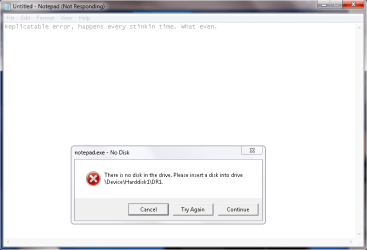
Recently my little Notepad has been broken. I'm not sure when it started happening, but every time I try to use it, this happens: Broken notepad.png
I can open it fine, type fine, etc, but every time I click Save or Save as, the above happens. No matter what option I click, the box just disappears for a split second and pops back up, unchanged. If I click on Notepad it starts to say it's not responding. The only way I can exit it out is via task manager, or making the 'Notepad is not responding, do you want to..' window come up and end it that way.
What is this problem and how can I fix it? I didn't think something like NOTEPAD could even do this |3
 

Attachments
  • Broken notepad.png
    Broken notepad.png
    72.3 KB · Views: 8

My Computer

Computer Manufacturer/Model Number
Inspiron 17r
OS
Windows 7 Home Premium
Right click on an empty spot on your desktop.
Select New from the context menu.
Select Text Document from the context sub-menu.
Double click on that newly created text document.
Type in some junk.
Try to save it.

Let us know what happens.
 

My Computer

Computer type
Laptop
Computer Manufacturer/Model Number
Employer provided Dell Latitude
OS
W7 Pro SP1 64bit
CPU
i7
Memory
8GB
Graphics Card(s)
Intel HD Graphics
Hard Drives
crappy SSD
Antivirus
Employer mandated Symantec Endpoint Protection
Browser
Pale Moon 64bit, IE11 64bit & Chrome 64bit

My Computer

Computer type
PC/Desktop
Computer Manufacturer/Model Number
Pandora (computer name)
OS
Windows 7 x64 / Windows Server 2008 / Linux (Redhat & Deb distros) / OS X / More
CPU
AMD FX 8150 Eight-Core Processor 4.23 Ghz OC
Motherboard
ASUS SaberTooth 990FX
Memory
G.SKILL Ripjaws X Series 32GB (4 x 8GB) DDR3 SDRAM 1333
Graphics Card(s)
2X Radeon HD 4870 CrossFire X
Sound Card
Onboard and loving it
Monitor(s) Displays
2x HP w2480 Wide LCD
Screen Resolution
1920x1200 each
Hard Drives
RAID (6x0 Seagate Barracuda 7200 rpm 32 MB cache 500Gb SATA)
PSU
Antec 850 Watt
Case
Antec 900
Cooling
Lots of fans
Keyboard
Logitech
Mouse
Rat 9
Internet Speed
40 Mbps Down 5 Mbps Up
Antivirus
AVG
Browser
Chrome, Firefox, IE
Other Info
My main desktop
Right click on an empty spot on your desktop.
Select New from the context menu.
Select Text Document from the context sub-menu.
Double click on that newly created text document.
Type in some junk.
Try to save it.

Let us know what happens.
It.. fixed it?
Weird.
It let me do as you instructed, and let me save just fine.
I then did it the way I was before (open up start menu, type Notepad into the search and hit enter, which, when I type the name of the program correctly like 'Paint' or 'Dropbox' or 'Notepad' it opens up like I want it to) and try to save something like normal, and it worked too.. I have no clue what happened there, but I think it's better now. Thanks for the easy fix, I suppose xP
 

My Computer

Computer Manufacturer/Model Number
Inspiron 17r
OS
Windows 7 Home Premium
That told notepad to forget the previous path that it had saved something to.

Perhaps the save and save as process was wanting to check a drive that did not have media in it.
 

My Computer

Computer type
Laptop
Computer Manufacturer/Model Number
Employer provided Dell Latitude
OS
W7 Pro SP1 64bit
CPU
i7
Memory
8GB
Graphics Card(s)
Intel HD Graphics
Hard Drives
crappy SSD
Antivirus
Employer mandated Symantec Endpoint Protection
Browser
Pale Moon 64bit, IE11 64bit & Chrome 64bit
Back
Top